
Home › Forums › Calendar Products › Event Aggregator › CSV Importing not giving me any column
- This topic has 16 replies, 4 voices, and was last updated 9 years, 10 months ago by
liamrabbitt.
-
AuthorPosts
-
November 1, 2016 at 11:21 am #1185938
liamrabbitt
ParticipantIan trying to import a large cvs file from events but it dose not give me any column to sort by I am trying to import venues 1st. Can you help I attach a sample of the CSV file

 November 1, 2016 at 5:25 pm #1186080
Andras
KeymasterHello liamrabbitt,
Thanks for reaching out! I’m sorry you are experiencing issues with importing that CSV file. Let me help you out.
I downloaded your csv sample and tried importing it with Event Aggregator. All worked fine.
On the screenshot you sent me however, I see semi-colons (;) as separator characters, not commas (,). That could very well cause the issue.
How you can solve that is basically open the file in a simple text editor like Notepad and do a find/replace for “;” to “,” and that should do the trick.
Let me know how that works out.
Cheers,
AndrasNovember 2, 2016 at 8:45 am #1186361ParticipantOk thanks that worked ))) but Start date is not coming in right.

Also I seamed to have a import loop going around in Circles see attached image. It been like that for 48 hours now.

I also was wondering could we import the Image in the meet up link It imports the events but not the image. here is link http://thingstodoinlondon-uk.com/events/category/social/
November 2, 2016 at 4:26 pm #1186690KeymasterHello liamrabbitt,
Glad to hear that helped.
Regarding date:
I tested the test file you send, and with that all went good for me. Which column are you setting up as start date, CF_eventdate?
Regarding import loop:
Is it still looping or did it stop? Do you see any strange result?
Regarding image:
Do I understand correctly you would like to import from that link? What are the steps you are taking to import? Where would you like to import the image?
Waiting for your answers.
Thanks and cheers,
AndrasNovember 3, 2016 at 12:29 pm #1187242ParticipantHi András and thank you for your replay,
Regarding date:
Sorted thank you.Regarding import loop:
I was a large CSV file so took over 48 hours. will up load smaller amounts from now on.On that CSV file I sent you are you getting the image imported and if so which one are you using.? As I can’t get it to work.
Regarding image: Ref Meetup
No I am using your import tool for Meetup it imports the event but not the events Image.
Waiting for your answers.
Thanks and cheers,
LiamNovember 4, 2016 at 9:02 am #1187730KeymasterHi Liam,
Happy to see that some issues are already solved. Let’s keep going so we kill this beast. 🙂
As I see only the image is left.
When I import your CSV file, then I map the Img_url column to be the Event Featured Image, and that does the trick:
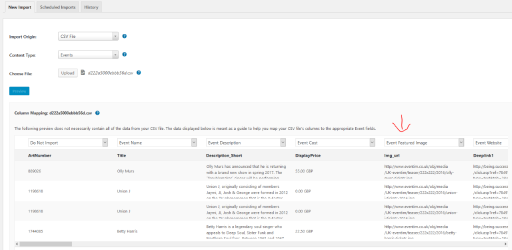
Result:

If you have a specific Meetup feed, then please share with me so I can test that.
Cheers,
AndrasNovember 4, 2016 at 10:05 am #1187830ParticipantOk nearly there.
On featured image. This is what I am doing but its not being imported to mo my site (
I have noticed when I open any event that has been imported to my site to edit there is no link on the right to change featured image. I can give you access if you like ?
On the meet up feed I have discovered its working just most people that set up a meet up event do not include a picture ))
November 7, 2016 at 7:47 am #1188610KeymasterHey Liam,
Hope you had a great weekend!
That’s weird, because for me it downloaded the image.
Do you see the images in your Media Library?
When you set up the import first time did you import the images as well? I’m not quite sure how it works after you update your import, or if you re-import.
What you can try is delete all the imported events (or just a couple for a test), remove them from Trash / Ignored and then import them again. Maybe give ‘Olly Murs’ a try, that for sure worked for me.
Also check the permissions for your wp-content/uploads folder and sub-folders whether it is writable. Permissions set to 755 should do it.
Let me know if this helps.
Cheers,
AndrasNovember 15, 2016 at 10:47 am #1192634ParticipantI still have a problem with a import loop going around in Circles. It been like that for 48 hours now.
This seams to happen when you try to up load to many events in on CSV file any Idea how to end this ?
Also is there any way we can load more than one Facebook event at a time like in the old system and also more than one face book page ?
November 16, 2016 at 7:35 am #1193131KeymasterHello liamrabbitt,
Sorry about that import loop. Let me check and I’ll get back to you on this.
As for the Facebook import, at the moment it is not possible to do a bulk update, like with the Facebook Events plugin. If you think that is something you would like as a feature I encourage you to visit our User Voice Page and either upvote an existing request or make a new request there.
I’ll get back to you on the import glitch, please hang in there. :elevator-music-plays: 🙂
Cheers,
AndrasNovember 17, 2016 at 2:27 pm #1194151KeymasterHi liamrabbitt,
Thanks for your patience. So far I don’t have good news.
The issue at hand is that an import gets queued up, it runs as much of it as it can, and then defers to another cycle. If something is causing that not to complete, it’ll just keep retrying indefinitely. It is handled by the cron of WordPress which runs every once in a while.
There might be one option to stop the import, one of our developers is looking into that. I will have to ask for a bit more patience on your side, until we try to figure this.
The other option is that the import gets done in the meantime. (Did it finish, by chance?)
I’ll get back to you as soon as I have something.
Andras
November 17, 2016 at 2:31 pm #1194155ParticipantNo luck still running but I have patience.
Thanks for update.Liam
November 21, 2016 at 12:56 am #1195201KeymasterHey Liam,
Sorry to hear that. Meanwhile I had a discussion with one of our developers and there is something you can try to do. You would need to tinker a bit in the database, but if you are comfortable with that, then it should be pretty easy to do.
So, in the database, within the wp_posts table there is a record that should match the following:
- ‘post_type’ = ‘tribe-ea-record’
- ‘post_title’ = ‘Record: manual ical’
- ‘post_status’ = ‘tribe-ea-pending’
You can get it with the following SQL query:
SELECT * FROM wp_posts WHERE post_type='tribe-ea-record' AND post_title='Record: manual ical' AND post_status='tribe-ea-pending';
If you are using phpMyAdmin, then your result should look something like this with one or more lines:

Once you have identified the entry, then take note of the number in the ID column.
That post’s post_status should be updated to ‘tribe-ea-failed’. You can edit that manually or run the following query:
UPDATE wp_posts SET post_status='tribe-ea-failed' WHERE ID={the id you identified};In case you want to stop that import, then try the above and let me know how it worked out.
Cheers,
AndrasNovember 24, 2016 at 3:01 pm #1197180ParticipantOk so it was a large list of events from a CSV file so not just 1 event so how do I find this in the database ?
November 25, 2016 at 3:13 am #1197285KeymasterHi Liam,
That depends on what you want to do.
If you want to find the import process and stop that, then you only need to do the above. That “post” is basically the whole process of importing that file.
If you want to find a specific event, then you will need a query like
SELECT * FROM wp_posts WHERE post_title like '%enter part of post title here%';
If it’s something else you want to do, then please give me the details.
Cheers,
Andras -
AuthorPosts
- The topic ‘CSV Importing not giving me any column’ is closed to new replies.