

Forum Replies Created
-
AuthorPosts
-
Andras
KeymasterHello liamrabbitt,
Sorry about that import loop. Let me check and I’ll get back to you on this.
As for the Facebook import, at the moment it is not possible to do a bulk update, like with the Facebook Events plugin. If you think that is something you would like as a feature I encourage you to visit our User Voice Page and either upvote an existing request or make a new request there.
I’ll get back to you on the import glitch, please hang in there. :elevator-music-plays: 🙂
Cheers,
AndrasKeymasterHello again,
Yes, you should be able to test this with the free Event Tickets plugin. Note however, that with Event Tickets you will only be able to create RSVPs – a sort of a registration for the event.
The email sent to the customer is pretty much the same and contains a QR code as well. You can do the tests with that.
With Event Tickets Plus you will be able to create and sell pay-for tickets as well. Note here, that for this you will need an eCommerce plugin as well. Currently we support WooCommerce, Easy Digital Downloads, WP eCommerce and Shopp.
I guess that QR embeds the url to validate the ticket and even if a customer opens it, it only can be validated by a Admin or Contributor user (nor Subscriber nor Customer role) … ?
Yes, you are right in that. The QR code is basically a URL encoded in that form. That URL will take you to your WordPress dashboard and check in the user for the event, IF you are logged in to the dashboard with at least a Contributor role. (That means Contributor, Editor, Author and Admin can all check in participants.) If you are only a Sub or a Customer, then nothing will happen.
I hope this explains. Is there anything else I can help you with?
Cheers,
AndrasKeymasterCiao Riccardo,
Yeah, I believe this should be fine. Let me know how it works out.
Cheers,
AndrasKeymasterHi Paula,
I understand this is difficult to test on the live site. Would it be possible to replicate the site into a development / staging environment? If yes, then first it should be tested whether the issue exists there as well.
If the issue exists, then you could commence with the conflict testing.
Based on the plugins you use I would check the payment gateway – which again is difficult to test in a live environment.
Why I’m pointing at that: earlier on we have received reports of some gateways (mostly PayPal b/c of its popularity) causing some issues with tickets not appearing or transactions not being marked as completed. So that’s why the hunch.
Do you think you could set up a test environment?
Other option would be to 1) put the live site into maintenance mode with a plugin like this in a time period when there are not many visitors; 2) put the gateway in sandbox mode; 3) make some test / fake purchases. Or do the whole conflict testing.
Again, I would test first if the issue still exists when in maintenance mode, or if it was a one-of-a-kind thing.
Any of this helpful? Let me know.
Andras
November 16, 2016 at 7:05 am in reply to: OPEN: wootickets child template file dont get called before parent template file #1193113KeymasterThis reply is private.
November 16, 2016 at 6:45 am in reply to: Can caching be used of the page with the tickets when scanning QRcodes? #1193105KeymasterHi Jack,
Yes, it should be fine like that.
Although I couldn’t find it in their documentation, the admin dashboard of WordPress is usually not cached at all. Otherwise you would have trouble doing anything there.
Let me know if you need any more help with this.
Cheers,
AndrasNovember 16, 2016 at 6:38 am in reply to: iCal Imported everything an hour early Starting on November 6th (Daylight Saving #1193101KeymasterHi,
Sorry for the long wait. I was testing the file but didn’t have the cURL issue you sent.
I contacted an Event Aggregator team member regarding this and waiting for his reply. Will let you know as soon as I have something.
Thanks for hanging in there!
Cheers,
AndrasNovember 16, 2016 at 6:29 am in reply to: The (dreaded) issue with Eventbrite and Timezones #1193095KeymasterHello Steve,
Thanks for your patience. I ran some test with creating events with different settings and publishing them to Eventbrite. Luckily I’m in the UTC timezone so I even had the same server timezone settings as you. So far I haven’t been able to reproduce your issue.
Could you please send me some screenshots, so I can investigate further? This is what I would need:
- timezone settings of WordPress (Settings > General – https://cloudup.com/cJoNqtRqvnZ)
- timezone settings of The Events Calendar (Events > Settings > General tab – https://cloudup.com/c03nK-6F7tI)
- Time / timezone settings of a faulty event (https://cloudup.com/c-y3NYsX-pX)
- Time / timezone settings of the same event in Eventbrite (https://cloudup.com/cXr0k2SSb19)
It would be best if you could create a brand new (test?) event. This would also help us see if the issue still exists.
Waiting for your reply.
Cheers,
AndrasNovember 16, 2016 at 3:03 am in reply to: Single Event Page: Move Sidebar to Right and Style It #1193047KeymasterHi Greg,
Thanks for reaching out with your question.
The layout you have is mostly driven by your theme and its page templates. I see you are using Enfold which is already overriding the default TEC templates. You would need to override the Enfold templates.
You can check this thread:
If that doesn’t help then you will need to get in touch with Enfold support.
I’m sorry I cannot help more with this, but my hands are tied. This is in the ballpark of Enfold.
Let me know if I can be of any more help.
Cheers,
AndrasKeymasterHello babak,
Thanks for going Pro and welcome to the forums! And thank you for your kind words, I am happy to hear you like our products. Sorry about the issues you are having, let me try to help you with them.
Regarding the sidebar I suggest to try this setting:
Events > Settings > Display > Events template > Default Page template
Or choose a page template there which has a sidebar.
This is how it looks in the admin:
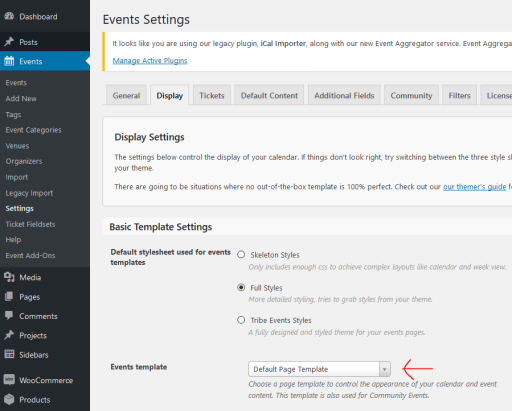
Let me know if this solves it for you.
Cheers,
AndrasKeymasterHi John,
Thanks for reaching out and sorry about the issue with the title. I can help you out with this.
There is a confusion here, maybe from our side. 🙂
The snippet you posted changed the title of the “My Events” page.
To change the tile of the “Submit an Event” page you need a slightly different one. Try with this. I tested is locally and it worked:
add_filter('tribe_ce_submit_event_page_title', 'change_the_title');

function change_the_title() {

return 'Submit Your Event';

}
Make sure that you are using straight quotes (‘) and not curly ones (’), as they can cause errors.Also check if your theme or the page template you are using allows the page title to be shown.
Let me know if this helps.
Cheers,
AndrasNovember 16, 2016 at 2:28 am in reply to: Same issue with no recurring events dropdown after update #1193038KeymasterHi Kairodesing,
Thanks for getting in touch with us. I’m sorry you are having this issue with recurring events.
Could you please run a test for conflicts based on this guide:
This can help us any badly coded / incompatible plugins and theme.
Let me know the results and we go on from there.
Thanks and cheers,
AndrasKeymasterHey Robert,
Thanks for using our plugins and welcome to the forums! I can help you out with this.
Can you give me a bit more details on the issue? Where / how are you trying to translate that string?
Thanks and cheers,
AndrasNovember 16, 2016 at 2:21 am in reply to: Generic function for adding custom taxonomy to the filter bar #1193034KeymasterHi Frederick,
Wow, supercool stuff!!! Thanks for sharing this, I’m sure it will be useful for others as well.
Keep rockin’!
Cheers,
AndrasKeymasterHello Justin and thanks for reaching out!
Yes, the Facebook importer should satisfy your needs. You can set up scheduled imports as well, so you don’t need to click import every time you refresh an event. In can be done automatically depending on your need.
I would also like to draw your attention to Event Aggregator, which gives you more than just importing from Facebook. You can find out all about it here: https://theeventscalendar.com/product/event-aggregator/
We don’t provide free trials, so if you want to test our plugins you will need to buy them. However, if you are unsatisfied, you can ask for a refund within 30 days of your purchase. More on that here: https://theeventscalendar.com/knowledgebase/refund-policy/
I hope this helps. Let me know if you have any other questions.
Cheers,
Andras -
AuthorPosts