

Forum Replies Created
-
AuthorPosts
-
November 16, 2016 at 2:08 am in reply to: Default Page for Events, Tags, Categories, See All is displaying the homepage #1193030
Andras
KeymasterHi Alex,
Thanks for going Pro and welcome to the forums! I’m sorry about the issues you are having. Let me try to help you with them.
It looks like there might be a conflict somewhere.
As a first step I’d like to ask you to run a test for conficts. Here’s a nice detailed guide for that:
Second, please check if you have a page or a post published, which is using the slug ‘events’. If yes, than change that slug to something else.
Let me know how these work out and we’ll go further from there.
Cheers,
AndrasKeymasterHi Cees,
Thanks for reaching out to us! I’m sorry you are having an issue with moving the ticket form.
What did you update which made the site turn blank? Was it The Events Calendar or some other plugin? Maybe a theme?
Did you manage to get your site back? If you still need help fixing the White Screen of Death, then I suggest these articles:
https://codex.wordpress.org/Common_WordPress_Errors
http://www.wpbeginner.com/wp-tutorials/how-to-fix-the-wordpress-white-screen-of-death/
For moving the ticket forms we have a nice knowledgebase article:
http://www.wpbeginner.com/wp-tutorials/how-to-fix-the-wordpress-white-screen-of-death/
Let me know if these help.
Cheers,
AndrasKeymasterHi AG,
I’m sorry to disappoint, at the moment we don’t have a solution for exporting / syncing the events in your Events Calendar to external ones.
What you can try is the following. At the bottom of month view there is a button labeled “Export Month’s Events”. Right click and copy the link of that. That will give you an iCal feed of your calendar which you can try to import.
I tried that in Outlook earlier and it worked well, and it updated when I clicked on the “Send / Receive All” button.
Does this help?
Cheers,
AndrasKeymasterThis reply is private.
KeymasterHello Riccardo,
Thanks for using our plugins and for reaching out!
We are limited in supporting customization but I can try to point you in the right direction.
Yes, the query above will show all the tickets as well, as they are also products.
You could try to do the following:
Filter out (and now show) those products where in the wp_postmeta table the meta_key _visibility is hidden and meta_key _virtual is yes. These are the attributes that the tickets have.
Or another way would be, if the product has a meta_key named _tribe_wooticket_for_event, then it is a ticket, so don’t show it.
I hope this helps you get started. Let me know.
Cheers,
AndrasKeymasterHello Jairo,
Thanks for going Pro and for reaching out to us! Let me answer your questions one-by-one.
Can the doorman use their smartphones to read QR codes?
– Do the doorman have to enter WP-admin to validate de codes ?Yes, they can absolutely use smartphones for that and they do need to enter WP-admin to be able to check the people in. According to my lasts test a while back a contributor account should be sufficient for this. I believe this has not yet changed, but I would recommend testing this.
Do the system detects if two people carry the same ticket ?
Yes. When checking in the same QR code the second time (or more), then you’ll see a warning message like this:
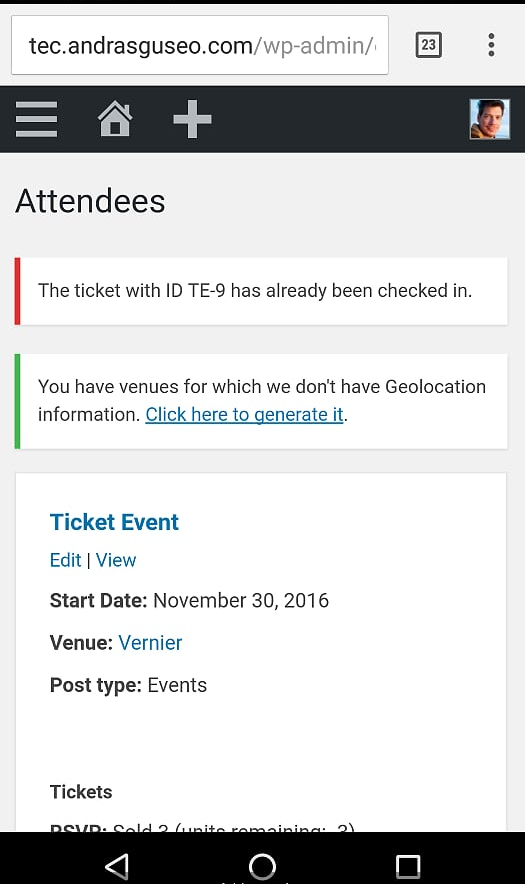
etc, etc
Yes. Ermmm… maybe. No, I don’t think so. But if… ermmmm no. What?!? 🙂
Let me know if this clarifies.
Cheers,
AndrasKeymasterHi Kathrine,
Thanks for using our plugins and welcome to the forums! Great question!
At the moment we don’t have a solution that would stop only that email, which is sent when you move an attendee.
I can share with you a solution that should prevent both the ticket email and the “move” email as well. You can find it in this thread:
Let me know how that works out for you.
Thanks and cheers,
AndrasKeymasterHi Paula,
Thanks for using our plugins and welcome to the forums! Sorry about this issue with the tickets.
We haven’t seen this before. Could you please test if this also happens when you only have the calendar / ticket plugins active, core WooCommerce and the twentysixteen theme? This can help us eliminate any conflicting plugins. Here’s a detailed guide for that: https://theeventscalendar.com/knowledgebase/testing-for-conflicts/
If it is not possible on the live site, then please try setting it up on a development site and check if the issue exists there.
If the issue still exists with other plugins deactivated or on the dev site, then please send me the below, so I can dig a bit deeper:
- a screenshot of the attendee list on the backend as well?
- would it be possible to send over that exported file to get a closer look?
Waiting for your results.
Cheers,
AndrasNovember 15, 2016 at 2:31 am in reply to: OPEN: wootickets child template file dont get called before parent template file #1192320KeymasterHi gtvmbh,
Thanks for reaching out and sorry about this issue with the template override.
Make sure you have your template override in this folder:
wp-content\themes\{your-theme}\tribe-events\tickets\wootickets\tickets.php
I believe this could be the issue, it seems you used the folder tickets-plus before.
If this doesn’t solve it then please give me more details on your issue:
- what did you do
- what do you expect to happen
- what is happening
Also, please share your system information with me, here’s a guide for that:
https://theeventscalendar.com/knowledgebase/sharing-sys-info/
Thanks and cheers,
AndrasNovember 15, 2016 at 2:19 am in reply to: Can caching be used of the page with the tickets when scanning QRcodes? #1192314KeymasterHey Jack,
Thanks for reaching out with your question.
The QR code will take you to a URL like this:
http://yourdomain.com?event_qr_code=1&ticket_id=86&event_id=12
This will then redirect you to the backend, to the attendee list of that event. Since the backend is usually not cached you shouldn’t have a problem with scanning a lot of tickets and caching.
I hope this helps. Let me know.
Cheers,
AndrasKeymasterGreat, glad to hear it works!
I am going to go ahead and close this ticket, but if you need help on this or something else, don’t hesitate to open a new topic.
Good luck with your project!
Cheers,
AndrasPS: If you like our plugin, and you didn’t yet do so 🙂 we would be happy to receive a review in the wordpress.org repository. Thanks!
https://wordpress.org/support/view/plugin-reviews/the-events-calendarPS2: We’d be also grateful if you would give us feedback on your satisfaction with support. Just click on one of the classy looking emojis below. 🙂 If you can spare a few words, that’s even better. Doublethanks!
November 15, 2016 at 2:13 am in reply to: Upgrade to Divi 3.0.18 breaks Events Calendar Pro entirely…. #1192310KeymasterHey Bill,
Thanks for getting back to me on that. Sorry, that there’s no reply yet from Elegant Themes. Hopefully soon.
Regarding licenses, you are allowed to use your personal license on a live site and on a dev site. Here is a detailed post on how you can do that:
https://theeventscalendar.com/knowledgebase/using-one-license-for-your-live-and-dev-sites/
Also what came to my mind, since you have a whole bunch of plugins, if you can, try increasing the memory limit. If I’m not mistaken, you have it set for 256M now. If you can go higher try that.
I experienced a memory issue with Divi in a personal project. Divi builder didn’t want to load, only if I switched off some plugins. I couldn’t nail it down to 1 plugin and a memory increase helped.
Let me know where you get.
Cheers,
Andras
KeymasterThis reply is private.
KeymasterHey Dominic,
Thanks for reaching out! Indeed, as Chris said (thanks for chiming in), this issue comes from the theme you are using. Usually this is beyond the scope of our support, but try adding this to your theme’s style.css file:
@media screen and (max-width: 480px) {

    .tribe-events-tickets td {

        display: table-row !important;

    }

}
Hope this helps!
Cheers,
AndrasNovember 14, 2016 at 3:32 pm in reply to: The filter bar closes after each selected element #1192144KeymasterGrüezi Muriel,
Thanks for using our plugins and welcome to the forums! I’m sorry you are having an issue with the filter bar.
Can you confirm that this odd behavior is also happening when you deactivate all non-calendar plugins and you switch to a default theme like twentysixteen ?
Also, could you share with me a link to a page where this is happening? It would help me if I could take a look at it.
Thanks and cheers,
Andras -
AuthorPosts