

Forum Replies Created
-
AuthorPosts
-
Andras
KeymasterHello again,
I do understand the issue at hand, thanks for clarifying.
There is a limitation to exceprts, which is the following. The excerpts are usually cut after a number of characters. Simply that is how they are done in WordPress.
If there are any HTML tags left in the excerpt, e.g. <br/> for a new line, then this might be cut in half and leave only <br without the closing tag, and that can lead to formatting issues.
This is why most html tags and shortcodes are removed from the excerpt.
I hope this clarifies the issue at hand.
It might be possible to get the full range of html tags in the excerpt / the event tooltip in month view with some customization work, but unfortunately we are limited in supporting customization requests.
I’m sorry I cannot provide you a solution for this. I can share with you though a list of developers who might be able to help you out with this.
https://theeventscalendar.com/knowledgebase/find-a-customizer/
I hope this helps. Let me know if there’s anything else I can help with.
Cheers,
AndrasNovember 23, 2016 at 3:07 am in reply to: The filter bar closes after each selected element #1196395KeymasterHey Conny,
I’m super stoked to hear you managed to solve it! Congrats!
I have no clue what could have gone wrong at the update, but happy to hear the reinstall solved it.
Since this is marked resolved I am going to close this ticket, but if you need anything else related to this topic or another please post a new topic in the forum and we will help you out.
Good luck with your project!
Cheers,
AndrasPS: If you like our plugin, and you didn’t yet do so 🙂 we would be happy to receive a review in the wordpress.org repository. Thanks!
https://wordpress.org/support/view/plugin-reviews/the-events-calendarPS2: We’d be also grateful if you would give us feedback on your satisfaction with support. Just click on one of the classy looking emojis below. 🙂 If you can spare a few words, that’s even better. Doublethanks!
KeymasterHello Jason,
Thanks for reaching out with your question.
I checked in our system and the feature of paginating the attendee list already ticketed. However, at the moment I don’t have any more information on when it is going to be implemented.
Although it doesn’t look like it, it is a complex issue, so, I would expect it coming sometime after Christmas only. The ticket has higher than average priority, which should give it some push.
I’m sorry I cannot give you better news at the moment.
I will set the status of this thread to pending fix, so you will get an update once that new feature ships.
Thanks for hanging in there.
Cheers,
AndrasNovember 22, 2016 at 9:09 am in reply to: Out of Installs Error When Switching from Subdirectories to Subdomains. #1195954KeymasterHello Robert,
Thanks for using our plugins and welcome to the forums!
I’m sorry you are having this issue with the multisite license.
I’m going to ask you the “Did you try switching in off an on again?” type of question. :blush: Did you try removing the license key, save, then add the license key back? Does that do the trick?
Please check and let me know.
Cheers,
AndrasNovember 22, 2016 at 9:04 am in reply to: I don't see the next month – only the previous month :( #1195950KeymasterHello Guy,
Thanks for reaching out. The prev / next links are usually not shown when there are no events in the past / future.
This article should help you fix it:
https://theeventscalendar.com/knowledgebase/add-nextprevious-links/
Test and let me know if it helps.
Cheers,
AndrasKeymasterHello Jim,
Thanks for reaching out! I’m really sorry about this frustrating issue with the timing of events changing at DST change.
Do I understand correctly that your event timing have changed automatically by 1 hour after the DST time was over?
We had some other reports of this unfortunate issue. More of us in the support team have checked this and none of us had this issue. It is also quite difficult to test because there are only 2 days in the year when this can happen. At the moment we are collecting as much information about the cases as we can.
In order to get a bit more details on why this could happen I would like to ask you to share some more details with me.
1. How is the timezone handling set up in The Events Calendar? You can find this under Events > Settings > General tab (looks like this: https://cloudup.com/cJxYQ0ulUVE)
2. How are the event timings / timezones set up for the individual events? (This section for the events in question: https://cloudup.com/chXmUKvZ1Oj)
3. Did this happen to all events in your calendar or only some? Do you see any specific rule for those where it happened?
Again, sincerest apologies. Thanks for getting back to me with the answers.
Cheers,
AndrasNovember 22, 2016 at 8:22 am in reply to: Events are not updated from our google calendar feed ! #1195826KeymasterSalut Samuel,
Thanks for reaching out to us. I’m really sorry you are having this issue with importing from Google calendar. Please give me some time while I test this. I’ll get back to you soon.
Thanks and cheers,
AndrasKeymasterGrüss dich Serafina / Adams
Thanks for reaching out with your question! You have a stunning looking website! Congratulations!
Try using this function:
tribe_events_count_available_tickets()This should get you the number of tickets.
Let me know how this works out.
Cheers,
AndrasNovember 22, 2016 at 5:23 am in reply to: Edit Ticket button/Link does not work on a HTTPS website #1195727KeymasterHello Marina,
Thanks for reaching out and opening a new thread with this issue. It helps us to keep things tidy.
I’m sorry about this issue with the SSL and the link. I would like to ask for a bit more information on this so we can investigate deeper.
I saw your system information in the other thread. I see there some outdated plugins, and the calendar and ticket plugins have mismatching version numbers. It is highly recommended to update them to the latest. Did you manage to do that? Does the issue still occur with the updated plugins?
If the issue still exists, then please share with me the url of the link that you are clicking on and is producing the error. And we’ll take it further from there.
Thanks and cheers,
AndrasKeymasterHi nnyorker,
Thanks for reaching out and I’m sorry about the issue you are having with importing from Facebook.
To be able to support you, could you please share your system information with me ? Here’s a handy guide how you can do that:
https://theeventscalendar.com/knowledgebase/sharing-sys-info/
Also, if you could share with me the group / event ID / url that you are trying to import, then I could run a test on it and check what the issue could be.
Thanks and cheers,
AndrasKeymasterHi Tashmina Artists,
Thanks for reaching out with your question concerning excerpts.
Well, since you asked it that way, it’s a feature. 🙂
But seriously, this is something we heard about before.
Unfortunately there is not much that can be done about this.
I recommend these 2 articles for reading, which might shed some more light on the case:
https://theeventscalendar.com/the-trouble-with-excerpts/
https://theeventscalendar.com/under-the-hood-filtering-excerpts-events-calendar/
Please read them, and if you have any questions afterwards, I’ll be most happy to answer them for you.
Cheers,
AndrasKeymasterHello Judy,
Thanks again for sharing your resources. I also did a test for conflicts and can confirm, that with Sensei 1.9.6, the version you are using the issue exists.
The I updated the Sensei plugin to the current 1.9.9 and the issue is gone. Could you please also do an update of Sensei – and an update an all plugins are recommended – and check if the issue still exists?
Thanks!
Andras
November 22, 2016 at 1:43 am in reply to: iCal Imported everything an hour early Starting on November 6th (Daylight Saving #1195682KeymasterHello again,
I tried and initially I got the same message. Most likely because all the events are in the past.
If you set the starting date to something in the past, e.g. November 1st, then you’ll see the events. It did the trick for me. Here’s a screenshot:
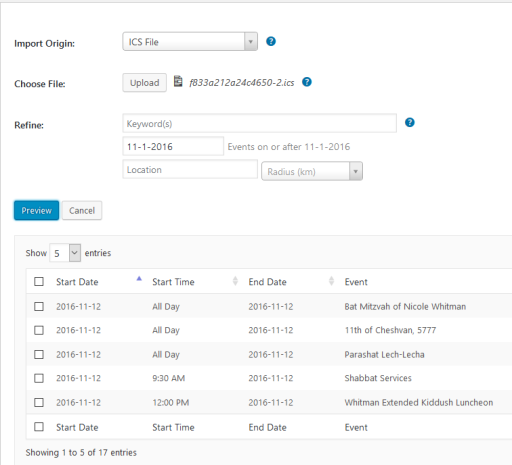
Let me know if this solves it. I’ll be here.
Cheers,
AndrasKeymasterDang! Sorry to hear that. We’re one step closer…
I checked you landing page and this is what I see:
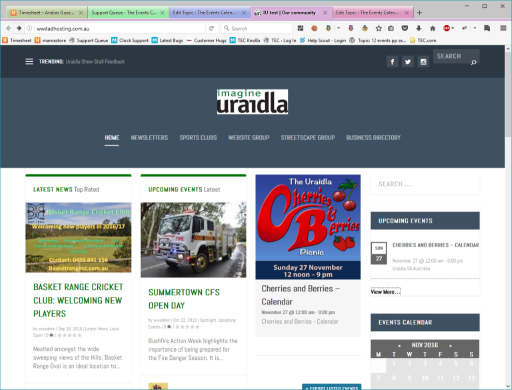
Maybe I misunderstood something. Could you please tell me again which title you want to make disappear?
If you don’t see the same, then try emptying your browser cache. (Ctrl + Shift + Del)
Let me know and we’ll get this dent hammered out.
Cheers,
AndrasNovember 22, 2016 at 1:34 am in reply to: The filter bar closes after each selected element #1195677KeymasterHi Muriel,
Could you please send me the following screenshots, so I can take a closer look into this:
- How the additional field is set up (Events > Settings > Additional fields tab)
- How the event is set up, which has this additional field, (including date/time)
- How the filters are set up (Events > Settings > Filters tab)
I’ll be waiting.
Thanks and cheers,
Andras -
AuthorPosts