

Forum Replies Created
-
AuthorPosts
-
Andras
KeymasterHi Torsten,
I am glad to see you were able to figure it out, thanks for getting back.
I am going to go ahead and close this ticket. If you have a similar issue or another in the future, please do not hesitate to create a new ticket.
Cheers,
AndrasNovember 21, 2016 at 1:47 pm in reply to: How to customize the Ticketing Portion of a Single Event Page #1195525KeymasterHello Kymiel,
Thanks for reaching out! Wow, that is quite an opener for a topic. Let me try to help you out with your questions.
If I understand correctly you have 2 issues, requests. Let’s go one at a time.
They should be able to see in their ticket confirmation, which workshop they are registered for.
Actually they should receive the submitted attendee information in their ticket email. If this is not the case, then try the plugin which is linked in this thread. There is also an explanation of the extra settings and where you can find them. Give it a try.
So I would like to implement the bypass the view cart but not sure where this code should go.
This should go in your active theme’s, preferably a child theme’s functions.php file.
For creating a child theme I recommend reading the WordPress codex:
https://codex.wordpress.org/Child_ThemesI just want to customize the verbiage (in the ticketing section) of this current event page – not in a template.
There are 2 ways for this. The first is the template override, which might be better to do if you have a lot of verbiage to add with designed sections. I think I would follow this route.
The other possibility would be to use filters and actions, and adding snippets in your functions.php file. You can find generic info on these here: https://codex.wordpress.org/Plugin_API
Let me know if this gets you started.
Cheers,
AndrasNovember 21, 2016 at 8:26 am in reply to: remove save-as and change next previous links and sales question #1195343KeymasterHi Mel,
Thanks for going Pro and welcome to the forums!
Although we don’t really provide support for customizations, I can help you get started.
Most of what you want to do can be achieved with some CSS snippets, that you need to put into your theme’s style.css file. You can learn about css on several good websites, e.g. http://www.w3schools.com/css/default.asp
For the next / prev the below gives you some basic random formatting:
.tribe-events-nav-previous, .tribe-events-nav-next {

background: grey none repeat scroll 0 0;

border: 1px solid red;

border-radius: 10px;

padding: 10px;

}

.tribe-events-nav-next > a {

color: #fff !important;

}
To remove “view as”:
.tribe-bar-views-inner label {

display: none !important;

}
To float it to the left:
.tribe-bar-disabled {

float: left !important;

}
To make the background white:
.tribe-bar-views-inner, .tribe-bar-views-list a {

background-color: #fff !important;

}
4. I would like to buy the event aggrigator… is there a discount code for TEC pro users?
No, unfortunately there is not. But you will get a discount when you renew after a year. 🙂
I hope this helps you get started.
Cheers,
AndrasNovember 21, 2016 at 8:09 am in reply to: Start time does not appear for multi-day events – Bug? #1195329KeymasterHi Stacey,
Thanks for using the Events Calendar.
Here on the pre-sales forum, I’m afraid we do not provide technical support. (Our support policy.) I would ask that you take any technical support questions across to our wordpress.org forum – our staff scan it regularly and other community members may also be able to help out.
If you have purchased a plugin from us, please login and post in the premium forums for that plugin and we can help you out there:
https://theeventscalendar.com/support/forums/
Thanks again!
To get you started, check if there is an issue with a theme you are using, or some custom code in your functions.php file, maybe a conflicting plugin. Try reverting back to twentysixteen and see if you still have the issue.
Cheers,
AndrasKeymasterHi Torsten,
Thanks for using our plugins and welcome back!
Where exactly would you like to change the length of the phone number fields? Could you send me a screenshot, that would help me better understand and would make it easier for me to help out.
Also it would be great if you could share your system information. https://theeventscalendar.com/knowledgebase/sharing-sys-info/
Thanks and cheers,
AndrasKeymasterHi Scott,
Thanks for reaching out!
I have checked, the bug related to this issue is already being worked on with highest priority. Although I cannot confirm a release date for the fix, if all goes according to plan it should come with our next Maintenance Release. Hang in there.
I’m sorry I cannot give you better news at this time, but wanted to let you know that your issue report is not going unnoticed.
Thanks for your patience!
Cheers,
AndrasKeymasterHello Thierry,
Thanks for using our plugins and for reaching out!
If I understand correctly, then you would like to be able to collect commission for community events posted by others.
In general, the payment processing is not done by our plugin. We leave that to WooCommerce or the eCommerce plugin that you choose to use.
I know that quite a lot of our users use PayPal Adaptive Payments for collecting commission. Here are 2 articles about that plugin:
https://docs.woocommerce.com/document/paypal-adaptive-payments/
I hope this helps answer your question. Let me know if there’s anything else.
Cheers,
AndrasKeymasterThis reply is private.
KeymasterThis reply is private.
KeymasterYou are very welcome! Happy to hear that solves it for you.
Since this is marked resolved I am going to close this ticket, but if you need anything else related to this topic or another please post a new topic in the forum and we will help you out.
Good luck with your project!
Cheers,
AndrasPS: If you like our plugin, and you didn’t yet do so 🙂 we would be happy to receive a review in the wordpress.org repository. Thanks!
https://wordpress.org/support/view/plugin-reviews/the-events-calendarPS2: We’d be also grateful if you would give us feedback on your satisfaction with support. Just click on one of the classy looking emojis below. 🙂 If you can spare a few words, that’s even better. Doublethanks!
November 21, 2016 at 1:59 am in reply to: Adding Field sets to Email Template and Order page #1195222KeymasterHello Chris,
All the code needed is in the plugin I linked in above. Once activated you will see 3 extra options under Events > Settings > Tickets tab:
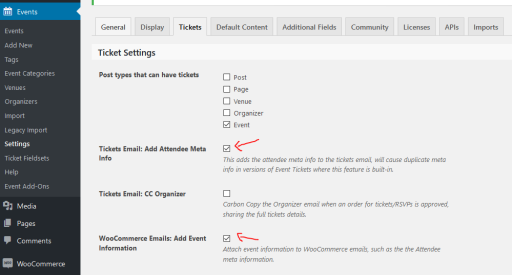
Make sure that the 2 checkboxes marked in the screenshot are checked in. The 1st adds the info to the email, the 3rd adds it to the orders-received page like this:
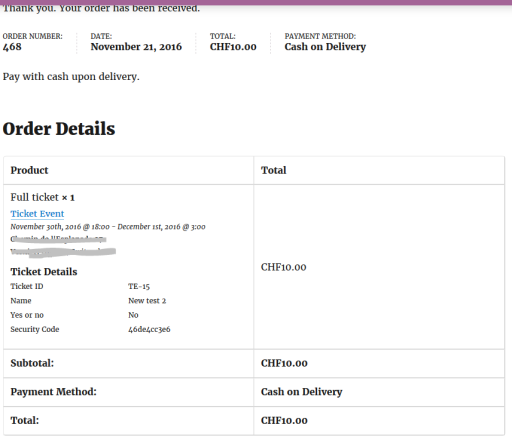
If by any chance you would have the details twice in the email, then simply uncheck the 1st checkbox.
Please test if this solves it for you and let me know. I’ll be waiting.
Cheers,
AndrasNovember 21, 2016 at 1:47 am in reply to: The filter bar closes after each selected element #1195219KeymasterOne more thing, does any of the events have that setting set? If no events yet use that new checkbox thing, then it will not show up in the filter bar, as there is nothing to filter with that yet. 🙂
A.
KeymasterHi Jairo,
Thanks for the feedback on that, I will relay the information to the webmaster of the demo site. Might be that the autocomplete order function of WooCommerce didn’t kick in. Sometimes it has glitches.
Since you marked it resolved I am going to close this ticket, but if you need anything else related to this topic or another please post a new topic in the forum and we will help you out.
Good luck with your project!
Cheers,
AndrasPS: If you like our plugin, and you didn’t yet do so 🙂 we would be happy to receive a review in the wordpress.org repository. Thanks!
https://wordpress.org/support/view/plugin-reviews/the-events-calendarPS2: We’d be also grateful if you would give us feedback on your satisfaction with support. Just click on one of the classy looking emojis below. 🙂 If you can spare a few words, that’s even better. Doublethanks!
November 21, 2016 at 1:43 am in reply to: The filter bar closes after each selected element #1195215KeymasterThat extra field, after setting it up under Events > Settings > Additional fields tab did you also add it to your filters under Events > Settings > Filters tab?
A.
November 21, 2016 at 1:35 am in reply to: The filter bar closes after each selected element #1195214KeymasterHello Conny,
Regarding the first issue about the filter bar closing after each selection on mobile, that is how the filter bar works. Once a filter is checked it immediately reloads the page with the selected filters. You can then open the filter bar again and select additional filtering conditions. I checked your site on my mobile and it worked properly like that. If you check our demo site, this is how that works as well.
As for your second issue with the checkboxes, could you please send me some screenshots of how that is set up, so I can take a look at it?
Thanks,
Andras -
AuthorPosts