
Home › Forums › Calendar Products › Events Calendar PRO › remove save-as and change next previous links and sales question
- This topic has 6 replies, 3 voices, and was last updated 9 years, 10 months ago by
Mel.
-
AuthorPosts
-
November 18, 2016 at 11:34 pm #1194805
Mel
ParticipantHi,
When using the full calendar shortcode (finally its here yehh) I would like to know how to:
1. Make the next previous links at the top of the full calendar, look more like a button…. more professional looking
2. Remove the save-as text and the background color to white so I only see the <icon> month <icon> week etc.
3.. Remove the save-as so nothing shows and move it to the left ( see image attached) some clients asked me about this.
4. I would like to buy the event aggrigator… is there a discount code for TEC pro users?
Thank you for the recent upgrades and great support!!!
Mel Fisher
TEC Pro user
newbie someNovember 21, 2016 at 8:26 am #1195343Andras
KeymasterHi Mel,
Thanks for going Pro and welcome to the forums!
Although we don’t really provide support for customizations, I can help you get started.
Most of what you want to do can be achieved with some CSS snippets, that you need to put into your theme’s style.css file. You can learn about css on several good websites, e.g. http://www.w3schools.com/css/default.asp
For the next / prev the below gives you some basic random formatting:
.tribe-events-nav-previous, .tribe-events-nav-next {

background: grey none repeat scroll 0 0;

border: 1px solid red;

border-radius: 10px;

padding: 10px;

}

.tribe-events-nav-next > a {

color: #fff !important;

}
To remove “view as”:
.tribe-bar-views-inner label {

display: none !important;

}
To float it to the left:
.tribe-bar-disabled {

float: left !important;

}
To make the background white:
.tribe-bar-views-inner, .tribe-bar-views-list a {

background-color: #fff !important;

}
4. I would like to buy the event aggrigator… is there a discount code for TEC pro users?
No, unfortunately there is not. But you will get a discount when you renew after a year. 🙂
I hope this helps you get started.
Cheers,
AndrasDecember 3, 2016 at 5:53 pm #1201294ParticipantHi,
Thank you for the reply. most of what you recommended worked….. I still have some questions 🙂
1. The next/prev button at the bottom look much better, but how can I move the buttons to the top of the calendar?
and have no buttons on the buttom.2. a small cirlcle appeared when I added the css for the next/prev buttons?
3. I want the “save as” gone so uses only see the full calendar…
Thank you for the great support always….
MelDecember 5, 2016 at 7:33 am #1201533KeymasterHey Mel,
It seems we’re on the right track to nail this.
The small circle is actually the ‘next month’ button on the top. 🙂
Here’s the css snippet you will need to make them visible above and hide them below:
#tribe-events-footer .tribe-events-sub-nav {

display: none;

}

#tribe-events-header .tribe-events-sub-nav li, #tribe-events-header .tribe-events-sub-nav li a {

display: block !important;

}
As for the ‘view as’, if you want that label gone, you should be able to achieve it with the code above.If you want the whole thing gone and only the Month view available, then you don’t need any CSS, you can even remove the one I sent before. In this case go to Events > Settings > Display tab > Enable event views and have only the one view active that you would like to show. This will automatically hide the ‘view as’ dropdown.
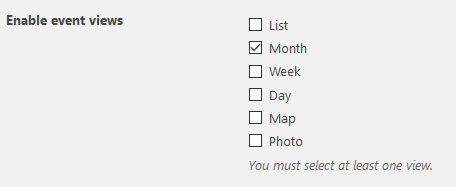
Does this fix it for you?
Cheers,
Andras
December 5, 2016 at 4:11 pm #1201803ParticipantHiiiii 🙂
Thank you for all the CSS tips… this topic is fine now….
I have several other questions but will post them separately.
Excellent support!! so thank you..
Mel
December 6, 2016 at 1:05 pm #1202280KeymasterI’m super stoked to hear that solved it! And thank you for your kind words!
Since you marked it resolved I am going to close this ticket, but if you need anything else related to this topic or another please post a new topic in the forum and we will gladly help you out.
Cheers,
AndrasPS: If you like our plugin, and you didn’t yet do so 🙂 we would be happy to receive a review in the wordpress.org repository. Thanks!
https://wordpress.org/support/view/plugin-reviews/the-events-calendarPS2: We’d be also grateful if you would give us feedback on your satisfaction with support. Just click on one of the classy looking emojis below. 🙂 If you can spare a few words, that’s even better. Doublethanks!
-
AuthorPosts
- The topic ‘remove save-as and change next previous links and sales question’ is closed to new replies.