
Home › Forums › Calendar Products › Events Calendar PRO › Shortcode to show events list (with image)
- This topic has 13 replies, 4 voices, and was last updated 9 years, 10 months ago by
richwall.
-
AuthorPosts
-
November 16, 2016 at 9:53 pm #1193682
richwall
ParticipantI am trying to add a shortcode to a column in my site, that will automatically list events (with the image and details), so that we do not have to replicate them as “posts” for them to show up on the front page…
An example is at
This is what I added as a shortcode in the third column
[tribe_events view=”photo”]
but the listing displayes at half the width of the column????, it should show at full width (as does the middle column, whihc is actually a posting of the same event I manually entered)
Cheers
Richard
November 17, 2016 at 2:49 pm #1194164Cliff
MemberHi Richard.
I’m unsure exactly what you’re wanting.
I see your Photo View in effect and it seems to be taking up its container: https://cl.ly/07331U0d3r35
If you have follow-up questions, please provide an annotated screenshot and/or a video screen recording.
Thank you.
November 17, 2016 at 3:04 pm #1194174ParticipantThanks
No as mentioned in the post, the middle column (as per your image) is actually a seperate post I added into WordPress and is not in Calendar Pro
The third column along , is using the Events Calendar PRO shortcode, and as yuo can see (as per your image)
The image and content only fills half the column (it should fill the whole column)
I hope this makes sense. If not I will delete the middle column post so as not to confuse you
Cheers
Richard
November 17, 2016 at 3:13 pm #1194181ParticipantOK, I have now taken out the extra “WordPress Post” that was in the middle column, so as not to confuse the matter.
You can see that the “Upcoming events” third column, whihc is produced from your shortcode, displays the events at 50%
Cheers
Rich
November 17, 2016 at 4:26 pm #1194218Andras
KeymasterHello Rich,
I see where you’re coming from. Let me help you with this.
This issue is there because the photo view is using 2 or 3 columns by default and the shortcode is also trying to cram in those 2-3 columns in that 3rd of a column.
You should be able to fix that with this little css snippet, just copy it into your child theme’s style.css file:
@media screen and (min-width: 1025px) {

  #tribe-events-photo-events.photo-two-col .type-tribe_events.tribe-events-photo-event {

    width: 95%;

  }

}
Hopefully this should solve it. Check and please let me know.Cheers,
AndrasNovember 17, 2016 at 4:36 pm #1194224KeymasterThis reply is private.
November 17, 2016 at 4:41 pm #1194225KeymasterThis reply is private.
November 17, 2016 at 4:57 pm #1194226ParticipantAndras
You are a legend, it works perfectly now, thankyou so much.
As to the “Find events” and “Upcoming event” all I ahve in that column is the shortcode
[tribe_events view=”photo”]
so that must be pulling in this extra code???
All I want is to show the events in the column, none of this other stuff….
Cheers
Rich
November 21, 2016 at 1:25 am #1195211KeymasterHi Rich,
Thanks for your kind words. 🙂 I’m glad it helps.
If you also want to remove the Search bar from above the events, then use this shortcode:
[tribe_events view="photo" tribe-bar="false"]
If you would also like to remove the Heading “Upcoming Events”, then add the below snippet in your theme’s style.css file:
.blog .tribe-events-page-title, .blog #tribe-events-header {

  display: none;

}

.blog .tribe-events-loop {

  margin-top: 0 !important;

}
I hope this helps, let me know.
Cheers,
AndrasNovember 21, 2016 at 2:45 pm #1195541ParticipantAndras
Wonderful stuff, thankyou.
The search bar did dissappear which is great.
The title did not though, when I added that css???
Cheers
RichNovember 22, 2016 at 1:39 am #1195678KeymasterDang! Sorry to hear that. We’re one step closer…
I checked you landing page and this is what I see:
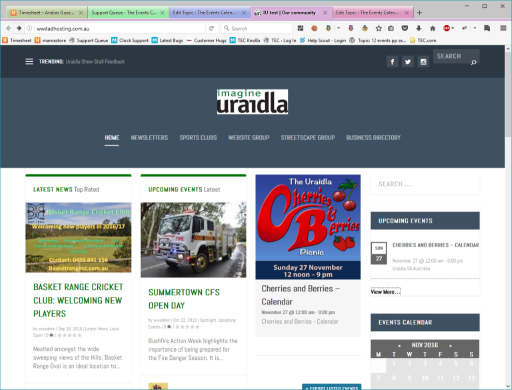
Maybe I misunderstood something. Could you please tell me again which title you want to make disappear?
If you don’t see the same, then try emptying your browser cache. (Ctrl + Shift + Del)
Let me know and we’ll get this dent hammered out.
Cheers,
AndrasNovember 22, 2016 at 5:49 pm #1196261ParticipantAndra
No you are right, it alllloks good now, it must ahve been cached
Cheers again, you are a legend
Cheers
Rich
November 23, 2016 at 5:45 am #1196438KeymasterHey Rich,
Thanks for the kind words! 🙂
I’m super happy to hear it works now! You have an amazing site, good luck for the future!
I am going to close this ticket for now, but if you need anything else related to this topic or another please post a new topic in the forum and we will help you out.
Cheers,
AndrasPS: If you like our plugin, and you didn’t yet do so 🙂 we would be happy to receive a review in the wordpress.org repository. Thanks!
https://wordpress.org/support/view/plugin-reviews/the-events-calendarPS2: We’d be also grateful if you would give us feedback on your satisfaction with support. Just click on one of the classy looking emojis below. 🙂 If you can spare a few words, that’s even better. Doublethanks!
-
AuthorPosts
- The topic ‘Shortcode to show events list (with image)’ is closed to new replies.