

Forum Replies Created
-
AuthorPosts
-
Andras
KeymasterGreat, happy I could provide some useful info to you.
I am going to close this ticket as resolved, but if you need anything else related to this topic or another please open a new ticket in the forum and we will be happy to help you out.
Good luck with your project!
Cheers,
AndrasPS: If you like our plugins, and you didn’t yet do so 🙂 we would be happy to receive a review in the wordpress.org repository. Thanks!
https://wordpress.org/support/plugin/the-events-calendar/reviews/PS2: We’d be also grateful if you would give us feedback on your satisfaction with support. Just click on one of the classy looking emojis below. 🙂 If you can spare a few words, that’s even better. Doublethanks!
February 10, 2017 at 7:07 am in reply to: Adding event and date title to cart/checkout and booking confirmation email #1232786KeymasterHi Rachel, I do apologize for that glitch. It looks like the genie of uploads played a trick on us. 🙂
Anyway, I corrected that download, so please try downloading and installing it again. It should work now, I tested it locally.
Test the extension and let me know how that works out for you.
Cheers,
AndrasFebruary 10, 2017 at 6:56 am in reply to: How to set /events/ featured image? Because currently FB fetch image from event #1232779KeymasterTom, thanks for chiming in and reporting that. We’ll check that out.
Can you share a url which produces this issue, so we can test it?
Thanks,
AndrasKeymasterHi Ernesto,
Good to hear you are making progress with Filterbar. :thumbsup:
The functions.php file should be located in the folder of your theme / child theme. Usually you can edit it if you go to Appearance > Editor then look for the file on the right side. Check this screenshot for reference.
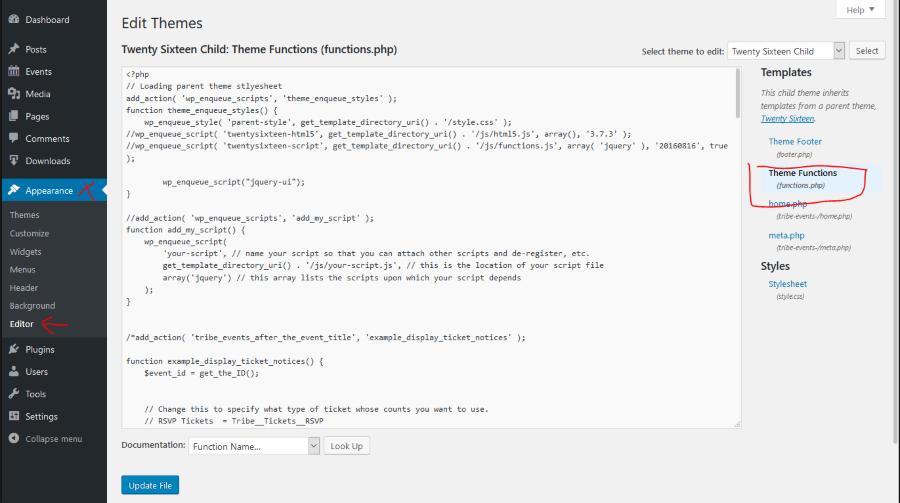
If you don’t yet have a functions.php file, then simply create one in your theme folder (wp-content/themes/[your-theme-name]. In this case don’t forget to add the opening <?php tag in the very beginning of the file.
And it is recommended to use a child theme, so your modifications don’t get lost with a parent theme update.
Let me know if you need anything else.
Cheers,
AndrasFebruary 10, 2017 at 6:45 am in reply to: Getting these Notices after a successful payment to a "virtual" normal product #1232773KeymasterShadi, thanks a lot for re-checking. I’m happy to hear that the notices stopped coming.
I’ll leave the topic open, so you can report back if anything comes up regarding this topic.
Cheers,
AndrasKeymasterThis reply is private.
KeymasterThis reply is private.
KeymasterHey Fifty,
What a find! Great stuff. We will test this out internally and if it cases a but the we will check what can be done about it.
I will leave the topic open for now so you can report back later whether the issue disappeared with that or not. (Note: that if there is no activity on the thread for 3 weeks, then it will be automatically closed.)
Thanks and cheers,
AndrasFebruary 10, 2017 at 5:38 am in reply to: "View all" recurring events list not displaying events in chronological order #1232747KeymasterHello @jussibr and thanks for chiming in here.
To give you an update, the fix is scheduled to come with the next maintenance release in 3-4 weeks max. Hang in there.
Thanks for your patience!
Cheers,
AndrasFebruary 9, 2017 at 8:13 am in reply to: Mini Calendar not quite working – related to memory issues bug? #1232045KeymasterHello Lorraine,
Thanks for going Pro and welcome to the forums! Let me try to help you with that one.
I checked your site, and I have a hunch that a bit more code was pasted with the shortcode into the page. To check that please open the page containing the shortcode for editing. Then in the editing area switch to Text mode and check if there is any other code around the shortcode. There shouldn’t be.
I expect it looks something like this:
<p><a href="https://theeventscalendar.com/knowledgebase/pro-widget-shortcodes/#mini-cal-shortcode" data-anchor="dl_mini-cal-shortcode">[tribe_mini_calendar]</a></p>Let me know what you find and we’ll go further from there.
Cheers,
AndrasKeymasterHello Thomas,
Thanks for using our plugins and welcome to the forums!
I’m sorry you are experiencing issues with the shortcode and the tribe bar. Let me help you dig down to the bottom of this and get this fixed for you.
As a first I would like to ask you to share with me your system information so I can give you better support.
Also it would be great if you could do a test for conflicting plugins and themes. I would start with switching to a default theme like twentysixteen.
Let me know what you find. Looking forward to solving this with you.
Cheers,
AndrasKeymasterHello Daniela,
Great question you poster here, thank you.
That might be possible however it would require some coding and customization which falls beyond the scope of our support.
I can try to help get you started on customizations but for the most part you are going to have to take it on to complete, or you can hire a developer to do that for you. (If you need, I can share with you a list of developers who might be able to help you out with this.)
The challenge lies in the following:
By default, when listing events (past or future), they are sorted by date increasingly. So for future events that is from today forward, for past events it’s from the oldest to today.
If I understand correctly you want to change this sorting order only for the events in the past, so they are sorted from today backwards.
To achieve this you will need to tap into how the query is done in the different scenarios, and so that it only affects events.
There are some plugins dealing with custom ordering of posts, you might give those a try as well, although I didn’t test any of them.
I hope this clarifies. Let me know if you have any more questions.
Cheers,
AndrasFebruary 9, 2017 at 7:44 am in reply to: Adding event and date title to cart/checkout and booking confirmation email #1232018KeymasterHello Rachel,
Thanks for reaching out with your question.
I believe the below extension will be the one that does this trick for you. Try and let me know how that works out.
Cheers,
AndrasFebruary 9, 2017 at 7:37 am in reply to: How to set /events/ featured image? Because currently FB fetch image from event #1232012KeymasterHello Darius,
Thanks for using our plugins and welcome to the forums!
I apologize, I don’t quite understand what you would like to achieve.
When you import events from Facebook with Event Aggregator, then it also imports the image and should set it up as the featured image of that event.
Can you send me a link or screenshot of the event / image that you want to import? And also tell me what happens after import?
Thanks!
Also if you would like or if it is easier for you, you can write in German, French, Spanish, Italian or Hungarian. We have people on the team who speak these languages and it might make communication easier.
Cheers,
AndrasKeymasterHello Dawid,
Thanks for reaching out.
I will share with you a video on how to create an event and a ticket with ET+ and EDD and afterwards you can also see a test purchase, where names can be added to the tickets.
https://1drv.ms/v/s!Aqh6lbOjUW1Tn2Bx-X0awqHNbNto
Note though that both tickets will be received on the same email address, which is entered at the checkout. So your client will get both per email, and then he will need to forward it to the friend.
In case you would like to give our plugins a test drive, then I recommend you to make a purchase and if it doesn’t work out for you, then you can ask for a refund within 30 days of the purchase. Here you can read more about our refund policy.
I hope this explains. Let me know if you have any more questions.
Cheers,
Andras -
AuthorPosts