

Forum Replies Created
-
AuthorPosts
-
Andras
KeymasterYou are welcome, I’m very happy to hear this solved it for you!
I am going to close this ticket, but if you need anything else related to this topic or another please post a new one in the forum and we will be happy to help you out.
Good luck with your project!
Cheers,
AndrasPS: If you like our plugins, and you didn’t yet do so 🙂 we would be happy to receive a review in the wordpress.org repository. Thanks!
https://wordpress.org/support/plugin/the-events-calendar/reviews/PS2: We’d be also grateful if you would give us feedback on your satisfaction with support. Just click on one of the classy looking emojis below. 🙂 If you can spare a few words, that’s even better. Doublethanks!
February 9, 2017 at 6:51 am in reply to: Strong Behaviour of the quantity field in RSVP tickets #1231984KeymasterI’m happy to hear the css snippet did the trick.
Of course, we’ll try to get down to the bottom of this. I’ll take a look at the files you sent and will get back to you most probably tomorrow with the findings. Please hang in there.
Cheers,
AndrasKeymasterHi NSTOR,
I took a look at your theme and child theme and tested it locally with our plugins on a clean install. So far all was working as expected and no error messages.
This error usually appears with Divi when there is either a plugin conflict of some sort, or if there are not enough resources / memory available. In cases the more plugins you have the more memory is needed for the wp admin to run smoothly.
As a first step it would be great if you could run a test for conflicts following our guide. This can help us discover issues caused by other plugins.
It can happen that you will not find any specific plugin to cause the conflict. E.g. you deactivate Gravity Forms and the addons, then all works fine. Activate it again. Then the issue is there.
Then deactivate Jetpack, Monarch and Bloom and issue is gone again …
This can be the sign of not having enough resources.
Let us know what you find and we’ll take it further from there.
Thanks and cheers,
AndrasFebruary 9, 2017 at 12:58 am in reply to: Mini Calendar – Language problems (links&translate) #1231914KeymasterHi Erik,
I did a quick test on a local install and so far it worked as expected.
I noticed in your system information, that both calendar plugins and WPML are also an earlier version. (And WordPress as well.) After backing up your site and database I would recommend to update these to the latest version, as this might be a bug that has been fixed since.
And another recommendation if I may, try to set up a development / staging site, that will make testing easier and less stressful. 🙂
I really love the site design! 🙂 Supercool!
Let us know if the updates solve the issue. If not, then we can dig further.
Cheers,
AndrasFebruary 9, 2017 at 12:29 am in reply to: Getting these Notices after a successful payment to a "virtual" normal product #1231905KeymasterThanks for getting back to me on that.
I did a first check on your logs. I see that these are notices only and not errors or fatals. If they are showing to your users then you should be able to switch that off.
Check if WP_DEBUG is set to false in your wp-config.php file (on a live site that is recommended) and check your server settings whether notices should be printed out as well, or only warnings. You can set that so it only shows warnings.
Cheers,
AndrasKeymasterHi Vera and Hans-Gerd,
Thanks for your feedback.
It is a nice idea but unfortunately not realistic given how busy we are, and given that not every issue has a workaround. We believe our time is better spent answering customers in the forums and squashing bugs. And users do have the opportunity to search the forums if anyone has reported the same or similar issue and check if they have a solution for it.
Thanks for your understanding!
I also checked on the ticket to give you an update. Unfortunately this fix did not make it into the coming MR due to lack of time, however due to the _popularity_ of this issue it will likely get fixed in the next one. Stay tuned.
Cheers,
AndrasKeymasterHi Ernesto,
Thanks for using our plugins and welcome to the forums!
For your first question try this snippet. Just paste it in your functions.php file ( without the opening <php tag):
https://gist.github.com/andrasguseo/6df4bf6911608bcc33d2deb9c795a37f
For your second question our <span class=”paragraph”>Filter Bar</span> product would be the easiest solution, which I see you just purchased. 🙂 If you would want to do that in the search bar, that would require custom coding which we are limited in supporting.
I hope these answer your questions. Let me know if you need anything else.
Cheers,
AndrasKeymasterHello again,
Sorry, I’m a bit confused now. Are you still experiencing the duplicating issue or it seems to be solved?
On testing, I can assure you that all of our plugins go through thorough testing before they are released. However, due to the multitude of different environments (servers, plugins, themes and calendars / calendar feeds) it is impossible to test every scenario. Thankfully our users help us a lot in finding and squishing bugs.
Let me know if you are still experiencing the issue and I’ll be more than happy to help.
Cheers,
AndrasFebruary 8, 2017 at 4:30 pm in reply to: Scheduled import is removing user added categories #1231756Keymaster🙂
KeymasterThis reply is private.
February 8, 2017 at 4:13 pm in reply to: Incorrect sort order when viewing all recurring events #1231747KeymasterHi Werner,
Unfortunately at the moment I don’t have any suggestions. The team is close to finishing up the current maintenance release. Once that is out in the wild we will do the scoping for the next MR to see what bugfixes can make it into the next one – I would expect this to be there – and then we set a target release date. Without any commitment I’d say 3-4 weeks.
You can read more about our release scheduler here.
Cheers,
AndrasKeymasterBummer. Sorry to hear that.
I took a look at it and it needed a little tweaking at the end.
Please overwrite with this version and check. It worked on my local site when I used it as a plugin.
https://gist.github.com/andrasguseo/d252c9e0c85c96e5a2bcfe36b0d09031
Cheers,
AndrasFebruary 8, 2017 at 3:39 pm in reply to: Can't Submit Event Error: Start / End Time is required #1231739KeymasterHello Rasmus & Thomas,
I just want to chime in here because another user, @eric submitted an idea regarding this topic.
<div class=”bbp-reply-content”>
I had the same error display upon submitting an event. I discovered that the issue was related to the tribe-events directory in my child theme directory. Removing the directory resolved the issue.
After the latest update, I suppose that some of the child theme directory files in tribe-events > community need to be replaced with new files from the updated plugin. Of course, any additions or revisions to these child theme files should be copied over.
I hope this helps.
Eric
</div>
Fabulous advice and it is so true. Whenever you do a plugin update, if you have template overrides, it is always worth checking if the original templates had some changes to them. Sometimes the changes can be minor which will have an unnoticeable effect, but sometimes they can be big enough to break a site.
We try to help our users with this, if you go to the Events > Help page, there is a section that lists the recent template changes, if there are any. It looks like this:
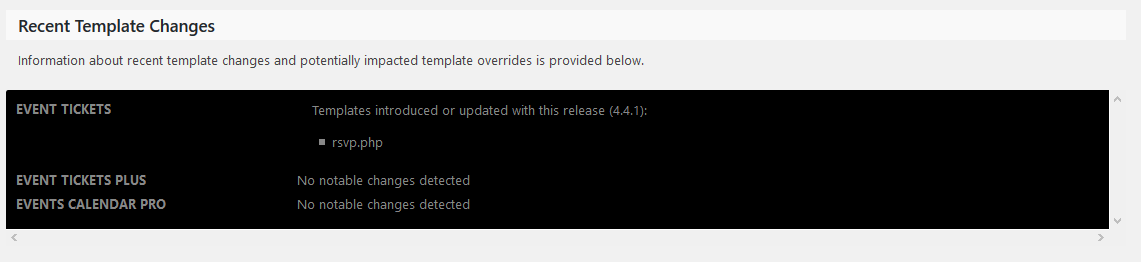
You might want to give that a check as well, maybe this will be the source of your issue.
Cheers,
AndrasFebruary 8, 2017 at 3:35 pm in reply to: Unable to submit events with Community Events 4.4.1 #1231737KeymasterHi Eric and thank you very much for chiming in.
Fabulous advice you shared there and it is so true. Whenever you do a plugin update, if you have template overrides, it is always worth checking if the original templates had some changes to them. Sometimes the changes can be minor which will have an unnoticeable effect, but sometimes they can be big enough to break a site.
We try to help our users with this, if you go to the Events > Help page, there is a section that lists the recent template changes, if there are any. It looks like this:
Trent, give that a check as well, maybe this will be the source of your issue. Let me know what you find.
Cheers,
AndrasFebruary 8, 2017 at 12:15 pm in reply to: Showing all events despite the 'Hide From Event Listings' being checked #1231595KeymasterHi Chad,
Thank you for your feedback!
Per our terms and conditions we support features of the plugins and although we try to help get you started on customizations for the most part you are going to have to take it on to complete.
Despite this I was giving you information, direction and resources as well.
Currently we are a bit swamped and just before a maintenance release, but I’ll see if I can get someone to take a look at this. I ask for your kind patience.
Thanks for your understanding.
Cheers,
Andras -
AuthorPosts