

Forum Replies Created
-
AuthorPosts
-
February 8, 2017 at 12:10 pm in reply to: Getting these Notices after a successful payment to a "virtual" normal product #1231592
Andras
KeymasterThis reply is private.
February 8, 2017 at 11:59 am in reply to: Strong Behaviour of the quantity field in RSVP tickets #1231577KeymasterHmmm, really strange indeed.
There are several paths of action we can take.
As for now would it be possible for you to pack your themes folder up in a zip file and share it with me? I would like to run some tests with it and see if I can find something.
Until then you can try the below rough css snippet to hide the unneeded buttons:
/* HIDE ALL BUTTONS */

.quantity.buttons_added input.minus, .quantity.buttons_added input.plus {

    display: none;

}

/* SHOW FIRST MINUS AND LAST PLUS */

.quantity.buttons_added input.minus:first-child, .quantity.buttons_added input.plus:last-child {

    display: block !important;

}
Andras
KeymasterThis reply is private.
KeymasterDanke Norbert!
I’m happy that solved it for you!
I’m going to close this ticket since the issue is resolved.
In case you need any help or you have any questions in the future, then open a new thread and we’ll be happy to help.
Cheers,
AndrasPS: If you like our plugins, and you didn’t yet do so 🙂 we would be happy to receive a review in the wordpress.org repository. Thanks!
https://wordpress.org/support/plugin/the-events-calendar/reviews/
https://wordpress.org/support/plugin/event-tickets/reviews/PS2: We’d be also grateful if you would give us feedback on your satisfaction with support. Just click on one of the classy looking emojis below. 🙂 If you can spare a few words, that’s even better. Doublethanks!
KeymasterHello NSTOR,
Just wanted to let you know that I’m looking into this issue. I still need to check some stuff, but will get back to you in the coming 2 days.
Thanks for your patience!
Cheers,
AndrasFebruary 7, 2017 at 12:59 pm in reply to: How to export additional ticket fields in ticket orders or attendee list #1230854KeymasterHello Steven,
Thanks for reaching out!
I guess you are talking about the extra attendee information that you can add to every ticket.
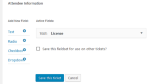
By default those are shown both on the attendee screen for the event and are included in the csv export as well. Here is a screenshot of a quick local test I did.

To be able to see it on the attendee page you need to click on the Show details text and then they will be revealed.
Let me know if this helps or if you meant something else.
Thanks and cheers,
AndrasKeymasterHello Kelly,
Thanks for going Pro and welcome to the forums!
And thank you for getting in touch with us regarding this topic. Sorry you are having this speed issue.
Just want to make sure, did you try to do a conflict test before to see if maybe another plugin or the theme is influencing the load times?
Also, if you are working with a large number of events that can influence load times of some views, esp. the month view. In this case using caching for month view and disabling JSON LD can be of some benefit.
I also recommend the following article for further information: https://theeventscalendar.com/knowledgebase/performance-considerations/
Let me know if I can be of any assistance. In this case, please also share with me your system information and a link to your site so I can check.
Thanks and cheers,
AndrasKeymasterHello stonewallcolumbus,
Thanks for using our plugins and welcome to the forums!
I’m really sorry about this issue with duplicate events when importing from Google Calendar. I’ll try to help you get to the bottom of this.
Do I understand correctly that there were imports when duplication didn’t happen?
Was there anything done differently in those cases? Were the import settings any different than before?
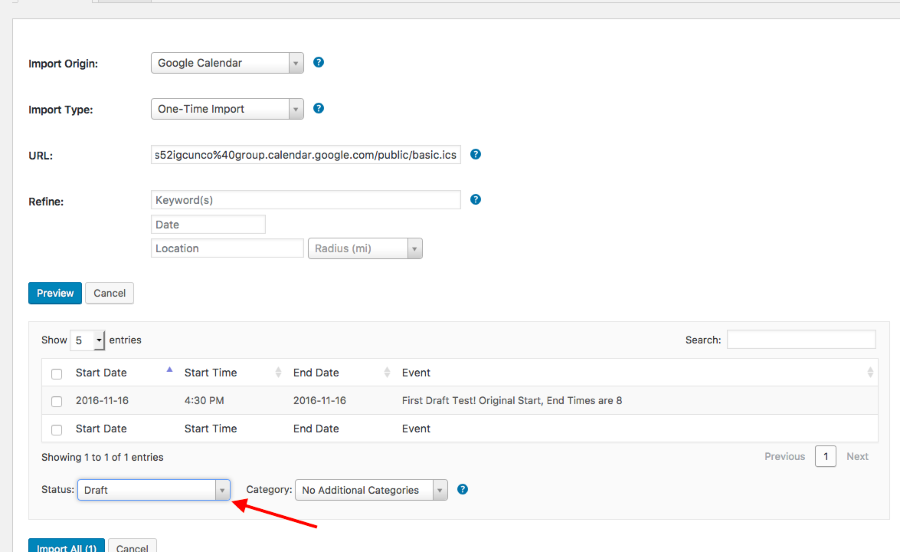
What was / is the status set to, when importing? Draft, published, …?
Were the events changed in Google Calendar before re-importing? If yes, how?
Looking forward to helping you with this.
Cheers,
AndrasKeymasterHiya Paul,
Thanks for using our plugins and welcome to the forums! Sorry about this issue you are having. Let’s try to find a solution for this, shall we…
To be able to support you, could you please share your system information with me? Here’s a handy guide how you can do that:
https://theeventscalendar.com/knowledgebase/sharing-sys-info/Also, can you please review our Testing for conflicts guide and let me know what you find?
Please make sure WP_DEBUG and WP_DEBUG_LOG are enabled on your site’s wp-config.php file. Any errors will display at the top of your page as you try to reproduce the conflict. I also recommend right-clicking your mouse and opening the ‘Inspect’ tool to see if any errors display in the console. Note what you find and please include it in your reply.
Thanks and I’m looking forward to solving this with you.
Cheers,
AndrasFebruary 7, 2017 at 9:52 am in reply to: Scheduled import is removing user added categories #1230751KeymasterHello Ryan,
Thanks for using our plugins and welcome to the forums!
I’m really sorry about this import issue you are experiencing. We are aware of this bug, which has been reported to us recently. We already have an internal bug ticket for this in place. I will add your thread to the ticket to give it more push.
At the moment unfortunately I cannot give you any details yet on when this is going to be fixed, due to the freshness of the bug. I am going to set the status of this ticket to “pending fix” and we will update it once the fix is released, so if you have email notifications activated, you will know when I post an update here. If you’d like you can also check back in a week or two, and I might be able to give you an update.
Again, I apologize for this issue and I thank you for your patience.
If you have any new questions or issues, please, create a new ticket so we can keep the forums clean.
Thanks and cheers,
AndrasKeymasterHey Gil,
Thanks for checking that for me.
Indeed we have a similar bug on file. We’ve seen cases where upgrading to 4.4 some recurrence rules are not properly taken over and some events went missing.
The fix will most probably not make it to the maintenance release which is coming this week, but since it is a high priority bug it should be in the next one. Until then the only solution is to stay on a version before 4.4.
I apologize for this inconvenience, rest assured we are working on the fix.
I am going to set the status of this ticket to “pending fix” and we will update it once the fix is released. If you have any new questions or issues please create a new ticket and reference this one.
And of course if you have more questions or details about this issue, just post it here.
Thanks and cheers,
AndrasKeymasterThis reply is private.
February 7, 2017 at 4:01 am in reply to: Showing all events despite the 'Hide From Event Listings' being checked #1230446KeymasterSorry to hear that didn’t help.
For checking the queries you can try the Query Monitor plugin for that. It is a tool we also use sometimes.
Andras
Keymaster🙂
February 7, 2017 at 3:57 am in reply to: Strong Behaviour of the quantity field in RSVP tickets #1230443KeymasterHi Uwe,
Thanks for checking that.
Since it works well with a default theme, it looks like Avada or a template override is doing some modifications.
For the template overrides you can check in this folder / file: [your-theme]/tribe-events/wootickets/tickets.php
This is the file that is responsible for the look of the ticket form on the single event page.
One other location might be your functions.php file with some custom code, that could affect this.
If it is an Avada related issue, then unfortunately I’m not able to help you with that. In this case the theme developers are your best choice.
Let me know what you find.
Cheers,
Andras -
AuthorPosts