
Home › Forums › Calendar Products › Events Calendar PRO › Specific default month view and dropdown menus
- This topic has 9 replies, 3 voices, and was last updated 9 years, 6 months ago by
Ernesto.
-
AuthorPosts
-
February 7, 2017 at 12:26 pm #1230830
Ernesto
ParticipantHi,
I’m preparing a site for a Cultural Festival that will start in a couple of months, hope you can help me with those two questions:
1. I’d like a specific month to appear by default in the month view and, actually, whenever you change from view, view the events from the day the festival starts and not from today. Is there a way to setup that?
2. I’d like that, instead of having a search field where you have to input the text, to have dropdown menus that can display venues or categories, select them and go to the desired filter/view. Is that possible?
Thanks for your help,
February 8, 2017 at 5:02 pm #1231785Andras
KeymasterHi Ernesto,
Thanks for using our plugins and welcome to the forums!
For your first question try this snippet. Just paste it in your functions.php file ( without the opening <php tag):
https://gist.github.com/andrasguseo/6df4bf6911608bcc33d2deb9c795a37f
For your second question our <span class=”paragraph”>Filter Bar</span> product would be the easiest solution, which I see you just purchased. 🙂 If you would want to do that in the search bar, that would require custom coding which we are limited in supporting.
I hope these answer your questions. Let me know if you need anything else.
Cheers,
AndrasFebruary 9, 2017 at 7:27 am #1232007ParticipantThanks! I’ll try the snippet and let you know if I run into any problem… I’m testing the Filter Bar product and adjusting it, it seems it will work for what I’m doing.
Best,
Ernesto BañuelosFebruary 9, 2017 at 7:35 am #1232010ParticipantWhere is the functions.php file placed? is it the one of the theme I need to edit? I only found a functions.php file on the deprecated folder from the events calendar plugin
Thanks,
Ernesto Bañuelos-
This reply was modified 9 years, 7 months ago by
February 10, 2017 at 6:54 am #1232777KeymasterHi Ernesto,
Good to hear you are making progress with Filterbar. :thumbsup:
The functions.php file should be located in the folder of your theme / child theme. Usually you can edit it if you go to Appearance > Editor then look for the file on the right side. Check this screenshot for reference.
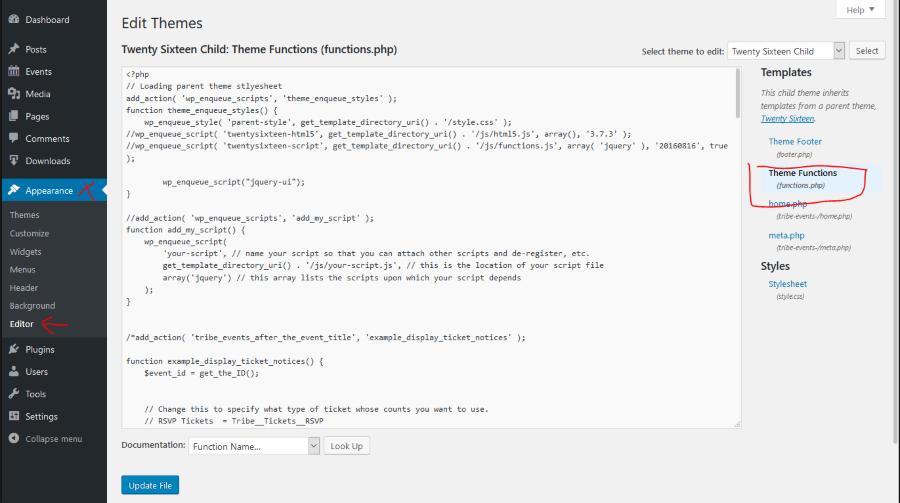
If you don’t yet have a functions.php file, then simply create one in your theme folder (wp-content/themes/[your-theme-name]. In this case don’t forget to add the opening <?php tag in the very beginning of the file.
And it is recommended to use a child theme, so your modifications don’t get lost with a parent theme update.
Let me know if you need anything else.
Cheers,
AndrasFebruary 16, 2017 at 7:16 am #1238549ParticipantHi András!!
The fix has been working smoothly. Thanks a lot. but now I have a new request from the client and I hope you can guide me through it: they want a specific month to be displayed in the month view while the festival starts. is it possible?
Thanks,
Ernesto BañuelosFebruary 17, 2017 at 3:17 am #1239757KeymasterAh, these clients… 😉
I have updated the snippet, here it is again. Now in month view it’s going to jump to the month you set in line 28. Otherwise the first upcoming event.
https://gist.github.com/andrasguseo/6df4bf6911608bcc33d2deb9c795a37f
Does this solve it?
Andras
February 17, 2017 at 5:13 am #1239825ParticipantDude!!! you rock!!! this is it!
Thanks a lot for your help
February 20, 2017 at 1:36 am #1241992KeymasterHi Ernesto,
Super stoked to hear that helped!
Since this looks to be resolved I am going to close this ticket, but if you need anything else related to this topic or another please post a new one in the forum and we will be happy to help you out.
Cheers,
AndrasPS: If you like our plugins, and you didn’t yet do so 🙂 we would be happy to receive a review in the wordpress.org repository. Thanks!
https://wordpress.org/support/plugin/the-events-calendar/reviews/PS2: We’d be also grateful if you would give us feedback on your satisfaction with support. Just click on one of the classy looking emojis below. 🙂 If you can spare a few words, that’s even better. Doublethanks!
-
This reply was modified 9 years, 7 months ago by
-
AuthorPosts
- The topic ‘Specific default month view and dropdown menus’ is closed to new replies.