

Forum Replies Created
-
AuthorPosts
-
October 1, 2018 at 6:06 am in reply to: Eventbrite tickets version 4 5 2 – previously imported events still broken #1634342
Victor
MemberHi Neil,
Thanks for running those tests to confirm there is no plugin conflict.
I understand about the PHP version. Thanks for letting us know about it.
It looks like your server environment does not work well with the migration process, just like your imports were not working before using the Asynchronous system.
I have created a report for this so one of our developers can have a look and see what we can do on our end to help overcome that problem.
I will leave this thread open and link it to the report. This way, we can follow up with you once we have an update.
We apologize for the inconvenience and appreciate your patience while we work on this.
Best,
VictorSeptember 27, 2018 at 8:34 pm in reply to: Adress shows incorrect in Google Maps – API seams to be loaded twice #1632844MemberHi Thomas!
Glad to be of help with this 🙂
I’ll close this thread now, but feel free to open a new topic if anything comes up.
Good luck with your project!
VictorMemberHi Lynden,
We have been able to identify a bug related the issue you are having and we are currently working to fix it in one of our next maintenance releases of our plugins.
I will set this thread’s status to “Pending fix” and link it to the report. This way, we will notify you once a fix is released so you can try on your end.
We apologize for the inconvenience and we appreciate your patience while we work on this.
Best,
VictorSeptember 27, 2018 at 4:22 am in reply to: Error Checking within the Date field in the Custom Fields #1631942MemberHi Stephen,
Thanks for following up.
We do have this as a feature idea posted in our user voice > https://tribe.uservoice.com/forums/195723-feature-ideas/suggestions/34063372-additional-fields-should-support-date-fields so I’d suggest you add your vote to it.
We can’t really commit to a date for this, however, I don’t think this functionality is going to be added in the near future as there seems to be many other features that have a higher priority at the moment.
Is there anything else I can help you with?
Best,
VictorMemberHi Lynden,
Thanks for sending over those screenshots.
That is a very strange issue. Were you able to see any console errors while inspecting the edit event page?
Additionally, to make sure we are not dealing with a theme or plugin conflict, please go through the steps outlined in our Testing for Conflicts guide and see if you can reproduce the same issue under default conditions.
We always suggest to setup a dev/staging site so you can test things out and make all plugins, theme and WordPress core updates without disrupting the live site.
When being under default conditions, try editing the event and click Update to regenerate the event series and see if any difference.
Let us know how it goes.
Thanks,
VictorSeptember 26, 2018 at 6:11 am in reply to: Pre Sales Questions for Events Calendar Pro & Event Tickets Plus #1630966MemberHi Steve,
Thanks for following up with this.
Is there any way to do this without duplicating the event page for every single day on which it takes place?
Unfortunately, this is not currently possible with our plugins. If you need to sell tickets for different events (or the same event happening at different times) the only built-in way to do it is creating a different event and tickets for it. One workaround could be to create different tickets for each time slots for the event and specify this in the ticket description. But technically, the tickets would still be linked to the same event.
Hope it helps!
Please note this is our pre-sales forum, so if you have any other inquiry, please log into your account and post in our Help Desk.
Best,
VictorMemberHi James,
Glad to know you were able to solve this issue.
I’ll close this thread now, but feel free to open a new topic if anything comes up and we’ll be happy to help.
Best,
VictorSeptember 25, 2018 at 5:08 pm in reply to: Eventbrite tickets version 4 5 2 – previously imported events still broken #1630633MemberHi Neil,
I understand your concern with your database. There is no need to share anything yet.
There is another thing we would like you to try on your test site to see if there is any difference with the migration process
First, I can see you are using PHP 5.5 which will no longer be supported by our plugins in the near future, so could you please try switching to PHP version 5.6 or above? If possible, please use PHP 7 or higher as they show a significant improvement in terms of performance.
Then, to make sure we are not dealing with any other plugin or theme conflict, please deactivate all other plugins except The Events Calendar 4.6.23 and Eventbrite Tickets 4.5.3
After that, please delete the transients again. Once the “Currently migrating…” message clears out, please Refresh your connection to Eventbrite by going to Events > Settings > APIs tab.
Finally, try running the migration process and see how it goes this time.
Thanks,
VictorMemberHi Steven,
Thanks for sharing your system information. I don’t really see anything that would indicate something is wrong from there.
Just to confirm, are there any failed imports showing up in WP Admin > Events > Import > History tab ?
Are you setting up a scheduled import? If so, please edit the scheduled import and send us a screenshot of the import settings so we can try to reproduce the same import on our end.
Also, what happens if you create a new import for that same source and hit preview? Do you get the September events in the preview?
Please let us know how it goes.
Thanks,
VictorSeptember 25, 2018 at 6:25 am in reply to: Adress shows incorrect in Google Maps – API seams to be loaded twice #1629940MemberHi Thomas,
Thanks for making those tests and making sure it’s not a conflict with another plugin or theme.
Having a closer inspection to your site I can see that in addition to the Google Maps API being embedded multiple times, there is an error coming from the Google “Geocoding Service: This API project is not authorized to use this API…” This means something is not correctly configured for your Google Maps API Key.
Could you please navigate to your Google API console and make sure you have both, the Maps Javascript API and the Geocoding API enabled? See the following screenshot as a reference:
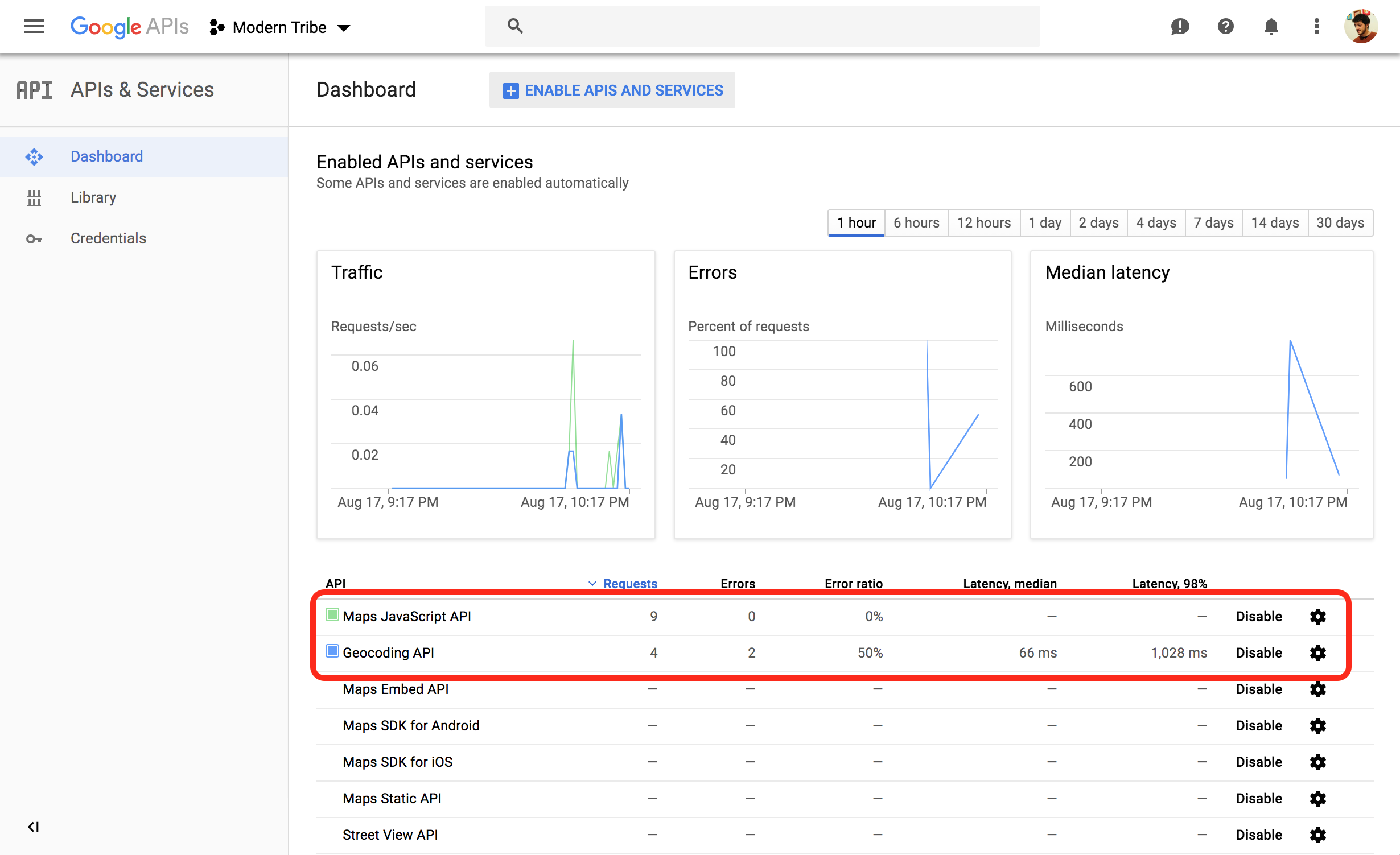
In addition to that, try also using the code snippet I previously shared with you to prevent the API being embedded multiple times.
Let me know how it goes.
Thanks,
VictorMemberHi Scott,
Thanks for running those tests and letting us know about it.
Is there any mechanism in the code to remove imports under any conditions? for example if it times out for some reason, or some other error is encountered, or if has been completed X times?
Not really. Our import system has checks to detect multiple errors and should show such errors in the Import > History tab. But in any case it should NOT delete the scheduled imports.
It would be good idea if you keep your WP_DEBUG and WP_DEBUG variables to true and see if you get any errors logged when the import gets deleted.
Also, you could try changing to change the Import Process System to use the Cron-based system and see if any difference. You can find this setting in Events > Settings > Imports tab under the Global Import Settings section.
Please let us know how it goes.
Thanks,
VictorMemberHi Karen,
You should be able to upload zip files. If the file is too big, you can use a third party service like dropbox or Google Drive and share the link with us.
Yes, I will need the complete child theme directory to be able to test.
Thanks,
VictorMemberHi Thomas,
Thanks for keeping us posted about this.
Yes, that seems to be the issue. It seems that the translation for German (Switzerland) is only 1% complete. If switching to German works for you then that is probably the best thing to do.
I can see that “German (Switzerland)” has a lot (more than 2000) of translated strings waiting to be approved by a translator editor. We don’t have direct access to approve them, but one of our team members have reached out to a user in Germany who may probably be a translator editor for “German (Switzerland)”. We can’t really promise anything, but you can check the status of the translation every once in a while and see if there is an update for it > https://translate.wordpress.org/projects/wp-plugins/the-events-calendar/stable/de-ch/default
I hope that helps. Let us know if any follow up question.
Best,
VictorMemberHi Karen,
Thanks for following up with this.
First, please let me note that we are fairly limited in how much support we can give for custom development questions like that.
That said, we always like helping out and at least point users into the right direction as much possible.
In the custom.php template, you can see that the custom fields are being retrieved by this code:
$fields = tribe_get_option( 'custom-fields' );You could also make use of this code in other parts of the edit-event.php template file and render only the custom fields you need to, doing the necessary checks.
Additional help with this customization is out of the scope of the support we can give, so you might want to find a suitable developer to help achieve what you are looking for. If that’s the case, you can find recommendations for custom development in https://theeventscalendar.com/knowledgebase/custom-development/
Hope it helps.
Best,
VictorSeptember 24, 2018 at 6:37 am in reply to: Adress shows incorrect in Google Maps – API seams to be loaded twice #1629026MemberHi Thomas,
Thanks for testing the snippet.
It seems like there could be a conflict with your theme, another plugin or even some custom code. To make sure we are not dealing with a conflict, please go through the steps outlined in our Testing for Conflicts guide and see if you can reproduce the same issue under default conditions.
Please let us know how that goes.
Thanks,
Victor -
AuthorPosts