

Forum Replies Created
-
AuthorPosts
-
Victor
MemberHi Buck!
Thanks for reaching out to us.
If you are having trouble accessing your account due to those circumstances, we can help you regain access to it via email.
Please submit your request through our contact form > https://theeventscalendar.com/contact/ and select the Help accessing my account option.
We’ll get back to you over email.
Thanks,
VictorMemberHi Dan!
I’m sorry to know you are getting that error.
I think it might relate to an already known bug on our end. To confirm this, could you please let us know if you are getting that error when trying to export the attendee list?
Thanks,
VictorFebruary 20, 2018 at 6:32 am in reply to: List widget date display not according to plugin settings #1458551MemberHi Angela!
Thanks for reaching out to us. Let me help you with this topic.
The Week Day Format is only used when showing days of the week in Week view. The List Widget uses the Date with year and Date without year formats:
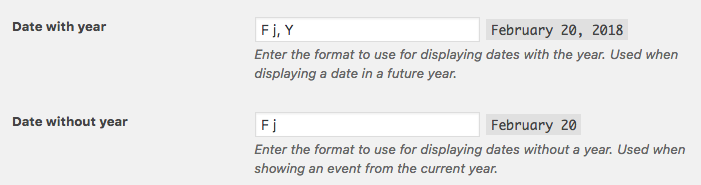
Try modifying those and see if it works for your site.
Let me know about it 🙂
Thanks,
VictorMemberHi Mark!
Thanks for reaching out to us.
I’m not sure I understand exactly what you are asking. There is no limit in the number of events to import using Other URL imports.
As a reference, let me point you to the following article about the Event Aggregator import settings > https://theeventscalendar.com/knowledgebase/event-aggregator-import-settings/
Does it help answer your question? Please let me know about it.
Thanks,
VictorFebruary 20, 2018 at 5:24 am in reply to: Event tickets / Woocommerce email subject settings not working #1458504MemberThanks for following up with this ilkka!
We will keep you posted about the fix 🙂
February 20, 2018 at 5:21 am in reply to: Events Calendar PRO breaks display order for posts #1458499MemberThis reply is private.
February 19, 2018 at 2:10 pm in reply to: Private (password protected) events details not visible in mobile view #1458053MemberHi Elaine!
We just reviewed this bug report and we think the issue is no longer present in our latest versions of our plugins.
Could you please update your plugins to the latest versions available and see if this solves the issue?
Remember you can always get the latests versions of our plugins from your downloads page > https://theeventscalendar.com/my-account/downloads/
Please let us know about it.
Thanks,
VictorMemberSure thing Marte!
I’ll leave this thread open so you can come back if anything is needed.
The thread will auto-close after 3 weeks of inactivity, in which case you can always open a new one referencing this one.
Best of luck!
VictorFebruary 19, 2018 at 1:41 pm in reply to: Submission Form – Required Fields and Error Message #1458021MemberSure thing Karly! Thank you for being on top of this 🙂
We’ll keep you posted
February 19, 2018 at 1:39 pm in reply to: Featured Images displaying differently in different widgets #1458019MemberHey Raymond!
I’m super glad you could make it work! 🙂
Thanks for following up to let me know about it.
I’ll go ahead and close this thread but feel free to open a new topic if anything comes up and we’ll be happy to help.
Cheers,
VictorFebruary 19, 2018 at 1:37 pm in reply to: WordPress database error: [Unknown column 'wpno_postmeta.meta_value' in 'field l #1458016MemberHi Roger!
You could try to remove and install The Events Calendar from scratch to see if any difference. The Event Aggregator functionality is built inside The Events Calendar plugin, so no need to worry about that.
Bear in mind, that if you delete the plugin and install again, you might need to enter your Event Aggregator license key again by going to Events > Settings > Licenses tab, so that your imports continue to work. You can always get your license key by going to your licenses page > https://theeventscalendar.com/my-account/license-keys/
If re-installing the plugin from scratch does not solve the issue, I recommend you go through the steps provided in the Testing for Conflicts guide > https://theeventscalendar.com/knowledgebase/testing-for-conflicts/. It is a set of troubleshooting steps to ensure you are not dealing with a theme or plugin conflict.
We always suggest to setup a dev/staging site so you can test things out and make all plugins, theme and WordPress core updates without disrupting the live site.
We also highly encourage to make a full backup of your site, both database and files so in case something goes wrong you can always restore your site.
Please let me know how that goes and if you have any questions.
Thanks,
VictorFebruary 19, 2018 at 1:26 pm in reply to: No upcoming events on venue and organizer pages shown #1457992MemberHey Raphael! Thanks for keeping us posted!
I’ll close this now, but don’t hesitate to open a new topic if anything comes up and we’ll be happy to help. 🙂
Cheers,
VictorFebruary 19, 2018 at 1:22 pm in reply to: Event tickets / Woocommerce email subject settings not working #1457991MemberHi ilkka!
Thanks for taking your time to report this.
I have just tried the setting in my own installation and It’s not working for me either.
I can confirm this is a bug on our end so I have logged a bug report for this so it can be addressed in one of our next maintenance releases of our plugins.
I will set this thread’s status as pending fix and link it to the report. This way, we will notify you once a fix is released.
We apologise for the inconvenience and we appreciate your patience while we work on this.
Best,
VictorFebruary 19, 2018 at 12:32 pm in reply to: Subscribing from an ios device and get notifications on upcoming events #1457930MemberHi Antwann!
Thanks for reaching out to us! Let me help you with this topic.
You can subscribe to your event RSS feed instead of using the Export functionality of your calendar. Let me point you to the following article that explains how RSS feed works for your events > https://theeventscalendar.com/knowledgebase/events-rss-feed/
I need the calendar feed to send notifications to my device before the events
Unfortunately, there is no built-in functionality in our plugins to achieve this, but let me point you to the following thread where Geoff suggests a couple of interesting plugins you could use to accomplish a similar functionality > https://theeventscalendar.com/support/forums/topic/events-notification/
I hope that helps. Let me know if any follow up questions 🙂
Best,
VictorMemberHi Roger!
Thanks for getting in touch with us. Let me help you with this topic.
Unfortunately, Event Aggregator does not delete events that are no longer present in a Google Calendar or any iCal feed.
We have a feature idea already logged in our user voice here > https://tribe.uservoice.com/forums/195723-feature-ideas/suggestions/15047292-option-to-remove-events-not-present-in-a-reimporte where we explain how this could be implemented in a future feature release of our plugins, and also the caveat associated with having such option built-in.
I suggest you add your vote to the idea so it has a better chance of being added as an option.
I hope that helps. Let me know if any follow up questions.
Best,
Victor -
AuthorPosts