
Home › Forums › Calendar Products › Events Calendar PRO › List widget date display not according to plugin settings
- This topic has 6 replies, 2 voices, and was last updated 8 years, 7 months ago by
planatstudio.
-
AuthorPosts
-
February 19, 2018 at 6:29 am #1457495
planatstudio
ParticipantHello,
In the plugin settings => display, I have setup the date display for weekdays like this: https://image.prntscr.com/image/NXEnjLDjRruadPF7np1IkQ.png
The list widget however is displaying the weekdays like this: https://image.prntscr.com/image/b9y3zQb0Ta2qLupdBMfNoA.png
I do not want this short, english display. How can I correct this?
PS: I cannot give a site url, as it is in coming soon mode.
Thanks 🙂
February 20, 2018 at 6:32 am #1458551Victor
MemberHi Angela!
Thanks for reaching out to us. Let me help you with this topic.
The Week Day Format is only used when showing days of the week in Week view. The List Widget uses the Date with year and Date without year formats:
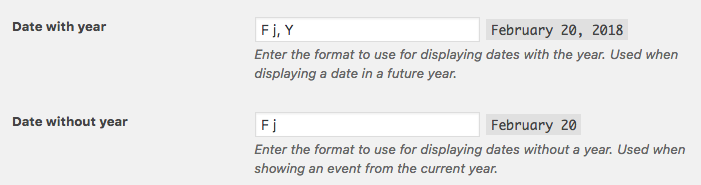
Try modifying those and see if it works for your site.
Let me know about it 🙂
Thanks,
VictorFebruary 20, 2018 at 7:27 am #1458621ParticipantHello Victor,
Thanks for your assistance. According to the preview, the Date with year and Date without year are diferent from the abbrevation, used in the list widget. See:
Still, I tried to change those values, but it doesn’t have any effect on the list widget.
Do you have any other suggestions?
Thanks!
February 20, 2018 at 12:39 pm #1459086ParticipantHello Victor,
Accidentally clicked the correct answer button.. I see the screenshot is missing from my last reply. I have attached it below.
February 21, 2018 at 4:49 am #1459625MemberHey There!
Thanks for following up with this.
If that’s not changing for you, then it could be the list widget is being customized by your theme. To confirm this, could you please try switching to a default theme (like Twenty Seventeen) and see if it works?
If it does, then you should check if there is a tribe-events folder inside your theme directory like this:
wp-content/themes/YOURTHEME/tribe-eventsThat folder is where you can make template overrides of our plugins to customize them. You can learn more about this in our Themer’s Guide > https://theeventscalendar.com/knowledgebase/themers-guide/
Let me know how it goes.
Best,
VictorMarch 15, 2018 at 9:35 am #1480173Support Droid
KeymasterHey there! This thread has been pretty quiet for the last three weeks, so we’re going to go ahead and close it to avoid confusion with other topics. If you’re still looking for help with this, please do open a new thread, reference this one and we’d be more than happy to continue the conversation over there.
Thanks so much!
The Events Calendar Support Team -
AuthorPosts


- The topic ‘List widget date display not according to plugin settings’ is closed to new replies.