

Forum Replies Created
-
AuthorPosts
-
Sky
KeymasterHello Marcial,
Thanks for reaching out! I will try to help with this.
There is no built in way to do this, other than manually going in and clicking “Hide from Event Listings” or setting the published status to “draft” or similar.
However, you can check out this plugin: https://wordpress.org/plugins/post-expirator/ which will allow you to set an expiration date on the event.
Let me know if that helps!
Thanks,
SkyKeymasterHi Chris!
Thanks for reaching out! I will try to help with this.
Can you provide a link to where the error can be seen, or a screenshot of the error?
Thanks,
SkyKeymasterHi Andy,
Thanks for reaching out! I’d be happy to help with your question.
Custom fields added via the “additional fields” tab will indeed show up on the Community Events submission form.
Hope that helps! Let me know if you have any other questions.
Thanks,
SkyKeymasterHi Michael!
Thanks for reaching out to us! We don’t generally provide product support in the Pre Sales forums. I see that you have also created a ticket for this in the Premium forums. I will help you with this on that ticket. I’m going to close this one.
Thanks,
SkyKeymasterHi Michael!
I’m sorry to hear that you’re having issues with the plugin. I will try to help you get this sorted.
Can you provide some more details about the problem you’re having? Do you have a link where I can view the problem in action?
If you go through the steps in our Testing for Conflicts Guide, is the issue still there with the Twenty Seventeen theme enabled and all other plugins disabled?
Thanks,
SkyKeymasterHi there!
Thanks for reaching out to us. I’m happy to help, and I’ll try to answer your question.
Can you help me better understand what you would like to do? By “default view” do you mean the “Monthly Calendar” view? Or the “List” view?
And, by “newest entries first” do you mean you wish the events to be ordered by when they were added to WordPress rather then the actual date of the event?
Thanks,
SkyKeymasterHi Donna,
Thanks for reaching out! I will try to answer your questions.
Events Tickets Plus doesn’t currently support PRO’s recurring events.
If you start to create a ticket for a recurring event, there will be a notice that reads:
Currently, tickets will only show up on the frontend once per full event. For PRO users this means the same ticket will appear across all events in the series. Please configure your events accordingly.
Something other users have done is to use PRO’s recurring events to populate the calendar but then breaking each occurrence from the series to turn them into single events — basically using PRO as an event generator but not actually using its recurring events functionality on the front-end. Others are just dealing with the tickets on recurring events even though you can’t then tell which occurrence they reserved the ticket for.
As for the product images: currently they need to be manually set, but it is possible to pull in the Events featured images with some customization. There is also a feature request open for this. You can vote on the feature by visiting our User Voice Forum.
Thanks, and let me know if you have further questions on any of that.
SkyKeymasterHi again,
Am I understanding correctly that the import is now handling the images correctly with Cloudflare disabled?
When you enabled WP_DEBUG, did you also enable WP_DEBUG_LOG? This will write any errors to a log file that we can look at. Once enabled, try to run the import on the large file of venues. Let it do it’s thing until it reports that it is complete.
If it timed out or had any problems during the import, hopefully the errors were recorded in the log file. Can you upload the contents of that file here? If it’s small you can just paste it in the editor, but otherwise you may need to save it as a .txt file and upload. The file is named “debug.log” and it should be generated in the site’s wp-content directory.
Thanks,
SkyKeymasterHi Mark,
I have created a bug ticket for your issue and included the database dump. Someone is looking through it to see if they can find anything that could be causing the problem. As you can imagine, this may be a bit challenging.
I have not heard back anything yet, but I will check into it again today.
Thanks,
Sky
KeymasterRegis,
Not sure exactly what you’re trying to do, but as I said there’s no way to associate RSVPs with tickets. They are two separate things.
Here’s an article explaining how the RSVPs work: https://theeventscalendar.com/knowledgebase/rsvps/
And another about managing your orders: https://theeventscalendar.com/knowledgebase/managing-your-orders-and-attendees/
Let me know if that helps.
Thanks,
SkyKeymasterThis reply is private.
KeymasterBart,
Ah, I see now. That is strange.
Can you share your system information with me?
Are you “network activating” the plugins, or just enabling on a single subsite?
You can read more about using our plugins on multisite here: https://theeventscalendar.com/knowledgebase/multisite-license/
Thanks,
SkyKeymasterHi again,
WP_DEBUG and WP_DEBUG_LOG are WordPress constants that need to be set to allow generating a log file of php errors. They need to be set in the site’s wp-config file. We just want to enable this while we are troubleshooting. Afterwards, these can be removed. With this enabled while you are running the import, we may be able to see what the problem is.
But with such a large import file, it is likely a resource allocation problem with the server settings.
Our dev team looked at the image urls from the import, and said that there seems to be some issues reaching the files due to redirects to localhost? It looks like you are using Cloudflare CDN and this is somehow preventing the images from being recognized as existing locally. Is it possible to temporarily disable Cloudflare while doing the import?
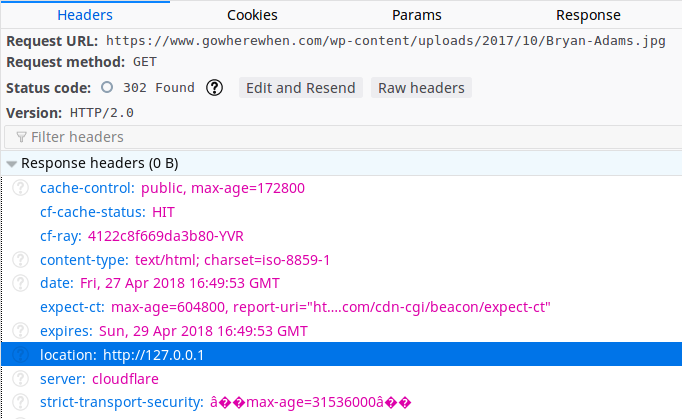
Let me know if the debug thing makes sense.
Thanks,
SkyKeymasterHello,
Our support is available weekdays, and we try to respond to posts within 24 hours. You can read more about our Support Policies here.
We are looking at the image importing issue more in depth. We will let you know as soon as we have more information on that.
As to the Venues. I imported the first CSV file you have uploaded, and it imported 1050 venues. Looking at the file, I see that there are maybe a few hundred more entries than that, but noticed quite a few with multiple per line. I’m wondering if these aren’t able to be processed properly and are being skipped.
Are you saying that when importing this file, it did not import that many? If that is the case, your server may be timing out during the request for some reason. Can you try enabling WP_DEBUG and WP_DEBUG_LOG and see if there are any PHP errors generated during the import process? If so, there should be a file named “debug.log” generated in your “wp-content” directory.
For your issue with your latest CSV Events import: Can you please go ahead and create a new ticket for this? You may get a quicker response this way. We try to limit each ticket to a single issue, and we already have our hands full with the images and venues problems in this thread.
Thanks again for your patience,
SkyKeymasterAwesome!
Glad this helped!
Please let us know if you have any other questions or issues in the future.
Take care,
Sky -
AuthorPosts