Forum Replies Created
-
AuthorPosts
-
November 24, 2017 at 8:55 am in reply to: !urgent! The Tagging and Categories fields do not work #1390872
Patricia
MemberHi Aeky,
I just realized that the path to your submission form is actividades/socios/agregar, so in this case we just need the user name and password to access it.
Thanks!
November 24, 2017 at 8:52 am in reply to: !urgent! The Tagging and Categories fields do not work #1390865MemberHey Aeky,
Thank you for reaching out!
Could you please make sure that all of your plugins are up-to-date and share your system info with us?
Also, could you please send us the link to your community events submission form so we can take a look? I tried to access it via default URL (events/community/add) and it didn’t work in your site (the default rewrite slug was probably changed). Also, if your form doesn’t allow anonymous submissions, please send us an user name and a password so we can access it.
Thanks!
Patricia
MemberHi again!
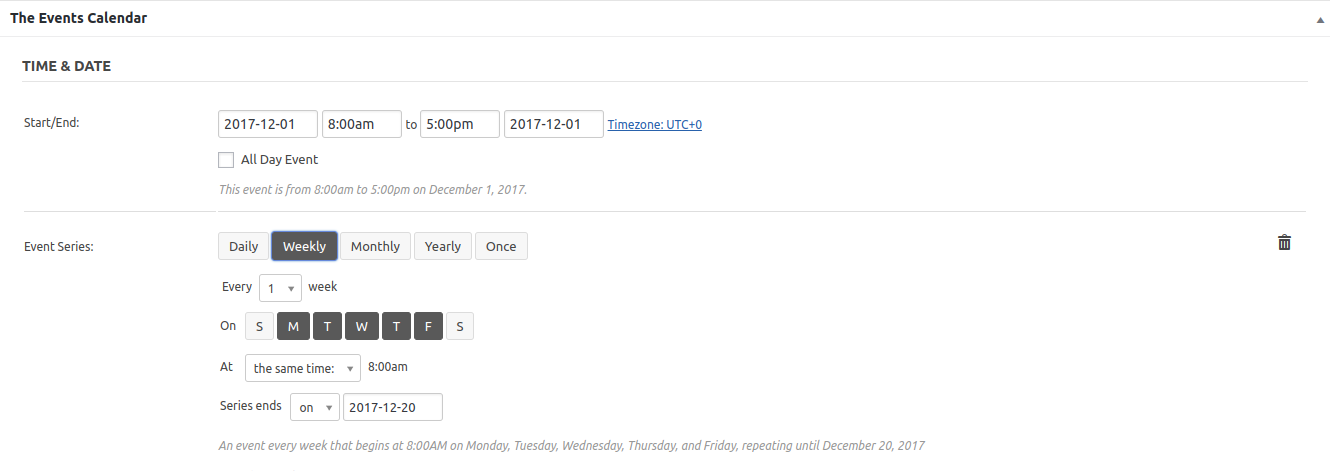
Actually, there is a simpler way to achieve what you want, I’m sorry I didn’t present you this solution before! Here’s a screenshot explaining the steps.
Cheers,
Patricia
MemberHi there,
You are welcome! We have this article explaining Recurring Events and how they work:
https://theeventscalendar.com/knowledgebase/pro-recurring-events/
I hope this helps! If you have any other questions please feel free to let me know and I’d be happy to help as best I can!
Cheers,
Patricia
MemberThanks Gail!
I’ve ran some tests in my own WordPress install and can confirm that this is not an issue that I can replicate from here, although it is definitely happening in your site.
This is the js error I’ve found in your community events submission form:
Uncaught Error: Syntax error, unrecognized expression: [href=#]After some research I’ve found out that this issue could be associated with a jQuery conflict/version. To get started, I would recommend you to temporarily change your theme to another one like Twenty Seventeen and let me know if the JavaScript error is solved after that (don’t forget to backup your database before changing anything). If the jQuery error is gone and reCaptcha works as expected after this change, I would recommend you to contact your theme developer so they can take a look.
I hope this helps! If you have any other questions ain the meantime, please feel free to let me know and I’d be happy to help as best I can!
Cheers,
Patricia
November 24, 2017 at 4:46 am in reply to: From Bad to WORSE: Event Aggregator Still Still not working #1390544MemberThis reply is private.
November 23, 2017 at 12:29 pm in reply to: EDIT ALL in Events Calendar Pro is not working. Browser hangs #1390234MemberThis reply is private.
MemberHi there!
Thank you for reaching out to us!
How are you adding this calendar to your page? Assuming that you are using the tribe_mini_calendar shortcode, you can limit the number of events displayed below the calendar to zero by using:
[tribe_mini_calendar limit=”0″]
You will find more info about our shortcodes here.
I hope this helps! If you have any other questions at all please feel free to let me know and I’d be happy to help as best I can!
Cheers,
Patricia
MemberHey Kieran,
Thank you for reaching out to us! I’m so sorry to hear that you are having problems with your calendar. Let me help you to solve this!
I’ve accessed your calendar and it looks like there is no pattern in these 404 errors: some pages are working, some are returning 404 errors: did you change/update all single event URLs that are working at this moment?
404:
http://www.sussexlocal.net/event/felpham-flower-club-meeting-and-floral-demonstration/
http://www.sussexlocal.net/event/tamed-with-professor-alice-roberts/
http://www.sussexlocal.net/event/littlehampton-christmas-lights-switch-on-late-night-shopping/Working:
http://www.sussexlocal.net/event/jailhouse-jazz-featuring-drawtones/
I wasn’t able to reproduce the issue from here in my own WordPress install (with all Modern Tribe plugins up-to-date), so to help you get started, I would recommend you to deactivate all plugins that are somehow associated with rewrite rules and/or could affect your URLs (like the “All 404 Redirect to Homepage” plugin you have installed).
If that doesn’t help you to find the culprit, I would recommend you to run the defaultConflicts Test. You can start the test by temporarily deactivating all of your plugins (except Modern Tribe plugins) and changing your theme to another one like Twenty Seventeen and let us know if the problem is solved after that (don’t forget to backup your database before changing anything).
Thanks!
Patricia
MemberHi Gail,
Thank you for reaching out to us!
This is odd: could you please send us the link to your community events submission form so we can take a look? I’ve tried the default path (events/community/add) and it didn’t work (the default rewrite slug was probably changed).
Thanks!
Patricia
MemberHi there,
You are welcome! I’m glad to hear that everything is working as expected now 🙂
If you have any other questions please feel free to open a new thread and we will be happy to help as best we can!
Best Regards,
Patricia
MemberHi!
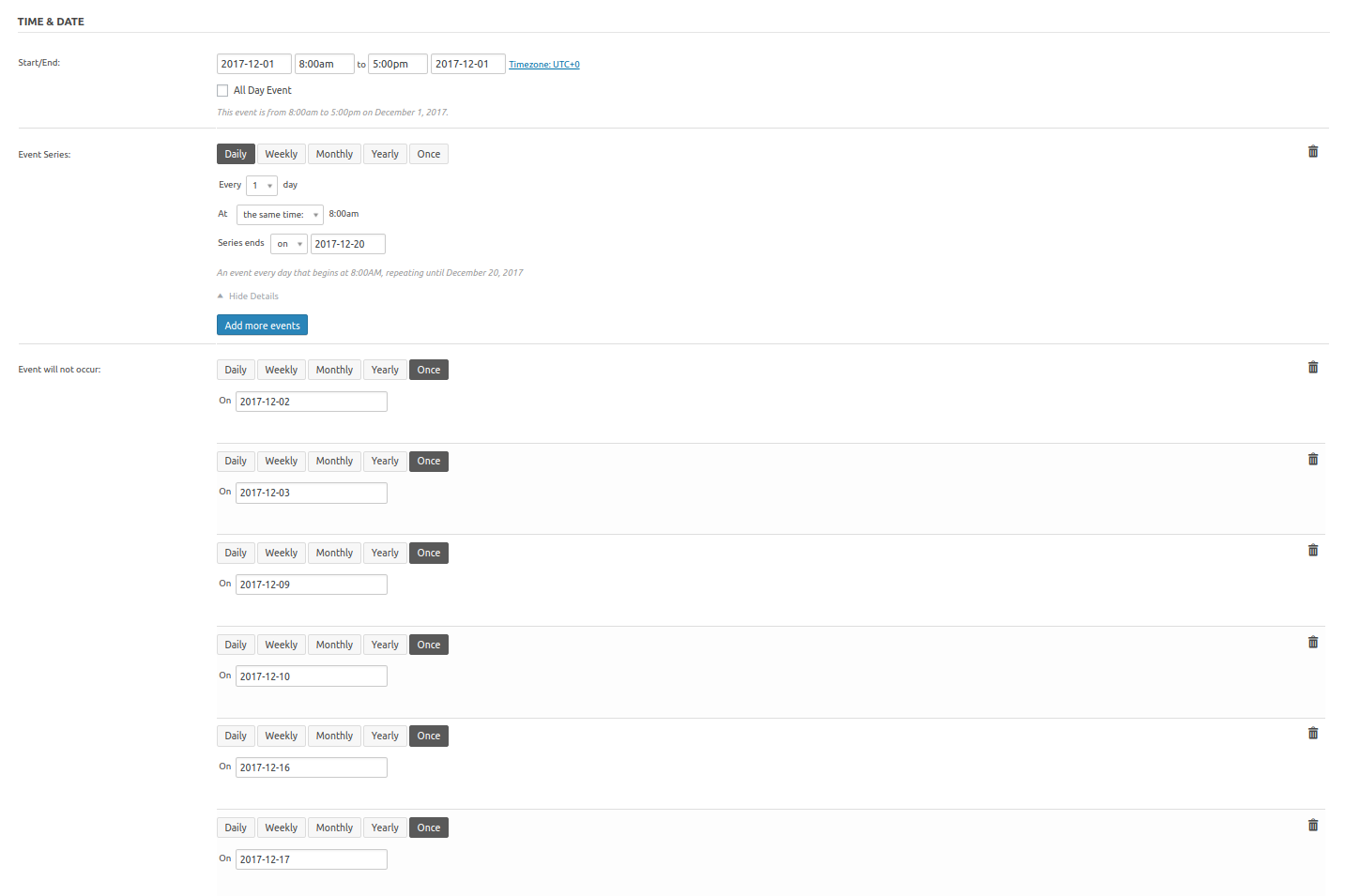
I’m not sure why you are unable to open the link I sent you before because it is working properly as I can see from here (https://ibb.co/e0M4dR), but let me upload it again here in our forum so we can make sure that you are able to access it:
https://theeventscalendar.com/content/uploads/2017/11/Screenshot-from-2017-11-22-20-03-18.png
I hope this helps you with your event setup. Please let me know if you have any other questions!
MemberHey Shah,
Thank you for reaching out to us! I’m really sorry to hear that you are having problems with our plugins, let me help you to solve this:
For future reference, we usually recommend our customers to upgrade their plugins in a staging/testing site first to prevent issues and errors in a production environment. It is also a good practice to backup your site content and database before updating themes and plugins.
Regarding the issue with Events Calendar PRO: you are uploading the new zip file to your site, but events-calendar-pro folder already exists. In this case you have two options:
1- Add your license key (as I can see from here your new license for Events Calendar PRO is not linked to your site yet) and after that update Events Calendar PRO to latest version via Dashboard.
2- Access your server via FTP, head over to wp-content/plugins, delete the events-calendar-pro folder and try to upload it again. More info about manual updates here.
Regarding the layout/menu issue and the 500 internal server error in Customizer, could you please let me know if the issue persists after upgrading Events Calendar PRO to version 4.4.19?
I hope this helps! If you have any other questions in the meantime, please feel free to let me know and I’d be happy to help as best I can!
Best Regards,
Patricia
MemberThis reply is private.
November 23, 2017 at 3:32 am in reply to: Calendar placed via shortcode will not advance to next month #1389886MemberHey Brice,
Thank you for reaching out to us! I’m sorry to hear that you are having problems with our shortcodes. Let me help you to solve this!
I’ve just accessed your site and it looks like you are running an outdated version of The Events Calendar (4.6.2): could you please update it to latest version 4.6.6 and let me know how it goes? Also, please make sure that Events Calendar PRO is up-to-date.
I wasn’t able to reproduce the issue with all Modern Tribe plugins up-to-date and Twenty Seventeen theme enabled, so if the issue persists, it could be associated with your theme or a conflict with one of your active plugins. In this case, I would recommend you to run a Conflicts Test. You can start the test by temporarily deactivating all of your plugins (except Modern Tribe plugins) and changing your theme to another one like Twenty Seventeen and let us know your test results (don’t forget to backup your database before changing anything).
Thanks!
Patricia
-
AuthorPosts