

Forum Replies Created
-
AuthorPosts
-
Jaime Marchwinski
KeymasterHi Christoph,
I’m sorry that this isn’t working for you so far. There could be a few reasons why this is happening, so let’s try to explore them.
As a next step, let’s try to rule out if there is some type of conflict at play.
This is usually because of:1. A conflict with another plugin
2. A conflict with your WordPress theme
3. A template customization for the Events Calendar that requires updating
When it comes to that type of issue, it is preferable to troubleshoot in a staging environment if you have one.
A first quick test is to simply temporarily revert back to a default WordPress theme such as twenty-sixteen to see if the issue persists.
The next step would be to go through our testing for conflicts procedure and let us know what you find out.
Basically the goal here is to revert back to a bare WordPress installation to see if the problem persists. It also allows us to pinpoint what the cause of the issue is.
But, before you do that, there are 2 things I would advise:
1. Make a backup of your database
2. Consider activating a “Maintenance Page” plugin if you are doing this on your live site (to minimize impact on your visitors)
Let me know how that goes.
Thanks,
Jaime
KeymasterI would be happy to continue to troubleshoot with you if you and your client are still interested. I took a look at your calendar, and everything seems to be working properly for now, although you most likely have Events Calendar PRO disabled. If you are still interested, would you mind being a bit more specific about what the issue is?
One thing you may want to look at is what your events slug is, to make sure that the calendar is where you think it is:

If you’d prefer, you can fill out a refund request here:
https://theeventscalendar.com/knowledgebase/refund-policy/
Ultimately, we’d love to continue to work together but if you’d prefer the refund, we completely understand.
Thanks,
Jaime
October 17, 2017 at 5:29 am in reply to: Rollover text showing code from siteorigin page builder #1364549KeymasterHi,
I apologize for the delay, we usually respond to threads once a day, which is why I am getting back to you now.
One suggestion that I have is for you to hide this notice using CSS. You can do something like this:
.tribe-events-tooltip .tribe-events-event-body p {

display:none;

}
The only issue with doing this is that it will remove the description that you have under your event. You can add this in under Excerpt in your Edit Event page.
Let me know if this solution helps!
Thanks,
Jaime
KeymasterHi Uwe,
Thank you for providing me with that information. As a next step, would you please update all of your Events Calendar plugins to their most recent versions and seeing if the issue still exists?
In the meantime, you can take a look at this forum post where a user was adding a fusion slider as well:
https://theeventscalendar.com/support/forums/topic/avada-theme-fusion-slider-on-events-page/
Let me know how it goes!
Thanks,
Jaime
KeymasterHi Dennis,
Just to make sure, you can compare your 302 completed orders with the cancelled orders and make sure that none of those orders are listed there. You can cross check this by comparing the email addresses or names of the cancelled orders with the ones listed on the CSV. If you export the CSV to a program like Excel, it may be easier for you to decipher. You can go to your Edit Events page, scroll down to the ticket, click on Attendees, and then Export, which will export the CSV. This will list order statuses, which can tell you if an order is cancelled or completed. If none of those 302 orders have been cancelled, then you have 302 attendees. However, I believe that you actually have 284 attendees and 18 of those are cancelled, which would add up to 302.
If that is the case, then your total_sales number should be 284. If you adjust the total_sales number to 284, are you seeing the correct number of tickets available? If not, you can also adjust the Ticket Stock in your events page so that everything adds up properly.
According to what you said in a previous reply, it looks like what you have in your attendees tab is correct, so everything should be working as expected. If you still have concerns or questions about this issue, please let me know what else I can clarify for you.
Thanks,
Jaime
October 16, 2017 at 8:26 am in reply to: Relabeler not working on Community Events/Filter Bar #1364170KeymasterHi Kat,
Thanks so much for reaching out!
I’m sorry to hear that the relabeler extension is not working on Filter Bar and Community Events. I just tested it myself on my local site, and everything seems to be working as expected. As a first step, you may want to try flushing your permalinks by going to Settings<Permalinks<Save Changes. Check your Community Events Page and see if anything changes.
Alternatively, you can try to change the wording by using a snippet and putting it in your functions.php file:
https://theeventscalendar.com/knowledgebase/change-the-wording-of-any-bit-of-text-or-string/
To alter the text in Filter Bar, you can go to Event Settings<Filters and change the Title on any of your filters.
I hope this helps, let me know how it goes!
Thanks,
Jaime
KeymasterHi Atli,
Welcome and thanks for reaching out!
By default, the Month View displays the current month, even if you are on the last day of the month. Week View may be a better default display option for you if you’d like to display the events for the current week, without displaying anything before it. You can change the default calendar by heading to Event Settings>Display>Default View and Save Changes.
If you are interested in customizing the Month View, our Themer’s Guide is a great place to start. I would recommend looking at the templates related to the Month View, and in particular month/loop-grid.php.
I hope this helps! Please let me know if you have any other questions on this topic!
Thanks,
Jaime
October 16, 2017 at 7:27 am in reply to: Events filter not working for multiple city choose #1364135KeymasterHi Sean,
Thanks for reaching out again!
As a first troubleshooting step, could you please provide us with your complete system information in a private reply using the instructions found in the following link?
https://theeventscalendar.com/knowledgebase/sharing-sys-info/
Thanks,
Jaime
October 16, 2017 at 7:20 am in reply to: Event tickets – Discounts for multiple payments and tickets #1364130KeymasterHi Greig,
Thanks so much for reaching out and for your interest in our products!
With Event Tickets Plus, you can set up discount codes right through WooCommerce by going to WooCommerce Settings<Coupons. Customers can then enter those discount codes at checkout when they purchase their tickets.
We are currently working on an extension that can attach PDF tickets to an email, which will be completed soon. For now, customers do get emails with their tickets once their order has been completed.
I hope this helps to answer your questions! Please let me know if anything else comes up!
Thanks,
Jaime
October 16, 2017 at 7:04 am in reply to: Rollover text showing code from siteorigin page builder #1364120KeymasterHi,
Thank you for creating that event for us to look at. I did a bunch of testing on my site and I haven’t been able to replicate the error yet. I have a few thoughts on next steps:
- It looks like the stylesheet that is being used is related to the plugin CMS Masters. This is the CSS for the event in the page builder:
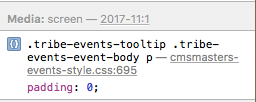
You may want to explore if the conflict lies with this plugin, by disabling it (if possible).
- I see another error related to MailPoet, although I’m not quite sure that it is affecting this particular issue.
- You may want to explore and play around with the settings that you have under Event Settings>Display>Basic Template Settings. What Default Stylesheet and Events Template do you currently have selected? You may want to see if changing what you have selected changes what you see on the front end. Here is more information on our stylesheets: https://theeventscalendar.com/knowledgebase/stylesheets-and-page-templates/
Let me know how it goes and if you have any other questions along the way! We appreciate your patience throughout this process.
Thanks,
Jaime
KeymasterHi Uwe,
Thanks so much for providing us with all of that information. Before moving forward, could you please provide us with your complete system information in a private reply using the instructions found in the following link?
https://theeventscalendar.com/knowledgebase/sharing-sys-info/
It sounds like you have isolated the issue to a conflict between your theme and our plugins. However have you tried switching to a default theme and seeing if the errors still occur? I just want to confirm that this is the issue.
In the meantime, you can take a look at some of the settings you have in Avada and seeing if adjusting them helps: https://theme-fusion.com/avada-doc/special-features/css-compiler/
And you can try this extension, which can dequeue some of the CSS Styles and Javascript Files that may be causing a conflict: https://theeventscalendar.com/extensions/dequeue-assets/
Let me know how it goes!
Thanks,
Jaime
October 16, 2017 at 5:36 am in reply to: Moving a multi-day event to the bottom of the list #1364081KeymasterHi Cary,
If this functionality is a requirement for your intended project, I’d suggest that a third-party developer would be the best way to make this feature happen on a short timeline. ? We maintain a list of developers who work with our plugins on our Knowledgebase here:
https://theeventscalendar.com/knowledgebase/find-a-customizer/
Let me know if you have any other questions on this topic.
Thanks,
Jaime
KeymasterHi Christoph,
You can add that code towards the top of your functions.php file, right after the initial <?php. You may want to check that it is working in a private browser window, as this does not have any browser history and can accurately see changes that you make.
Let me know how it goes!
Thanks,
Jaime
KeymasterHi Dennis,
Don’t worry, it is definitely not an intuitive process (at least not right now), so it can be confusing. Altering the total_sales custom field on the WooCommerce Product Page of the ticket should alter Attendees by Ticket under the Attendees tab in your report. This number is the actual number of people attending your event, not including people who have cancelled. You will want to verify that the total_sales number matches the number of actual attendees. This is the number that you will want to be accurate as far as how many attendees you truly have.
Of the 302 attendees on your CSV, have any of them cancelled, or are they all completed orders? One more thing that you can adjust if things still aren’t lining up is the Ticket Stock. You can access this by going to your Edit Event page and scrolling down to edit your ticket. You will see Stock there, which you can manually change if necessary.
You may have to do the same type of alteration with future events for now. This is because WooCommerce and Events Calendar are working together and there may be some miscommunication along the way with how things are handled.
Please let me know if you need any further clarification!
Thanks,
Jaime
KeymasterHi David,
Thanks so much for reaching out and for your interest in our products!
Events Calendar PRO is well-equipped to handle high traffic sites. If you’re anticipating significant traffic on the events portion of your site, you may wish to consider a hosting provider that specializes in high-volume WordPress-based sites. As WordPress is an extremely popular CMS, there are quite a number of options available to choose from!
Please check out our Showcase that can give you an idea of the kinds of sites that are created with Events Calendar PRO.
I hope this helps to answer your question, please let me know if anything else comes up!
Thanks,
Jaime
-
AuthorPosts