
Home › Forums › Calendar Products › Events Calendar PRO › Rollover text showing code from siteorigin page builder
- This topic has 13 replies, 2 voices, and was last updated 9 years ago by
englishteacherfrance.
-
AuthorPosts
-
October 12, 2017 at 5:50 am #1362485
englishteacherfrance
ParticipantHi
I have two issues so far with events calendar pro.
1. When I create an event using siteorigin pagebuilder the rollover text (text displayed when the cursor is placed over the event in the main calendar) displays the code from pagebuilder.
2. I want to remove the links from the main calendar page and the course/event page (removing the links all courses +Google Calendar and + iCal Export). I have used the Removing “Export” Links from Event Views code from this page https://theeventscalendar.com/knowledgebase/removing-export-links-event-views/ I loaded it via the add new plugin section and selected the file, then activated it, but the export links are still there.
I would appreciate any help for this issues please.
Thanks
October 13, 2017 at 5:09 am #1363139Jaime Marchwinski
KeymasterHi,
Welcome and thanks for reaching out!
- I do not see the page builder code appearing on your site as I see it in the screenshot. If you are still experiencing the issue, would you mind sharing a link to the page where you see the issue, so that I can take a look?
- The Remove Export Link extension is no longer compatible with the most recent version of Events Calendar PRO. You can try adding this code to you theme’s functions.php file:
https://gist.github.com/jmarchwinski/6fcf81942b1d2c9701e24dd05d324506
Let me know how it goes!
Thanks,
Jaime
October 13, 2017 at 7:02 am #1363170ParticipantHi
You cannot see the issue now as I am not using pagebuilder to put details in the calendar, the site is live and having the code displaying looked really bad.
I edited the code myself to remove the links.
Do you not think that it is worth explaining to your customers “The Remove Export Link extension is no longer compatible with the most recent version of Events Calendar PRO.”
That seems a fairly easy thing to do, rather than wait till people try it, find it no longer works and lose interest in your products and support?
After digging around regarding these issues I see they have both been ongoing for a long time, with no clear fix yet.
October 13, 2017 at 9:53 am #1363361KeymasterHi,
Thank you for your feedback and I apologize for any inconvenience that we have caused you.
As for the Remove Export Link code that I provided you with above, I have tested it myself and it should work to help you achieve what you are looking for.
It is not always possible for our plugins to work in sync with other plugins, as we are all writing code in a vacuum and cannot always anticipate the combination of plugins that a user will have on their site. With that being said, we always try to make our plugins as compatible as possible with other plugins.
I would love to continue to assist you with this issue to the best of my abilities. Without having access to the issue on your site, it is difficult for me to offer support. You have a few options here, if you are willing. You can set up a staging site or have your site in Maintenance Mode, so that I can see the error. Or you can try to remove the display of the error with CSS. I can assist you further with this, if you’d like to take this route.
I have installed the free version of SiteOrigin’s PageBuilder on my test site and would like to try to replicate the error if possible. You may want to take another look at your settings to make sure that you have all of your desired Post Types checked. Please let me know any additional settings that you have enabled, or send me a screenshot, so that I can try to see what you are seeing.
You may want to reach out to SiteOrigin’s support to see if they have any insight on this issue as well. This is not meant as a way to pass you off to someone else, but rather to get additional input on the issue in an effort to solve things as efficiently as possible.
Please let me know what else we can do to better assist you through this process. Please note that we do not check the forums over the weekend, but I can answer any questions that you may have on Monday.
Thanks,
Jaime
October 13, 2017 at 10:22 am #1363394ParticipantThis reply is private.
October 14, 2017 at 12:06 am #1363630ParticipantThis reply is private.
October 16, 2017 at 7:04 am #1364120KeymasterHi,
Thank you for creating that event for us to look at. I did a bunch of testing on my site and I haven’t been able to replicate the error yet. I have a few thoughts on next steps:
- It looks like the stylesheet that is being used is related to the plugin CMS Masters. This is the CSS for the event in the page builder:
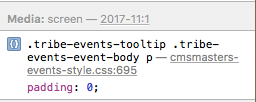
You may want to explore if the conflict lies with this plugin, by disabling it (if possible).
- I see another error related to MailPoet, although I’m not quite sure that it is affecting this particular issue.
- You may want to explore and play around with the settings that you have under Event Settings>Display>Basic Template Settings. What Default Stylesheet and Events Template do you currently have selected? You may want to see if changing what you have selected changes what you see on the front end. Here is more information on our stylesheets: https://theeventscalendar.com/knowledgebase/stylesheets-and-page-templates/
Let me know how it goes and if you have any other questions along the way! We appreciate your patience throughout this process.
Thanks,
Jaime
October 16, 2017 at 8:12 am #1364162ParticipantHi
I have disabled all cms masters plugins – this made no change at all, these are still disabled
I have disabled mailpoet – this also made no difference, this is still disabled
I have tried all options for the layout as you suggest – this has made no difference.
Please advise whats next to try?
Thank you
October 17, 2017 at 1:06 am #1364448ParticipantAnything?
October 17, 2017 at 5:29 am #1364549KeymasterHi,
I apologize for the delay, we usually respond to threads once a day, which is why I am getting back to you now.
One suggestion that I have is for you to hide this notice using CSS. You can do something like this:
.tribe-events-tooltip .tribe-events-event-body p {

display:none;

}
The only issue with doing this is that it will remove the description that you have under your event. You can add this in under Excerpt in your Edit Event page.
Let me know if this solution helps!
Thanks,
Jaime
October 17, 2017 at 6:51 am #1364585ParticipantHi
I have uploaded your css code
It removes all from being displayed, but in addition, as you said it would it deletes the descriptions from the roll over text.
Adding the description into the Excerpt box does not display it as rollover text.
I would appreciate being able to display the rollover text, as my events(courses) have the same title but are different classes (class numbers). So without roll over text it is hard to see what is what, unless you click and open every event..
Thanks for trying, but we are not there yet.
October 17, 2017 at 8:07 am #1364630ParticipantOk, I have a work around.
I removed the css code that you suggested as that removed all the rollover text, which on our site was not good due to the number of same name events (courses).
This left the issue of the code being displayed in the roll over text.
However, by pasting the text required to be displayed (rollover text) in the excerpt field, this removes the displaying of the coding, but allows the rollover text to display.
Nov 11th is text editor built page, 18th nov is page builder built page, and now both display the same.
It is not perfect as it means duplicating text in the excerpts box as well as the main on page text, more work when creating events (courses), but it is working.
Thank you for trying.
Support is in effect part of development of a plugin, its not the pain in a developers life, its part of the development solution.
October 18, 2017 at 4:48 am #1365265KeymasterGreat, I’m glad you were able to find a workable solution for your site. I appreciate your patience and understanding throughout the support process.
You are welcome back in our support forums any time!
For now, I am going to close this thread.
Have a great week!
-
AuthorPosts
- The topic ‘Rollover text showing code from siteorigin page builder’ is closed to new replies.