

Forum Replies Created
-
AuthorPosts
-
December 8, 2016 at 2:34 pm in reply to: iCal import feature is importing all the same events again over and over #1203543
Hunter
ModeratorHey Preston,
Thank you for the update and the valuable feedback. I have noted it and we will take it into consideration for an upcoming maintenance release. Another route would be to use a plugin such as Bulk Delete to clean up the deleted events.
With the amount of deleted events you have, the snippet I provided would take quite some time to clean up them from your database. If you did choose to go that route, you can get a revised Twenty Seventeen functions.php file here. To use it, simply replace the code on your site’s Twenty Seventeen theme’s functions.php file with the code from the Pastebin link provided. Once you’ve saved your changes, 50 events will be deleted every time you visit/refresh a page on your site.
Let me know how things go and have a good afternoon. Cheers!
ModeratorWelcome back!
Thank you for the helpful response. It appears we have a logged bug about the inability to add organizers. It’s making progress and should be available in an upcoming maintenance release. I can’t give an exact date when that will be, but I can assure you it should be any day.
In response to the event website field when adding an event: does this behavior still occur with the default theme and only our plugins active? I’m not seeing the same layout issue on my test installation using the Twenty Seventeen theme. (see screenshot below)

I recommend editing the form using CSS or create a custom template as outlined in our Themer’s Guide. Have a great afternoon and thanks again. Cheers!
ModeratorHi Mel,
Thank you for the response. I understand your concern, but unfortunately it is a risk you run when using most services. To submit feature requests, please visit our UserVoice Feature Ideas. We are always incorporating the most upvoted ideas, so hopefully yours can be included in an upcoming release.
How can I filter events by category as shown in the 1st pic I attached! The pic show a dropdown when selecting the category. And I would like one of the dropdown options to say “view all categories”.
Unfortunately, this is not a feature included in our plugins, so there’s not much support I can provide. There isn’t a built-in page which displays a list of all categories, but this sounds like something tribe_get_events could help out with. Our Filter Bar plugin might also help in this instance.
Sorry again we can’t do more and if it comes down to it, we have a list of customizers that can help further assist. Good luck and have a great afternoon!
ModeratorHello,
Welcome to our premium plugin forums and thank you for your purchase! I would be happy to help answer your questions.
1. The Event Aggregator is not importing my facebook event photos. It is forcing me to manually set the event photo myself (as shown with the Gingerbread party). This is extremely counter-productive.
We have a bug logged resembling what you’ve described. It is marked as “Priority 1” and a fix will be included in the next maintenance release which is set to be released any day. Please stay tuned to our Release Notes and the plugin changelogs for more info.
2. In addition, the icon next to the event venue is covering the text. Please see screenshot.
Unfortunately, we aren’t able to assist with theme conflicts. For more information on what we’re able to help out with, please review our What support is provided for license holders? Knowledgebase article. I would start by using my browser’s Inspect tool as explained in this Using the ‘Inspect’ tool to make changes with CSS YouTube video.
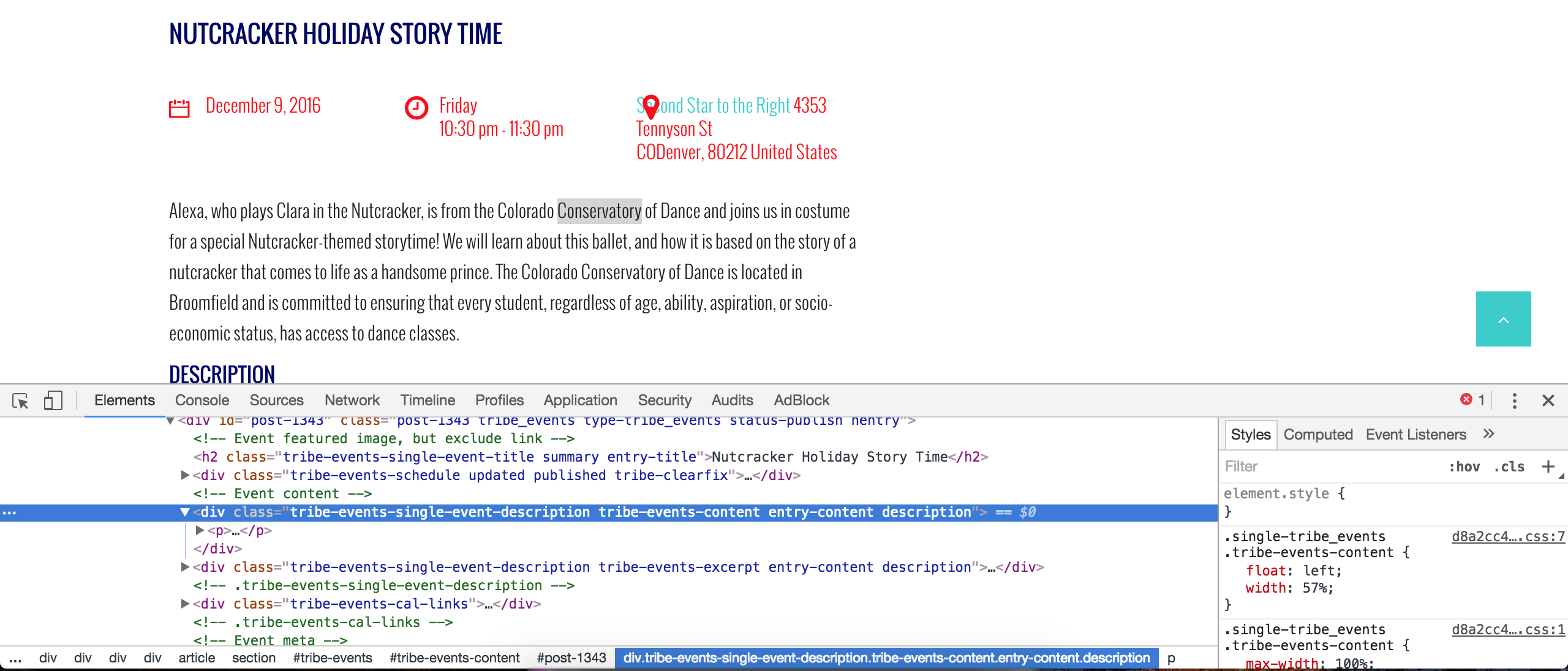
3. It is also displaying the description twice on the detailed view.
It appears your event content is being called twice (see screenshot below). This is another scenario where I can’t do much, but I would start by reviewing our Themer’s Guide to learn how to create and save customizations properly. I’d look to see if you have a file with the following structure as it’s the code most likely responsible for the duplicate content: /your-theme/tribe-events/single-event.php.
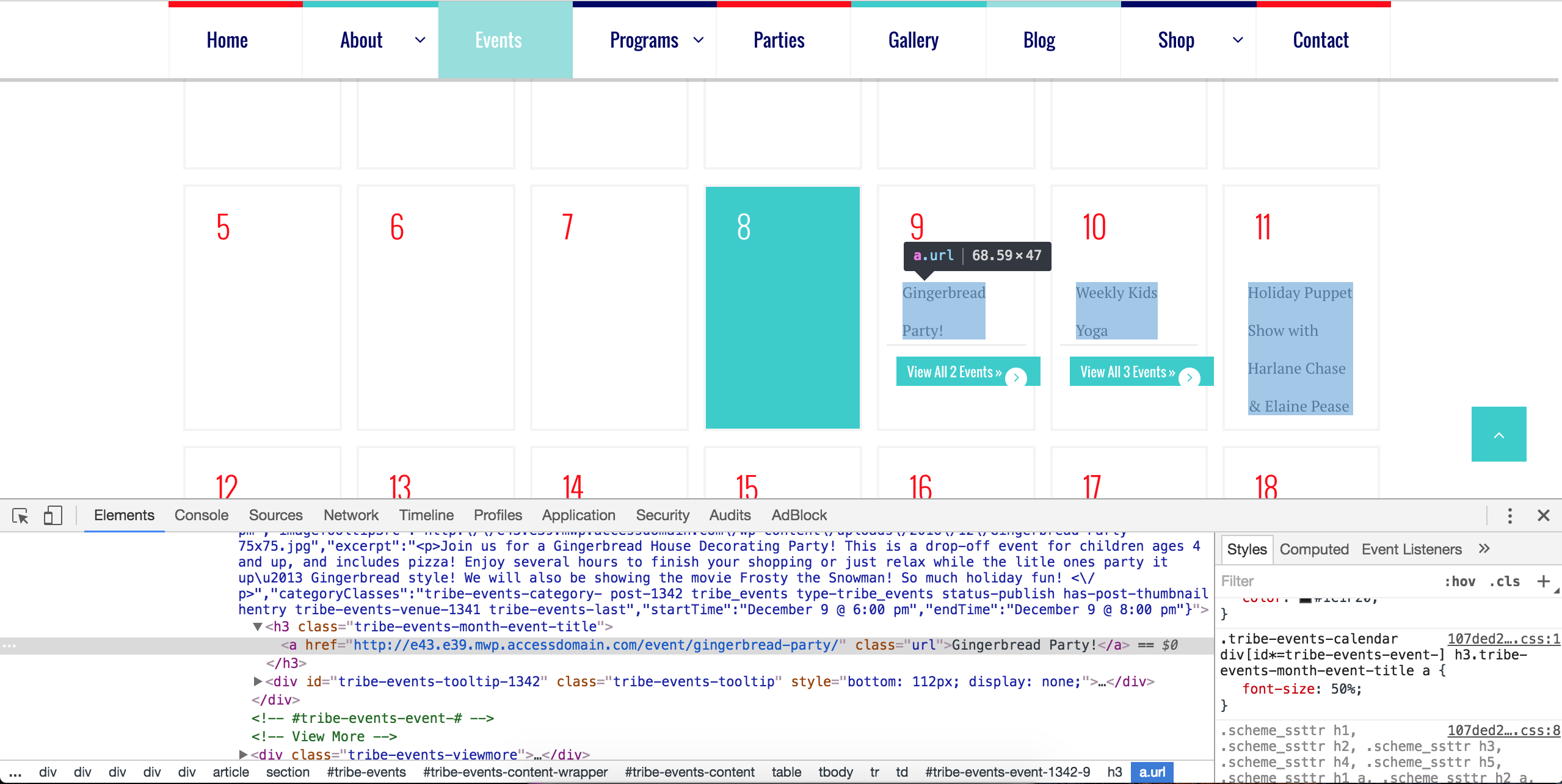
Also, on the month view, the text is coming through wayyyyy too large. How do I adjust the font size?
I used my browser’s Inspect tool and I believe the following CSS code should reduce the size of the text. Adjust the 50% to whatever you’d like. Try adding it to your theme’s style.css file or if they’ve built in a CSS tab in your theme options, add it there. More info on styles can be found here, here, and here.
.tribe-events-calendar div[id*=tribe-events-event-] h3.tribe-events-month-event-title a {

    font-size: 50%;

}
I hope this helps and best of luck with the customizations. Cheers!
ModeratorHello,
I am able to successfully import events from a test Facebook Group I’ve set up for these instances. I also tested the https://www.facebook.com/groups/AYYEvents/ link but was given an error. (see below)
Events cannot be imported because Facebook has returned an error. This could mean that the event ID does not exist, the event or source is marked as Private, or the event or source has been otherwise restricted by Facebook. You can read more about Facebook restrictions in our knowledgebase.
Are your events age restricted or do you see any other reason this issue could be occurring after reviewing the article I linked to above? Let me know what you learn and please include your System Information as a private reply. Cheers!
ModeratorHello,
Thank you for your patience while we worked our way to your thread. Before we proceed, can you please confirm you’ve temporarily reverted back to the default WP theme and deactivated all plugins other than our simultaneously? We need to eliminate the possibility of both theme and plugin conflicts before we proceed.
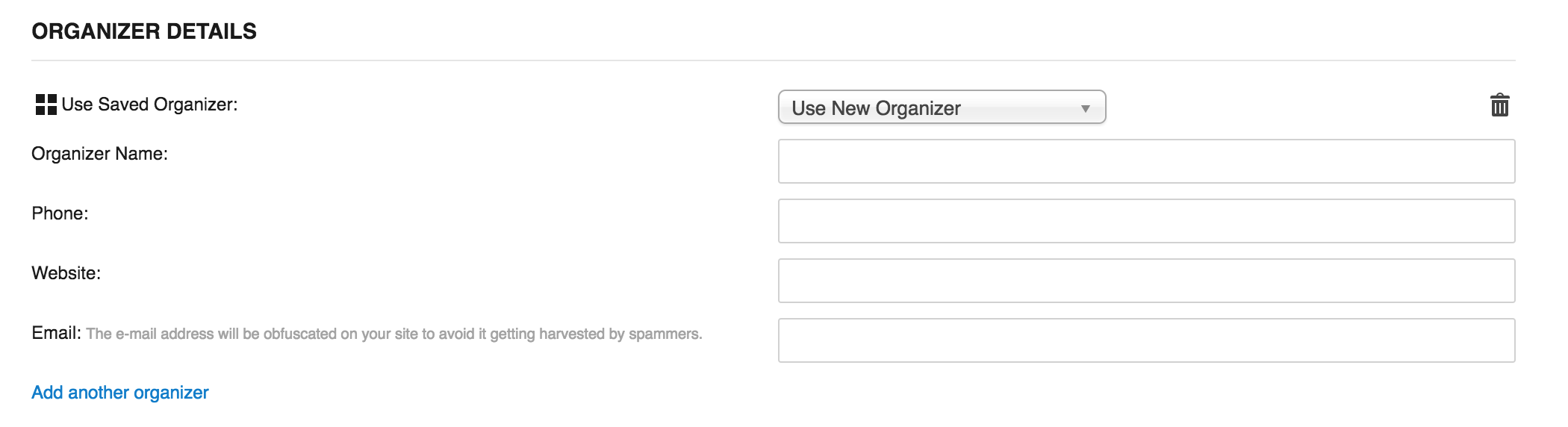
I’ll also need you to send over your System Information as a private reply. I’m not seeing any logged bugs of users reporting similar behaviors and I did not experience anything unusual on my test site. (see screenshot below)
Thanks again and have a good evening. Cheers!
ModeratorHi Mel,
Welcome back to our premium plugin support forums. The author of The Events Calendar Category Colors is not associated with our plugins, so we are unfortunately unable to provide support for these types of requests. For what is covered on our support forums, please review our What support is provided for license holders? Knowledgebase article.
I recommend reviewing the plugin’s support forums and if you still need assistance, try creating a support topic there.
Sorry again we can’t do more and best of luck with the customizations. Cheers!
ModeratorAndrew,
Thank you for the update and I’m happy to hear things are working properly. Please feel free to create a new thread if you have any new questions or concerns. Have a pleasant rest of your week. Cheers 🙂
ModeratorHey John,
Sorry to hear you’re still having troubles. When viewing the Related Events section on my test website, they display the start/end date/times, not the published date/time like you’re experiencing. (see screenshot below)
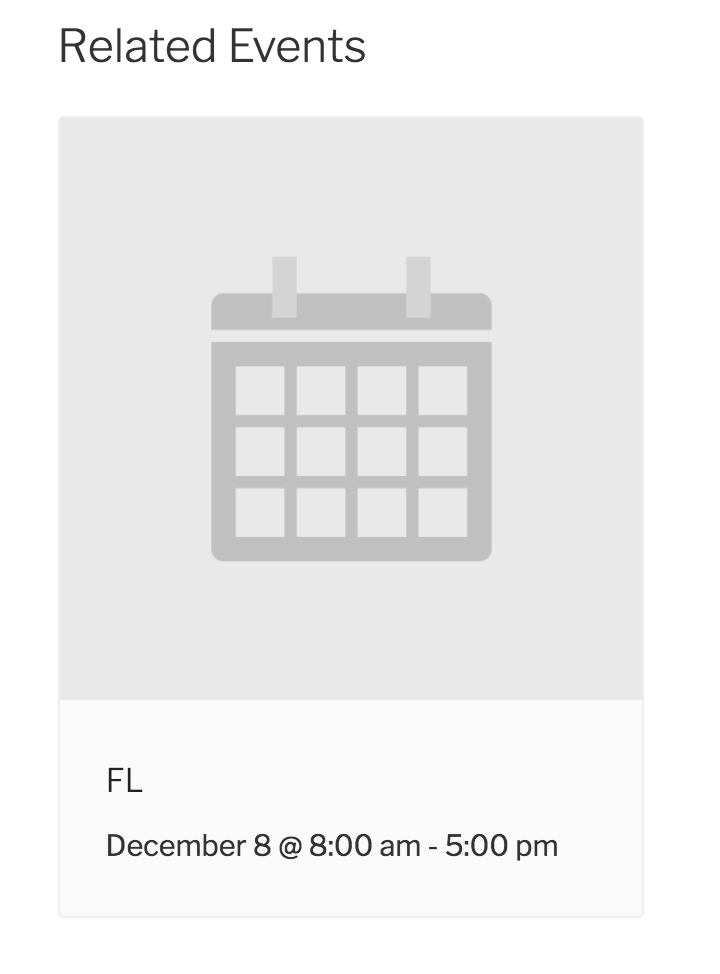
This leads me to believe there is a potential theme and/or plugin conflict which can be confirmed by reviewing the Testing for conflicts guide in it’s entirety (deactivating both your custom theme and all plugins other than ours.)
We are unable to provide support in these instances. More information on what is covered can be found on our What support is provided for license holders? KB article. If you do confirm the conflict is coming from your theme, I recommend searching their support forums (if available) and contacting the theme author to see if they have any advice.
If you’re having issues updating to the latest versions, please create a separate thread and we would be happy to help. Sorry again we can’t do more and have a pleasant rest of your day 🙂
December 7, 2016 at 12:02 pm in reply to: Events page switching between photo and day view issues #1202839ModeratorHello,
Thank you for the update. The behavior you’ve described isn’t necessarily a bug. After some discussion with other team members, we’ve concluded that when you navigate from one view to another, then back to the original view, you’re not actually being taken to the main events page (which has the ‘Upcoming Events’ title). Instead, you are taken to a view which includes a date range in the URL, thus the page title text changes to display a date range of events seen on the current view.
I unfortunately do not have a workaround for you at this time, but if it’s something you’d like altered/adjusted, the best routes to do so would be to a) visit our UserVoice Feature Ideas and submit it as a feature request and/or b) make the customizations yourself or hire a developer to further assist. We have a list of customizers that can help out.
Sorry I don’t have a better answer for you at this time and please let me know if you have any more questions on the matter. Have a pleasant rest of your day. Cheers 🙂
December 7, 2016 at 11:56 am in reply to: Event Aggregator Hourly Update not running every hour #1202835ModeratorHello,
If there were any issues with the hourly scheduled import feature, they would occur regardless of the amount of events on the source calendar. I don’t have a concrete date when we’ll get fixes included in the next maintenance release, but it should be any day (or hour) now.
I recommend installing a plugin such as WP Crontrol so you can see what’s going on with the hourly import issue. If you would still like to proceed with the refund, please visit our Refunds page and we’d be happy to help get that processed.
Sorry again you’ve fallen victim to these bugs and have a pleasant afternoon.
December 6, 2016 at 10:38 pm in reply to: States Listed in Multiple Formats Based on Import But Not on Database #1202461ModeratorHello,
Thank you for your patience while I did more investigating on the matter. I found the array of the state codes and names can be found in /the-events-calendar/common/src/Tribe/View_Helpers.php. I believe this is where the two different ways of representing states comes from.
I logged another bug to address the issue of getting different results when selecting “FL” and “Florida” from the Filter Bar State/Province option. Please stay tuned to the plugin changelogs and our Release Notes for more information.
Please let me know if you have any additional questions on the matter and have a great rest of your day. Cheers!
ModeratorHi and welcome back,
I don’t believe what you’ve described possible at this time. In my experience, changing that setting at all after the site is live is probably not a good idea because it can apply retroactively. For example: say you have sold 50 tickets and decide to switch from including the fees in the price to tacking them on. The amount shown paid out to clients for those 50 will be different from the amount actually paid out.
Just some strange oddities here. And I don’t see a great way of working around those oddities to implement per event pricing. Sorry I don’t have a better answer for you and in these instances, I like to recommend submitting your request to our UserVoice Feature Ideas page. Best of luck and have a great rest of the day!
ModeratorHi Antonio,
Welcome to our premium plugin support forums and thank you for your purchase! I would be happy to answer your questions.
we purchased event aggregator thinking that the schedule was also available about CSV files, this action is planned and is being developed?
This feature is already available! You can import events, venues, and organizers by using the CSV import function. Visit Events > Import and select CSV Import from the dropdown. (see screenshot below)
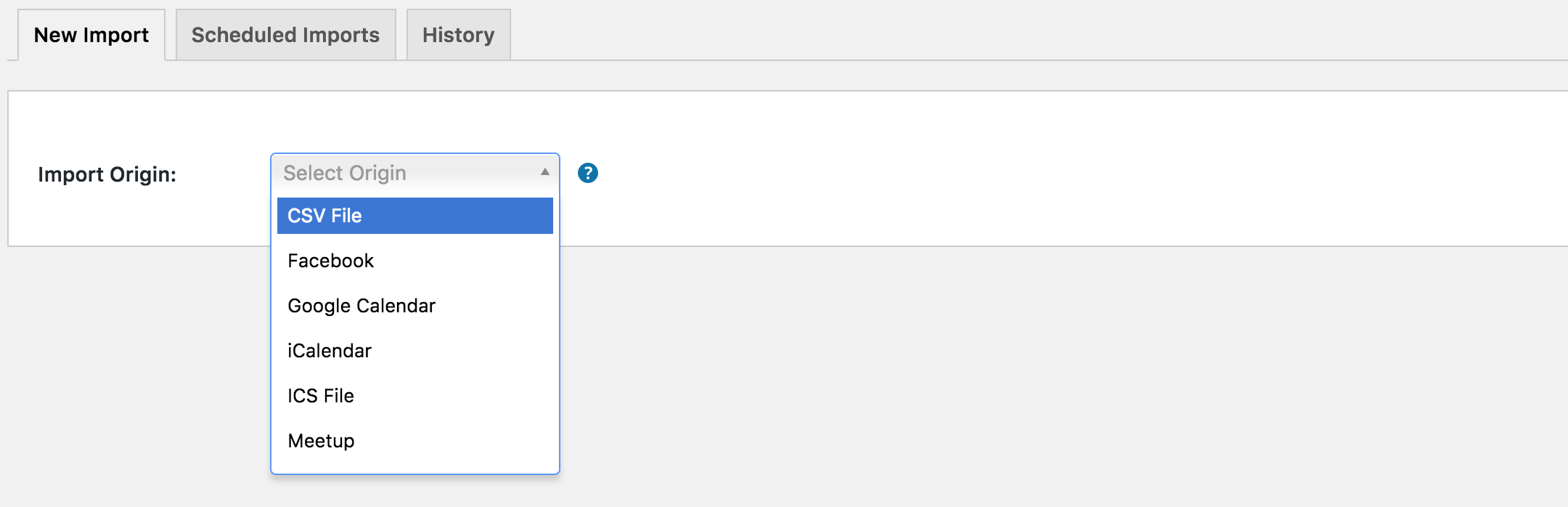
More information and examples, including mock CSV files can be found here. Instructions on how to use the CSV importer can be found here. Please let me know if this helps answer your question.
In addition, the events previously imported and modified or deleted later by the external source to be definitively removed from the calendar with a new import?
At this time, after the event from the source calendar has been deleted, it will still remain on your WordPress website after a new import has been completed. If you’d like to request additional features and functionality for any of our products, we invite you to submit your request to our UserVoice Feature Ideas page.
Please let me know if this helps clear up any confusion and have a great rest of your day. Cheers!
ModeratorHey Colin,
Welcome back! Unfortunately, there is no way to do what you’ve described at this time. I would recommend checking out the premium version of Bulk Delete. I believe they have an addon to delete content on a scheduled basis. Another idea is to visit our UserVoice Feature Ideas and submit your request there.
Good luck with the project and let me know if you have any more questions or comments. Cheers!
-
AuthorPosts