

Forum Replies Created
-
AuthorPosts
-
Hunter
ModeratorHi Michael,
Welcome back and thank you for posting to our premium plugin support forums! At this time, I can’t think of a way off the top of my head which would allow you to alter the event title during the import process. I wish I had a better answer for you at this time and if it’s a feature you’d like to see in an upcoming feature release, please visit our list of customizers and submit your request there.
Images are not included in .ics imports at this time, but we have a feature report logged aimed to address this shortcoming. I don’t have a concreted date if/when this feature will come to fruition, but please stay tuned to our Release Notes and the plugin changelogs for more info.
Please let me know if this helps answer your questions and have a great rest of your day. Cheers!
ModeratorThank you for letting me know you have identified the source of conflict and please feel free to create a new thread if you have any additional questions or concerns. Have a great rest of your week and thanks for choosing PRO. Cheers!
ModeratorExcellent! Glad to hear we could help out and have a great rest of your week. Cheers!
ModeratorWelcome back,
If you visit our demo site, you can see what is included in the Tribe Events Bar and the Filter Bar in action.
I am not 100% certain where the dropdown is coming from, but I know it’s not a built-in feature of any of our plugins. I hope this helps clear up any confusion and have a great rest of your day. Cheers!
ModeratorHey Neil,
We try and keep threads to the original user who posted the request for support. If you don’t mind, please create a new thread in regards to your issue and we’d be happy to help provide assistance. Thanks for understanding and I’ll keep my eye on the incoming queue. Cheers!
ModeratorHey Bryan,
Welcome back! I believe you’re missing the code which calls the venue title. (shared below)
<dd class="tribe-venue"> <?php echo tribe_get_venue() ?> </dd>This is located in /the-events-calendar/src/views/modules/meta/venue.php and you’ll need to save as [your-theme]/tribe-events/modules/meta/venue.php to avoid losing changes. I hope this helps get you started in the right direction and have a great evening. Cheers!
ModeratorHey Steve,
Thank you for posting to our premium plugin forums and sorry to hear you’re having troubles. Before we proceed, can you please confirm you reviewed our Testing for conflicts guide? If not, I’ll need you to do so and reply back with what you find out. Please include your System Information as a private reply.
I am not able to reproduce the behavior on my test and we don’t have any logged bugs resembling your issue, so once I hear back we’ll have a better idea on how to proceed. Thanks again and have a good evening!
ModeratorHi Simon,
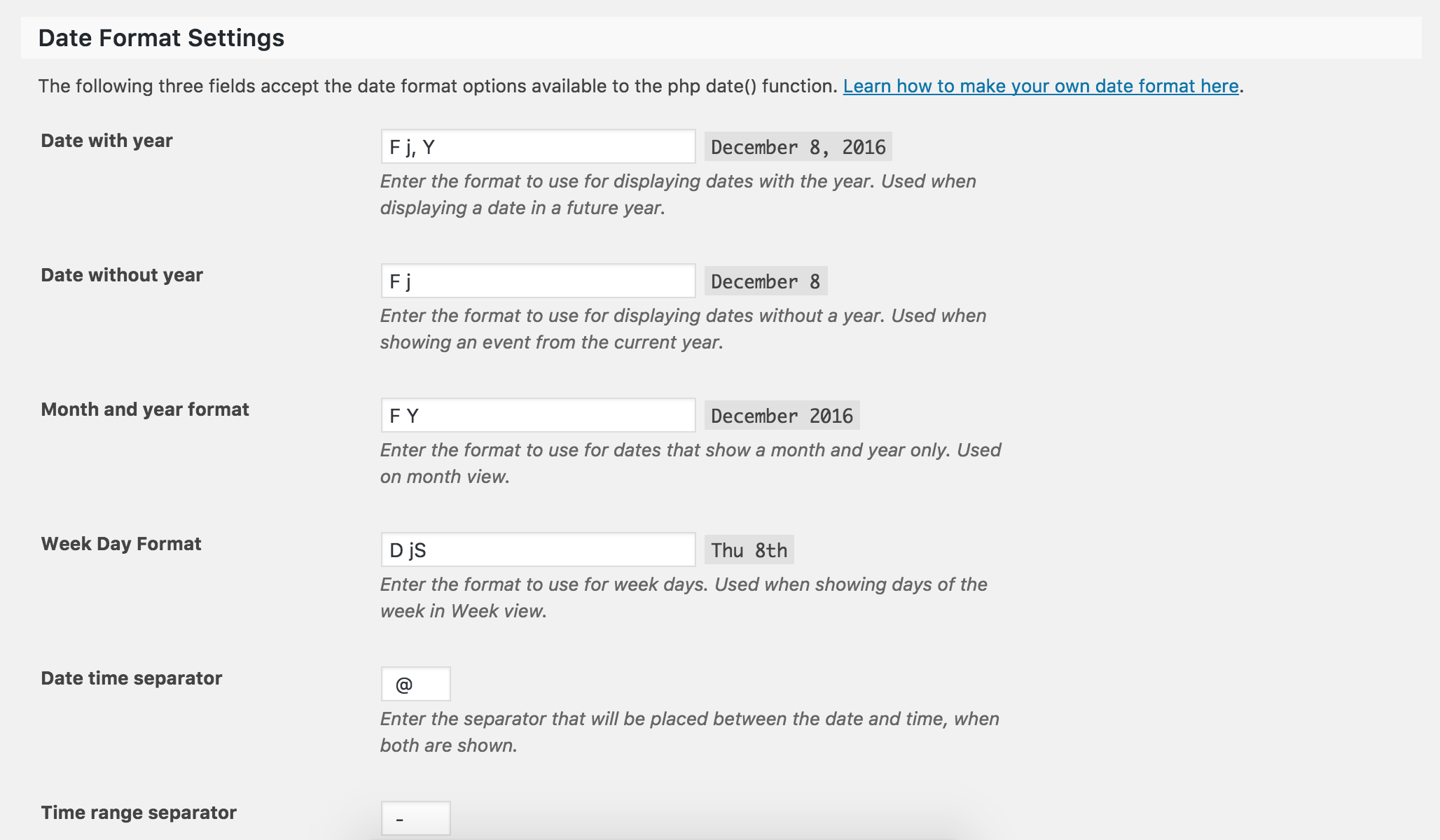
Welcome to our premium plugin forums and thank you for the kind words! We have included a Date Format Settings section under Events > Settings > Display where you can adjust how the plugin displays start/end dates/times (see screenshot below). Please let me know if this helps and have a great evening. Cheers!
 Moderator
Hi and welcome 🙂
Before we proceed, I’ll need you to temporarily revert back to the default WP theme and deactivate all plugins other than ours. Please review our Testing for conflicts guide. This will rule out the potential for both theme and plugin conflicts and give us a better idea on how to proceed.
Thanks and have a great evening. Cheers!
ModeratorHello,
There is no setting in the Events dashboard relating to site admin/organizer notifications when a guest RSVPs, but you could use the snippet below (add to theme’s functions.php file) to help send emails to the admin. If you are not receiving emails, please install a plugin such as Easy WP SMTP which helps ensure emails get delivered.
/**

  * BCC site admin email on all Event Tickets' RSVP ticket emails so they get a copy of it too

  *

  * From https://gist.github.com/cliffordp/4f06f95dbff364242cf54a3b5271b182

  *

  * Reference: https://developer.wordpress.org/reference/functions/wp_mail/#using-headers-to-set-from-cc-and-bcc-parameters

  *

  */

function cliff_et_rsvp_bcc_admin_ticket() {

	// get site admin's email

	$bcc = sanitize_email( get_option( 'admin_email' ) );
// set Headers to Event Tickets' default
$headers = array( 'Content-type: text/html' );// add BCC email if it's a valid email address
if ( is_email( $bcc ) ) {
$headers[] = sprintf( 'Bcc: %s', $bcc );
}return $headers;
}
add_filter( 'tribe_rsvp_email_headers', 'cliff_et_rsvp_bcc_admin_ticket' );If this is a feature you’d like seen in an upcoming release, please visit our UserVoice Feature Ideas and submit your request there. I hope this helps and have a great evening. Cheers!
December 8, 2016 at 3:07 pm in reply to: Changed License from test domain to actual site – Now not functioning #1203569ModeratorHey Kevin,
Sorry to hear you’re experiencing such frustration and rest assured I’m here to help save your hair! It sounds like you could be dealing with a caching issue. Have you reviewed our Testing for conflicts guide? If not, please do so and let me know what you learn. I’ll also need you to include your System Information as a private reply.
I’ll go ahead and leave this Knowledgebase articles relating to updating license keys, though I have a feeling you’re well aware of them:
Please let me know how things go and have a great evening. Cheers!
ModeratorHi Katy,
There is not a place in the Events settings where you can edit the main event’s SEO description. Have you tried a plugin such as Yoast SEO? You can edit essentially any SEO-related meta much more extensively with a reputable SEO plugin.
I hope this helps and let me know how things go. Cheers!
ModeratorHi Sbastien 🙂
Before we proceed, I’ll need you to please review our Testing for conflicts guide and reply back with your findings.
Once we know if a theme or plugin conflict is in play, we can proceed investigating. Thank you for posting to our premium plugin forums and have a great rest of your day. Cheers!
ModeratorExcellent! Glad to hear you’re on the right track and please feel free to open a new thread if you have any more questions or concerns. Have a great upcoming weekend!
ModeratorHey Wayne,
My apologies for the delayed response! I didn’t see any notification you had replied. At this time, I think the best route would be to review our list of customizers to see if anyone can help at your available budget.
I know this isn’t ideal, but we’ve outlined how the plugin needs to be set up in our New User Primer and the other existing topics in our Knowledgebase.
I really wish I could dedicate more time to helping you resolve the conflict, but with no known conflicts impeding your progress, you’ll have to take the reigns from here. Thank you for understanding and best of luck. Cheers!
-
AuthorPosts