

Forum Replies Created
-
AuthorPosts
-
December 11, 2016 at 11:15 am in reply to: Event Listing Disappearing From Calendar on Day of Event #1204549
Hunter
ModeratorExcellent! I’ll close this thread out. Please create a new one if you have any more questions or concerns. Cheers!
ModeratorGlad I could help out! Have a great week ahead and feel free to open a new thread if you have any more questions. Cheers!
ModeratorHey Peter and Lance 🙂
@Peter, I have seen similar behaviors and noted my findings in the logged bug report. Thank you for sharing your experience!Lance, I too noticed the update issue is still going on. The developers are aware and hopefully a fix gets release shortly! Thanks again to the both of you and have a great weekend. Cheers!
December 11, 2016 at 11:05 am in reply to: Menu Bar Goes Away when Submitting in Filter Bar #1204540ModeratorHey Steve,
Thank you for the update. As previously mentioned, I’ll need you to confirm you reviewed the Testing for conflicts guide. If you have not, please do so and let me know what you learn.
Thanks again and have a great rest of the weekend!
ModeratorHello,
Thank you for the update. I see you’re still running the Facebook Events plugin. If you’re not already aware, we are in the process of retiring that plugin. The ability to import events from Facebook has been included in our newest plugin, Event Aggregator.
You have been granted a license for Event Aggregator and it will expire on the same date as your Facebook Events license. We recommend moving to Event Aggregator sooner rather than later. Info on how to make the switch can be found here.
I’ll also need you to confirm you’ve reviewed our Testing for conflicts guide to see if you can reproduce the issue using the default WP theme and only our plugins active. Please let me know what you learn and we’ll continue troubleshooting.
Thanks and have a great rest of the weekend. Cheers!
ModeratorHey Rich,
Thank you for your input. If you’re not already aware of our UserVoice Feature Ideas, I encourage you to check it out and submit upvote any feature request ideas you have.
Thanks again and have a great week ahead. Cheers!
December 11, 2016 at 10:55 am in reply to: Just updated all my plugins and all the events entered disappeared #1204534ModeratorHey Karen,
Thank you for the update and I’m glad to hear things are working properly. Have a great week ahead and feel free to create a new thread should anything else come up. Thanks again and take care!
ModeratorHi Sheri,
Sorry to see you here under the circumstances. We are only able to offer a 30-day money back guarantee, but you’re more than welcome to visit our Refunds page to see if there is any way we could work around it.
I know both PayPal and Stripe have limits on how far out refunds can be processed, so again, feel free to complete the form on our Refunds page and we’ll do the best we can to help out. I hope this helps clarify the matter and let me know if you have any additional questions. Have a great rest of your week and thanks for choosing PRO. Cheers!
ModeratorHey Mark,
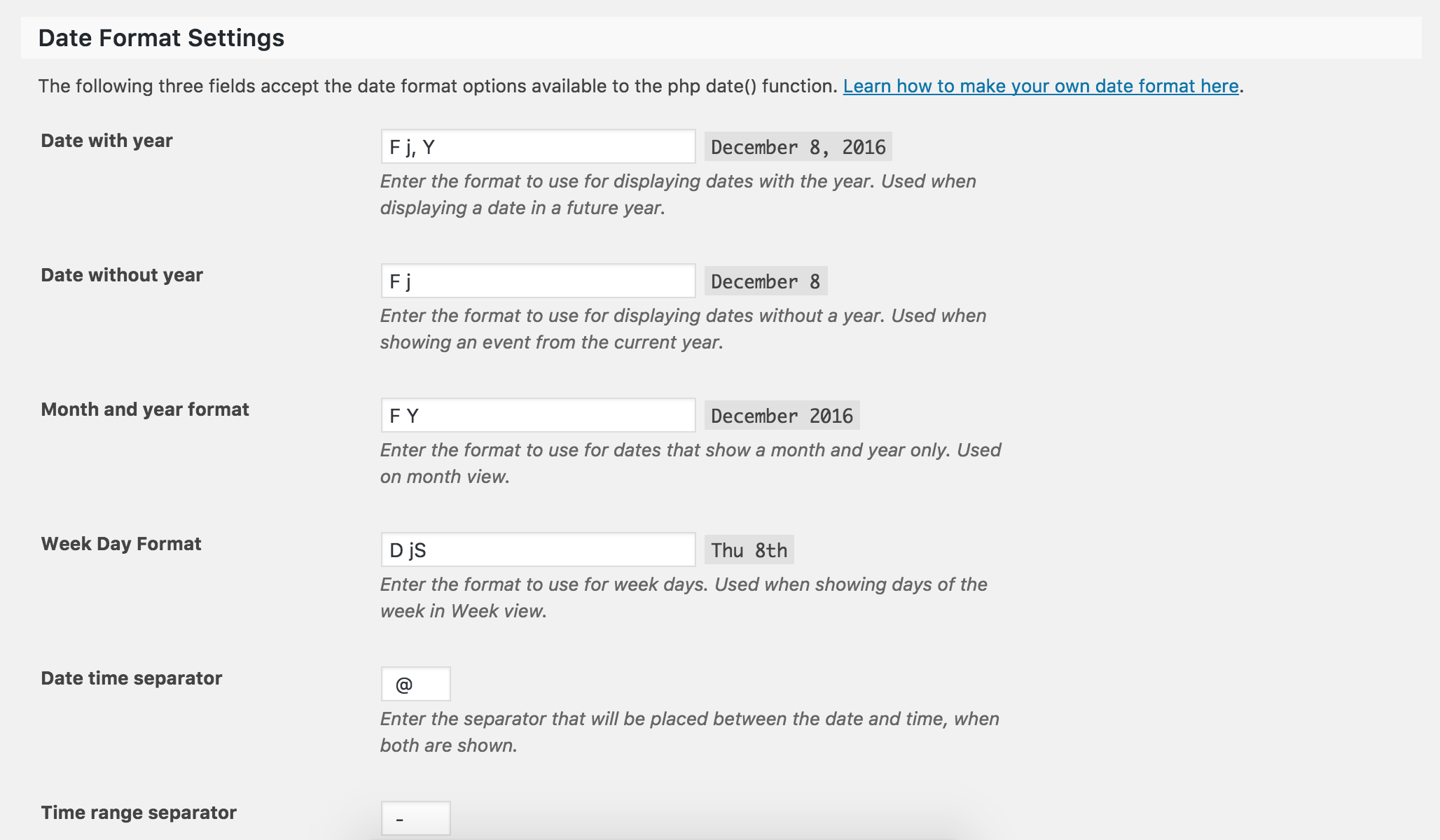
If you visit Events > Settings > Display and look for the Date Format Settings section, you should be able to adjust the options so the year is also displayed (see screenshot below). Please let me know if you have any more questions or get caught up along the way and I’d be happy to help further assist. Have a great rest of your day and thanks for choosing PRO. Cheers!
 Moderator
Hi Emma,
Unfortunately, we aren’t able to provide support in our Pre-Sales Questions channel, but we’d be happy to help out in the appropriate forum. I can tell you real quick though that we have included shortcodes which allow for displaying events anywhere on your site, including your home page! Lastly, you will be able to set your main events page as your home page in an upcoming release set to be available any day now. Please let me know if this helps and have a great rest of your day. Cheers!
ModeratorHi and welcome 🙂
I’m not seeing any logged bugs of users reporting similar behaviors and my test website running the default WP theme and only our plugins seems to be performing as expected. I’ll provide documentation on the matter below and please let me know if you have any additional questions.
- https://theeventscalendar.com/knowledgebase/caching-basics/
- https://theeventscalendar.com/knowledgebase/caching-month-view-transients/
- https://theeventscalendar.com/knowledgebase/caching-basics/
- https://theeventscalendar.com/the-events-calendar-performance-considerations/
- https://theeventscalendar.com/favorite-developer-plugins/
- https://theeventscalendar.com/knowledgebase/problems-with-minification/
I also recommend looking into a hosting company such as Digitalocean if you’re on a shared hosting provider. It will always be an uphill battle in regards to performance when running your site through a shared hosting provider. I also recommend you install a caching plugin such as WP Rocket.
I hope this helps answer your question and gets you started in the right direction. Please let me know if you have any additional concerns and have a great rest of your day. Cheers!
ModeratorHey Dirk,
Thank you for purchase and welcome to our premium plugin support forums! Before we continue investigating, can you please review our Testing for conflicts guide and reply back with what you learn?
Thanks again and have a wonderful afternoon. Cheers!
December 9, 2016 at 9:20 am in reply to: Just updated all my plugins and all the events entered disappeared #1204009ModeratorHi Karen,
Thank you for posting to our premium plugin support forums and sorry to hear you’re having troubles. Before we proceed, can you please review our Testing for conflicts guide and reply back with your findings? Please include your System Information as a private reply.
Once we eliminate the potential of a theme and/or plugin conflict we can continue investigating. Thanks again and have a good afternoon. Cheers!
ModeratorHi David,
We are currently in the process of releasing a “Featured Events” functionality, but I don’t have a concrete date when that will be. Please keep an eye on our Release Notes and the plugin changelogs for more info.
I hope this helps answer your question and have a great rest of your day. Cheers!
ModeratorHey Cody,
Can you send over your System Information as a private reply? Also, did you review our Testing for conflicts guide to see if you can replicate the issue using the default WP theme and only our plugins?
Please let me know what you find out and have a great rest of your afternoon. Cheers!
-
AuthorPosts