

Forum Replies Created
-
AuthorPosts
-
Hunter
ModeratorHi Corey 🙂
You are unfortunately the victim of a known bug, so I’ve added this forum thread to the report which helps expedite the process of getting a fix included in an upcoming release. I don’t have a precise date when it will be available, but please stay tuned to our Release Notes and the plugin changelogs for more information. Thanks again and let me know if you’ve got any additional questions or comments. Cheers!
ModeratorWelcome back 🙂
Does visiting WooCommerce > Products > Display and unchecking the ‘Redirect to the cart page after successful addition‘ option accomplish the behavior you’re going for?

Please let me know. If it does not, please review our Testing for conflicts guide and include what you find out in your response. Thanks and have a great evening!
ModeratorHey Ivan,
We unfortunately have a bug logged resembling what you’ve described, so I linked this forum thread to the ticket which helps expedite the process of getting a fix included in an upcoming release. I don’t have a precise date when it will be available nor a temporary workaround, but please stay tuned to our Release Notes and the plugin changelogs for more information. Thanks again and let me know if you’ve got any additional questions or comments. Cheers!
January 17, 2017 at 5:27 pm in reply to: My main navigation menu Never Finish loading the Page after Activate the plugin! #1219996ModeratorHi Luis,
Thank you for your purchase and sorry to see you’re having issues. As much as I’d love to troubleshoot this conflict with you, we’re simply unable to provide support for conflicts with custom themes and plugins by other authors. For what we are able to cover, please review our What support is provided for license holders? Knowledgebase article.
I’d start by making sure WP_DEBUG and WP_DEBUG_LOG are enabled on your site’s wp-config.php file. Any errors will display at the top of your page as you try to reproduce the conflict. Another tip is to right-click your mouse and open the ‘Inspect’ tool to see if any errors display in the browser console. If any errors do display in either location, feel free to share them with me and I’d be happy to further investigate.
Sorry again I can’t do more in this instance and if things get out of hand, we have a list of customizers that can help further assist.
Thanks for understanding and best of luck resolving the conflict. Cheers!
ModeratorHey Marc,
Thank you for your purchase and welcome to our premium plugin support forums! Sorry to see you here under the circumstances. I compared our logged bug reports to what you shared with me and can confirm we’re aware of the first error, but wasn’t able to locate anything on the second error.
With that said, I’ve linked this forum thread to the ticket which helps expedite the process of getting a fix included in an upcoming release. I don’t have a precise date when it will be available nor a workaround besides reverting to a previous version, but please stay tuned to our Release Notes and the plugin changelogs for more information. Thanks again and let me know if you’ve got any additional questions or comments. Cheers!
ModeratorHello 🙂
Sorry to see you’re experiencing issues with the comments section. I actually logged a bug on the matter, so our devs are aware and working on fixing the faulty code. I’ve gone ahead and added this forum thread to the ticket which helps expedite the process of getting a fix included in an upcoming release. I don’t have a precise date when it will be available, but please stay tuned to our Release Notes and the plugin changelogs for more information.
To revert back, you can visit your Downloads page and select the version you want from the dropdown and download the plugin. Next, deactivate Community Events and delete it from your site. From there, upload the plugin to your site. For more details, you can read over our Manual Updates Knowledgebase article. You’ll technically be backdating rather than updating, but it’s the exact same process. Thanks again and let me know if you’ve got any additional questions or comments. Cheers!
ModeratorHi and welcome 🙂
Sorry to see you’re having troubles with the Customizer. Before we proceed, can you please review our Testing for conflicts guide and reply back with your findings? Please include your System Information as a private reply.
Thank you and have a great evening.
Cheers!January 17, 2017 at 5:01 pm in reply to: Use short Code To Display Different Map/Calendar Information #1219979ModeratorHey Gary 🙂
I hope you’re having a great week so far. You can definitely achieve what you’ve described using shortcodes. I’ll provide all the relative documentation I have below. Please let me know how things work out and enjoy the rest of your day 🙂
ModeratorHello!
First off, thank you for your purchase and welcome to our premium plugin support forums! Before we continue, can you please review our Testing for conflicts guide and reply back with your findings? This is a required step to continue receiving support.
Thanks again and take care 🙂
ModeratorHello,
Welcome back 🙂
I see you checked ‘Yes’ to reverting back to the default WordPress theme and deactivating all plugins other than ours as instructed in the Testing for conflicts guide, but can you please confirm this?
The reason I ask is because I’m not able to reproduce the behavior on my test website. Please let me know and we’ll continue investigating. Thanks and have a wonderful evening!
January 17, 2017 at 1:30 pm in reply to: Event calendar category settings keep getting lost/reset #1219833ModeratorHi and welcome 🙂
Sorry to see you’re having troubles! Is there a possibility that the widget is somehow losing the event category each time the scheduled import runs? We did have a logged bug resembling what you’ve shared with me, but it was patched in recent release.
I understand this is not ideal, but it might be best you set up a fresh WordPress installation where you can fully troubleshoot the issue. Make sure you have only the default WordPress theme and The Events Calendar installed and activated on the test site. Please review our Using One License for Live and Dev Sites and Testing for conflicts guide for more information.
Please let me know what you find and if the issue is still occurring, I’ll attempt to reproduce the behavior. If I experience the same issues, I’ll gladly get a bug report written up. Thanks and have a wonderful rest of your day!
January 17, 2017 at 1:23 pm in reply to: Imports from Facebook dont import automatically and Load wrong images manually #1219826ModeratorHey, Joe!
Welcome back and sorry to see you’re having troubles. Is the EA scheduled import failing 100% of the time? We are aware of some issues with the scheduled imports having issues, but in order to confirm your issues are coming from this known bug, I’ll need you to review our Testing for conflicts guide and reply back with what you learn.
In response to the featured images; please review our Featured Images Knowledgebase article for more information on how to manage images so they don’t appear skewed or distorted. Let me know if this helps answer some of your questions as to why your images are appearing the way they are.
Please keep me posted and have a great rest of your day 🙂
January 16, 2017 at 4:01 pm in reply to: Confused about Event Templates and Page Templates – can't find setting to select #1219313ModeratorHi and welcome back 🙂
Sorry to hear you’re having troubles.
…I cannot find these selectors in my Display settings.
Do these options display when you revert back to the default WordPress theme and deactivate all plugins other than ours? Please review our Testing for conflicts guide and let me know what you learn. Please include your System Information as a private reply.
All of the other Events Template options will use one of your available theme page templates (page.php, full-width.php, etc.), which you can also edit.
What this essentially means is whatever files your theme author has included are also available to use for event templates. These files will be included in your theme’s folder rather than our plugin folders. For example, if you’re using the Avada theme, you would have the option to use the files they’ve included in their theme as the event template. If you look at their Page Templates, you’ll see which files they’ve included.
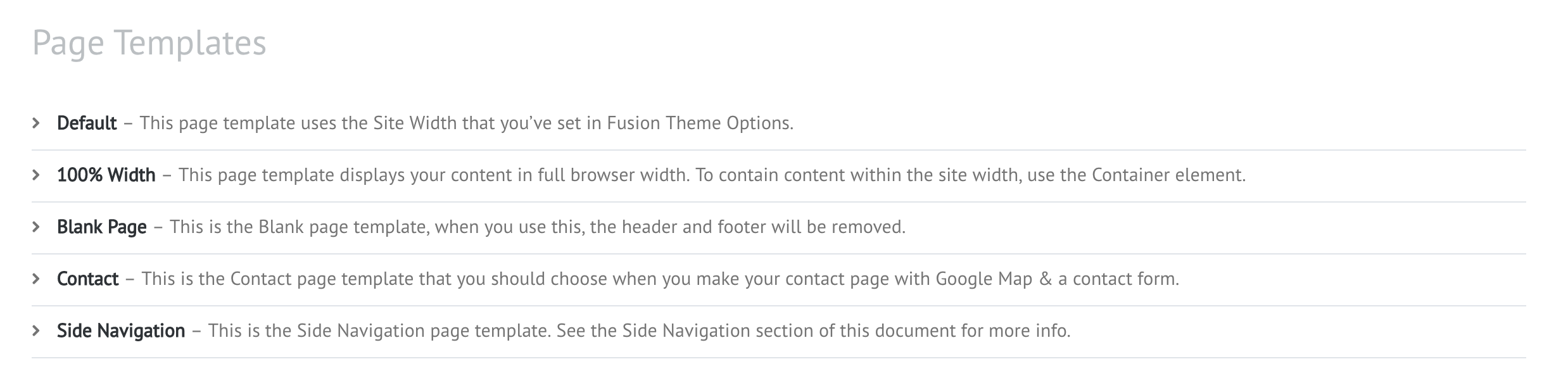
I recommend reviewing our Themer’s Guide. It is a great resource on explaining templates in greater detail.
Please let me know what you find out from your testing and if my explanation clears up any confusion you have. Once you are able to access the settings and further test, it should make more sense.
Thanks and have a great evening!
January 16, 2017 at 3:52 pm in reply to: Installing Events Calendar Pro caused .php Fatal Error #1219305ModeratorHey Andrew,
Sorry to see you’re having troubles. It might be best you temporarily revert to the default Twenty Seventeen theme and deactivate all plugins other than The Events Calendar. Reactivate TEC and try updating it, then attempt to activate and update PRO. Please review our Testing for conflicts guide for more information. There might be a theme and/or plugin conflict. If so, we need to identify that so we can look for a solution.
Let me know how things go and we’ll continue investigating. Thanks and have a great evening!
ModeratorHey Alan 🙂
Welcome to our premium plugin forums and sorry to see you’re having troubles. I’ll provide a few helpful resources below in regards to timezones.
- http://pastebin.com/vPEZaCAb – Converts imported events date/time to the site timezone when the imported event has no timezone defined. The snippets assumes those events are UTC. It will surely needs some love and refinement, but it works. Add to your theme’s functions.php file to implement.
- Working with timezones
Before I can test the issue myself, I’ll need you to please review our Testing for conflicts guide and reply back with your findings. Please include your System Information as a private reply.
Thanks for understanding and have a great rest of your day!
-
AuthorPosts