

Forum Replies Created
-
AuthorPosts
-
Hunter
ModeratorHey Alex,
Welcome back and sorry to see you’re experiencing troubles. I see you checked ‘Yes’ to reverting back to the default WordPress theme and deactivating all plugins other than ours as instructed in the Testing for conflicts guide, but can you please confirm this?
I went ahead and attempted to reproduce the missing attendee info, but as you can see in the screenshot below, the information is displaying for me:
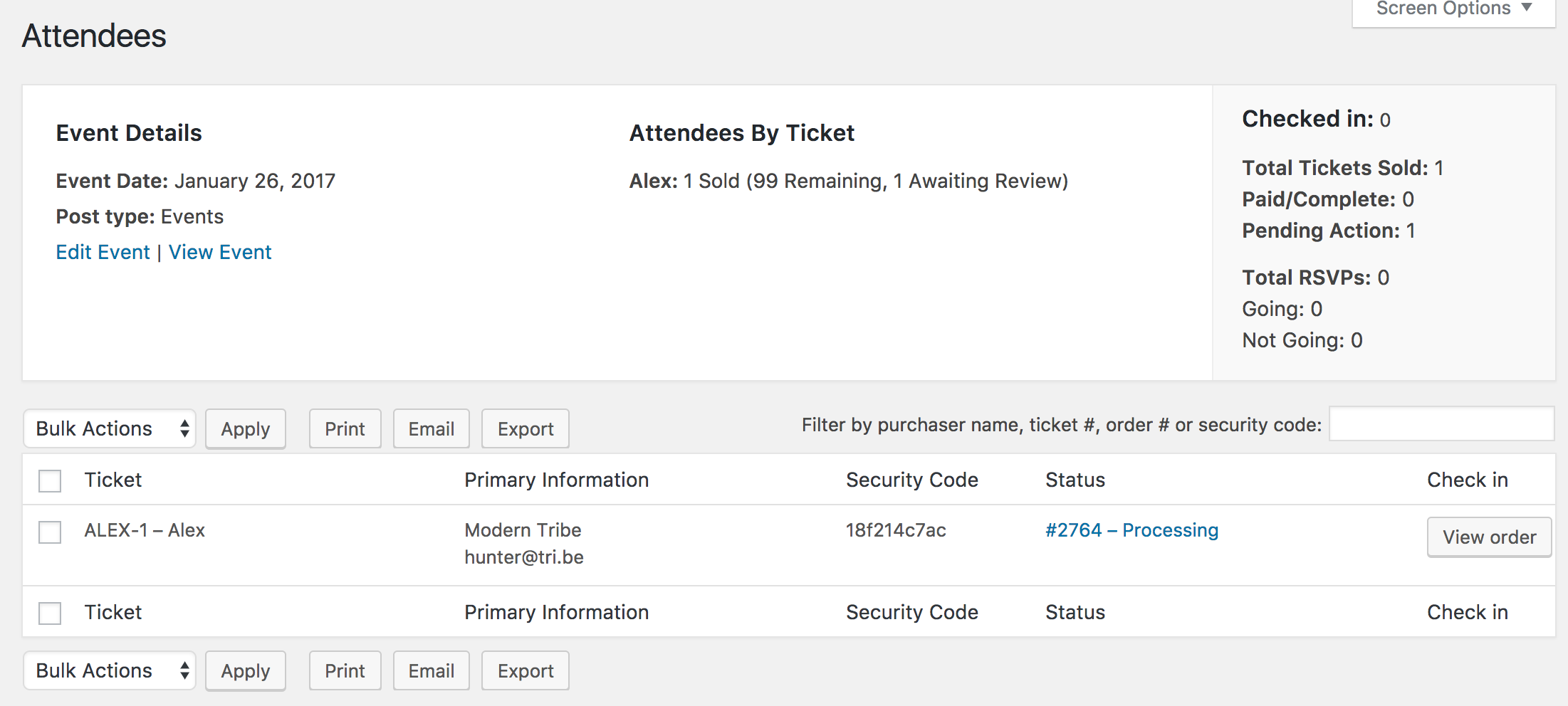
Can you send your System Information as a private reply? It would also be helpful if you could test once more, but this time please make sure WP_DEBUG and WP_DEBUG_LOG are enabled on your site’s wp-config.php file. Any errors will display at the top of your page as you try to reproduce the conflict. Note what you find and please include it in your reply.
Thanks and have a good rest of your day. Cheers!
ModeratorAwesome! I appreciate the update and glad to hear the issue has been resolved. Please open a new thread if you have any more questions. Cheers!
ModeratorMy pleasure! I’ll close this thread out but feel free to create a new one if you have any more questions or concerns. Enjoy the rest of your day!
January 25, 2017 at 12:12 pm in reply to: Would like to show, use filter bar on my custom pages with events #1223901ModeratorWelcome back,
My apologies for misunderstanding! I understand your request now 🙂
The ability to include the Filter Bar on pages using shortcodes is not possible at this time, but we have a feature report logged aimed at allowing the Filter Bar to be implemented using the shortcode, so I’ve added this thread to the report which helps increase attention on the matter.
I don’t have a precise date when that will be available, but please stay tuned to our Release Notes and the plugin changelogs for more information. Thanks again and let me know if you’ve got any additional questions or comments. Cheers!
January 25, 2017 at 12:02 pm in reply to: Google maps position/size change on single event view #1223896ModeratorThank you for letting me know you’ve got things figured out and also for sharing your solution for others to learn from. Feel free to create a new thread if you have any more questions or comments and have a pleasant evening. Cheers!
January 25, 2017 at 11:58 am in reply to: Imports from Facebook dont import automatically and Load wrong images manually #1223888ModeratorGlad to hear you’ve identified the source of conflict. Unfortunately, we’re not permitted to troubleshoot issues with themes and plugins by other authors as stated in our What support is provided for license holders? Knowledgebase article. I wish I could troubleshoot further with you, but you’ll have to manage the conflict resolution yourself.
If things get beyond your level of expertise, you might want to look into hiring someone to help get past the issue. We have a list of non-affiliated customizers available to further assist. Again, I apologize I can’t do more in this instance and best of luck.
Cheers!
January 25, 2017 at 11:50 am in reply to: Can't Submit Event Error: Start / End Time is required #1223878ModeratorCan you set WP_DEBUG and WP_DEBUG_LOG to true on your site’s wp-config.php file? Any errors will display at the top of your page as you try to reproduce the conflict. Note what you find and please include it in your reply. I’d also use the ‘Inspect’ tool by right-clicking your mouse to see if any errors display in the console.
There is most likely a conflict here, but we still don’t have anything logged, so hopefully by testing once more we’re able to get some more information. Please let me know if this is manageable at this time and if so, what the results are.
I’m going to bring this thread to the attention of my support team staff to see if they have any insight on the matter. Thanks and I’ll update you once I hear back. Cheers!
ModeratorHi Debra 🙂
Thank you for reaching out and sorry to see you’ve run into difficulties. We’re fairly limited with theme customizations, but I’ll provide all the resources I have and hopefully they’ll help get you on the right track.
- Stylesheets and Page Templates
- Settings Overview: The Events Calendar and Events Calendar PRO
- Themer’s Guide
- Customizing WordPress #1 – How To Create A Child Theme by LevelUpTuts
The first two articles describe what the settings do. The last two articles are handy if you need to create any custom templates. For example, if you wanted to add content to your single event pages, you would create a file and save it as: [your-theme]/tribe-events/single-event.php.
I wish I was able to provide more assistance in this situation, but our What support is provided for license holders? Knowledgebase article states theme customizations need to be addressed by the user.
If things get beyond your level of expertise, you might want to look into hiring a front end developer to help work out the kinks. We’ve got a list of non-affiliated customizers available to help further assist, but there are many great developers ready to help in exchange for compensation, just be sure and do your due diligence.
Best of luck and thanks again. Cheers!
January 24, 2017 at 9:28 pm in reply to: Pagination on list view doesn't take you to the right page #1223394ModeratorHey John,
Sorry to see you here under the circumstances. I believe I understand the issue you’re having, but I wasn’t able to reproduce it on my test website. To ensure I’m not missing anything, can you provide exact step-by-step instructions I need to follow in order to reproduce the behavior?
Have you visited our demo site to see if the issue occurs there? Please let me know what you find out.
Thank you and have a good evening. Cheers 🙂
ModeratorHello and welcome 🙂
I am not able to see which thread was above you, so linking to it in the future is the best case. Before we can say for certain the issue you’re experiencing is from a known bug, I’ll need you to review the Testing for conflicts guide. It is a required step to continue receiving troubleshooting and should always be done prior to opening new threads. Please include your System Information as a private reply.
Let me know what you find out and we’ll continue investigating. Thanks for understanding and have a pleasant evening!
ModeratorHey Allison 🙂
Thank you for posting to our forums and sorry to see you’re having issues with the exports. We are aware of a few issues which are set to be addressed ASAP, but to identify the exactly error/conflict, please review our Testing for conflicts guide and I’ll compare what you find to our list of known issues.
Thanks again and take care!
ModeratorHi and welcome 🙂
Does this behavior occur when you have the default WordPress theme and only our plugins active? Please review our Testing for conflicts guide for more information. It is a required step and will help identify the exact source of conflict.
Note what you find out and I’ll compare what you share with me to our list of known issues. Thanks and have a good evening!
January 24, 2017 at 9:11 pm in reply to: Eventbrite requires a Venue and it must have a valid Address. #1223369ModeratorHello 🙂
Thank you for purchase and welcome to the Premium Plugin support forums! I was not able to reproduce the issue you described. I went ahead and created a short screencast documenting the behavior I experienced when creating a new event and attempting to sync it to Eventbrite.
I see you checked ‘Yes’ to reverting back to the default WordPress theme and deactivating all plugins other than ours as instructed in the Testing for conflicts guide, but can you please confirm this? If not, please do so and let me know what you learn.
Can you visit Events > Settings > APIs and hit the Remove Authorization button near the bottom of the page under the Eventbrite section? After the page refreshes, hit the Get Authorization button in the same location and let me if it authorizes correctly. The Remove Authorization button will reappear the authorization went through.
Let me know if reauthorizing makes a difference when attempting to sync an event to Eventbrite and we’ll go from there. Thanks and have a good evening!
ModeratorHey Sara,
Welcome to our Premium Plugin support forums and thank you for your purchase! I’d also like to thank you for reviewing the Testing for conflicts guide before opening the thread. I went ahead and added this forum thread to the logged bug report related to the known Community Events comments issue.
I’m not 100% certain on the second issue you’re having, but I’d be happy to try reproducing to see if I experience the same behavior. Can you provide exact step-by-step instructions on how to replicate the issue? This includes listing which plugins I need active during my testing. Screenshots and screencasts are always helpful in this situation.
Thanks again and I look forward to resolving the conflict. Cheers!
ModeratorHey Barry,
Sorry to see you’re having troubles. I’d be happy to try and reproduce the behavior, but before you doing so I’ll need you to review our Testing for conflicts guide and reply back with your findings.
Thank you and take care 🙂
-
AuthorPosts