

Forum Replies Created
-
AuthorPosts
-
Hunter
ModeratorThank you for further clarifying! I actually had a hunch your issue had to do with the folder structure – we have a bug report logged relating to this issue but don’t have much information on the matter, so your response will be very helpful to the developers!
Thank you for letting me know the issue has been resolved and please feel free to create a new thread if you have any more questions or comments. Take care!
ModeratorThank you for the update,
Would you please clarify with a yes or no? Do any errors display in the console or at the top of you site? If so, please share them with me so I can compare them against our list of known bugs. Thanks and have a great weekend ahead!
ModeratorThank you for sharing that info with me. I’ve gone ahead and mimicked your import so I’ll keep you updated on my findings. In the mean time, can you confirm the issue occurs when you revert back to the default WP theme and deactivate all plugins besides The Events Calendar? Please review our Testing for conflicts guide so we can fully rule out the potential for theme and plugin conflicts.
Please respond when your schedule allows and have a pleasant weekend ahead 🙂
ModeratorHello,
I appreciate the update and you sharing the screenshots and errors with me. Before I’m able to proceed, I’ll need you to confirm you’ve reviewed our Testing for conflicts guide. We need to identify if a conflict is coming from either your theme and/or a plugin.
If you are able to reproduce the behavior when the default WP theme and only our plugins are active, then provide step-by-step instructions on how to reproduce the behavior (screenshots/casts are helpful) so I can test on my local environment. If I am able to reproduce the behavior, I’ll log a bug report and a fix will be included in an upcoming maintenance release.
Thank you and have a great weekend ahead!
February 3, 2017 at 1:55 pm in reply to: Event tickets 4.4.1 update breaks styling for "add to cart" #1229181ModeratorHello,
I believe you’ll need to update your CSS for the button after you update to the newest version. I was able to come close using my ‘Inspect‘ tool, see screenshot below:
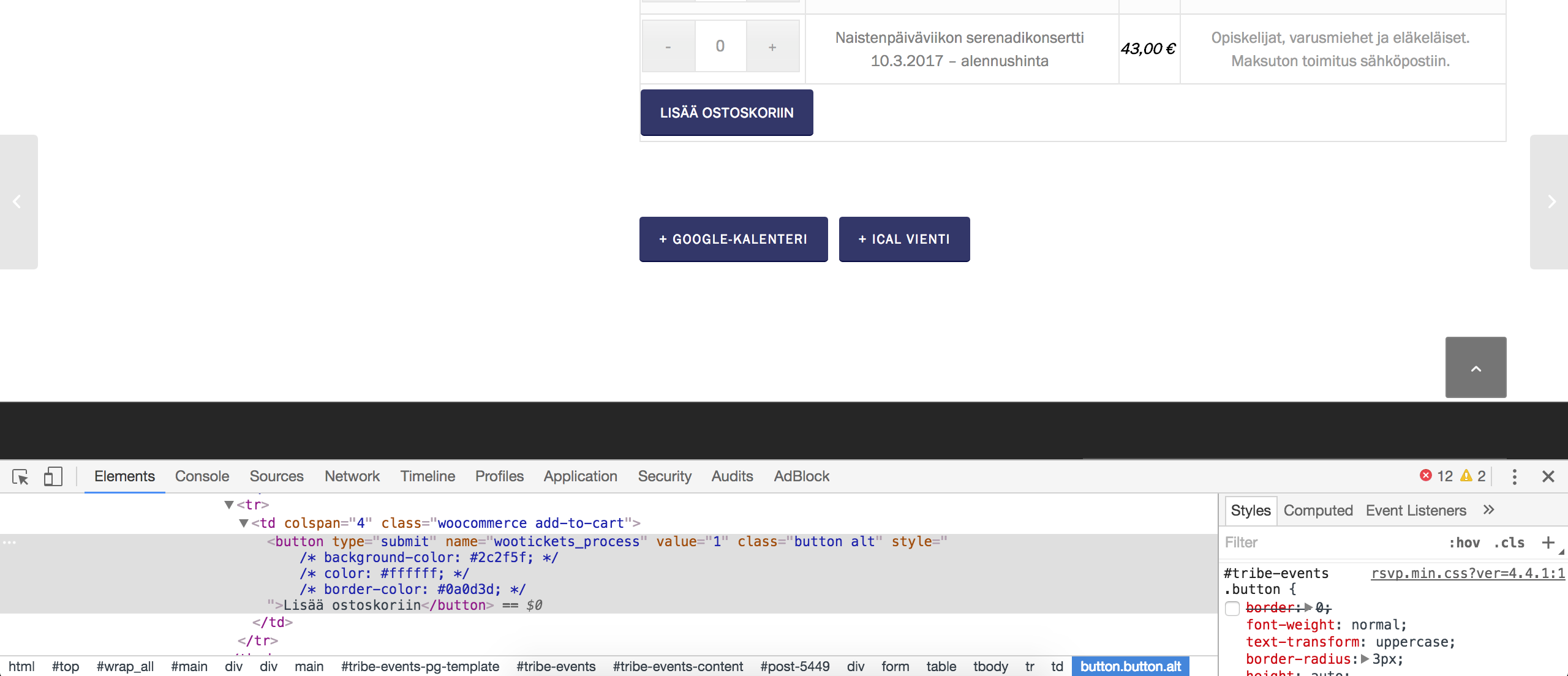
I confirmed with the devs that there were style tweaks applied to the buttons and some of the surround table structure, so you’ll need to go through and update your coding as needed. I hope this provides closure on the matter for all involved in this thread and let me know if you’ve got any additional questions. Have a great weekend ahead!
ModeratorHey Mike,
There doesn’t currently appear to be any issues of other users reporting similar behaviors, so I’m not sure the incorrect dates listed on Google relate to our plugins. I’d spend more time investigating the matter – try searching our forums and Google’s forums to see if you can further identify the reasoning behind the incorrect dates and possible solutions.
If you do somehow identify our plugin to be the cause of conflict, please provide as much documentation on the matter and step-by-step instructions on reproducing the problem so I can attempt to recreate the behavior. If I’m able to, I’ll get a bug report logged and our devs will get to work on a solution.
Please let me know what you find and have a great weekend ahead. Cheers 🙂
ModeratorThank you for the update,
If you review our New User Primer: The Events Calendar and Events Calendar PRO, we walk you through the process of installing and setting up the plugin.
Please review our Finding and Inputting Your License Key tutorial to ensure you’re entering your license key properly.
Other helpful articles include WP Admin Settings Overview which explains each feature included in the plugins and PRO Recurring Events which goes over the process of adding and managing recurring events.
If you run into any issues once you get everything set up properly, review the Testing for conflicts guide once again. Please make sure WP_DEBUG and WP_DEBUG_LOG are enabled on your site’s wp-config.php file. Any errors will display at the top of your page as you try to reproduce the conflict. I also recommend right-clicking your mouse and opening the ‘Inspect’ tool to see if any errors display in the console. Note what you find and please include it in your reply.
Thanks and please keep me updated with the status of your situation. Have a great weekend ahead!
ModeratorHello,
Thank you for your patience. I brought this thread to the attention of our dev team and they’ve recommended I log a bug report so they can further investigate. I’d be happy to update this forum thread once I have more information from the devs. I don’t have any date/time when you can expect a response, but again I’ll update this thread when I know more.
Can you please clarify whether the issue occurs with both TEC and PRO active, or just when TEC is active? Thanks again for your patience and please let me know if you have any more questions or concerns. Cheers!
ModeratorHey Ryan,
We do our best to avoid conflicts with themes and plugins by other authors, but unfortunately it’s bound to happen. With that said, we are also limited on the amount of support we can provide with code by other developers. Please review our What support is provided for license holders? Knowledgebase article for more information.
I’ll go ahead and log a bug report for the developers to review, but I cannot guarantee if/when a fix will be included in an upcoming maintenance release. I’d be happy to update this thread if/when the developers update the report with their findings. If you could reply back with any errors you see in your error log and browser console when reproducing the behavior, it would be helpful and appreciated.
Sorry I can’t do more in this instance and let me know if you’ve got any questions or comments. Thanks and have a great weekend ahead!
ModeratorHi Phil 🙂
Before we proceed, can you please review our Testing for conflicts guide and reply back with your findings? Please make sure WP_DEBUG and WP_DEBUG_LOG are enabled on your site’s wp-config.php file. Any errors will display at the top of your page as you try to reproduce the conflict.
I also recommend right-clicking your mouse and opening the ‘Inspect’ tool to see if any errors display in the console. Note what you find and please include it in your reply.
Thanks and have a great rest of your day!
ModeratorHey Scott,
Featured images depend on a few things, including the sizes WordPress and your theme generates, if you’re using the correct size in your templates, using CSS, etc. Please review our Featured Images tutorial for more information on the matter and let me know if you’re able to get things squared away.
Cheers!
ModeratorHey Scott,
I understand the only thing working for you at the moment is the legacy plugins, but it is highly recommended you update to Event Aggregator. If you haven’t already, please review our Moving to Event Aggregator Knowledgebase article.
It might be best you do this on a test site where you can fully troubleshoot any issues you run into along the way. Please refer to our Using One License for Live and Dev Sites and Moving Your License Keys Knowledgebase articles for more info.
Lastly, the issue you’re experiencing is actually a bug from WordPress itself. Please add the following line to the bottom of your site’s wp-config.php file and it should resolve the issue:
define (‘ALLOW_UNFILTERED_UPLOADS’, true);Let me know how it goes and have a pleasant rest of your day!
February 2, 2017 at 3:55 pm in reply to: Export Events or Venues Files in a csv file or otherwise. #1228629ModeratorHello,
There are numerous plugins available in the WordPress repository that were developed specifically for exporting data via CSV. You could also export by the tribe_venue post type via phpMyAdmin.
Please let me know if this helps answer your question and have a great rest of your day!
February 2, 2017 at 3:48 pm in reply to: I get ERROR in Google Chrome console on my Event Archive page #1228626ModeratorHi and welcome back!
Before we proceed, I see you checked ‘Yes’ to reverting back to the default WordPress theme and deactivating all plugins other than ours as instructed in the Testing for conflicts guide, but can you please confirm this?
If the errors do display, please take another screenshot while you have the default WordPress theme active and all plugins other than ours and include it in you reply. Thanks and take care 🙂
February 2, 2017 at 3:46 pm in reply to: Bring the details box up to the wordpress content box #1228624ModeratorHey Rodrigo!
Welcome back 🙂
If you review our Themer’s Guide, it walks you through the process of creating and saving custom templates. This Customizing WordPress #1 – How To Create A Child Theme by LevelUpTuts YouTube video is similar to what you’ll be doing.
Let me know if you get caught up along the way and I’ll do my best to help. Have a great rest of your day and take care!
-
AuthorPosts