
Home › Forums › Ticket Products › Event Tickets Plus › Event tickets 4.4.1 update breaks styling for "add to cart"
- This topic has 12 replies, 5 voices, and was last updated 9 years, 8 months ago by
Hunter.
-
AuthorPosts
-
January 28, 2017 at 4:05 am #1225585
Heikki
ParticipantI just updated the Event Tickets and Event Tickets Plus plugins to 4.4.1 from 4.4.0.1 and 4.4, respectively. After the update the “add to cart” button on the standard event page (produced by the events calendar) was incorrectly styled (using enfold theme without customisations).
Rolling back to Event Tickets Plus 4.4 didn’t help. But rolling back to Events Tickets Plus 4.4.0.1 brought back the normal button.
From the changelog I can see you guys did some changes to styling in 4.4.1 releases, but they seem to break stuff. Cannot upgrade until you release a fixed version. Thanks!
January 28, 2017 at 12:27 pm #1225687Jonathan
ParticipantI also experienced this. I was able to add this CSS to my child theme to override it:
#tribe-events .button.alt {
	background: [your color here];
	font-size: 1em;
	font-family:[your font stack here];
}
I’ve had less luck with the “TICKETS” H2 above that. They’ve forced the font to sans serif, and I can’t seem to override it in the child theme CSS editor:
.tribe-events-style-full .tribe-events-tickets-title {
    font-family: sans-serif;
}
Support, please advise. Thank you.
January 29, 2017 at 3:02 pm #1225968Tanya Kieneker
ParticipantMe too. Actually a number of custom CSS items have been overridden since the last update – in most cases it looks like a renaming of classes, which is just really frustrating. To find every single one and change it seems like a lot of work.
January 31, 2017 at 8:16 pm #1227312ModeratorHello,
Thank you for your patience. I had responded to this thread but apparently it didn’t go through correctly and I’m just now noticing :-/
@Mikko, I tried backdating to the versions you mentioned, but didn’t notice any difference in the Add to Cart button. Can you please further clarify which version(s) of plugin(s) I need installed to reproduce the behavior? @Jonathan, Does marking the font-family CSS with !important make a difference? @Tanya, code changes quite frequently but if something is actually broken, rest assured we’ll identify the conflict and get it resolved in an upcoming maintenance release.
Thanks to you all for your patience on the matter and have a wonderful evening. Cheers!
February 1, 2017 at 2:33 pm #1227825Participant@Hunter, no !important doesn’t make a difference. I’ve attempted two ways:
.tribe-events-style-full .tribe-events-tickets-title {
    font-family: 'Oswald', sans-serif !important;
}
and
h2.tribe-events-tickets-title {
    font-family: 'Oswald', sans-serif !important;
}
February 1, 2017 at 6:21 pm #1227946ModeratorHey Jonathan,
Strange it’s not working! I took a look at your site and was able to get the font switched to Oswald using my ‘Inspect’ tool, but I know CSS doesn’t always work as expected. Can you skim over our Basic font and color changes with CSS tutorial? Maybe it’s got something we’re both missing. Be sure to pay attention to the links provided at the bottom for further assistance.
I was able to successfully change the styling for my Tickets texts on my test install by creating a file and saving it as /your-theme/tribe-events/tribe-events.css. The code I used is:
.tribe-events-style-full.tribe-events-style-theme h2.tribe-events-tickets-title {

    font-size: 17px;

    font-family: "Libre Franklin";

}
Let me know if this helps and have a great evening!
February 2, 2017 at 7:33 am #1228151Participantit was a browser cache issue. All fixed now!
February 2, 2017 at 12:07 pm #1228452ModeratorGlad to hear you’ve got it squared away! Thanks for the update and have a great rest of your week 🙂
February 2, 2017 at 12:22 pm #1228466ParticipantHi @hunter, I’m sorry to say but my problems didn’t go away even after clearing site & browser caches. But immediately when I revert to 4.4.0.1 the view is back to normal.
I now kept the 4.4.1 on the site, you might take a look:
The problematic button is obviously “Lisää ostoskoriin” (“Add to cart” in Finnish).
Attached also an image about the situation.
February 3, 2017 at 1:55 pm #1229181ModeratorHello,
I believe you’ll need to update your CSS for the button after you update to the newest version. I was able to come close using my ‘Inspect‘ tool, see screenshot below:
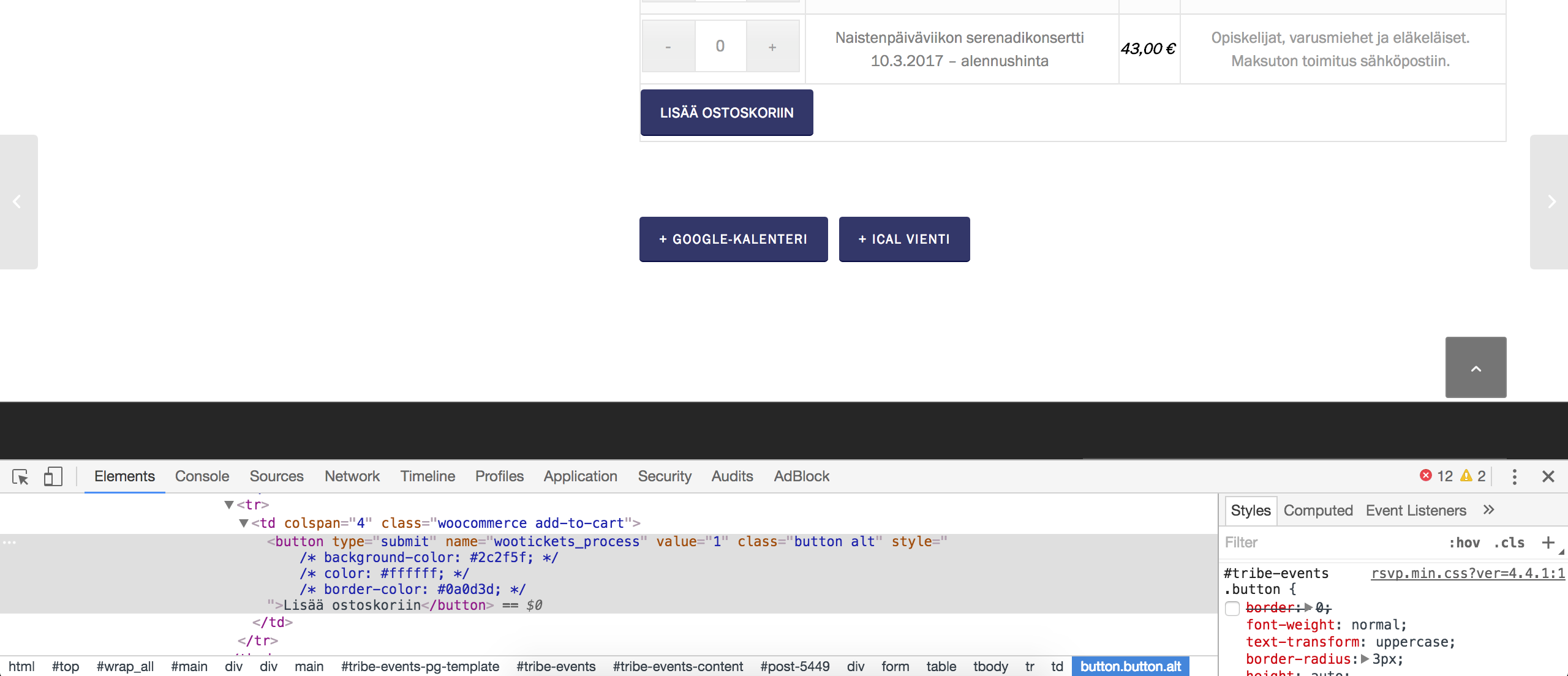
I confirmed with the devs that there were style tweaks applied to the buttons and some of the surround table structure, so you’ll need to go through and update your coding as needed. I hope this provides closure on the matter for all involved in this thread and let me know if you’ve got any additional questions. Have a great weekend ahead!
February 5, 2017 at 7:11 pm #1229778ParticipantI think I’ve figured out that there are a number of CSS files that are referencing the add to cart button and they are all conflicting each other. I’ve found code in rsvp.css and wootickets.css that are definitely conflicting. The classes are just slightly different meaning my custom css wasn’t over-riding it. Once I disabled those to entire files, my custom css started working again.
February 6, 2017 at 11:24 pm #1230378ModeratorThank you for letting me know you’ve got things figured out and also for sharing your solution. Feel free to create a new thread if you have any more questions or comments and have a pleasant evening. Cheers!
-
AuthorPosts
- The topic ‘Event tickets 4.4.1 update breaks styling for "add to cart"’ is closed to new replies.