

Forum Replies Created
-
AuthorPosts
-
Hunter
ModeratorHello 🙂
Thank you for posting to our premium plugin support forums and sorry to see you’re having troubles.
We use the plugin on a custom backend dashboard to display events from a certain category. Now, when trying to switch months, the calendar is not reloaded. In the front-end, this feature works without problems.
This sounds like a conflict with a customization you’ve built. If this is the case, we are unfortunately unable to provide support in these instances. If I’m mistaken, please provide more clarification and screenshots if possible of a) the issue itself and b) any related errors, whether they be from your server error log or setting WP_DEBUG to true.
Thanks again and have a great rest of your day. Cheers!
ModeratorHello!
First off, thank you for your purchase and welcome to our premium plugin support forums! Sorry to see you here under the circumstances. Rest assured we’ll identify the conflict and if a bug is found, our devs will get it addressed in an upcoming maintenance release.
Before we’re able to proceed, can you please review our Testing for conflicts guide and reply back with your findings?
Please make sure WP_DEBUG and WP_DEBUG_LOG are enabled on your site’s wp-config.php file. Any errors will display at the top of your page as you try to reproduce the conflict. I also recommend right-clicking your mouse and opening the ‘Inspect’ tool to see if any errors display in the console. Note what you find and please include it in your reply.
Thanks again and have a pleasant rest of your day. Cheers 🙂
ModeratorHey Tony 🙂
I attempted to reproduce the behavior on my test site, but I’m able to upload images on the Community Events Add Event form.
I see you checked ‘Yes’ to reverting back to the default WordPress theme and deactivating all plugins other than ours as instructed in the Testing for conflicts guide, but can you please confirm this?
If so, it might be best you set up a fresh WordPress installation where you can fully troubleshoot the issue. Make sure you have only the default WordPress theme and The Events Calendar installed and activated on the test site. Please review our Using One License for Live and Dev Sites and Moving Your License Keys tutorials for more information.
Please make sure WP_DEBUG and WP_DEBUG_LOG are enabled on your site’s wp-config.php file. Any errors will display at the top of your page as you try to reproduce the conflict. I also recommend right-clicking your mouse and opening the ‘Inspect’ tool to see if any errors display in the console. Note what you find and please include it in your reply.
Thanks and please keep me updated. Cheers 🙂
February 6, 2017 at 10:50 pm in reply to: Duplicate Organizer Fields / Can't Add New Organizer #1230352ModeratorHello,
Thank you for taking the time to be so thorough in your initial post and sorry to see you’re having issues with the Community Events Add Event form.
I compared our logged bug reports to what you’ve shared with me and attempted to reproduce the behavior on a few test sites I have set up, but neither resembled the issues you’re currently experiencing. Does this issue occur if you revert back to Community Events 4.4?
It might be best you set up a fresh WordPress installation where you can fully troubleshoot the issue. Make sure you have only the default WordPress theme, The Events Calendar, and Community Events installed and activated on the test site. Please review our Using One License for Live and Dev Sites and Moving Your License Keys tutorials for more information.
Please make sure WP_DEBUG and WP_DEBUG_LOG are enabled on your site’s wp-config.php file. Any errors will display at the top of your page as you try to reproduce the conflict. I also recommend right-clicking your mouse and opening the ‘Inspect’ tool to see if any errors display in the console. Note what you find and please include it in your reply.
It would also be helpful if you could include screenshots of the issues so I can have a visual of them. It also helps our devs when they’re working to improve the faulty code. If you could “allow anonymous submissions” on the test site, that would be ideal so we could go in and investigate. It would be best to have the default WordPress theme, The Events Calendar, and Community Events only installed/activated while we are looking at your site.
AND, I even went into settings and set it so the user should not be able to add a new organization – yet on the Add Event (community events) page the option still exists to add a new organization. Guess we’ll have to hide that with CSS if we want it gone?
I’m also unable to reproduce this issue. Please see the screenshots below.
Screenshot of ‘Organizer‘ section with the ‘Users cannot create new Organizers‘ option checked under Events > Settings > Community:
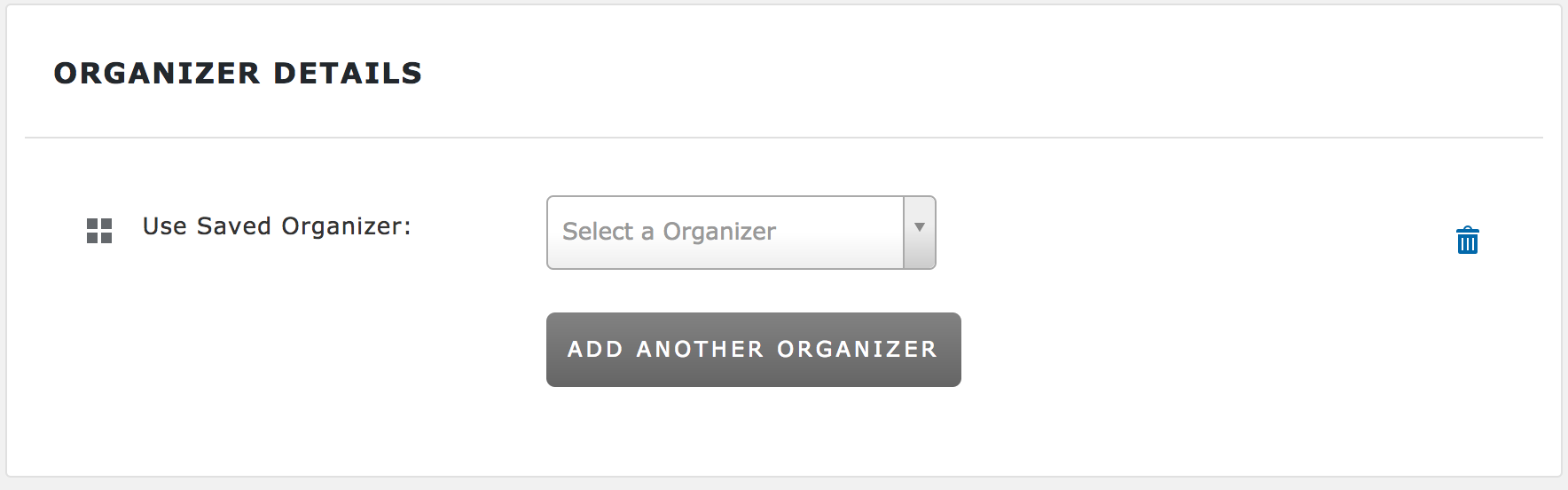
Screenshot of ‘Organizer’ section with the ‘Users cannot create new Organizers‘ option unchecked under Events > Settings > Community:
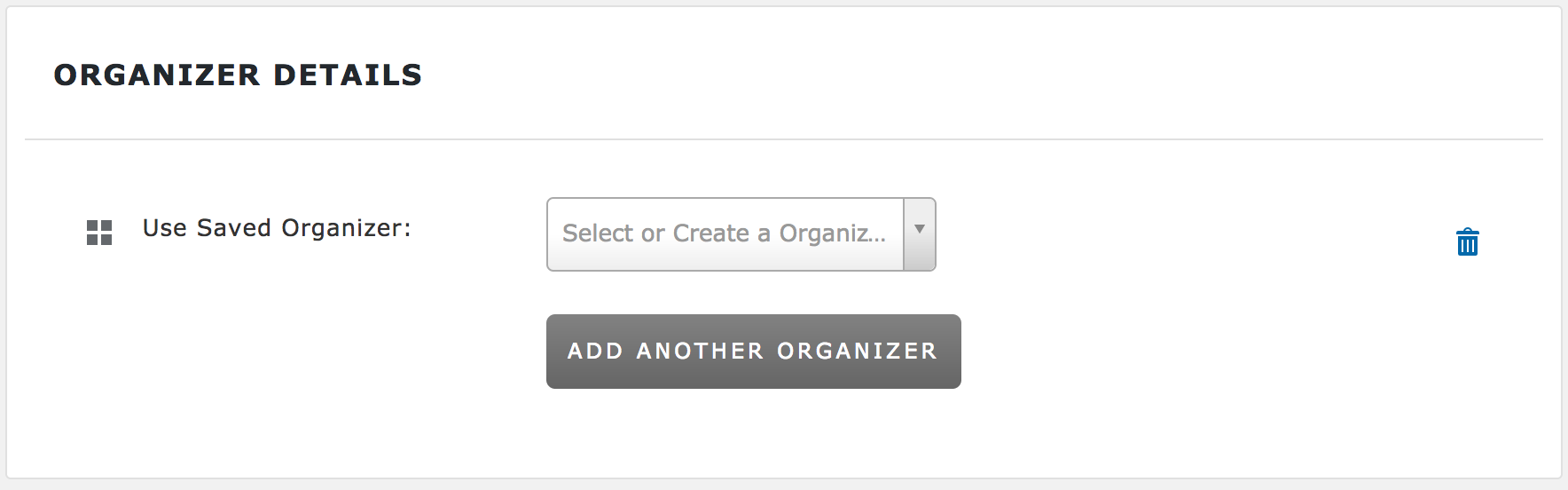
You can see the difference in text in the dropdown: “Select a Organizer” compared to “Select or Create a Organizer”. If you want to completely remove the ‘Organizer’ section from the Add Event form, please review our Themer’s Guide for more information on creating and saving custom templates.
Sorry again you’re having troubles and please keep me updated. Cheers 🙂
February 6, 2017 at 10:16 pm in reply to: Where to customize php files for Event List widget #1230344ModeratorHi Allegra 🙂
First off, thank you for your purchase and welcome to our premium plugin support forums! Our Themer’s Guide goes over the process of creating and saving customize templates to avoid losing. It also includes “directions” on finding each template. Let me know if you get caught up and we’ll go from there.
I also need to add the shortcode for the “view more” link, which no longer displays a button.
I’m not 100% certain I understand your question. If there was a button in place of the “view more” link, it was most likely a customization built into your theme if your theme author included any overwrites. If the author did include customizations, they will be located in a folder inside your theme folder named tribe-events.
Let me know if I’m on the right track and if not, please reply back with more detail and I’d be happy to help further assist. Thanks again and have a great rest of your day!
ModeratorHello,
I see you checked ‘Yes’ to deactivating all plugins other than ours, but can you please also revert back to the default WordPress theme to see if the conflict persists? Before we proceed, I’ll need you to review the Testing for conflicts guide in it’s entirety and let me know what you find out.
Thanks and have a great day!
February 6, 2017 at 9:32 pm in reply to: 7 events showing in month view (correct), but only 2 show in day view #1230329ModeratorHey Jeffrey,
Thank you for including the screenshots with your initial post. Before we proceed, can you send over your System Information as a private reply?
Thanks again and have a great day 🙂
February 6, 2017 at 9:30 pm in reply to: ETA for when Facebook GPS map and Facebook Picture will be fixed? #1230326ModeratorHey Martin 🙂
Thank you for posting to our premium plugin forums and we appreciate the kind words! Can you provide any more information on the GPS map import feature you’ve mentioned? Any links you can provide would also be helpful. Once I know which feature you’re referring to I’ll gladly look for any information I can provide.
The Facebook featured image issue is marked at Priority Level 1 which means it’s being expedited and a fix should be available any day/hour now! I unfortunately don’t have a concrete time when that will be, but please stay tuned to our Release Notes and the plugin changelogs for more information.
For the time being, you can revert back to TEC 4.4.1.1 and the images should import with no problems. Thanks again and let me know if you’ve got any additional questions or comments. Cheers!
ModeratorHey B 🙂
First off, thank you for your purchase and welcome to our premium plugin support forums! Sorry to seer you’re having troubles connecting to Facebook. Do you mind testing the issue once more on your test site with the default WP theme and only our plugins active, but please make sure WP_DEBUG and WP_DEBUG_LOG are enabled on your site’s wp-config.php file. Any errors will display at the top of your page as you try to reproduce the conflict.
I also recommend right-clicking your mouse and opening the ‘Inspect’ tool to see if any errors display in the console. Note what you find and please include it in your reply.
Once I’ve got more information back from you I’ll have a better idea on how to proceed. Thanks again and have a great day!
February 6, 2017 at 11:58 am in reply to: Embedding Calendar Views with the [tribe_events] Shortcode #1230109ModeratorHello,
Thank you for the updates 🙂
Can you send over your System Information as a private reply?
Is it possible to run three installations with my license keys?
Yes it is! Please review our Using One License for Live and Dev Sites and Moving Your License Keys tutorials and let me know if you run into any problems.
Please let me know what you find after you’re able to test the issues on a test site and have a good afternoon!
February 5, 2017 at 2:16 pm in reply to: Can't post events – Calendar claims Event Start & End times are missing #1229749ModeratorHey Martha,
Thank you for the detailed update. Rest assured we will get it figured out! What I would do in this instance is set up a test site where you can fully troubleshoot the issue. Make sure you have only the default Twenty Seventeen WordPress theme and our plugins installed on the test site.
Please make sure WP_DEBUG and WP_DEBUG_LOG are enabled on your site’s wp-config.php file. Any errors will display at the top of your page as you try to reproduce the conflict. I also recommend right-clicking your mouse and opening the ‘Inspect’ tool to see if any errors display in the console.
I really don’t think this is about a conflict with another program. I have not been able to deactivate all the other plug-ins (there are quite a few). I downloaded a “Maintenance” plug-in but could not get it to work.
Unfortunately, I’m not able to provide much support until you are able to fully run through the Testing for conflicts guide, so please do that when convenient (best to do it on a testing site) and let me know what you find out.
I will see if I can figure out which file is the one controlling the date selection section of the Add an Event form. Maybe that file got corrupted and I can just re-install it. If you can tell me which one it is, that would be great.
The Add Event form can be found at /the-events-calendar-community-events/src/views/community/edit-event.php. If you have any template overrides inside the [your-theme]/tribe-events/ folder, you’ll want to make sure all the code you have is updated with the latest version.
What should I do? I have downloaded another copy of Events Calendar Community, and I was going to re-install it, but I am afraid to delete the old one because it says it is going to remove all the data.
Simply deleting the plugins won’t remove the data from the database, but it’s always recommended you make backups just in case.
Also, if I try to make a recurring event by clicking on Daily, Monthly, etc. – instead of seeing the dialogue box that would let me choose my dates, the cursor jumps to the top of the screen – and the url suddenly says – http://www.womenarts.org/swandates/community/add/# instead of http://www.womenarts.org/swandates/community/add/
I visited your site and was able to reproduce this behavior. As you can see in the screenshot below, an error appeared once I clicked “Weekly”. This is most likely due to a theme and/or plugin conflict, so the only way to identify whether it’s coming from a conflict or a bug in our code is to review the Testing for conflicts guide.
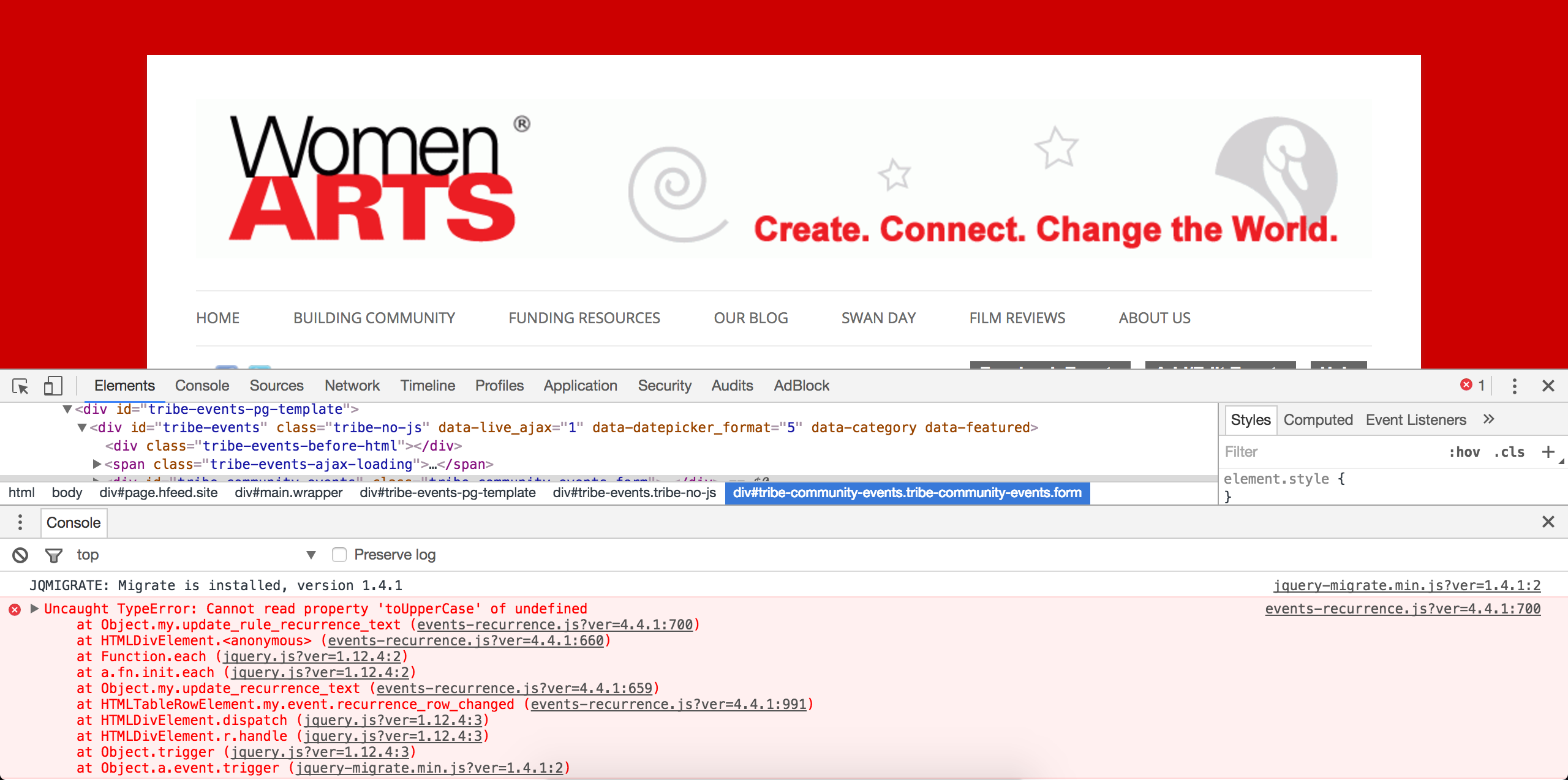
Thanks again and have a pleasant rest of your weekend!
ModeratorHi Mark,
Thank you for the update and I hope you’re having a great weekend thus far! I went ahead and attempted to reproduce the behavior on my test site, but I did not experience the same issues you’ve shared with me. Please see this short screencast for reference.
If you right-click your mouse and open the ‘Inspect‘ tool, do any errors display in the browser console?
Is there any difference when using different options under Events > Settings > Display > Basic Template Settings? Lastly, I appreciate you trying different themes to see if that had any effect on the behavior, but can you please confirm you’ve tested after reverting back to the default WordPress theme and deactivating all plugins besides ours?
Please keep me updated and have a great rest of your weekend!
ModeratorHello,
Happy Superbowl Sunday 🙂
Did any errors display after setting WP_DEBUG to true and opening the ‘Inspect’ tool? You mentioned you purchased The Events Calendar for one site and Events Calendar PRO for another site. The Events Calendar is free, so can you please clarify more on that statement you made?
Do you have The Events Calendar (free version) installed and activated on both sites? If not, please make sure you do as The Events Calendar is required to run Events Calendar PRO.
Can you send the System Information for the site you’re attempting to use PRO on as a private reply? Lastly, can you please confirm you’ve reviewed our Testing for conflicts guide to rule out the potential for a theme and/or plugin conflict? I’ll need a solid yes or no to this answer before we can proceed.
Thanks for your patience while we continue investigating and have a great remainder of your weekend!
ModeratorThank you for the update and I’ll mark the thread as ‘Pending Fix‘ until we hear back from the dev team. Thanks again and have a great Superbowl Sunday.
ModeratorStrange indeed! Thank you for letting me know the issue has been resolved and please feel free to create a new thread if you have any more questions or comments. Take care!
-
AuthorPosts