
Home › Forums › Calendar Products › Community Events › Where To Edit Venue Country Fields
- This topic has 7 replies, 4 voices, and was last updated 9 years, 8 months ago by
Mark.
-
AuthorPosts
-
January 28, 2017 at 6:17 am #1225593
Mark
ParticipantHowdy,
1) I would like to remove all country selections except the United States from venue location fields. Can you please point me to the file(s)?2) Should I place the modified file(s) into the “tribe-events” directory within my theme or a different directory?
Thanks,
MarkJanuary 30, 2017 at 4:27 pm #1226541Hunter
ModeratorHey Mark 🙂
1) I would like to remove all country selections except the United States from venue location fields. Can you please point me to the file(s)?
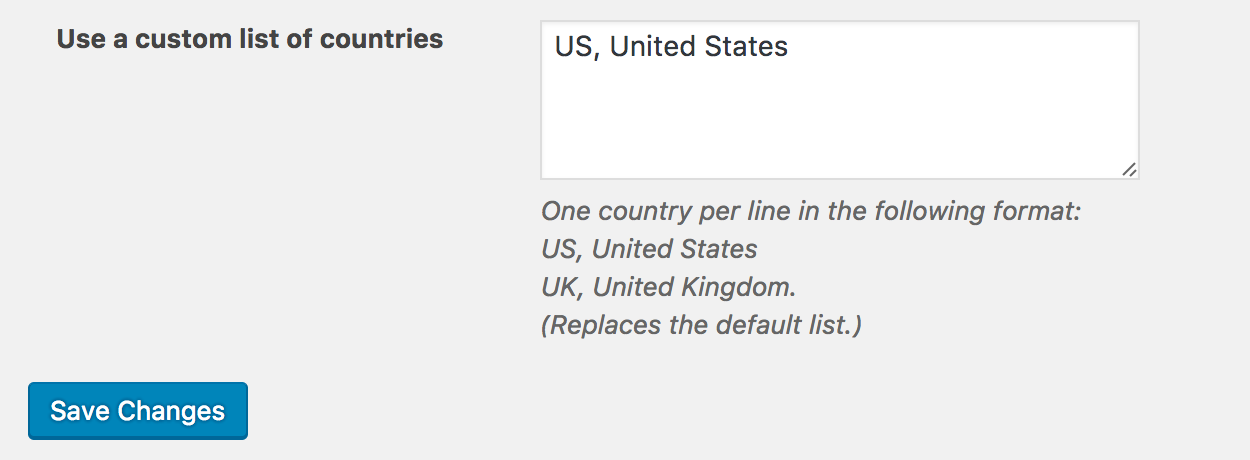
If you navigate to Events > Settings > Default Content and enter “US, United States” into the ‘Use a list of custom countries‘ field, the Community Events Add Event venue country dropdown should not display any countries other than the United States. Give it a shot and let me know how it works out. Cheers!
 January 30, 2017 at 6:45 pm #1226584Participant
Hi Hunter,
Thanks for the reply. This does it But…. now I notice the fields address, country/state, postal code/phone are overlapping or pushed off screen in mobile views. See shared images.It is far worse on mobile devices which as you know represents the majority of users. I removed the US, United States default… but the form remains screwed up. I don’t know when this occurred or if I just didn’t notice it originally when I install community events about a week ago now.
How to fix?
Thanks,
MarkJanuary 31, 2017 at 4:00 pm #1227201ModeratorHi Mark,
Glad we’re making progress. Does the display issue occur when you revert back to the default WordPress theme and deactivate all plugins other than ours? Please review our Testing for conflicts guide and let me know what you find out.
I went and checked to see if the behavior was similar on my test site, but everything looks good to me. Please keep me posted and have a good evening!
February 4, 2017 at 7:25 am #1229409ParticipantHi Hunter,
Yes, everything looks good until… I add a “venue” (example: Redondo Beach) to the community events form. Then the fields break. They are breaking on wordpress 2016 and 2015 themes, they break on my Woo Canvas theme and I would assume they break on many if not all other themes. The breaks were at full +768 screens. Once a venue is “created” the hidden fields, (address, city, etc) now display overlapping and address and city (maybe others) will not accept text input – broken. On my woo theme when scaled to -768 screens the the fields overlap even more severely… they overlap and/or are pushed off-page rather than stack to remain visible and useful.For me this is a serious issue.
Please see attached screen shots.
Regards,
MarkFebruary 5, 2017 at 1:58 pm #1229743ModeratorHi Mark,
Thank you for the update and I hope you’re having a great weekend thus far! I went ahead and attempted to reproduce the behavior on my test site, but I did not experience the same issues you’ve shared with me. Please see this short screencast for reference.
If you right-click your mouse and open the ‘Inspect‘ tool, do any errors display in the browser console?
Is there any difference when using different options under Events > Settings > Display > Basic Template Settings? Lastly, I appreciate you trying different themes to see if that had any effect on the behavior, but can you please confirm you’ve tested after reverting back to the default WordPress theme and deactivating all plugins besides ours?
Please keep me updated and have a great rest of your weekend!
February 27, 2017 at 8:35 am #1246247Support Droid
KeymasterHey there! This thread has been pretty quiet for the last three weeks, so we’re going to go ahead and close it to avoid confusion with other topics. If you’re still looking for help with this, please do open a new thread, reference this one and we’d be more than happy to continue the conversation over there.
Thanks so much!
The Events Calendar Support Team -
AuthorPosts
- The topic ‘Where To Edit Venue Country Fields’ is closed to new replies.