

Forum Replies Created
-
AuthorPosts
-
Hunter
ModeratorThank you for the feedback 🙂
We are definitely going to take a good look at incorporating as much data into the search results, so rest assured the search functionality will be improved in an upcoming feature release. Thanks again and have a good weekend!
ModeratorHey Joe,
Thanks for the update. My apologies for not being more clear, I was hoping you could test it on a local (not live) server to see if it’s possibly related to your hosting provider. Regardless, I’m glad to hear you’ve got it going in the right direction.
Best of luck with the project and feel free to create a new thread should anything else come up.
ModeratorHey Paul,
The snippet that moves the ticket form should still work on the latest versions. Can you try and replicate the problem while following our Testing for conflicts KB article?
Let me know and we’ll continue troubleshooting from there. Thanks for reaching out and have a good upcoming weekend.
ModeratorHey John,
Welcome back. Can you please elaborate on how the location search field isn’t working? The more information you can provide, the better.
Additionally, I see you checked “Yes” to reverting back to the default WP theme and deactivating all other plugins other than ours as outlined in our Testing for conflicts guide, but can you please confirm this?
Thank you and have a good upcoming weekend 🙂
May 19, 2016 at 11:59 am in reply to: Hide attendees list on event page is off, but still showing option on event page #1116600ModeratorHey Mark,
Welcome to the forums and thanks for choosing PRO 🙂
We’ve got a bug report currently logged aimed to address the option to ‘Hide attendees list on event page’ from your events when the option is enabled on the back end.
For the time being, you can do a template override as explained in our Themer’s Guide. The file you’ll need to overwrite is /event-tickets-plus/src/views/wootickets/tickets.php. You’ll need to make changes starting around line 104 and save it as /your-theme/tribe-events/wootickets/tickets.php.
I’ve linked this forum thread to the logged bug report for the developers to reference during improvements, so hang tight and keep an eye on your wp-admin and theeventscalendar.com/blog for maintenance release information. Thanks and have a good upcoming weekend.
ModeratorHi Clair,
Sorry to hear about the issue. I tested to see if I could replicate the problem but was unfortunately unable to do so. I created a demo event and a ticket with a custom fieldset (name). All 4 names were saved to the database and exported to the .csv file properly.
Can you see if the issue still occurs when following our Testing for conflicts guide? Let me know your findings and we’ll continue troubleshooting from there.
Thank you for reaching out and have a good rest of the day.
ModeratorHello,
Our HTTP 404 errors KB article provides our stance on the matter and that’s the most informative answer I can give at this time. The developers are aware of the concerns and are always discussing ways to improve the entire experience with regards to SEO.
Thanks again for the patience and in-depth discussion and have a good upcoming weekend.
ModeratorHey Saulo,
Thank you so much for running through the provided resource. While you were doing that, I spent a bit more time investigating and upon doing so located a bug relating to the issue you’re experiencing.
Unfortunately I don’t have a solution in the interim but we are hard at work and hopefully can come up with a fix in the next maintenance release. Stay tuned to your wp-admin and theeventscalendar.com/blog for release info and have a great upcoming weekend 🙂
ModeratorBarb,
Glad to hear you’re on the right track! Your events should display on the url you have entered in the Events URL slug field found under Events > Settings > General. For example, if you have ‘events’ entered in the field, your events would display at your-site.com/events.
If you haven’t already, I’d recommend reading our New User Primer as it gives a pretty good explanation on how the plugin works including screenshots.
Take care and let me know if you have any additional questions or comments 🙂
May 19, 2016 at 10:18 am in reply to: Events Tickets Plus, Woo Commerce Ticket Emails not happening? #1116542ModeratorThe snippet will override the setting regardless if it’s checked or not. Let me know if it does the trick.
ModeratorWelcome back,
You can start troubleshooting by enabling wp_debug in your wp-config.php file and see if you get any errors. You can also try using “Inspect” as demonstrated in this YouTube Video.
As previously mentioned, there aren’t any logged bugs so I don’t have any more information that can be of assistance. Best of luck and thanks for understanding.
ModeratorThank you again for understanding. Don’t hesitate to reach out the next time you’ve got something a little more technically challenging than you’re comfortable with. We’re always glad to take a look and see if we have existing documentation that can help or write up a quick snippet if we have the resources.
Take care 🙂
ModeratorGlad to hear you’re on the right track 🙂
It shouldn’t display both a calendar and list. Can you double-check to make sure you don’t have both the Events List and Events Calendar widgets inserted? (see screenshot below)
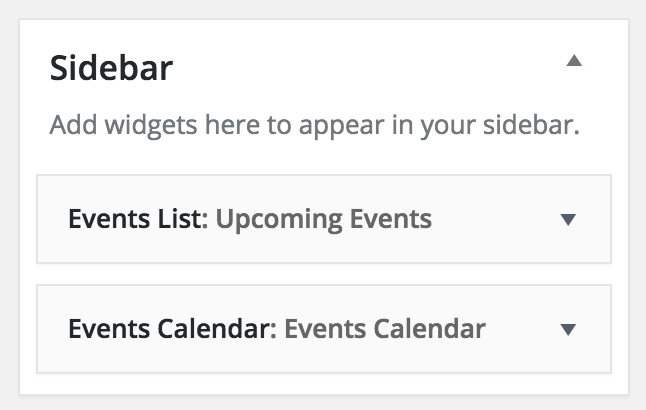
Let me know if this answers your question and have a good rest of your day.
ModeratorSorry to hear it’s not working. Did you try it on the default Twenty Sixteen theme to see if it works? Also, send over your System Information as a private reply if you don’t mind.
Thanks for the update and have a good rest of your day.
ModeratorHi Linda,
That could most definitely be a reason why the dates are displaying incorrectly in the search results. To update the information, I’d recommend installing Yoast SEO. You can set the SEO title and description on the event page, then once your site gets crawled again it should show the updated information.
Give that a shot and let me know if you’re able to get the correct information displaying. Thank you for the update and have a good rest of the day.
-
AuthorPosts