

Forum Replies Created
-
AuthorPosts
-
Hunter
ModeratorHello Barb,
Welcome to the Pre-Sales Channel and thank you for reaching out 🙂
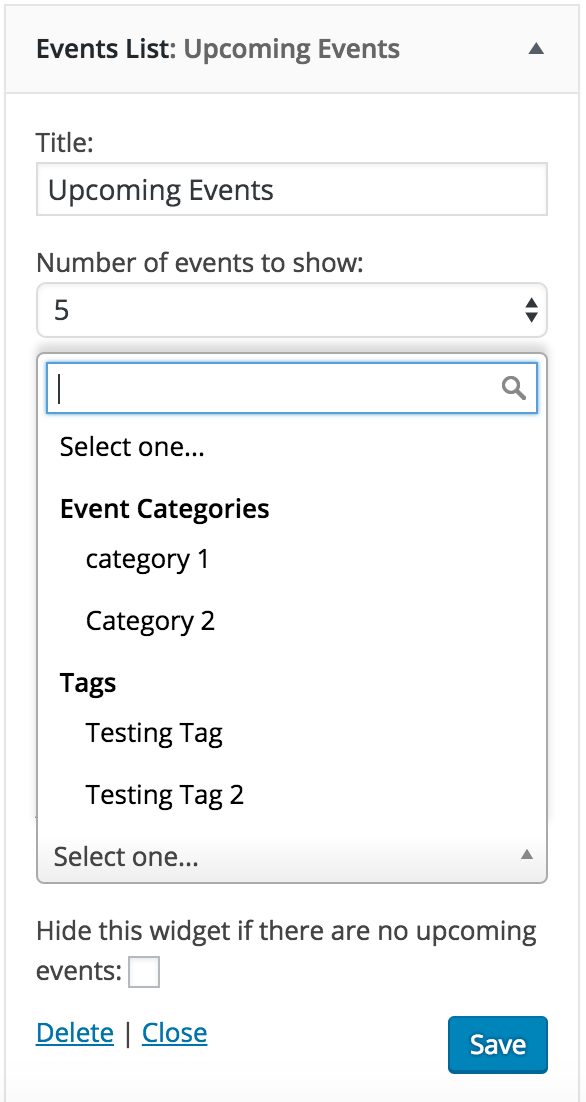
With the Advanced Widget functionality included in our PRO version, you could add a widget to display events related to one or more categories. I’ve attached a screenshot below that gives a visual example.
Please let me know if I’ve sufficiently answered your question and if there is anything else I can assist you with. Thank you again for the inquiry. Have a great upcoming weekend!
 Moderator
Hi and welcome back,
We’ve got a Knowledgebase tutorial providing a quick example on how to go about altering the /venue/ URL structure. Let me know how it goes and best of luck 🙂
May 18, 2016 at 8:12 pm in reply to: Mini Calendar Widget Redirects to Out of Order List of Events #1116211ModeratorHey Eric,
Welcome back to the forums and sorry to hear about the troubles.
I see you have Post Type Order plugin installed. Does the issue still occur with that plugin deactivated? To double-check you’re not experiencing a theme and/or plugin conflict, can you please run through our Testing for conflicts guide one more time and report back with your findings?
Thank you for reaching out and I look forward to resolving the issue with you.
May 18, 2016 at 12:26 pm in reply to: Events Tickets Plus, Woo Commerce Ticket Emails not happening? #1116069ModeratorWelcome back,
What payment options do you have available? Have you noticed if the order doesn’t get marked as complete depending on which type of payment is being used? If you haven’t already, visit Events > Settings > Tickets and check the box under WooCommerce Support.

If that doesn’t work, there is an Automatically Complete Orders snippet available from Woo. Let me know if it helps.
We do have a logged report which aims to address the issue at hand. I’ve attached this thread to the report for the developers to reference. You’ll see maintenance release info in your wp-admin and theeventscalendar.com when we get a fix out for it.
Thank you for reaching out and have a good rest of the day.
ModeratorHi and welcome to the forums,
Sorry to hear about the troubles. I visited your site and attempted to navigate to the next month on the mini calendar but was unable to do so. We don’t have any logged bug reports of users experiencing similar issues, so you are more than likely experiencing a conflict from your server environment, theme and/or plugins.
I wish I was able to provide more support but without the ability to replicate the issue and no existing logged bug reports, there isn’t much I can do :-/
You may want to review the Testing for conflicts once again to ensure it’s not a theme/plugin conflict. If you don’t find anything, the next step would be to contact your hosting provider to see if they have any insight on a resolution.
Thank you for understanding our position on the matter and best of luck. Have a great upcoming weekend and thanks for choosing PRO!
ModeratorWelcome back,
Glad to hear you’ve identified the source of conflict! Luckily, we’ve got a logged bug at priority 1 (top priority) planned that can hopefully solve the issue. I’ve attached this thread for the developers to reference during a fix. Hang tight and keep and eye on your wp-admin and theeventscalendar.com/blog for maintenance release info. My apologies for not having a workaround in the mean time.
ModeratorHi and thanks for the patience,
Feel free to try out that plugin and see if it helps out. Please note it changes the status of hard 404s to 200s, so arguably it will increase your soft 404s.
If you visit http://www.misspaule.com/events/list, you can see that you do in fact have a page with /list/ (list view) in the permalink. So if you are using /upcoming/ in links you’ve created as stated above, it’s best to use /list/ instead:
To keep results current, I have learned that I create a link that’s something like “events/category/…/upcoming”
I wish I was able to go more in-depth with you on the matter as I understand there hasn’t been a concrete answer provided. Hopefully I’ve given insight on our position with regards to how our plugins handle hard and soft 404 errors. Additionally, I’ve brought this thread to the attention of my fellow support team members and we will continue to investigate as we’re always open to suggestions for improvement.
Thank you for the patience and willingness to work with me and have a happy Wednesday.
ModeratorHi and welcome back,
Thanks for sending that information over. I do wish I had a better answer for you, but with the amount of events you have, slow page load times may start to occur. Of course, there are ways to alleviate those page load speeds, but ultimately that is up to the site owner/manager/developer.
We have users with tens of thousands of events listed on their sites, so it is possible to maintain optimum load times while listing a good amount of events. With every environment being unique, it’s really hard to give you a precise answer on how to go about improving your speeds.
I would start by using speed testing metrics and see where the shortcomings are. Once you can identify those, you’ll have more information on how to go about addressing them. I know this isn’t exactly the answer you’re looking for, but my hands are tied in these types of support requests.
Best of luck and thank you for choosing PRO.
ModeratorWelcome back,
Thank you for sending over the screenshot and System Information. Can you review our Testing for conflicts guide real quick to rule out a theme and/or plugin conflict?
Let me know the results and we’ll take it from there. Have a good Wednesday 🙂
ModeratorHi Hans-Gerd,
I do wish I was able to be of more assistance, but your best bet would be to explore documentation on jQuery or see if there is a plugin available in the WP repository that can alleviate some of the technical aspects. YouTube videos are a great resource too. Again, my apologies I can help out more and good luck.
ModeratorWelcome back,
Try adding the following snippet to your theme’s functions.php file (leave out the opening php tag) and see if you’re able to get it going. We’re working on adding Google Maps API Key fields in an upcoming release, so stay tuned for that. Report back with your findings, more specifically if the location search field works.
<?php

/**

	* From https://gist.github.com/cliffordp/9d6c25feb389f98e8ae09a41273a3488

	*

	* Override Google Maps API call URI and add Google Maps API Key

	* @link: https://github.com/moderntribe/the-events-calendar/blob/4.1.3/src/Tribe/Embedded_Maps.php#L162

	**/

add_filter( 'tribe_events_google_maps_api', 'cliff_add_google_maps_api_key' );

function cliff_add_google_maps_api_key() {

	// https://developers.google.com/maps/documentation/geolocation/intro

	// https://developers.google.com/maps/documentation/javascript/get-api-key#specify-a-key-when-loading-the-api

	$api_key = ''; // enter your own API Key here
if ( ! empty( $api_key ) ) {
return sprintf( 'https://www.googleapis.com/geolocation/v1/geolocate?key=%s', $api_key );
}
}May 18, 2016 at 10:28 am in reply to: Recurring event created 14,000 entries and they need to be deleted #1116006ModeratorMary,
I noticed you aren’t using the most recent versions of our plugins. Can you update to the latest release and create a new recurring event with the same rules you have for the event giving you troubles? Once published, let me know if the problem persists.
To answer your questions, you can trash the event and it should stop the events from being generated. Changing the end date should also work too. I’m pasting an SQL query below that deletes current recurrences and changes the recurrence pattern to prevent it from trying to recreate new events. As always, it’s recommended you backup before running any SQL queries.
/*

This SQL Query will delete all recurrences of an event, while preserving the

original event. It can delete many thousands of recurrences per second on most

servers.
The query and steps below is modified version of that in this tutorial:
It is recommended that you read the source article above before proceeding.Step 1) Grab the "post_parent" ID for your recurring series of events. Navigate
to one of the recurrences in your WP Admin and click Edit Series. This will take
you to a URL like example.com/wp-admin/post.php?post=140&action=edit Grab the
post ID from this URL, in this case it’s 140.Step 2) As the article says it’s first a good idea to preview the posts you are
going to delete before deleting them. Swap out the X at the bottom of the
following query with the post ID you just grabbed, in the case above we would
make the bottom line "WHERE a.post_parent = 140" Now run the query. The results
should be many thousands of posts all with the same title, your recurring event.SELECT *
FROM wp_posts a
LEFT JOIN wp_term_relationships b ON ( a.ID = b.object_id )
LEFT JOIN wp_postmeta c ON ( a.ID = c.post_id )
LEFT JOIN wp_term_taxonomy d ON ( d.term_taxonomy_id = b.term_taxonomy_id )
LEFT JOIN wp_terms e ON ( e.term_id = d.term_id )
WHERE a.post_parent = xStep 3) Now run the below query, be sure to once again swap out the post_parent
ID at the bottom for the ID you grabbed earlier.Step 4) The original event which spawned the series still exists in your
WP-Admin. If you would like to delete it find it, click Trash Series, and you
are done. If you wish to instead edit its recurring rules click Edit Series and
make your modifications.*/
delete a,b,c,d
FROM wp_posts a
LEFT JOIN wp_term_relationships b ON ( a.ID = b.object_id )
LEFT JOIN wp_postmeta c ON ( a.ID = c.post_id )
LEFT JOIN wp_term_taxonomy d ON ( d.term_taxonomy_id = b.term_taxonomy_id )
LEFT JOIN wp_terms e ON ( e.term_id = d.term_id )
WHERE a.post_parent = xI hope this helps and let me know how things go 🙂
ModeratorThanks for getting back to me 🙂
Check out this KB tutorial on an explanation and solution for editing role capabilities. Let me know if you need any more assistance. Take care and enjoy your Wednesday.
ModeratorHi and welcome to the forums 🙂
Thank you for choosing PRO! I would be happy to help you out.
To start, do the events appear after following the instructions outlined in our Testing for conflicts guide?
Let me know and we’ll continue troubleshooting from there. Thanks again and have a good day.
ModeratorHello,
Welcome to the forums and I am sorry to hear about the slow load times. I’d be happy to see if I can be of assistance.
We do have a few Knowledgebase articles pertaining to performance which I’ve provided links to below:
- The Events Calendar: Performance Considerations
- Caching month view HTML in transients
- Caching: What, when and how
With those out of the way, would you mind sharing your System Information as a private reply? Approximately how many events do you currently have listed on your site? Are you on a shared hosting environment? Do you currently have a caching plugin installed and activated on your site?
As you can tell, there are many questions and areas relating to performance, so it’s hard to give an exact answer. Respond back with as much information as possible and thank you for reaching out. Have a great rest of your day!
-
AuthorPosts