

Forum Replies Created
-
AuthorPosts
-
Hunter
ModeratorHey Todd,
Thanks for posting and welcome back 🙂
What you describe is definitely possible using jQuery. You’ll first need to identify the category ID by visiting Events > Event Categories and hovering over “Delete” on the category you want as the default when users submit events. You’ll see text in the bottom left-hand side of your browser window containing tag_ID=3. Grab whichever number is where the bolded number is above.
An example of what the jQuery might look like:
jQuery("#tribe_events_cat-6").prop('checked', true);If you need a bit more assistance on how to go about inserting jQuery into the Community Events submission form, this article may help. Please note this type of support is outside the scope we’re able to provide, so you’ll have to take the reigns from here.
Best of luck and thank you for choosing PRO!
ModeratorHi and welcome back,
We do have a feature report logged which aims to address the lack of search ability for venue names when using the “Search” field. I’ve attached this forum thread to the report for the developers to reference during their planned improvements. Stay tuned to your wp-admin and theeventscalendar.com/blog for feature release information.
Thanks for reaching out and providing detail in your post. Have a good rest of your week and thanks for choosing PRO!
ModeratorHey Alex,
Welcome to the forums and thanks for choosing PRO 🙂
Can you send a screenshot of the recurrence rules you have set for the events giving issues? Also, provide your System Information as a private reply.
@Matt – would you mind creating a separate thread per forum rules? It helps expedite the process of narrowing down sources of conflicts and taking steps towards resolutions for both parties.Thanks to the both of you and I look forward to hearing back.
May 17, 2016 at 10:05 am in reply to: Widget admin won't load when Events Calendar is activated. #1115470ModeratorThank you for the response 🙂
ModeratorWelcome back,
One way you could set a default category would be to inject JS or jQuery into your template once the page has loaded:
$( document ).ready(function() {

$('[the-thing-to-select]').prop( "checked", true );

});
Best of luck with the customization and take care!
ModeratorHi and welcome back,
My apologies for not recognizing prior to my first response, but to have the filters seen in the screenshot I posted, you’ll need to purchase Events Calendar PRO. You can see near the bottom of the page in the comparison table, the Advanced Widget is only available with the PRO version.
I hope this answers your question and take care 🙂
ModeratorHello,
My sincerest apologies – it appears the link didn’t save properly! Let’s try this again… here is the link to Brook’s support thread.
Let me know how it goes!
May 17, 2016 at 9:36 am in reply to: Widget admin won't load when Events Calendar is activated. #1115446ModeratorHello,
I’m glad to hear the issue has been resolved and thank you for the update. I’ll close this thread out but feel free to create a new one should anything else come up. Have a great rest of the week 🙂
ModeratorHi and welcome back,
Glad to hear you’ve found a solution and thank you for letting me know the issue has been resolved. Feel free to create a new thread if you have any more questions or concerns. Have a good rest of the week!
May 17, 2016 at 9:30 am in reply to: Recurring event created 14,000 entries and they need to be deleted #1115393ModeratorHey Mary,
Thanks for getting back to me 🙂
I haven’t ever come across a situation where extra events were created due to changing the date/time on a recurring event that is never set to end, but there is always the possibility.
What is the status on the issue as of now? Do you have things “under control” now that the event dates have been updated and you’ve been able to clean the extra events from your database? Let me know and I’ll also do a bit more investigating to see if I can find any similar instances.
Thank you the patience and professionalism exercised on your end and have a great rest of your day!
ModeratorHi and welcome back 🙂
To clarify, you would like to have a default category set when users reset the filter bar, correct? Let me know if I’m on the same page and we’ll take it from there.
Thank you for choosing PRO and have a good rest of the day.
May 16, 2016 at 12:07 pm in reply to: Map and Countdown widget not working – theme conflict? #1115082ModeratorHey Lara,
First off, thank you for the respectful and informative post. I would be more than happy to help investigate these issues with you 🙂
I do believe based on the information you’ve provided that you are experiencing a theme and/or conflict. We don’t have too many threads relating the the Mixin theme and I don’t see any logged bug reports about the issues you’re currently dealing with.
With that said, I think the best route would be to follow our Testing for conflicts guide to see if you can narrow down the exact source of conflict. I understand you’ve reverted back to the default WP theme, but if you could do it in the order and follow the exact instructions from the Testing for conflicts guide, it may help give more detailed information.
Once you’ve done that, report back with your findings and I’d be happy to see if I see anything that seems out of the ordinary.
Thank you again for reaching out and enjoy the rest of your day!
ModeratorHi and thanks for posting,
Under Appearance > Widgets, if you add an Events List widget, you should have the ability to limit which categories are displayed in the widget (see screenshot below).
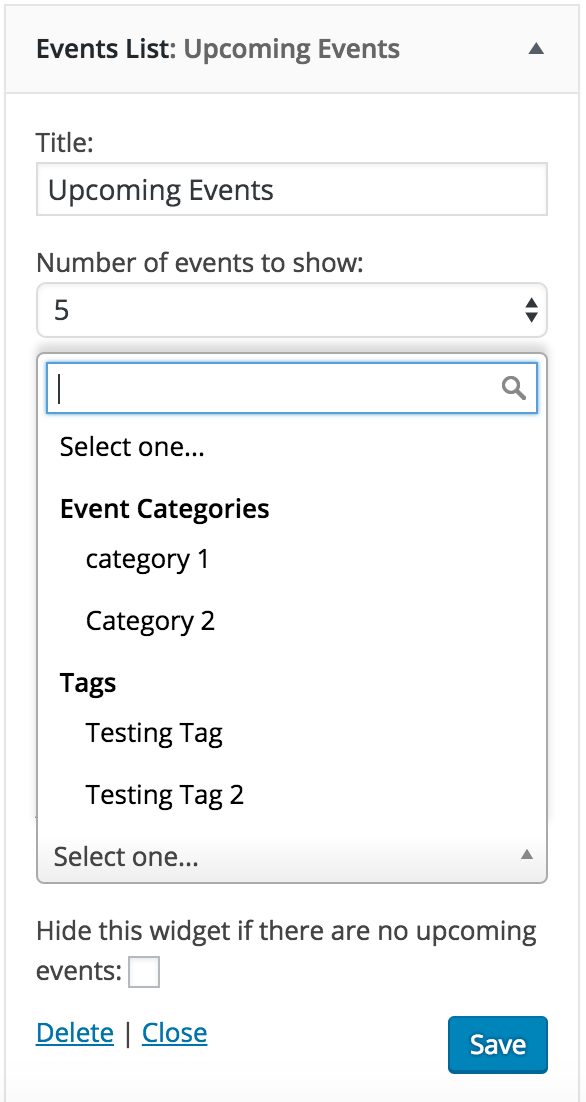
If I misunderstood you or you have any additional questions, please let me know and I’d be happy to help. Thank you again for reaching out and have a great rest of the day!
May 16, 2016 at 11:55 am in reply to: Way to have a Create Event Button on the Main Calendar Page? #1115069ModeratorHey David,
Thank you for posting and also choosing PRO! I’d love to help assist with this, but please note that theme/plugin support and customization requests extend beyond what we’re able to provide.
We don’t have a built-in setting which adds a button to add new events, but the best way to achieve what you need is by creating a custom template as outlined in our Themer’s Guide.
You could also add a button to your submit event form page under Events > Settings > Display > Advanced Template Settings.
If you need any more instruction or clarification, please feel free to respond with any questions you have. Thank you again for reaching out and enjoy the remainder of your day!
ModeratorHello and welcome back!
Check out this recent support thread from Brook and let me know if it helps remove the RSVP option.
To rename the WooCommerce label, try adding the following snippet to your theme’s functions.php file:
/**

 * Change WooCommerce tickets label

*/

function change_woo_label() { ?>
<script>
jQuery(document).ready( function ( ){
jQuery('input[value="Tribe__Tickets_Plus__Commerce__WooCommerce__Main"]').next().html('Ticket Sales');
});
</script>
<?php
}
add_action('wp_head', 'change_woo_label');Feel free to respond with any follow-up questions or comments. Thank you for reaching out and enjoy the rest of your day.
-
AuthorPosts