

Forum Replies Created
-
AuthorPosts
-
Hunter
ModeratorHi Andreas,
Glad to hear you’re on the right track and thank you for choosing us for your events calendar needs 🙂
I see you checked “Yes” to reverting to the default WP theme and deactivating all other plugins other than ours as recommended in our Testing for conflicts guide, but can you please confirm this?
I tested the issue you described on my local environment but was unable to do so. Report back with your findings and we’ll take it from there. Thank you again and welcome to the forums!
ModeratorHey Joe,
Welcome back and sorry to hear about the troubles. Thanks for the in-depth post and the testing results. Can you send over your System Information as a private reply?
As of right now, I don’t see any logged bug reports of users reporting similar issues. Additionally, I just tested on my local environment using the default Twenty Sixteen theme and only our plugins activated. I was able to switch views and maintain the filters I applied.
Can you create a completely new environment with the default WP theme and only our plugins installed and activated and see if you’re able to reproduce the issue if you haven’t already?
I look forward to your response and thanks for choosing PRO. Have a good rest of your day 🙂
May 16, 2016 at 11:07 am in reply to: Widget admin won't load when Events Calendar is activated. #1115027ModeratorHi and welcome back 🙂
Can you confirm that you have tested to see if the issue still occurs when reverting back to the default WP theme and deactivating all other plugins other than ours? I understand globaltwincities.com is uses our plugin and the same theme you are, but every development environment is different, so the first step will need to be reviewing our Testing for conflicts guide. Let me know your findings and we’ll go from there.
Have a good rest of your day and thanks for choosing PRO.
ModeratorWelcome back and thanks for the in-depth responses.
Any place you are using /upcoming/ in the URLs should be updated to /list/ – that won’t solve the basic problem of there being no events to show in some of those categories, but it will mean they basically point to the same place as you intended when you first set them up.
Also, if you take http://www.misspaule.com/events/category/adult-classes/list/ as an example – right now its empty, but we do set a
noindexmeta tag telling Google/other search engines not to index them.It would be possible to make them return a hard 404 if that’s what you really want, but that would really be custom development territory and beyond what we can help you with here on the forums.
Last but not least… /event/knitting-1000-1200/ seems to me to be a recurring event with no upcoming instances and it redirects to /event/knitting-1000-1200/all/. We do set a
noindexhere also.I do want to acknowledge the way that view behaves doesn’t suit everyone and that we’re reviewing possible ways to improve it. I’ve linked the report we currently have to this forum thread.
I hope this answers some of your questions and look forward to hearing back. Have a great remainder of your day.
ModeratorHi @kortis,
So sorry if my replies have frustrated you or caused any confusion!
What I hear you saying is that you have a number of events that show the Google Maps link when you do not want that link to show up. Is that correct?
If so, I want to clarify that The Events Calendar does not have a setting to hide those links or the location information in the calendar’s List View. If you have location or venue information on the event, then that link will display by default, as well as any location information. On the flip side, that link will not display if there is no location of venue information on the event. It’s an all-or-nothing sort of thing that the plugin automates without a specific setting.
Am I understanding the question correctly, or is there something I’m missing in there and you can help clarify that for me? That would help a lot.
Please let me know and we can go from there.
Thanks for your patience and understanding while we work on this together!
ModeratorHello and welcome back,
Glad to hear we’ve got it addressed 🙂
I’ll close this thread out but feel free to create a new one if anything else comes up. Have a good week!
ModeratorHi Jason,
Welcome back and thanks for the response.
There should be a previous and next events links on all event listing views (list, month, etc.) as apparent on our demo site. Do the navigation links appear when reverting back to the default theme and deactivating all other plugins other than ours?
Let me know your findings and we’ll go from there 🙂
ModeratorHi Kortris,
Thanks for replying. I understand your position on the matter when displaying the Google Map link. I recommend visiting our UserVoice Feature Ideas and submitting the idea if it hasn’t been already.
I would recommend right-clicking your mouse and opening “Inspect” to identify CSS classes so you can hide them via your theme’s style.css file. The other alternative is the template override as explained in our Themer’s Guide.
Unfortunately, this will be as much support as I can provide. Best of luck and have a great weekend 🙂
ModeratorHey Ken,
Welcome to the forums and thank you for reaching out 🙂
After some extensive testing and reaching out to my fellow support team members, we’ve concluded it is going to be less cumbersome to create multiple events rather than recurrence rules with different start dates.
I’m currently investigating the situation in greater detail, but for now I recommend creating separate events. Let me know if this works for the time being and thanks again for reaching out. Have a lovely upcoming weekend!
ModeratorHey William,
I also tested by doing adding <input type=”hidden” name=”MAX_FILE_SIZE” value=”4194304″ /> to the events/views/community/modules/image.php file but unfortunately don’t have much time to test why it’s not working.
Regardless, by altering the line you did, it appears to work for me as well. I can’t say whether it’s the best way, but it is working and I didn’t see any errors in my console so I’d go with it until you find a better route. Make sure you’ve saved it in your tribe-events folder that is inside your theme folder so it won’t be overridden when you update our plugin.
And yes, you do need to have the “modules” folder in order for the overrides to apply. I hope I’ve sufficiently answered your questions and thanks for the patience while we got to a resolution. Take care 🙂
ModeratorHey Joe,
Glad to hear everything is headed down the right track! Before I get to testing, does the issue still occur after reviewing our Testing for conflicts guide? Let me know how that goes and we’ll continue troubleshooting from there.
Thank you for reaching out and I look forward to getting this resolved with you. Have a good day 🙂
ModeratorHi Linda,
Thank you for posting and welcome back 🙂
I took a quick look at some of the Google search results and the screenshots provided and noticed the discrepancy you mentioned. What do you have for your End Date & Time setting for each events showing incorrect dates? Send over screenshots if possible and we’ll go from there. If you don’t mind, can you send over your System Information as a private reply?
Thanks again and have a good rest of the day.
ModeratorHello and thanks for the response,
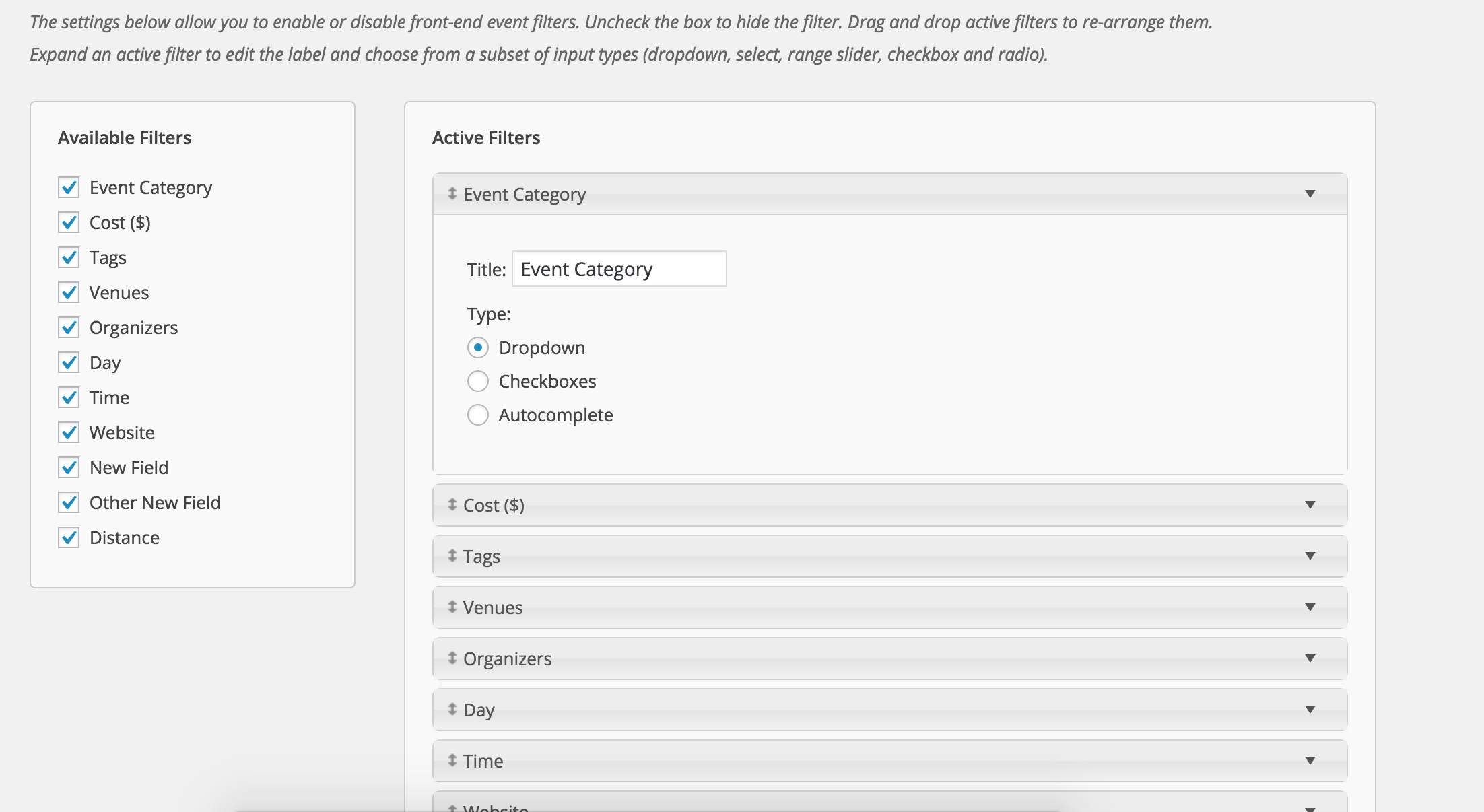
If you visit Events > Settings > Filters, you can set which field you’d like to display for organizers, venues, tags, etc. Let me know if this does the trick 🙂
 Moderator
Hello,
Thank you for sharing that information with me. As previously mentioned, hang tight while our developers work towards a resolution and keep an eye on your wp-admin and theeventscalendar.com for maintenance release information. Have a good weekend and thanks for choosing PRO 🙂
May 12, 2016 at 9:57 am in reply to: I've updated to 4.1.3, but calendar events are still out of order #1113878ModeratorHi and thanks for the response,
You mentioned it doesn’t appear to be a plugin issue after reviewing the Testing for conflicts guide, but did you check to see if the issue still occurs with the default theme activated and all other plugins deactivated?
There could be some lingering code altering the month view, but I think that’s unlikely. You may want to try a plugin like WP Sweep if you haven’t already to see if you can clean up any outdated info in your db.
Can you find any pattern of how the events are being “thrown off” when in month view? E.g. can you compare a few days of list view events to month view events and see any similarities across a span of time?
Thanks again for keeping me posted and I look forward to hearing back.
-
AuthorPosts