

Forum Replies Created
-
AuthorPosts
-
Hunter
ModeratorHi and welcome back,
I did some testing and can confirm that the featured venue shortcode is not restricting listed events to the featured venue as desired. With that said, I’ve logged a bug for the developers to reference.
You should see a solution in an upcoming maintenance release, so keep an eye on your wp-admin and theeventscalendar.com/blog for updates. I wish I had a concrete time to give you but that information is unfortunately unavailable to me.
Thank you for understanding and your patience while we work on a resolution. Have a good upcoming week and thanks for choosing PRO 🙂
ModeratorHey Patricia,
Sorry to hear about the invalid license key error. I compared the screenshot (which was removed to protect your license key) and it matched what we have in our records. If you haven’t already, check out our Finding and inputting your license key KB article to see if you possibly missed something.
Also, can you please confirm you’ve followed the steps outlined in our Testing for conflicts guide?
You may also want to contact your hosting company to see if they have any insight as to why your site is having troubles connecting to theeventscalendar.com during it’s attempt to confirm the license key.
Keep me informed and we’ll continue investigating. Thank you and have a good day!
ModeratorHey Mark,
Emails can be tricky, so my first recommendation would be to try a plugin like Easy WP SMTP and see if you can get the emails delivered properly.
Try that out and let me know how it goes. Thank you for reaching out and have a good one!
ModeratorHey Andrew,
I’d be happy to help out! Our Themer’s Guide is a great resource on how to create custom templates. If you have any specific questions, feel free to reply back and I’d be happy to assist where possible.
Thank you for choosing PRO for your events calendar needs and have a good rest of the day 🙂
ModeratorHey Andy,
Welcome to the forums and sorry to hear about the troubles.
The first step any time you’re experiencing an issue is to review our Testing for conflicts guide so we can rule out a theme and/or plugin.
Let me know what you discover and we’ll continue troubleshooting from there. Thank you for choosing PRO and have a good one!
ModeratorHi Kristie,
Thank you for choosing PRO and welcome to the support forums 🙂
I see you checked “Yes” to both reverting to the default WP theme and deactivating all other plugins as outlined in our Testing for conflicts guide, but can please confirm this? I did a quick check on a site I’ve got with over 400 venues and didn’t experience any speed/load issues on the venue dropdown when adding/editing an event.
I understand it’s only about one-third of the venues you have, but I just want to confirm you’re not working with a theme and/or plugin conflict. Additionally, we do have a KB article relating to the issue you’re experiencing. Take a look and let me know your findings from the Testing for conflicts guide. Also, send over your System Information as a private reply.
Thank you again and have a good rest of your day!
June 2, 2016 at 10:38 am in reply to: attendee info fields not showing up on event page nor checkout #1121746ModeratorHi Joanne,
Welcome to the support forums and sorry to hear about the conflict you’re experiencing. Unfortunately, we are limited on the amount of support we can provide in these instances.
I did a quick check of our known theme conflicts but don’t see anything pertaining to your problem. I did however find a logged report which aims to improve out-of-the-box compatibility between the Enfold theme and our plugins.
You may want to contact the theme authors to see if they have any insight on a resolution. The reason I say this is because they claim integration on their product page, so we’re not exactly tuned into what and how they’ve done to ensure the theme and plugins play nicely.
I hope this clears up any confusion and I’ll attach this thread to the logged report for the developers to reference. If you wouldn’t mind, please review our Testing for conflicts one more time and reply back with your findings. Include your System Information as a private reply too.
Thank you for reaching out and I apologize I wasn’t able to give you a clear solution. Best of luck and have a great upcoming weekend!
ModeratorHey Gerry,
Sorry to hear about the 404 errors. Those are never fun! I’d be happy to help you out 🙂
First step would be to review our Fixing HTTP 404 errors KB article. If that doesn’t work, reply back and we’ll continue investigating.
Thank you for reaching out and have a good rest of your day.
ModeratorGood to hear! I’ll close this thread but feel free to create a new one if you have any questions. Thanks again have a good upcoming weekend.
ModeratorHello and thank you for reaching out,
The recurring events functionality is available for Community Events. Can you see if the option displays after following our Testing for conflicts guide?
Reply back with your findings and we’ll take it from there. Thank you again and have a good day!
ModeratorHey Donna,
Thank you for choosing PRO and welcome to the forums. We are aware of the issue described and have a logged report aimed to address the error in an upcoming maintenance release. I’ve attached this thread to the mentioned report for the developers to reference while working on a resolution.
In the mean time, one of our support team members came up with a handy snippet you can add to the bottom of your theme’s functions.php file. Let me know if you have any additional questions and again, thanks for choosing PRO. Have a great Wednesday!
ModeratorWelcome back 🙂
We don’t have any logged bugs of users reporting similar errors at this time. Do you by chance have ‘Debug mode’ enabled under Events > Settings > General (see screenshot below).
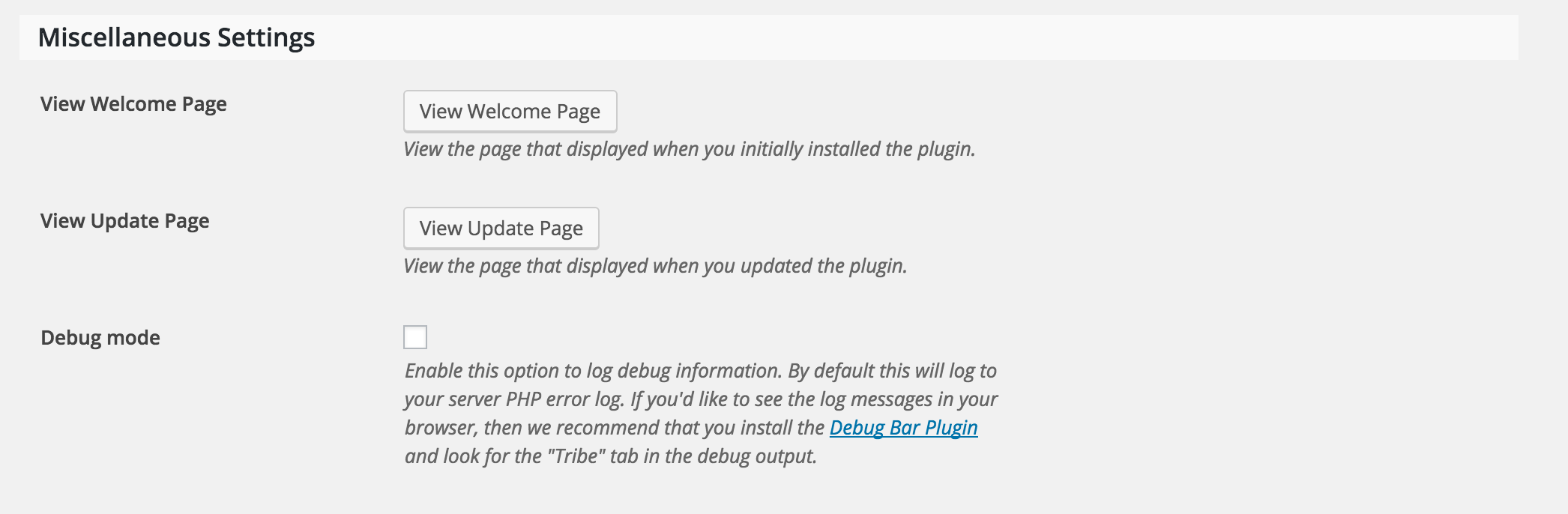
It appears those aren’t actually errors, rather just a debug log. Let me know if the notices subside after trying different ‘Debug mode’ settings and we’ll go from there. Thank you for reaching out and have a good rest of your Wednesday!
ModeratorThis reply is private.
ModeratorThank you for the responses,
I attempted to purchase 5 tickets with a new text fieldset added to the ticket (Name:) and all 5 names were saved properly. So, I’m on the same page in thinking these two issues are not related. Ryan – thanks again for the input!
Clair, can you save the fieldset giving you troubles and try using it on another event? Rest assured, once we can find the exact source of conflict and confirm a bug, we’ll prioritize it accordingly. Thank you again to the both of you for your patience and willingness to work with me on this.
Have a great rest of your Wednesday 🙂
ModeratorHey John,
Welcome back and sorry to hear about the troubles. Can you send over your System Information as a private reply?
Also, include more detail about your problem and if possible, include screenshots. Thank you for reaching out and have a good rest of the day.
-
AuthorPosts