

Forum Replies Created
-
AuthorPosts
-
Hunter
ModeratorGlad to hear you’ve got it figured out! I’ll close this thread out but please open a new one if you have any more questions. Thank you and have a good week!
May 31, 2016 at 8:15 pm in reply to: Private Events scheduled to publish in the future appear immediately #1121018ModeratorWelcome back,
I’ve tested with multiple roles and it appears to be hidden until I log in as an administrator. Let me know your findings. As of right now, it appears you are experiencing a theme and/or plugin conflict as I’m unable to reproduce the issue.
Good luck and thanks for the response.
ModeratorHey and welcome back,
I tested how you described and indeed, no error was displayed after I deleted the start date from the event submission form. It turns out the datepicker fields are exceptions and that’s because the datepicker code tries to ensure they are populated with a value (defaulting to today’s date) as soon as the form is submitted. We’ll update the knowledgebase post, but I’m afraid working around this would be a customization you’d need to drive forward by yourself._
I wish I had a better answer, but one other recommendation I have would be to check out this list of available developers for hire. Good luck and thank you for your understanding.
ModeratorNice 🙂
Happy to hear you’re on the right track! I’ll close this thread out but feel free to create a new one if anything else comes up. Thank you and have a wonderful week!
ModeratorWelcome back,
Hope you had a good weekend! I hate to be the bearer of bad news, but I don’t see anything obvious that I can assist with after looking at the provided code :-/
One recommendation I have would be to check out this list of available developers for hire. Again, I wish I could have been able to help more and good luck with the customizations.
May 30, 2016 at 10:48 am in reply to: Private Events scheduled to publish in the future appear immediately #1120426ModeratorHello,
I did more investigating and created a new test event, this time with the event starts and ends on the same day – but I had the same results as before. I also checked the logged bug reports one more time but am still unable to find anything.
With that said, there is not much more I can do unless we start seeing more users reporting similar issues and can confirm through our own testing. I apologize I was unable to reproduce the issue but I will keep an eye on the queue for related issues and I find anything, we’ll log a bug and start working towards a resolution.
Thank you for the patience and take care.
ModeratorHey Ryan
Thank you for the input. I’ll use that information to see if I can track down any more helpful information 🙂
ModeratorWelcome back,
As long as you have your changes saved as custom templates inside your theme folder, you should be good. Just be sure to check the changelogs to see if the templates you’ve overwritten have potentially changed.
Glad to hear the issue is resolved. I’ll close this thread out but feel free to open a new one if anything else comes up 🙂
ModeratorWelcome back and thank you for the in-depth responses.
Can you provide more information and screenshots if possible of the Ticket Fieldset on the problem event? Let me know and I’ll continue testing.
At this point, I’m able to add 5 or more ‘Text’ Ticket Fieldsets and they save properly. I altered the ‘Text’ Ticket Fieldset after going through a purchase and did experience the same loss of data you did as mentioned in this thread: https://theeventscalendar.com/support/forums/topic/attendee-data-wiped-when-global-ticket-fieldsets-are-updated/
I don’t believe the two issues are related at this point, but respond back and we’ll take it from there. Thank you again and have a good weekend.
ModeratorThanks for the response,
Can you visit Events > Settings > Display and change the ‘Default view’ setting to different options and visit your main /events page in between testing each view?
My second recommendation would be to try changing the Events URL slug in Events > Settings > General from /events to something different just in case this is somehow corrupted by the old plugin.
Be to visit your WordPress Settings > Permalinks and hit the ‘Save Changes’ button after doing any of the recommended steps, then visit your /events page to see if it’s working properly.
Other than that, there isn’t much more support I can provide as it appears you’re experiencing a theme and/or plugin conflict which we’re unable to cover per forum rules. Thank you for understanding and best of luck narrowing down the conflict.
ModeratorThanks for the response,
I understand the majority of the filters do work ‘out-of-the-box’, so the start date field should work as it’s not mentioned in the fields that can’t be marked as required; but the customization you’re seeking is beyond simply marking the start date as “required”.
Please send over that gist as mentioned in my previous response and we’d be glad to take a look. Thanks and let me know if anything I’ve said needs clarity. Have a good weekend 🙂
ModeratorHey Noah,
If you would like users submitting events to have the option of adding RSVPs, then you’d need Community Tickets and Event Tickets Plus.
Another option would be to add RSVP functionality to an event that was submitted via the Community Events submit event page.
Let me know if this clears up any confusion and thanks for choosing Community Events!
ModeratorFirst and foremost, welcome to the forums and thank you for choosing PRO!
The way you can achieve what you need would be to do a template override as explained in our Themer’s Guide. Basically, you’ll be copy/pasting the contents of files you want to edit and saving them in a folder named tribe-events which you’ll create and save inside your theme folder.
If you need any specific instructions, such as where certain code/files reside, please feel free to respond and I’d be happy to provide more assistance. Again, we truly appreciate you choosing PRO for your events calendar needs and have a good rest of the day!
ModeratorWelcome back 🙂
If you have a value entered in the event’s ‘Cost‘ field (see screenshot below), the price will display in the list view as shown in your screenshot. Can you temporarily deactivate all plugins other than The Events Calendar and The Events Calendar PRO, visit the ‘Industrial Rope Access Training – London’ edit event page, scroll down to ‘Cost’ and remove the ‘700’ value?
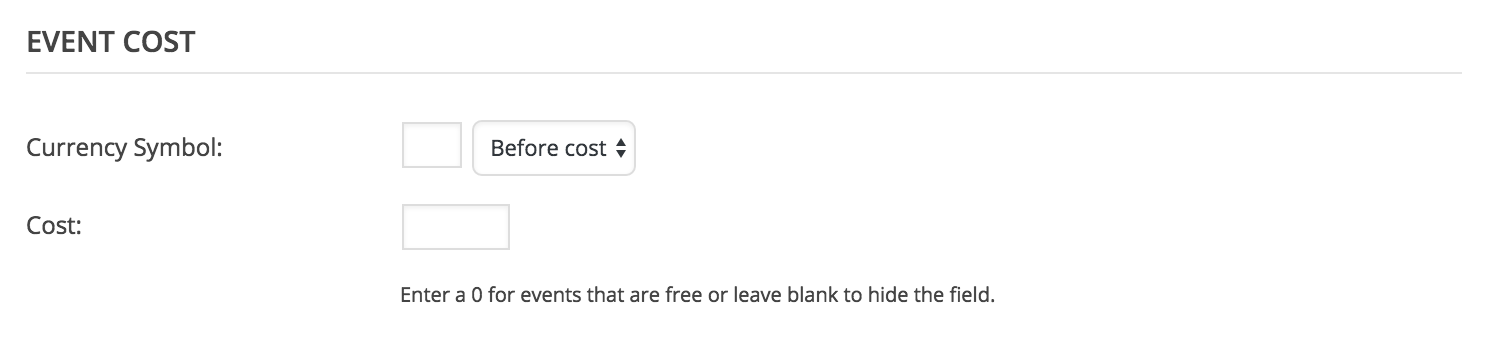
Reactivate your ticketing plugins and visit the list view to see if the price still displays. Let me know how it goes for you.
ModeratorHi and welcome back,
If you haven’t already, explore the Date Format Settings found under Events > Settings > Display. Other than that, there isn’t much I can do to recommend other than digging through our Technical Docs section to see if you can come up with a proper filter or need be, we’ve got a great list of developers available for hire.
I understand this isn’t exactly the answer you’re looking for but per support guidelines, these types of requests extend beyond what we’re able to cover. Thank you for understanding and good luck with the project.
-
AuthorPosts