

Forum Replies Created
-
AuthorPosts
-
Hunter
ModeratorHey Robert,
We have a logged bug of users reporting similar issues, so we’re currently working on a fix which will more than likely be available in the next maintenance release. In the mean time, you can download previous versions of PRO here and TEC here. You’ll also need to do the updates manually.
I’ve attached this thread to the logged bug for the developers to reference, so thank you ahead of time for providing your System Information with your initial post. Have a great weekend and thank you for the patience while we get this bug addressed.
Cheers!
ModeratorHey Kylan,
Thank you for reaching out. If you need help getting the plugin setup and going, our New User Primer is a great resource. Additionally, we are always here to help answer any questions you may have!
If you would still like to proceed with a refund, you can visit our Refund policy page and complete the form on that page. Let me know if this helps and if you have any additional questions or concerns. Take care and have a great weekend!
ModeratorAlso, can you please send over the license key you’re attempting to input and save as a private reply? Thanks!
ModeratorHey Patricia,
Sorry to hear about the troubles. If you need a refresher, please refer to our Finding and inputting your license key guide.
Additionally, can you please hit the ‘Save Changes‘ button after entering your license key and send a screenshot of the success/error message it gives you?
Thanks again and I look forward to your response. Have a great weekend!
ModeratorHey Heather,
Your responses have me cracking up over here! And I think you only need a bachelor’s degree for this 😉
Lol thank you for keeping it light-hearted as it makes it much more enjoyable to work through these issues compared to the alternative!
We are unfortunately not able to log into customer sites. With that said, I know these things are difficult, but GoDaddy customer support may be able to help assist/guide with editing the line on your wp.config.php file from:
define('WP_DEBUG', true);to:
define('WP_DEBUG', false);Notice the difference of ‘true’ and ‘false’ between the two. If not, check out this YouTube video on the GoDaddy file manager. You’ll need to track down wp.config.php file which will more than likely be in your ‘public_html‘ folder in your file manager.
If that’s still too daunting a task, try downgrading to versions 4.1.4. as a temporary fix. You can download previous versions of PRO here and TEC here. You’ll also need to do the updates manually.
Again, thank you for being so cool about the situation as I understand it’s far from ideal. Keep me updated on your progress and if anything I’ve said needs more clarity, feel free to ask. Have a great Friday and enjoy the weekend.
Cheers!
ModeratorHi and sorry for the misunderstanding,
I do notice the difference but am not sure as to why the tooltips are displaying different image sizes. The Avada theme has made customizations beyond what we’re able to support, so it may be a question worth asking the Avada authors.
Would you mind reverting back to the default WP theme and deactivating all other plugins as recommended in our Testing for conflicts guide to see if it is in fact being caused by the theme? One last idea I have would be to alter the size of the tooltip image size to ‘full’ with this snippet.
Again, my apologies for leading you down the wrong road and I hope this answer has helped address the question. Take care and enjoy your weekend.
Cheers!
ModeratorHi Monica,
Thank you for the response. We don’t have a setting in PRO which allows you to display events on your homepage. You could check out our list of shortcodes for our widgets that can display events.
They do not include a feature image, but our Horizontal list widget can get you going in the right direction. To avoid losing customizations, refer to our Themer’s Guide 🙂
Best of luck and thanks for choosing PRO. Have a good weekend.
Cheers!ModeratorHey Juan,
Thanks for the update. Can you please review our Testing for conflicts guide to see if you’re experiencing a theme and/or plugin conflict?
Let me know if the Additional Information fields shows back up. Thank you again and have a great weekend!
ModeratorHey Katie,
Sweet! Thank you so much for letting me know everything worked out 🙂
I’ll close this thread out but feel free to create a new one if you have any more questions or comments. Take care!
ModeratorHello and welcome back 🙂
I understand your hesitation at not wanting to mess with the settings until we can get a fix out for the current issues, so no worries there!
“Heavily modified” can definitely be taken a few directions, but essentially any custom code nullifies our ability to support these types of issues. I wish things were different, but we aren’t able to take on that type of role at this time.
Without having the ability to look the back-end of your site (which we’re also unable to do at this time), there is not much support I can offer here :-/
We do have a list of developers available for hire should you run out of ideas on how to remedy the situation. I wish I had a better answer but again, we’re pretty limited on theme/plugin conflicts. Thanks for understanding and have a good upcoming weekend.
Cheers!
ModeratorHey Katja,
My apologies for misunderstanding the first time around! I believe this article will be of assistance to you 🙂 Again, let me know if it helps answer your image question.
To edit the tooltip excerpt length, navigate to the /the-events-calendar/src/functions/template-tags/general.php file and open it within your preferred text editor.
Scroll down to line #1370 within that file. It should look like:
$excerpt_length = apply_filters( 'excerpt_length', 55 );Change the “55” to whatever you’d like. Let me know how this goes and have a good rest of your day!
ModeratorThis reply is private.
ModeratorWelcome back,
Correct me if I’m wrong, but you’d like the events to show up in your news feed based on their post date rather than the event start date? If so, we have a snippet which can be added to your theme’s functions.php file that will do just that. Try it out and let me know how it goes.
If I’m misunderstanding you, my apologies! If that’s the case, feel free to respond in greater detail and provide screenshots if possible. Thanks for the response and take care.
Cheers!June 16, 2016 at 10:55 am in reply to: Calendar Widget causing significant slow page loads. #1128036ModeratorHey Todd,
Thank you for the response, though I’m admittedly a bit confused by the first paragraph. As previously stated, we don’t have any logged bugs of users reporting similar issues of slow load times when using the mini calendar widget.
I took a quick look at the list of plugins you’re currently using and it appears you’re not utilizing a caching plugin. Additionally, if you’re on a shared hosting environment, your speeds are going to be limited compared to a dedicated server or VPS, for example.
If you haven’t already, I invite you to read the KB article pertaining to performance when using our plugins. We do have many users with tens of thousands of events hosted on their sites, so it is possible, but speeds are determined by many factors unrelated to our plugin.
I hope this clarifies any questions you may have and please let me know if you need further assistance. Thanks again and take care!
ModeratorHey Juan,
Thank you for getting back to me. It looks like you don’t anything set for your ‘Shop‘ and ‘Cart‘ pages. What you’ll need to do is visit WooCommerce > Settings > Tools and navigate down to the ‘Install WooCommerce Pages‘ option and hit the ‘Install pages‘ button (see screenshot below).

Once you do that, check WooCommerce > System Status and check to see if the ‘WC Pages‘ notices are green like they are in the screenshot I provided in my previous response. You may need to navigate to WooCommerce Settings > Checkout and scroll down to ‘Checkout Pages‘ and set the dropdown to the correct pages (see screenshot below).
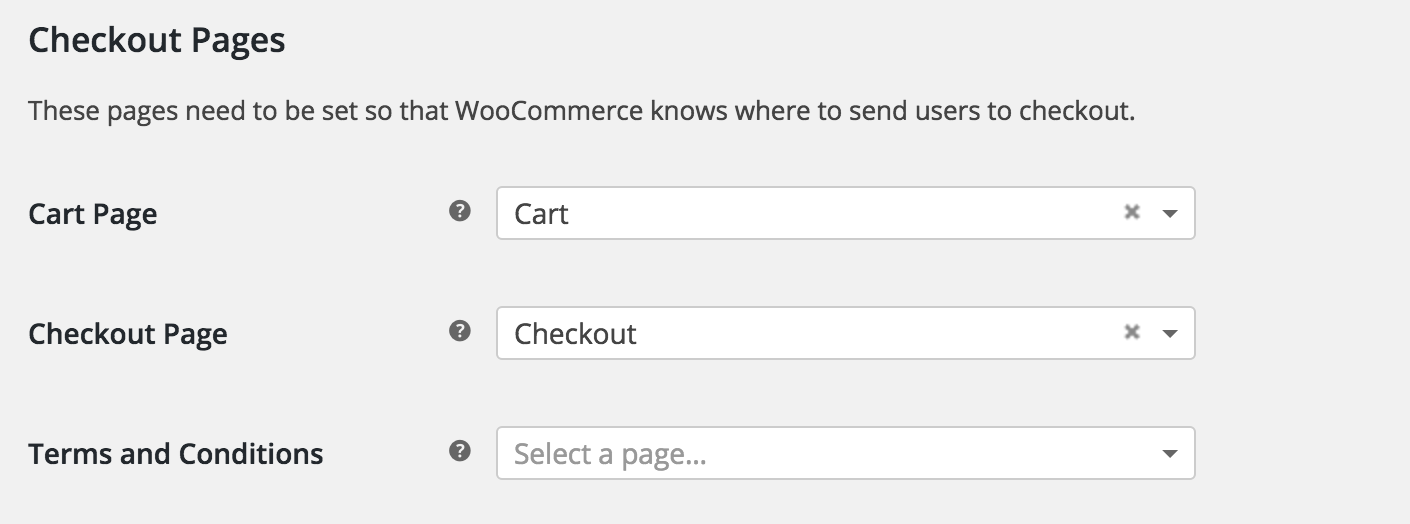
Let me know how that goes and we’ll take it from there. Thanks again.
Cheers! -
AuthorPosts