

Forum Replies Created
-
AuthorPosts
-
Hunter
ModeratorHey Joanna,
Thank you for reaching out and sorry to hear about the issues.
We’ve got a logged bug in regards to the ‘json_ld’ warnings you’re seeing, so I’ve added this thread to the report for the developers to reference while working towards a resolution. It should be out in the next maintenance release. In the mean time, you can either downgrade to version 4.1.4 or replace ‘define(‘WP_DEBUG’, false);’ in your wp-config.php file with this:
ini_set(‘log_errors’,’On’);

ini_set(‘display_errors’,’Off’);

ini_set(‘error_reporting’, E_ALL );

define(‘WP_DEBUG’, false);

define(‘WP_DEBUG_LOG’, true);

define(‘WP_DEBUG_DISPLAY’, false);
Should you choose to revert back to version 4.1.4 until we can get a fix, you can download prior versions of TEC here: https://wordpress.org/plugins/the-events-calendar/developers/
Previous versions of PRO can be downloaded here: https://theeventscalendar.com/my-account/downloads/
You’ll also need to update manually, instructions can be found here: https://theeventscalendar.com/knowledgebase/manual-updates/
In response to your second question, would you mind sending over a screenshot of the recurrence rules for an event that is showing signs of the issue? Additionally, what happens if you create a new event with the same recurring rules you have set up? Lastly, are you able to check your database to see if the events have been created, but for some reason aren’t displaying?
Thank you again and I look forward to resolving this with you. Have a good day!
ModeratorHey Carlos,
Welcome back 🙂
Can you send over a screenshot of where you’re referring to? More specifically:
You have 1 Ticket for this <EVENT>. View your Tickets
At this time, we don’t have a place for users to view their order/ticket, they’re simply sent via email. I look forward to your response and thanks for reaching out.
Cheers!
ModeratorHello and happy Wednesday 🙂
I’d be more than happy to help figure this out as I wouldn’t want to edit all those fieldsets by hand either! Before I get to testing, would you mind running through the Testing for conflicts guide and also sending over your System Information as a private reply?
In the mean time, I’ll test the issue out on my local environment and check our logged bug reports and I’ll keep you in the loop on my findings once I’ve got that info back from you. Thank you for choosing us for your event & ticketing needs and have a good rest of your day.
Cheers!
ModeratorHey Todd,
Welcome back and I’m sorry to hear about the slow load times :-/
I like to start these types of questions off by checking our report of logged bugs and feature ideas. I didn’t see anything pertaining to load time issues when using the calendar widget which leads me to believe you may be experiencing a theme and/or plugin conflict. Have you reviewed our Testing for conflicts guide to see if that might be the case?
The amount of events may have something to do with performance, but a lot of that depends on your hosting environment and again, themes and/or other plugins. We have a Knowledgebase article geared towards addressing questions often asked in regards to site performance.
Let me know how the testing goes and have a good rest of the day.
Cheers!ModeratorHello,
We have a Knowledgebase article geared towards explaining how our plugin uses featured images and how to make changes through either template overrides or filters. Let me know if the information helps answer your question 🙂
Cheers!
ModeratorThis reply is private.
ModeratorYou nailed it right on the head! I appreciate your response and as previously mentioned, be prepared for the maintenance release as it’s almost finished and will be shipped out soon. Take care 🙂
ModeratorHi Katie,
Sorry to hear it’s not working out. I used the ‘Inspect’ tool on your website and it is using the same ‘.screen-reader-text’ class as the CSS snippet provided above. You may want to try contacting your theme author to see if they have any insight as to why your theme’s style sheet isn’t picking up the CSS code.
I did a quick check and based on your theme, it appears the theme author has included a section to include custom styling (screenshot taken from your theme’s Themeforest description page).

Try adding that ‘.screen-reader-text’ snippet there and let me know if it works. Thanks for keeping me updated and have a good Wednesday.
@Oliver… SWEET! Glad to hear it worked for you and thank you for letting us know!
Cheers!
ModeratorThis reply is private.
ModeratorThank you for sending that over 🙂
To delete/modify any field on the RSVP section, you’ll need to do a template overwrite as explained in our Themer’s Guide. The specific file you’ll need to overwrite is /event-tickets/src/views/tickets/rsvp.php. If you need any specific instructions or get confused along the way, don’t hesitate to reach out.
Thanks for choosing PRO and have a good week.
Cheers!ModeratorForgive me for not answering this question in my first response:
Can you please tell me which pages should I set for cart and payment on the Woocommerce settings?
If you visit WooCommerce > System Status and scroll down to ‘WC Pages‘ – do you currently have any pages created/set? See screenshot below for how it should appear if you used the default WooCommerce page structure.

Let me know if this helps and if possible, send over a screenshot of your System Status ‘WC Pages’ settings and I’d be happy to take a closer look!
ModeratorHey Juan!
Thank you for choosing Event Tickets Plus and sorry to hear about the troubles! In these instances, we typically ask that you review our Testing for conflicts guide to see if we can identify the source(s) of conflict. Let me know what you find and we’ll continue investigating.
Again, thanks for choosing us for your event ticket needs and have a good rest of your day!
ModeratorHey Patti!
First off, I’d like to thank you for testing so thoroughly! You skipped right past where we typically ask users to start and went right for it! So thank you for that 🙂
We unfortunately have a logged bug of users reporting similar issues in regards to the settings not being saved. It is being worked on as we speak and is set to come out in an upcoming maintenance release. I know it’s a top priority, so I imagine it will be out in the next release.
For now, you can download to version 4.1.3 of the core plugin here: https://wordpress.org/plugins/the-events-calendar/developers/
Version 4.1.3 of PRO can be downloaded here: https://theeventscalendar.com/my-account/downloads/
And follow these steps to manually update the plugin: https://theeventscalendar.com/knowledgebase/manual-updates/
In regards to your second issue, again, we have a logged bug about the Photo view display problems. Luckily, we’ve got a quick CSS snippet that can alleviate the issue until we can get it addressed. Try adding the following CSS snippet to your theme’s style.css file:
.tribe-events-list-photo-description.tribe-events-content {

    width: 100%;

}
I’ve attached this thread to the logged reports for the developers to reference. Hang tight and keep an eye on your wp-admin and theeventscalendar.com/blog for update information. Let me know how it goes and thanks again for everything.
Cheers!
ModeratorHey Jonas,
What you are attempting to achieve is not actually possible at this time :-/ You will need to create 10 individual events and new tickets for each event. We are still working on improving how our plugins handle tickets for recurring events, but for the time being, this is the best route to accomplish what you need.
If you have any more questions or need any more assistance, please feel free to respond.
Cheers!ModeratorHey Monica,
Welcome to the PRO support forums 🙂
If you check under Events > Settings > General, you should see the ‘Include events in main blog loop‘ option (see screenshot below). Try checking that and see if your events display in your news feed. I believe you’ll need another plugin to mesh the event categories and your WordPress post categories.

To enable Photo view, visit Events > Settings > Display and make sure the ‘Photo’ checkbox is checked (see screenshot below).
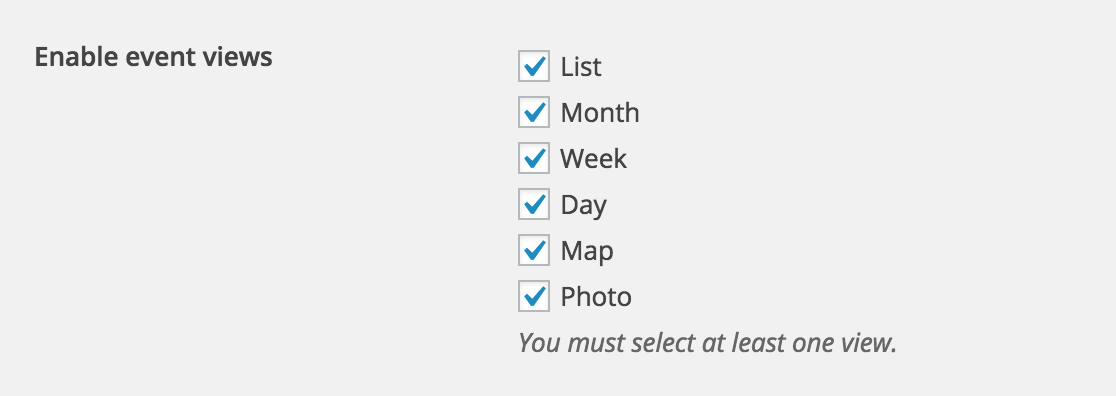
I hope my answers suffice and please feel free to respond if anything needs clarification or if you have any follow-up questions.
Cheers!
-
AuthorPosts