

Forum Replies Created
-
AuthorPosts
-
Hunter
ModeratorThis reply is private.
July 9, 2016 at 2:47 pm in reply to: When setting recurring events, ECP populates many copies of same event date #1137842ModeratorHey Charles,
Thank you for providing the System Information with your post! Can you also send over the ‘Time & Date‘ rules you’ve got set for the event(s) that are giving you troubles? Does the issue occur with both the default WP theme active and only our plugins active as outlined in our Testing for conflicts guide? Lastly, does the issue occur with all recurring events? A couple? If only a couple, can you provide links to those events?
Thanks again and I look forward to your response. Have a great weekend.
Cheers!ModeratorHey @austen,
Sorry to hear about the issue! I unfortunately cannot recreate issues with recurring events as you describe, but I’d be happy to investigate this so that we can see what’s going on.
To help us investigate, can you do the following things?
1. Please share a screenshot of the complete ‘Time & Date‘ section of the problematic event on its edit screen. This is the section of the edit-event screen where the recurrence information is located.
2. Can you confirm if this issue only seems to affect a certain recurring event, or certain recurring events? Or does it seemingly affect ALL recurring events? If only one event or a few, can you share links to these specific events on your site?
3. Last, but certainly not least, can you post your complete, un-edited System Information as a private reply?
I look forward to your response and have a good day.
Cheers!ModeratorHi Astrid,
Welcome to the support forums and thanks for choosing PRO! I’d also like to thank you for your well-written post, praises about our product, and the constructive criticism 🙂
From what I’ve gathered, we have the feature allowing you to insert the main events calendar on any page with a shortcode planned in an upcoming feature release. I can’t give you an exact timeframe on when it will come out, but it is on our roadmap!
In response to the issue you’re experiencing, we try our very best to build and design our plugins so they’ll jive with every theme and plugin, but it’s essentially impossible. With different code/features/functions going on, the chance for conflict is high and ultimately it comes down to the site owner/manager to resolve issues and come up with viable solutions to necessary customizations.
If trying different options included under Events > Settings > Display doesn’t do the trick, then creating the custom template via the Themer’s Guide is probably your best bet to achieve what you need/want.
I know this isn’t the most ideal answer but at this time, it is the situation we’re in. Also – I took a quick look at your site and I didn’t see anything that looked too “off”. Please feel free to respond with any feedback and if you’d like, provide screenshots of the exact issues you need help with and maybe I can provide some CSS that will help.
Take care, enjoy your weekend, and thanks again for choosing PRO.
Cheers!ModeratorHi Amy,
Welcome back!
The post type for events is ‘tribe_events‘. Try it out and see if that works. Have a good weekend!
ModeratorAwwww! Thank you so much for the kind words. It really means a lot to us! Satisfying our customers is the entire point of our existence 🙂
Thanks again and I’ll be sure to keep an eye on the queue for any new threads from you down the road. Enjoy your weekend and thanks for being amazing!
ModeratorHi @Amy,
The code refers to the image size rather than the page size. Try it out and if it doesn’t work out, feel free to create a new thread and we’d be happy to take a closer look. I’ll close this thread out once Fred gets back to you with an answer 🙂
@Fred, thank you for letting me know your question has been answered! Feel free to open a new thread if you have any more questions. Take care to the both of you!
ModeratorWelcome back,
Thank you for the update and I’m glad to hear we’re on the right track. To add the ‘Sold out’ notice to month view, you’ll need to do a custom template override as outlined in our Themer’s Guide.
The file you’ll need to overwrite is /the-events-calendar/src/views/month/single-event.php. Save it with the following structure to avoid losing customizations when updating: [your-theme]/tribe-events/month/single-event.php.
Add the following code wherever you’d like, we recommend on line 197:
<?php if ( tribe_events_has_soldout() ): ?>

    <span class="tickets-sold-out">

        Sold out!

    </span>

<?php endif ?>
Let me know how it goes 🙂
July 8, 2016 at 12:14 pm in reply to: Events URL is redirecting to a single event when Month View is default #1137492ModeratorThank you for the update. I’ll close the thread out but feel free to create a new one should anything else come up. Have a great weekend!
ModeratorHi Karen,
You mentioned a CDN – does the issue still occur with the default WP theme active, only our plugins active, and the CDN temporarily disabled? I hate to be the bearer of bad news, but considering I’m unable to reproduce the issue and we have no reports of users experiencing similar problems, this is more than likely going to have to be solved on your end. If you’ve exhausted all resources, we’ve got a list of customizers that might be able to help out.
I understand this isn’t the ideal answer and situation but unfortunately we’re limited on the amount of support we’re able to provide. I encourage you to set up a test environment to see if you’re able to reproduce the issue. Thank you for your understanding and enjoy the upcoming weekend!
July 8, 2016 at 11:56 am in reply to: Change Woocommerce Label in Community Event Submission Form #1137477ModeratorHey Carlas,
Thanks for the response. Try adding the following code to your theme’s functions.php file. Let me know how it works and if you have any more questions 🙂
/**

 * Change WooCommerce tickets label

*/

function change_woo_label() { ?>
<script>
jQuery(document).ready( function ( ){
jQuery('input[value="Tribe__Tickets_Plus__Commerce__WooCommerce__Main"]').next().html('Sell Tickets');
});
</script>
<?php
}
add_action('wp_head', 'change_woo_label');ModeratorHello and welcome back,
Thank you for providing the screenshot. Can you check to see if you have the ‘Map’ view enabled under Events > Settings > Display? (see screenshot below)

If not, try checking that box and refresh your events page. It should be giving you the option to view the ‘Map’ view. Keep me updated and have a good Friday!
ModeratorHi Marlies,
Thanks for the response 🙂
There is not a problem with the recurring events that have an end date.
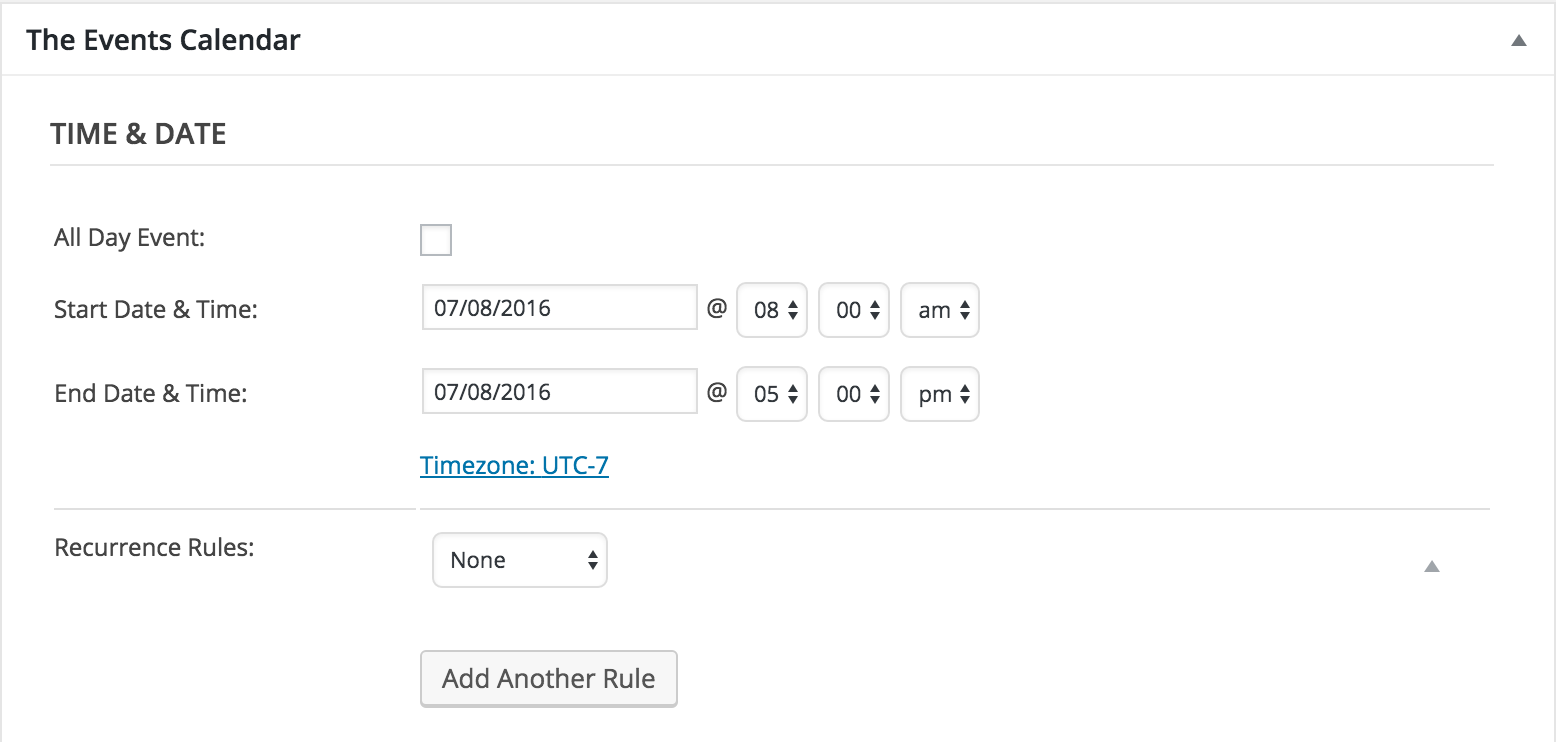
This is definitely useful information! Glad to see we’re headed in the right direction. It appears the entire System Information didn’t come over. Can you try sending everything included as a private reply? Additionally, please send over screenshots of the ‘Time & Date’ section of the event that is giving you troubles. (see screenshot below)
 Moderator
Hi @Charles,
Thank you for providing you experience on the matter. If you’d like support on your issue, please feel free to create a new thread and we’d be happy to help out. Thanks again!
ModeratorHey Daniel,
Sorry for any confusion. The API you’ll want to create is ‘Google Maps JavaScript API‘ – the third one down. I’d like to point out that this might not have any impact on the fact that your Search bar isn’t working. Is it possible you can set up a test site and try recreating the problem? As I’ve said a few times, I’m still unable to reproduce the error and we don’t have any logged bugs, so it’s more than likely a theme/plugin conflict.
Thanks for keeping me updated and enjoy your day 🙂
-
AuthorPosts