

Forum Replies Created
-
AuthorPosts
-
Hunter
ModeratorHi Hugues,
Thank you for reaching out! We are unfortunately unable to provide support through our Pre-Sales forum channel, but you can head over to The Events Calendar WordPress.org support forums for assistance and answers.
If you have a PRO license, you can log into your account and get assistance through the PRO forums.
Thanks for understanding and good luck resolving your issue. Have a good day!
ModeratorHey Karen,
I talked with our developers and they said it’s more than likely related to your theme and/or another plugin. As you stated, the same issue isn’t occurring on your testing site, so it’s got something to do with your hosting environment, theme/plugins, CDN, etc. Without the ability to replicate the issue, I can’t troubleshoot :-/
If you search around, you’ll find there are essentially zero other support threads relating to your issue. So this is an even bigger indication it’s an isolated incident.
If you need help exporting your events, I’d be happy to help provide the most effective way of doing so. Let me know and I’ll reply back with instructions.
ModeratorThis reply is private.
ModeratorHello and thanks for sending that over 🙂
We just released a maintenance release update which aimed to fix the recurring events running amok! Update to version 4.2.2.1 of PRO and if you’re still experiencing issues, let me know and we’ll continue troubleshooting.
Thanks for your patience while we got to addressing the issue and have a great Monday!
July 11, 2016 at 12:03 pm in reply to: Embed conflict with videos on GravityForm and GravityView #1138286ModeratorHi Robyn,
I’m not 100% certain it still works, but Event Rocket did have a feature that basically wipes any trace of our plugin, including events, venues, organizers, and information stored in the database. If that doesn’t work, you might want to look at a plugin such as WP Clean Up.
I’m sorry you’re having to go this route :-/ I’m not really sure as to why the embeds are still displaying events and the other issues have popped up. In regards to the 404 error, try refreshing your permalinks by visiting Settings > Permalinks and hit the ‘Save Changes‘ button and visit your week view to see if it is working. For the list view style issue, try visiting Events > Settings > Display and try different options found there.
Keep me updated with your progress and have a great Monday!
ModeratorKaren,
I really wish I had an answer for you, but I’ve diligently researched your issue and cannot find any similar instances of the errors you’re providing. I’ve also kept an eye on the logged bug reports, but nothing relative has shown up.
You can “hide” the tooltips from showing with the following CSS:
.tribe-events-tooltip {
display: none !important;
}Let me know if that CSS helps and have a good day. Thanks again 🙂
ModeratorHi Ingrid,
It appears the redirect is still in place. At this point, the best advice I can offer would be to watch this YouTube Video on how to identify CSS classes/IDs and make changes via your theme’s style.css file.
We do our best to build our plugins to play nicely with themes and plugins, but there’s only so much we can do. If you aren’t able to get the changes you need by visiting Events > Settings > Display and trying different options there, you might have to do a bit of custom CSS work. Our Themer’s Guide is useful if you need to create/save custom templates.
I wish I could help more but these issues/requests will need to be handled by you as stated in the forum guidelines. Thank you for your understanding and good luck with everything.
ModeratorHey Daniel,
My apologies if I came off rude in any way. It was not my intention whatsoever. Can you confirm the issue occurs with only our plugins and the default WP theme active? We are able to help troubleshoot bugs occurring when your site is in this state, but once a custom theme and/or another plugin is activated, we are no longer able to continue troubleshooting.
Without having the ability to log into your site, I’m limited on how much information I have in regards to the issue, so therefore I’m limited on the level of support I’m able to provide. Again, I hope this clears up any confusion and take care!
July 11, 2016 at 11:27 am in reply to: Change Woocommerce Label in Community Event Submission Form #1138265ModeratorHey Carlas,
Thank you for sending that over. It looks like you should be able to drop the code I provided at the bottom of your functions.php file. The best way for you to test would be using a text editor so you’re able to undo changes that cause your site to “crash”. You might also want to contact your theme author to see if they have a better idea of where to insert the code.
Let me know how it goes and have a good Monday!
ModeratorYippee! I’ll close the thread out but go ahead and create a new one if you have any more questions or comments. Enjoy your weekend!
ModeratorThis reply is private.
ModeratorHi Astrid,
Thanks for the update and also sending over the screenshot. I took a look but I’m really not sure where that dot is coming from. It appears there is there is a ‘list’ (Example:
) somewhere in your events template (see screenshot below). The dots you see are an example of ‘list-style-type’ CSS:
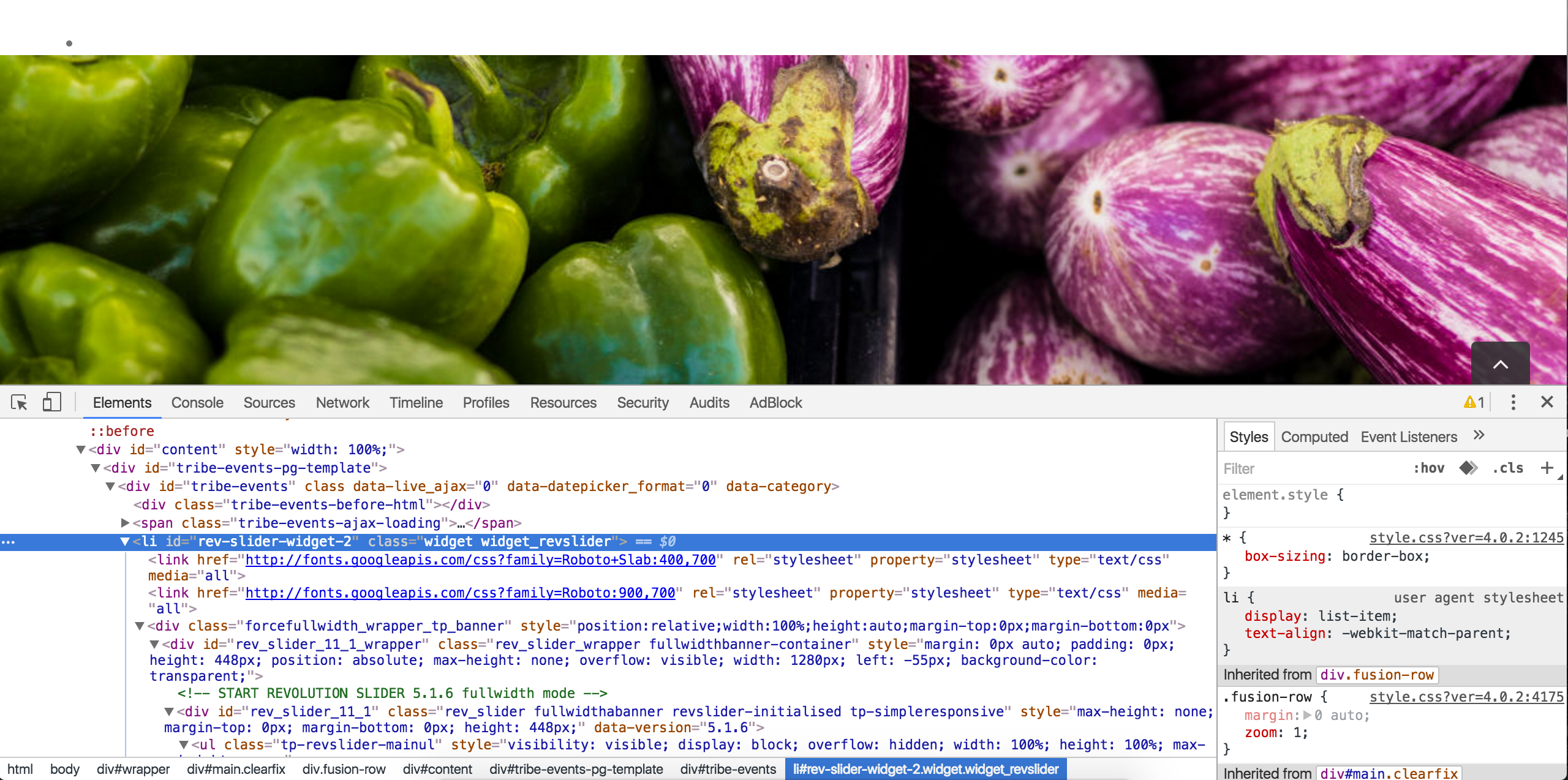
This is unfortunately something that you’re need to going to handle. Without having access to your site (which we’re unable to do), I wouldn’t be able to give you the right answer. You might want to try contacting your theme author, but they may give you the same response.
I understand this isn’t the most ideal situation, so if you exhaust all resources, check out our list of customizers and hopefully one of them can help.
Take care and have a great rest of your weekend!
ModeratorHi Margie,
Thanks for the update. I understand your frustration, but theme and plugin conflicts are outside what we’re able to cover.
With that said, can you please confirm the issue occurs with the Twenty Sixteen theme and only our plugins active? Review our Testing for conflicts guide and report back if the tooltip hover issue still occurs.
If it’s a theme/plugin conflict, you’ll need to reach out to someone who can help address the issue. We have a handy list of customizers that can take on the project.
Again, I apologize I don’t have a better answer for you at this time. Take care and enjoy your weekend.
July 9, 2016 at 3:13 pm in reply to: Change Woocommerce Label in Community Event Submission Form #1137850ModeratorHey Carlas,
Sorry to hear you ran into troubles but I’m glad your site is back up! Can you try adding the snippet I provided in my previous response to the Twenty Sixteen theme’s functions.php file and see if it works? I tested it real quick and it worked for me.
If you want, copy/paste your theme’s functions.php file to Pastebin and share a link. I’d be happy to see why it didn’t work and possibly provide a solution.
I do want to point out that I’m limited on the amount of support I’m able to provide, so if this doesn’t work, you might have to begin looking for additional resources to help get the label changed.
Keep me posted and have a good rest of your weekend!
July 9, 2016 at 3:09 pm in reply to: After update to 4.2.1. the whole site returns 500 error #1137849ModeratorHey Thomas,
I’m definitely a little stumped here :-/
I’m not seeing any other users reporting similar issues and I was able to update without seeing any 500 errors. Can you revert to the Twenty Sixteen theme, deactivate all other plugins, then try updating and see if it work properly? If that doesn’t work, are you able to set up a test environment on a subdomain/staging environment to see if the issue still occurs?
Let me know what you’re able to do and the results of those actions and I’ll do my best to advise on a solution. Thanks for keeping me updated and have a good rest of your weekend!
-
AuthorPosts