

Forum Replies Created
-
AuthorPosts
-
Hunter
ModeratorHi and welcome,
We are aware of an issue when using any setting other than the default (2017-01-15) for the Datepicker Date Format option in Events > Settings > Display.

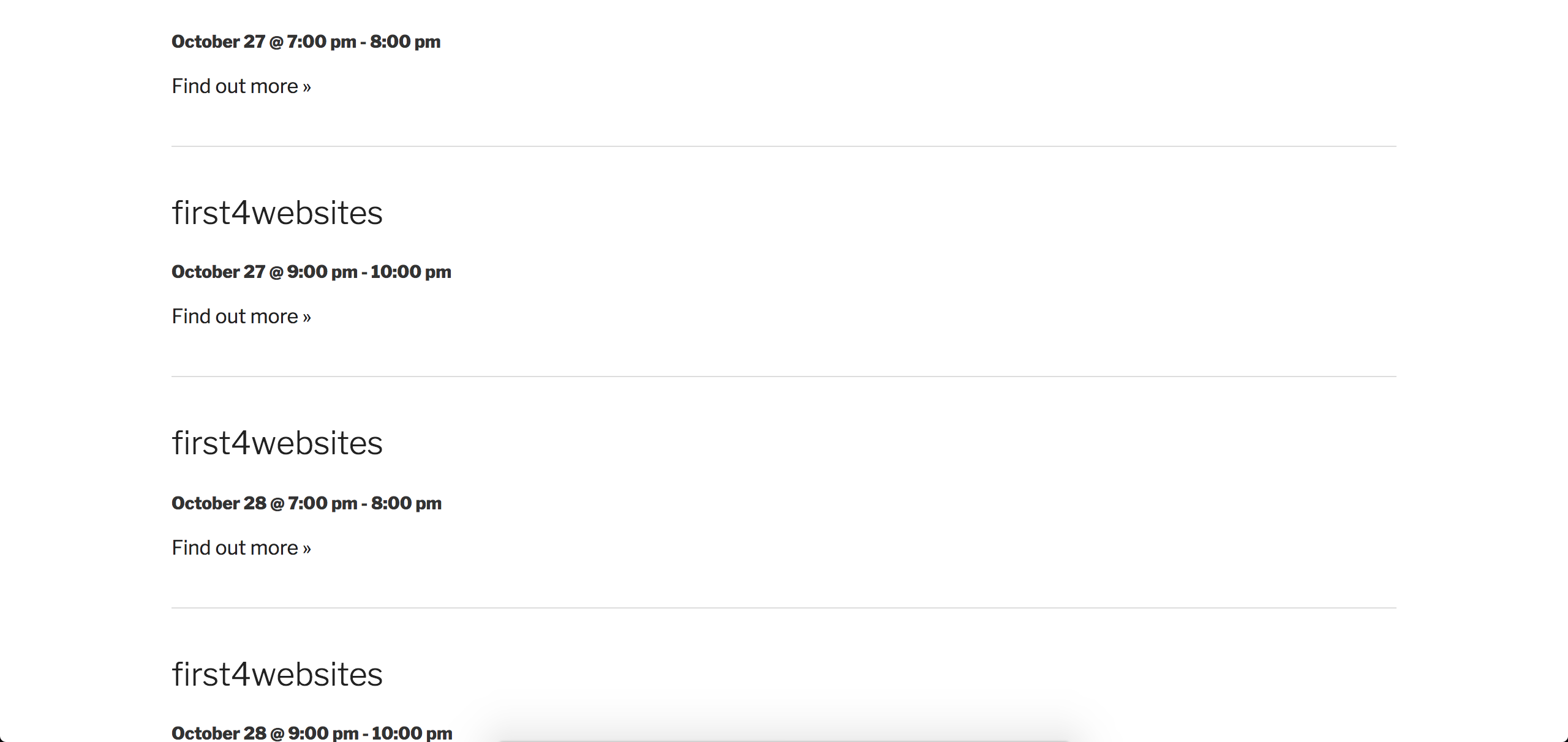
I was able to get the events published correctly when using the default Datepicker Date Format:
Using the following recurrence rules:
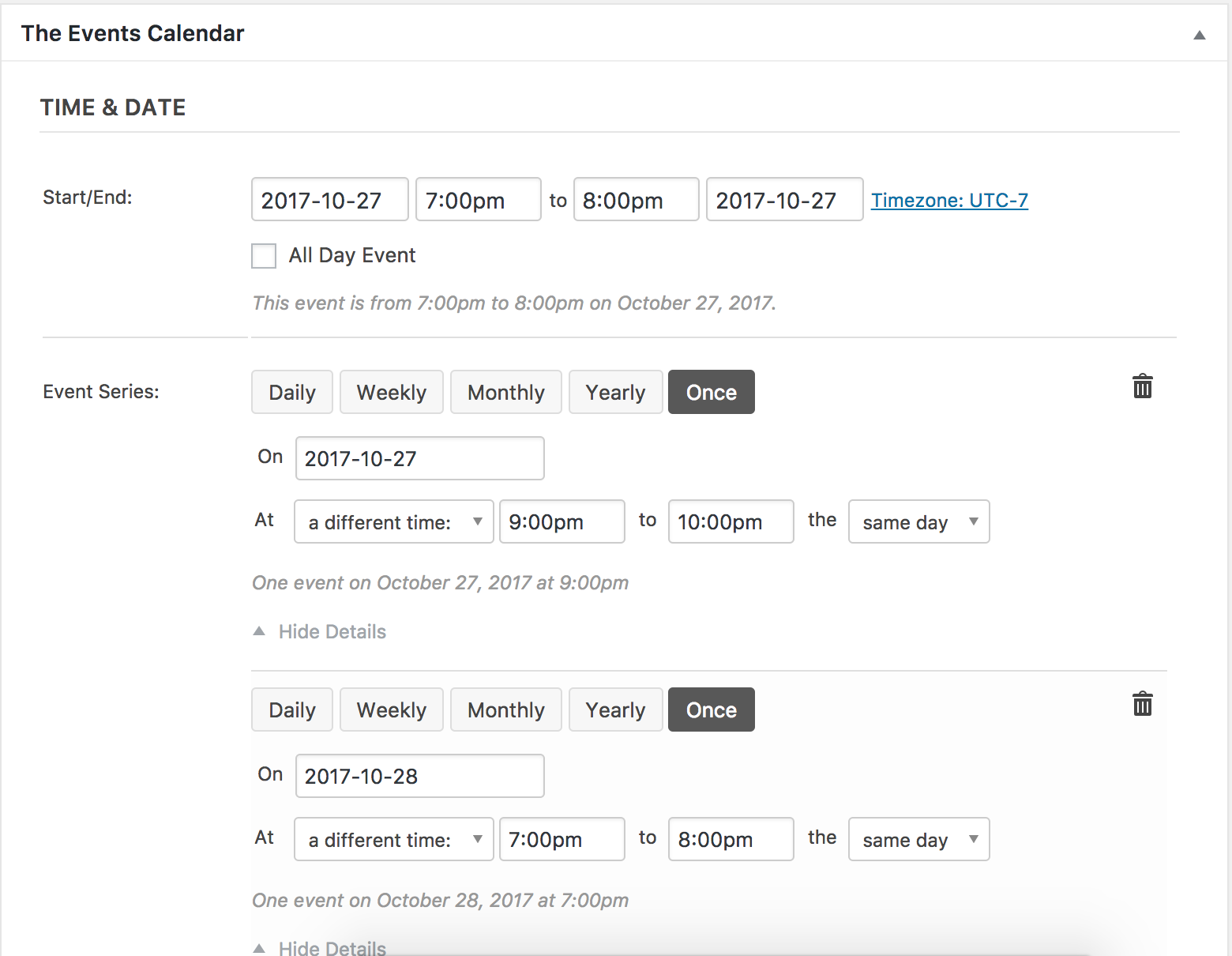
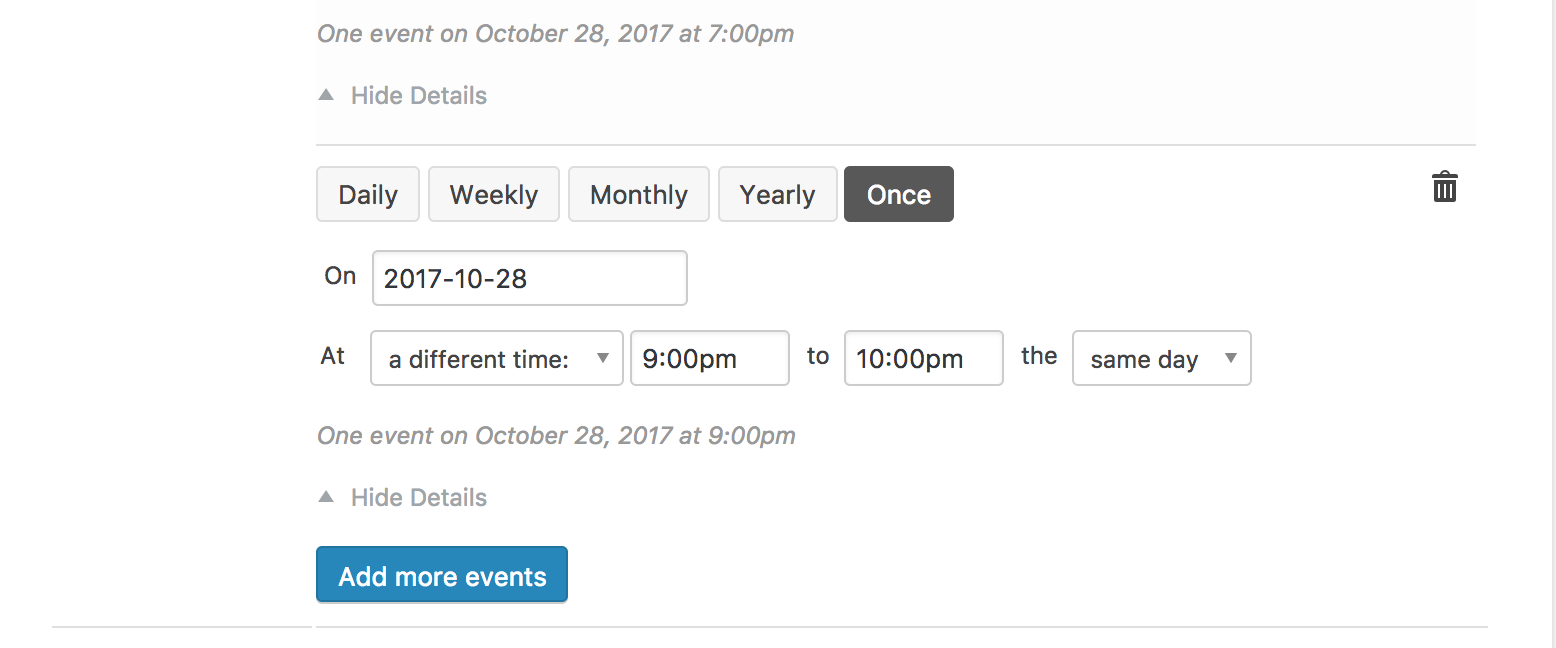
I’ve included this forum thread to the logged bug report, so hang tight while our devs work on a fix and we can ship it in a maintenance release. I don’t have any precise timeline when it will be available, but we’ll update you here, in the plugin changelogs, and our Release Notes.
I don’t see any temporary workaround attached to the report, so you can try downgrading to the version that best works for your site until a fix is released. Let me know if you’ve got any additional questions and have a good rest of your day. Cheers!
ModeratorHello 🙂
We explain the process of creating and saving customizations in our Themer’s Guide. Please take a moment and if you need any specific help, I’ll do my best to address.
Thanks and have a good evening. Cheers!
March 16, 2017 at 8:24 pm in reply to: Users can create new Organizers even when it's set not to #1255660ModeratorHello and welcome 🙂
Thank you for taking the time to elaborate on the issue you’re experiencing and testing on a fresh local install. Before we go down any rabbit holes, can you please review our Admin roles and permissions tutorial to see if any information helps solve the riddle you’re dealing with? And is this all happening on the latest versions? Have you noticed any difference when downgrading to past versions? If so, share which version(s) the issue appears to arise.
We have a known issue which I feel might be related, but until I hear back I cannot say for certain. Let me know and we’ll go from there. Thanks again and have a great rest of your day!
ModeratorHello 🙂
We have a bug logged resembling what you’ve described, so I’ve added this forum thread to the ticket which helps expedite the process of getting a fix included in an upcoming release. I don’t have a precise date when it will be available, but please stay tuned to our Release Notes and the plugin changelogs for more information. As you’ve found, downgrading to version 4.4.1 is a temporary workaround. Thanks again and let me know if you’ve got any additional questions or comments. Cheers!
ModeratorHi and welcome,
Unfortunately, the request you seek is currently unavailable at this time. I checked around to see if I could find any working examples but am coming up empty-handed. I see the validity in why you’d want to allow users the ability to export from the list of Featured Events, so please take a moment and submit your request to our UserVoice Feature Ideas page.
You might be able to come up with something by reviewing our Themer’s Guide, so take a moment to review it in addition to doing general web searches.
Sorry I don’t have a better answer for you at this time and best of luck. Cheers!
ModeratorHey Ken,
Sorry to see you’re having troubles. Can you possibly send over your System Information as a private reply? Also, is there any way you can review our Testing for conflicts guide and run through the process of purchasing a ticket just to make sure there aren’t any theme and/or plugin conflicts?
When testing, please make sure WP_DEBUG and WP_DEBUG_LOG are enabled on your site’s wp-config.php file. Any errors will display at the top of your page as you try to reproduce the conflict. I also recommend right-clicking your mouse and opening the ‘Inspect’ tool to see if any errors display in the console. Note what you find and please include it in your reply.
Lastly, you say, “tickets/attendees have gone missing” – can you please elaborate exactly what is missing? If possible, include exact step-by-step instructions on how to reproduce the issue. The more detail you can provide, the better. This includes screenshots and screencasts.
Thanks and have a good rest of your day!
ModeratorHey Lisa,
You should be able to temporarily deactivate your license key on site A and enter it to site B as outlined in our Moving your license keys tutorial. Did you try that? If not, please give it a shot and let me know if you need further assistance getting your license squared away on your test environment.
Thank you so much for bearing with me while we go through the hoops. Hopefully your legs aren’t getting too tired! Have a good evening 🙂
ModeratorPlease note: I had responded which included incorrect information and has since been updated. Please make sure you apply the code change to your theme’s functions.php file, not your site’s wp-config.php file.
ModeratorTry adding the following line to your theme’s functions.php file:
/*

 * Disable JSON LD markup used by search engines

 */

add_filter( 'tribe_json_ld_markup', '__return_empty_string' );ModeratorThank you for letting me know the issue has been resolved and please feel free to create a new thread if you have any more questions or comments. Take care!
March 16, 2017 at 7:47 pm in reply to: Event Imports from Facebook not populating with the right location data. #1255643ModeratorThis reply is private.
ModeratorOh no! Sorry to hear! Hopefully things didn’t get too ugly. I’ve been there myself, hopefully the troubles are almost over. You can downgrading to the version(s) that best worked for your site until we can get this issue resolved.
That error is most likely related to the bug. The developers can make that determination as they review each thread during the dev and QA process. The fix is set to be included in the next maintenance release barring any unforeseen circumstances. Regardless, we’ll update you here with that information once it’s available.
Let me know if you need any additional assistance on the matter and take care 🙂
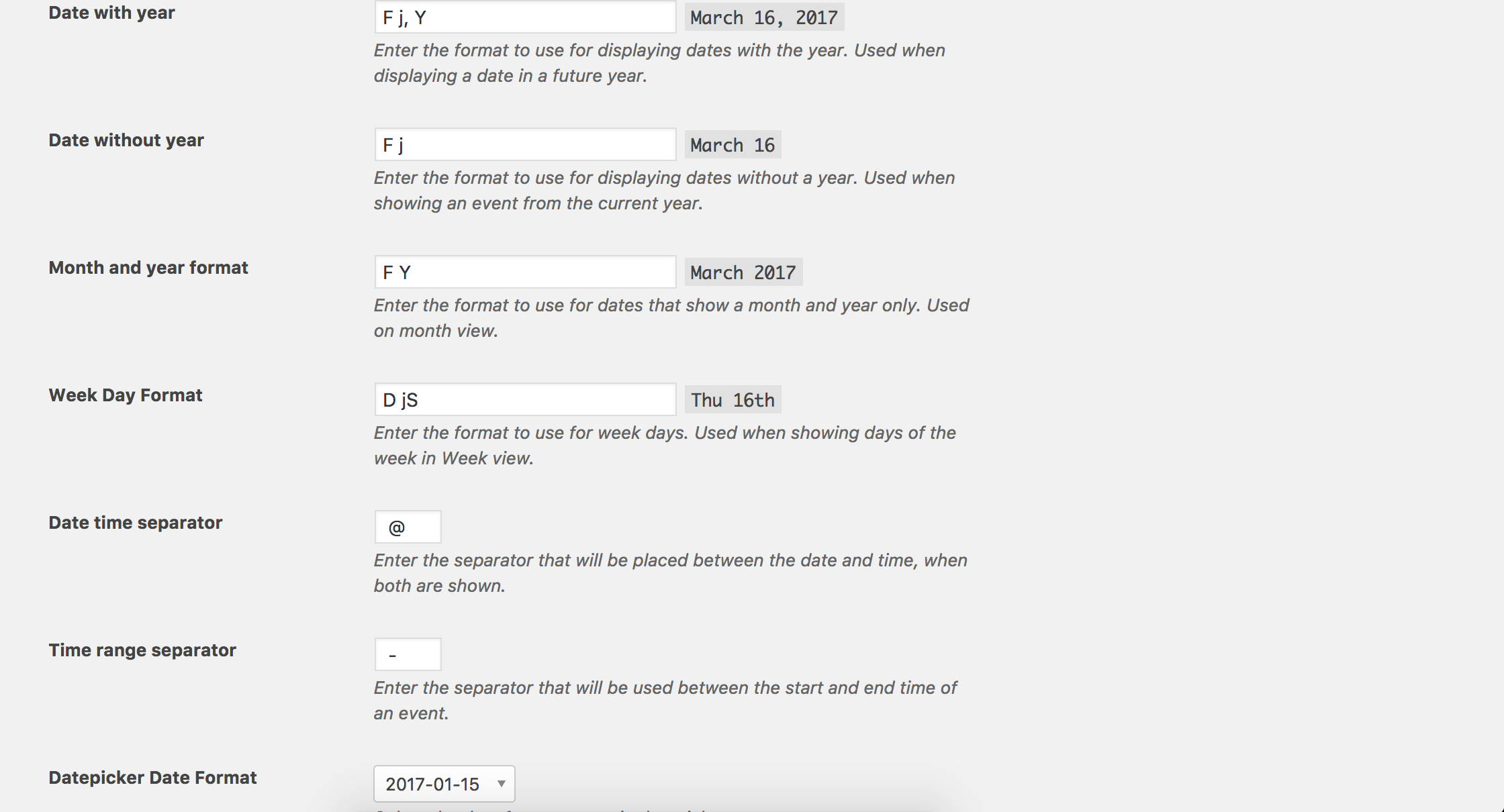
ModeratorCan you send a screenshot of your WordPress Admin Settings > General > Timezone and Events > Settings > Display > Date Format Settings screens? See screenshots below for example:
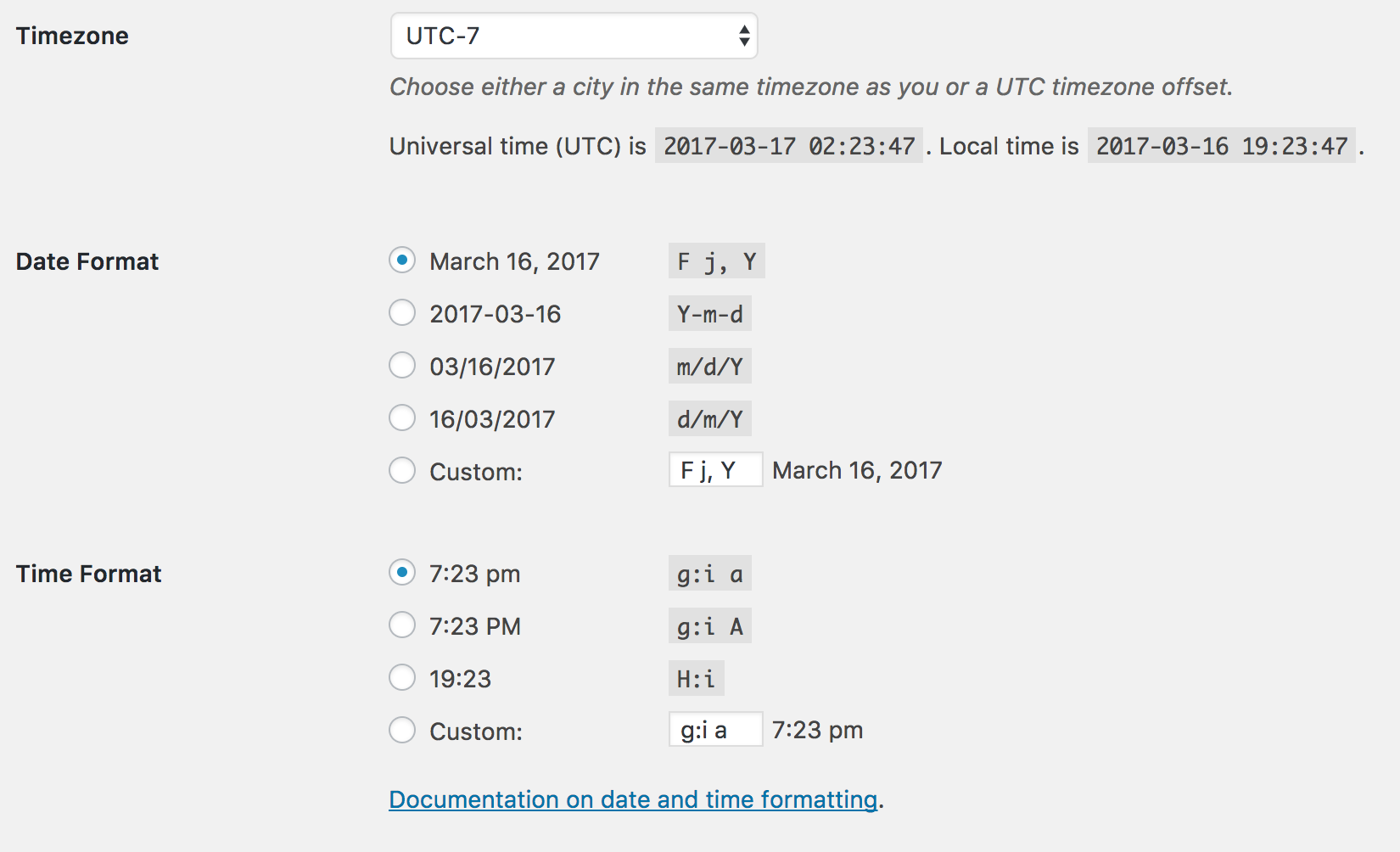
Thanks 🙂
ModeratorPlease keep me updated. And I corrected the link, so please review the tutorial and let me know if it helps.
ModeratorHey Bill,
We are actually aware of a situation you’re referring to though it’s been proven difficult to reproduce for many support team members. I’ve included this forum thread to the log report. Doing so helps bring attention to the matter and hopefully expedites a fix. I don’t have any sort of concrete timeline when our devs can patch things up, but we’ll gladly update you here once the faulty code has been addressed. Other than downgrading to the version that best works on your site, I don’t have any temporary workarounds. Should I learn more information on the matter, I’ll be sure and update you here.
We appreciate you taking the time to create the thread and including so many useful details. The more information we have on the matter, the quicker things usually go. Thanks again and let me know if you’ve got any additional questions or comments for me. Cheers 🙂
-
AuthorPosts