

Forum Replies Created
-
AuthorPosts
-
Hunter
ModeratorHello!
First off, thank you for your purchase and welcome to our premium plugin support forums! Sorry to see the known bug is affecting your site. I’ve included this forum to the report; we’ll update you here once a fix is released in an upcoming maintenance release.
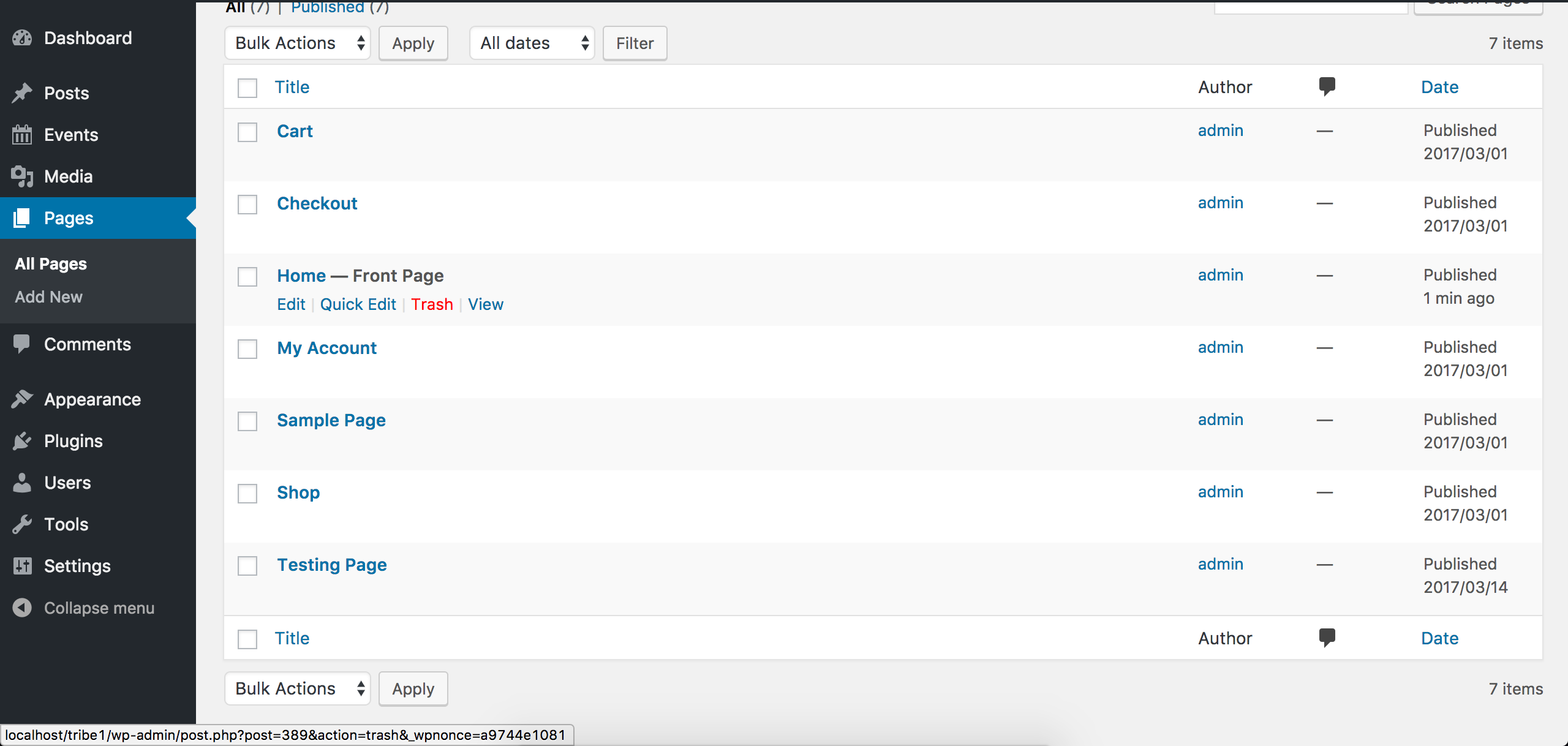
You can apply CSS to specific pages. Check out this great answer on Stack Overflow explaining the process. A quick way to identify your home page ID is to visit your WordPress Admin > Pages and hover over the Delete text for your home page, look at the bottom left-hand side of your screen for a URL and in that URL will contain post=some_number_here – the number is your page ID. See screenshot below for example. My home page ID is 389.
If you’re unfamiliar with CSS, I’ll share all the documentation I can think of which might help out:
- https://theeventscalendar.com/knowledgebase/pro-color-customizer
- https://theeventscalendar.com/knowledgebase/themers-guide
- https://theeventscalendar.com/knowledgebase/stylesheets-and-page-templates
- https://theeventscalendar.com/knowledgebase/wp-admin-settings-overview
- https://theeventscalendar.com/knowledgebase/changing-fonts-and-colours
- https://css-tricks.com/methods-overriding-styles-wordpress
- https://theeventscalendar.com/wordpress-web-developer-extensions/
- https://theeventscalendar.com/favorite-developer-plugins/
- Customizing WordPress #2 – Using Chrome Developers Tools
- Using Google Chrome Developer Tools
Let me know if this helps and we’ll go from there. Thanks again and have a great weekend ahead!
ModeratorHi and welcome,
Sorry to see the known bug is affecting your site and to add insult to injury, the patch is not working. I checked the report status and notes in hopes of learning more. It appears the issue arose around version 4.3, so you could downgrade to the version that best works on your site. Check out our Release Notes and plugin changelogs for more information.
Question: do things work correctly if you add the snippet from the thread you referred to to your default WordPress Twenty Seventeen theme’s functions.php file?
Hopefully we can get things squared away in time for your site launch. Keep me posted and have a great weekend ahead. Cheers!
ModeratorWelcome back, Sergey 🙂
I checked our list of logged bugs but cannot find the bug Brook mentions in his response. I’ve contacted him in hopes of learning more, so hang tight while I await his reply. I’ll gladly share any information I learn.
Thanks for your patience and have a great weekend ahead. Cheers!
ModeratorHi Stephen 🙂
Sorry to hear about the conflict with Store Locator Plus. Unfortunately, we’re fairly limited supporting conflicts with custom themes and plugins by other authors as stated in our What support is provided for license holders? Knowledgebase article, but I’d be happy to help as much as I can.
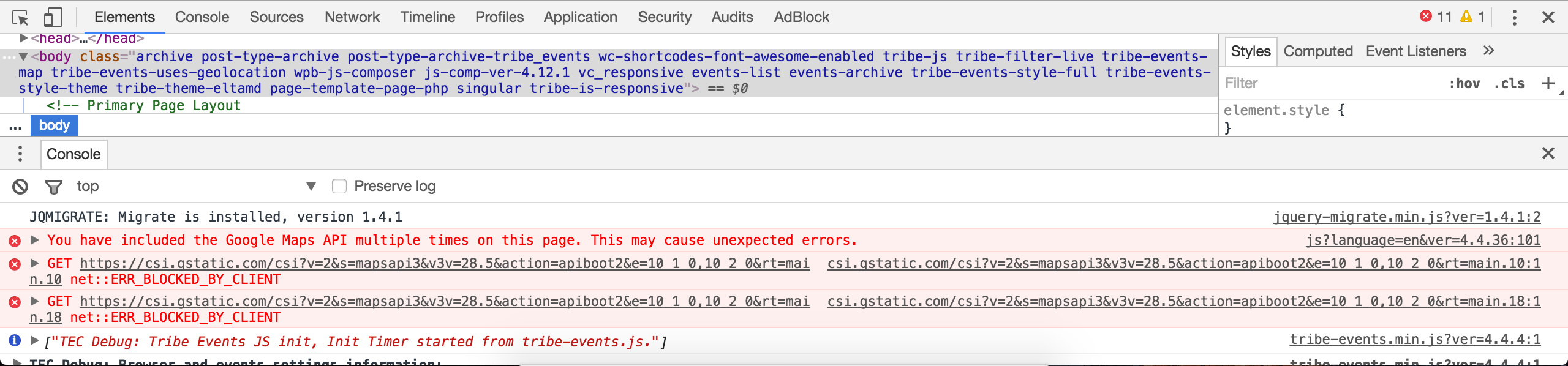
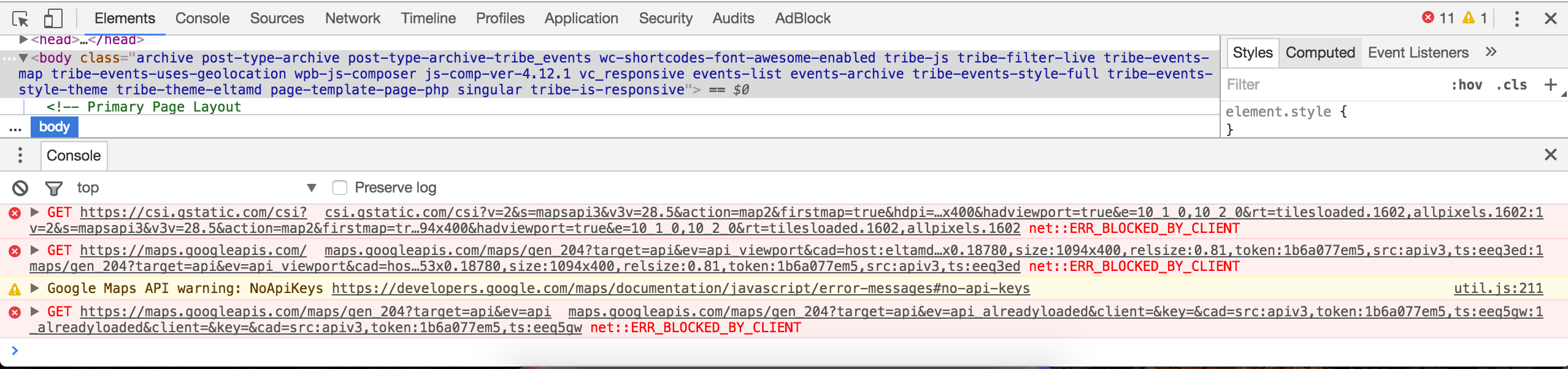
With that said, I took a look at your site and typed in “Plano” into the “Near” field and ran into the problem you’ve described. I noticed many errors when using my Inspect tool as explained in our Using Google Chrome Developer Tools tutorial:
The most I can do is basically share with you any relative resources we have on Google Maps:
• Setting Up Your Google Maps API Key
Visit Events > Settings > General and check to see if any venues need their geolocation data updated. See screenshot below for example:

We do have a few bug reports open relative to the Tribe Events Bar’s “Near” field, so I’ll include this forum thread to the reports. I cannot guarantee your issues will be resolved once our devs patch up the bugs. With the number of themes and plugins available, it’s impossible to support every conflict. If things get beyond your level of expertise, you might want to look into hiring someone to help overcome this obstacle.
I hope my answer helps shed some light on the matter and let me know if you’ve got any more questions or comments and have a great weekend ahead. Cheers!
March 17, 2017 at 3:58 pm in reply to: Google Search Structured Datas – Incorrect Date or Timezone – Missing events #1256119ModeratorHello again.
After further inspection, it appears Google is displaying the correct results. The time for the MANU MILITARI event on your site is 17:00 EDT (UTC-4). In the Google Structured Data Testing Tool results, it shows as 21:00 (UTC) – (2017-03-18T21:00:00+00:00). I consulted a few other support team members and they too don’t see any issue.
The bug I believed might be affecting your results only occurs with multi-day events so is unlikely to affect your site. Please let me know your thoughts on the matter and have a great weekend ahead. Cheers!
ModeratorHey Meredith 🙂
Welcome back and I hope your weekend is off to a great start. We’re obviously limited in this situation as stated in our What support is provided for license holders? Knowledgebase article, but you sound prepared enough to tackle the challenge.
Check out this bit of code and let me know if it helps. I believe it should do the trick. Have a pleasant rest of your Friday and thanks for choosing PRO!
ModeratorThis reply is private.
ModeratorHey Mattias 🙂
I appreciate the update and am happy to hear the issue has been resolved. Thanks for sharing what you learned so others can benefit from your hard work. Please open a new thread if you have any more questions. Cheers!
ModeratorWhat is your dev environment URL? As explained in our Using One License for Live and Dev Sites tutorial, you should be able to use one license on your live site and dev site.
Are you able to get the orders set to ‘Complete’ with the Mollie Extension deactivated? As previously requested, can you share a .zip file of the latest version so I can test on my local site?
Have a good weekend! Cheers 🙂
ModeratorThis reply is private.
ModeratorHi and welcome back,
We’re unfortunately fairly limited with customizations as outlined in our What support is provided for license holders? Knowledgebase article.
I recommend familiarizing yourself with the process of creating and saving customizations. It seems difficult at first, but a little practice goes a long way. Our Themer’s Guide is the best documentation we have on the matter. I also like to share this Customizing WordPress #1 – How To Create A Child Theme by LevelUpTuts YouTube video. It’s essentially the same process as the Themer’s Guide.
I believe the following line of code should accomplish what you need, so give it a shot and let me know how things work out:
echo date_i18n( 'F', strtotime( tribe_get_month_view_date() ) );Sorry again I can’t be more help in this scenario and keep me posted with your progress. Have a great weekend! Cheers 🙂
March 16, 2017 at 10:09 pm in reply to: Google Search Structured Datas – Incorrect Date or Timezone – Missing events #1255680ModeratorHi and welcome,
I believe you are being affected by a known issue relating to Google’s Structured Data. Before I am able to confirm, do you have a Google Webmaster account? If so, have you investigated all possible options relating to your issue for any insight? Have you submitted a sitemap recently?
Thank you and let me know if you’ve got any additional questions or comments. Cheers!
ModeratorHey Sara,
If you remove/comment out lines 119-125 of /the-events-calendar/src/views/modules/meta/details.php and save with the following structure, it will essentially remove the Cost field from your single event template: [your-theme]/tribe-events/modules/meta/details.php

Please review our Themer’s Guide for more information. Another route is using CSS. Review this Customizing WordPress #2 – Using Chrome Developers Tools YouTube video and Using Google Chrome Developer Tools tutorial. Let me know how it goes and have a good evening! Cheers 🙂
ModeratorHello,
Please review the following documentation relating to importing CSV-related content and let me know if they help answer your questions. You can compare our example files to ensure you’re following proper procedure:
• CSV file examples for importing
• Importing Data from a CSV FileThanks and have a pleasant rest of your day. Cheers!
ModeratorHi Carolyn,
Please review our Renewing your license tutorial for detailed instructions on how to easily renew any licenses you still have the need for. Let me know if it helps and have a good evening. Cheers!
-
AuthorPosts