

Forum Replies Created
-
AuthorPosts
-
Hunter
ModeratorHello again, Brad 🙂
The Community Events ‘Submit Event‘ page uses the ‘Medium‘ size image by default, but you can override this by creating a custom template as explained in our Themer’s Guide. The file you’ll need to overwrite is /the-events-calendar-community-events/src/views/community/modules/image.php.
Good luck and let me know if you get stuck along the way. I’m limited on how much support I can provide, but I’ll do the best I can. For more info on what’s covered in the support forums, I invite you to review our What support is provided for license holders? Knowledgebase article.
Cheers!
ModeratorHey Larry,
Welcome back and I hope all is well 🙂
The plugin you linked to is by a different author and it appears you need their Pro version to implement tag shortcodes.
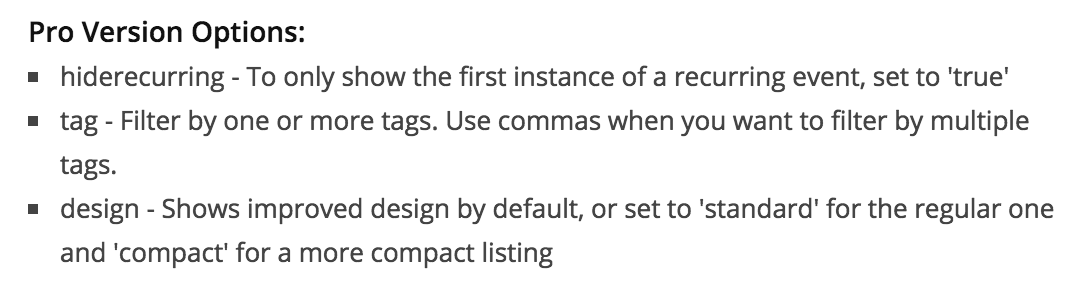
Luckily, we’ve got you covered! If you head over to our PRO Widget Shortcodes article, we provide instructions on how to display a list of events based on tags using a shortcode. It should look something like this:
[tribe_events_list tags="your-tag-slug-here"]Let me know how it goes and thanks for choosing PRO. Cheers!
ModeratorHey Greg,
Thank you for being so thorough and including screenshots. Before we go any further, I’ll need you to please review our Testing for conflicts guide and reply back with what you find out.
Can you confirm if this is happening with all events, or just a few? If only a few, do you notice a pattern with the featured images with issues compared to the featured images without issues?
Thanks again and have a great evening. Cheers!
November 9, 2016 at 7:24 pm in reply to: Filter Bar Not Showing Top Filter on Mobile or Showin in "Open" State #1190083ModeratorHi Brad,
Thank you for reaching out about the issue. I took a look at your site and the Event Category filter did display, though I had to scroll up to see it. I’m unfortunately not able to provide much more assistance with this due to the fact it is related to a theme conflict. More info on what we can help with can be found on our What support is provided for license holders? Knowledgebase article.
I would start by identifying the CSS class or ID using the ‘Inspect‘ tool, then add in the necessary code to get the ‘Event Category’ field displaying properly. If you’re unfamiliar with this process, please review this YouTube Video.
I too experience the filters staying closed when viewing on a smaller screen when testing on my setup, even when the ‘Filters Default State‘ option is set to ‘Yes‘ under Events > Settings > Filters. I’ve gone ahead and logged a bug report for the developers to review. A fix will be included in an upcoming maintenance release, so stay tuned to your WordPress admin dashboard and our Release Notes.
I’ve put in a request to get a temporary workaround, so please reply to this thread tomorrow to see if I was able to come up with anything. Thanks for your patience while we work to resolve the bug and have a great evening. Cheers!
ModeratorHey Dustin,
Sorry to hear you’re having troubles. I’d be more than happy to help troubleshoot the issue.
The same issue is happening to my site, all the events are an hour off.
Can you link to any threads you might be referencing when you say, “the same issue is happening on my site…” The more information I have on the issue, the better of an idea I’ll have on a conflict and solution.
I’ll also need you to review our Testing for conflicts guide and reply back with what you learn. This is a required step and most of the time will tell us where the conflict is coming from.
Thank you for posting and I look forward to getting this issue resolved. Cheers!
ModeratorHi and welcome back,
Sorry about any confusion you might be feeling right now. You should have received emails in regards to the Facebook Events plugin being retired. The good news is, all features have been incorporated into Event Aggregator. You have been granted a license for EA, which will expire on the same date your Facebook Events license is supposed to expire – so you won’t need to purchase anything in order to import events from Facebook. You can access your Event Aggregator on your License Keys page.
I’ll link to a few recent articles announcing the transition, new features included with Events Aggregator, etc.
- Moving to Event Aggregator
- Things to Be Aware of in Version 4.3 of The Events Calendar, Event Tickets, and Premium Add-ons
- Release: The Events Calendar 4.3, Event Aggregator, and Premium Add-ons
I have Community Events and it has not worked since I bought it, and I have tried everything you guys have suggested, nobody can submit an event.
Feel free to elaborate on the issue you’re having and I’d be happy to help. There are a few known conflicts, none of which should hinder users from simply adding events using the Community Events submit event form.
We ask you review the Testing for conflicts guide to ensure there is not a conflict with your theme and/or another plugin(s). Please keep me posted as I would really like to figure this out so your users can successfully add events.
Let me know if you have any questions or concerns on the transition to Event Aggregator and have a good afternoon. Cheers!
ModeratorGo ahead and send over the Google Calendar URL you’re having troubles with and include the exact step-by-step instructions needed to replicate the behavior and I’ll report back with what I find out.
ModeratorYou are welcome! Enjoy the remainder of your week and please create a new thread if you have any more questions or comments. Cheers 🙂
ModeratorMy pleasure! Have a good rest of your week and please create a new thread if you have any more questions or comments. Cheers 🙂
ModeratorHi Crystal,
Sorry to hear you weren’t able to identify the conflict. The next step would be to set wp_debug to ‘TRUE‘ on your wp-config.php file and see if any errors display at the top of your screen when you attempt to switch views using the ‘View As’ dropdown. Make sure you have the default WP theme active (Twenty Sixteen) and only The Events Calendar active. Go ahead and deactivate all plugins other than TEC, including Event Tickets and Event Tickets Plus.
Another way to track down conflicts is using the ‘Inspect‘ tool. Right-click your mouse and select the ‘Inspect‘ option before you click the ‘View As’ dropdown. Any errors should display in the console window.
Let me know how the testing goes and have a good afternoon!
ModeratorJenny,
Sorry to hear things just aren’t working out. Please visit our Refunds page and we’d be happy to process that for you.
If you end up coming across the financial resources to move beyond the conflict, check out our list of customizers.
Best of luck with your site and thanks for giving us a shot. Cheers!
Moderator@Felix, I don’t have any more info on when the fix will be released, but the priority has been bumped up for this issue which means it’s being “fast tracked” and will hopefully be included in the next release.
@Roger, please create a separate thread for your issue and we’d be happy to help.
Thanks to the both of you. Cheers 🙂
ModeratorHi and welcome 🙂
Thank you for posting to our PRO forums. Sounds like a strange issue indeed! Before we continue, can you please review our Testing for conflicts guide and reply back with your findings?
I also notice you still have iCal Importer and Facebook Events plugins installed. We encourage you to make the transition to Events Aggregator.
Thanks again and I look forward to your response. Cheers!
ModeratorHello, Shah!
Welcome to the Pre-Sales Question channel and thank you for reaching out. You are correct – we are currently working on enabling recurring events so they work with Event Tickets Plus.
You can view developers we recommend by visiting our list of customizers. As far as the Square integration, it looks like you shouldn’t have any issues integrating it into Event Tickets Plus. I’ve pasted some links below for reference.
Lastly, we have a 30-day money back refund policy. See our Refunds page for more info. I hope this answer helps address your questions and please let me know if you have any additional questions or comments. Thanks again and have a great evening. Cheers!
November 8, 2016 at 6:28 pm in reply to: Will the WooCommerce Square Sync Capabilty work with Event Tickets Plus? #1189443ModeratorHey Steve,
Welcome to the Pre-Sales Question channel and thank you for reaching out. We can’t necessarily guarantee whether the plugins will integrate properly, but from what I’m gathering from other threads relative your question, it looks like the WooCommerce Square extension should work properly with Event Tickets Plus.
I’ll go ahead and paste the relative threads below for you to review yourself. We offer a 30-day money back guarantee, so if things don’t end up working out we’d be happy to refund your purchase. I’ll also go ahead and link to our list of customizers just so you have that option in the case you need to hire a dev for assistance.
I hope this answer helps address your question and please let me know if you have any additional questions or comments. Thanks again and have a great evening. Cheers!
-
AuthorPosts