

Forum Replies Created
-
AuthorPosts
-
Hunter
ModeratorHey Rob,
I hope all has been well 🙂
If you’re using a custom template override as explained in our Themer’s Guide, you should be able to move the code calling in the attendee list back into your sidebar.
As far back as I remember, the list of attendees has always been beneath the event details, so I imagine you’ve got a file named single-events.php with the following structure: [your-theme]/tribe-events/single-event.php.
I’m pretty limited on these types of requests (see What support is provided for license holders?), but if you get hung up, feel free to reply back and I’ll do my best to help.
Thanks and have a good evening. Cheers!
ModeratorHey Jenny,
Welcome to the PRO support forums and sorry to hear you’re experiencing issues between PRO and your theme. I can’t answer for certain whether the Ultimatum theme will integrate with PRO. I’m not seeing many threads relating to your issue, but have you tried contacting the theme authors to see if they have any insight on a solution?
I truly wish I had a different answer for you, but we do offer a 30-day money back guarantee, so if you’re unable to get things integrated we’d be happy to refund your entire purchase.
Please let me know if this addresses your question and feel free to reply back with any additional questions or comments you have. Take care and enjoy your evening. Cheers!
ModeratorMatthias,
Welcome back! Forgive me if I’ve misunderstood your question, but when you import events using Events Aggregator, you should be presented the option to assign categories to events. (see screenshot below)
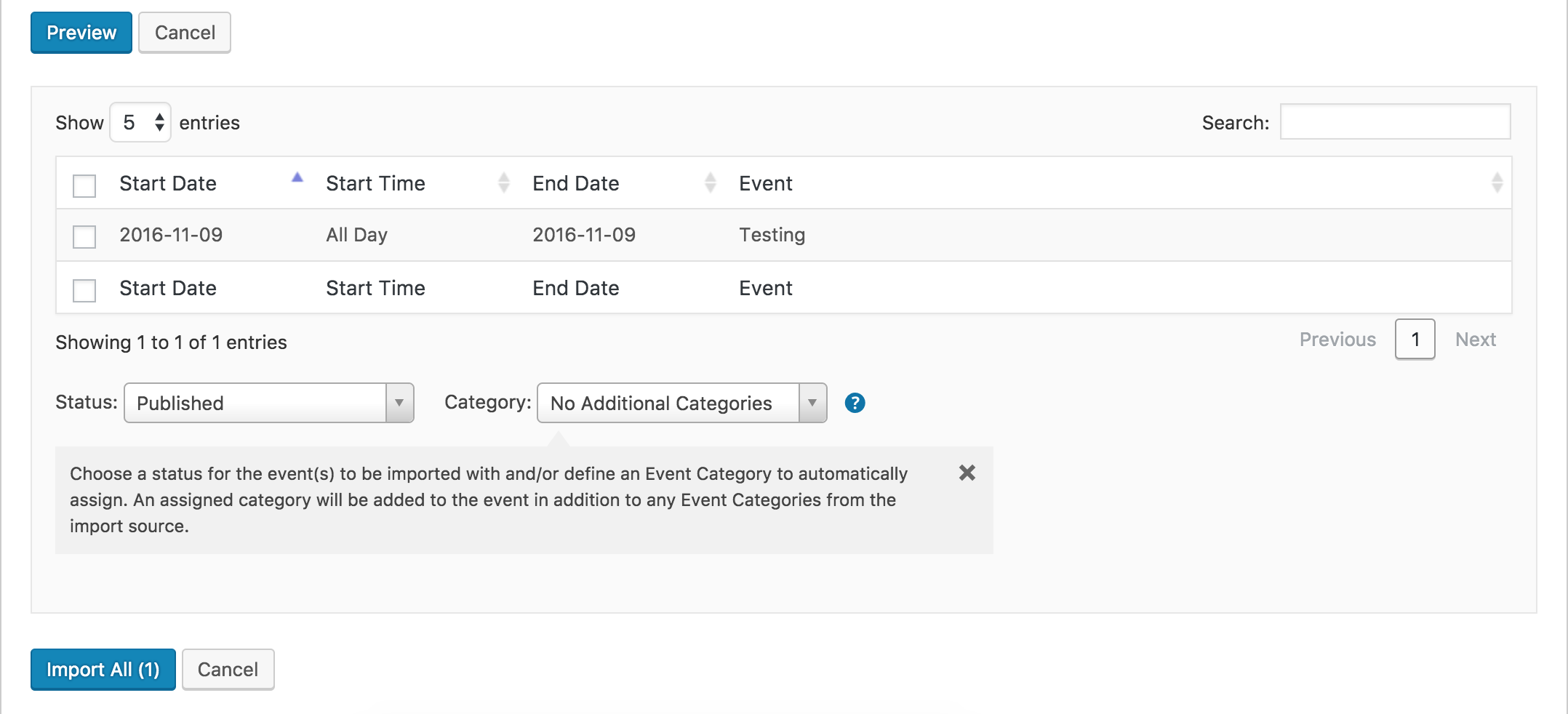
Please let me know if I’ve understood your question correctly and if not, please reply back with more details and I’ll do my best to help. Thanks for choosing PRO and have a good evening!
ModeratorGabriel,
My apologies for the delayed response and welcome to our premium support forums! Sorry to hear you’re dealing with duplicate events. The calendar saves information in a few different areas, mainly the wp_posts and wp_postmeta tables. Try using the Bulk Delete plugin to rid your database of all event-related info. Please let me know how it goes and if you have any more questions. Sorry again about the lengthy time between your post and my response and have a great evening. Cheers!
ModeratorHello,
Thank you for your patience. I wasn’t able to come up with a snippet which will stop the import, but please follow the steps below. We’ve noted this huge inconvenience and are incorporating a way to easily stop imports.
1. Backup site and database
2. Deactivate all Tribe plugins
3. Delete all Tribe plugins
4. Reinstall The Events Calendar pluginOnce you’ve finished the steps above, temporarily revert back to the default WP theme and deactivate all plugins other than ours. From there, create a new import under Events > Import and attempt the import you originally had troubles with. Let me know how things go from there. If you still run into issues, reply back with the exact step-by-step instructions needed to replicate your issue so I can log a bug report.
Once we have that going, our dev team will jump on it and hopefully get a fix released in the next maintenance release. I don’t have any concrete date when that will be, but rest assured we’ll get it taken care of as soon as possible.
Thanks again for your continued patience and I look forward to hearing back. Hopefully everything works and we don’t need to log any bug reports. Cheers!
November 8, 2016 at 5:34 pm in reply to: Calendars are messed up when selecting event date on event creation page. #1189429ModeratorHello,
Thank you for the update. It’s always best practice to have a development environment where you can troubleshoot these issues so you can confirm the cause of conflict. It is a required step in order to get support from our team as we don’t provide support for theme and/or plugin conflicts. See our What support is provided for license holders? Knowledgebase article for more info.
I’m glad things worked out this time and please feel free to create a new thread if you have any more questions or concerns. Thanks again and take care!
ModeratorHello,
That is correct, though the venue ID will be different for your venue. I simply copied the link from my browser bar after I typed “tickets” into the ‘Search’ field and selected the desired venue from the Filter Bar.
If everything is good to go, please mark the thread as ‘Resolved’ and I’ll go ahead and close it out. Thanks and take care!
November 8, 2016 at 5:26 pm in reply to: Events Imported with the Wrong Times and End Date/Time not displaying #1189426ModeratorCody,
If you wouldn’t mind, please give the Bulk Delete plugin a shot first. If you have any issues, reply back and I’ll try coming up with the proper SQL query.
Thanks and sorry about the delayed response. Cheers 🙂
November 8, 2016 at 5:19 pm in reply to: How to require category selection on Community Events Submission Form? #1189424ModeratorJustin,
We’re fairly limited on how much support we can provide, but I found this recent thread which relates to what you’re trying to accomplish. Try changing the line to:
$fields[] = 'tax_input';I did so on my local test environment and got the desired behavior. With that said, you’ll have to handle things from here and best of luck. Cheers!
ModeratorThanks again to the both of you for the input. Hopefully we hear back from @Filip on his progress. Cheers!
ModeratorExcellent! I’m glad we could help out! I’ll close this thread out but please create a new one if you have any more questions or concerns. Have a great week ahead. Cheers!
ModeratorHello,
Thank you for the update. I’ll go ahead and close this thread out but feel free to create a new one if you have any additional questions or comments. Enjoy the remainder of your week. Cheers!
November 7, 2016 at 1:45 pm in reply to: Taxonomy filter will not register with Event List Widget #1188810ModeratorBryan,
I don’t have any new information for you at this time :-/
Thanks for hanging tight and we’ll update our Release Notes with more info once we get a fix out.
Take care!
ModeratorMichael,
What I would do is use the snippet below (add to bottom of theme’s functions.php file) to change ‘Organizers’ to ‘Teachers’. You can assign multiple ‘Teachers’ when adding/editing events.
add_filter('tribe_organizer_label_singular', 'change_single_organizer_label' );

function change_single_organizer_label() {

	return 'Teacher';

}
add_filter('tribe_organizer_label_plural', 'change_plural_organizer_label' );
function change_plural_organizer_label() {
return 'Teachers';
}Let me know how this works out for you. Cheers!
ModeratorHello,
If you have created a page with the same slug as what you’ve entered into Events > Settings > General > ‘Events URL slug‘, you need to delete the page. The plugin will automatically display events and if a page with the same slug exists, it will present problems.
Let me know if this was the case and how things work out once the page is deleted. Thank you and have a good afternoon.
-
AuthorPosts