

Forum Replies Created
-
AuthorPosts
-
Hunter
ModeratorThomas,
I’m sorry to hear you’ve been experiencing the issue for weeks, but I’m not able to reproduce the behavior on my test installation using the default WP theme and our plugins. Unfortunately, conflicts that involve a custom theme and/or additional plugins are outside out scope of support.
To ensure I’m not missing something, I took a few minutes looking for relative bugs in our logs, but I’m not seeing anything. I understand how frustrating it can be in this situation, but I assure you if there was anything I could do, I would already be hard at work looking for a solution for you. We put these guidelines in place to maintain our brand. If we chose to take on every conflict our users had, we would be a completely different company.
If you can show me exactly what part of our plugin is causing an issue, I would be more than happy to try replicating the behavior and if I get the same results, a bug report will be filed. I hope I’ve clarified the reasoning behind our guidelines and let me know if you have any comments or concerns. Thank you for your patience and have a good afternoon.
ModeratorRiccardo,
The best way to accomplish what you’ve described would be to bring up the criteria you want, copy the link from your browser window, select ‘Custom Links‘ from WordPress > Appearance > Menus, and paste it into the ‘URL‘ field. (see screenshot below)
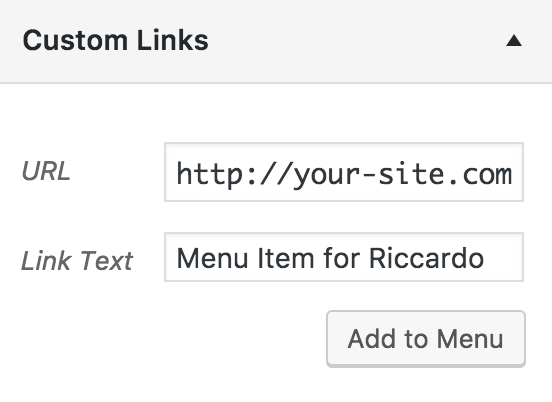
For example, if you wanted to a link in your site menu which leads to events held at a particular venue and includes the keyword “tickets”, it would look similar to this:
Please let me know if this helps answer your question and take care. Cheers!
ModeratorWelcome back!
Guess I need Community Events as users of Community shall place bookings?
Correct. If you want users to be able to add their own events, Community Events does just this.
Can users view and book conferance room in front end?
You would need to purchase a license for Community Tickets in order for users to add tickets to their events.
We don’t have a post type for meeting rooms like we do venues and organizers, but you could probably work something out using our PRO Additional Fields.
And I want to have an event calendar in addition to meeting rooms.
Can you elaborate on this statement? I’m afraid I don’t fully understand the request.
Can you have multiple calendars simultaneously and decide what to display in the filter for each calendar?
All events will display on your main events page, but you can use shortcodes and venue/organizer/category/tag archive pages to display a specific set of criteria for different lists/calendars of events.
I hope this helps answer the remaining questions you have and let me know if you have any more questions. Cheers!
ModeratorHi John,
Thank you for reaching out to our Pre-Sales Question channel! I would be happy to help answer your questions. It sounds like you would need Events Calendar PRO, which includes the ‘Week‘ view you expressed the need for. I would also recommend our Filter Bar plugin, which allows users to sort events by venues, organizers, PRO Additional Fields, and more.
You’ll need Event Tickets (free in the WordPress repository) and Event Tickets Plus so users will have the ability to purchase tickets, or book rooms in your case. One great option would be to purchase one of our Bundles to save money and get more bang for your buck!
We offer a 30-day money back guarantee, so if you decide to give it a shot and things don’t end up working out, we’ll refund your entire purchase! Please let me know if this helps answer your questions and have a wonderful Monday. Cheers!
ModeratorHey Riccardo,
Welcome back and thank you for reaching out. To add venues to the Filter Bar, visit Events > Settings > Filters and make sure the ‘Venue‘ checkbox is checked under the ‘Available Filters‘ column. (see screenshot below)
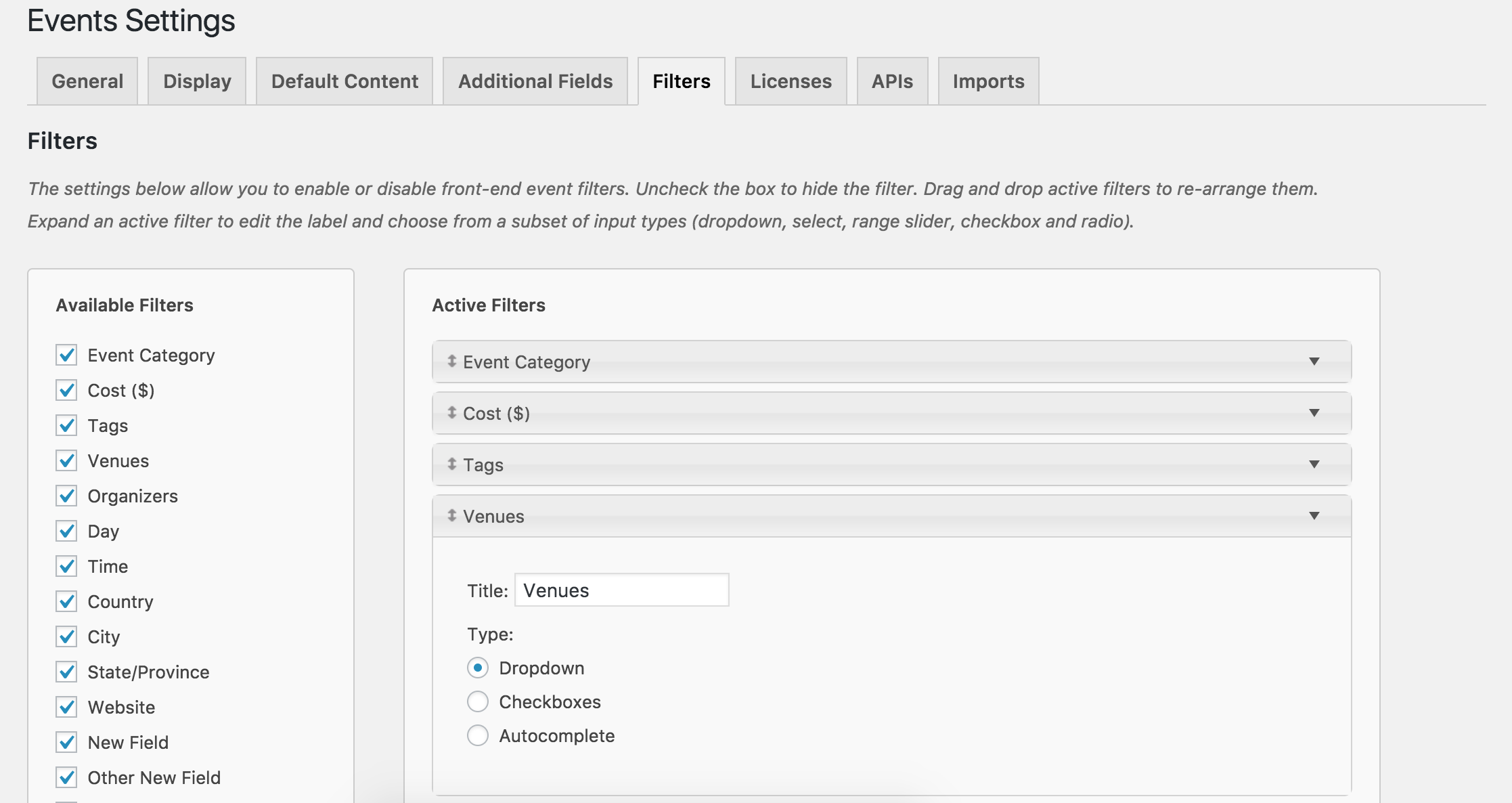
If I misunderstood your question, please provide more detail on what you need and I’ll do my best to accommodate. Screenshots are always helpful. Thanks again and have a great Monday. Cheers!
ModeratorHello,
Thank you for reaching out to our Pre-Sales Questions channel! The only way that would work with one license would be via Multisite. In order to have the PRO widget functionality, you’ll need to have an active PRO license set up for each domain.
I hope this helps answer your question and please let me know if you have any additional inquiries or concerns. Take care and thanks again. Cheers!
ModeratorHey Stephen,
Thank you for taking a moment to reach out. At this time, our plugin does not auto-detect user locations, so users will need to input data for the plugin filter events by distance. We are always looking for new ideas, so we invite you to visit our UserVoice Feature Ideas and suggest it as a request. Hopefully we can get something released in an upcoming version!
There might be some other plugins in the WP repo that, when combined with our plugins, could help achieve the auto-detection for user locations and filtering by distance. Another option would be to hire a developer from our list of customizers to build that functionality.
We do offer a 30-day money back refund, so if things don’t end up working out, we’d be more than happy to process a refund for your entire purchase.
I hope this answer helps address your concerns and please let me know if you have any additional questions or comments. Thanks again and take care. Cheers!
November 7, 2016 at 1:26 am in reply to: Include events in main blog loop : Confusing, Almost unusable… #1188504ModeratorHey Chris,
Thank you for taking the time to post your thoughts. Even if it’s not all rosy and cheerful, it is still valuable feedback which we cherish dearly. Rest assured, we have a lot of hard working members on our team with the sole purpose of putting out the best plugins and support possible.
With that said, try the following snippet. I believe it should work for what you’re hoping to achieve. Let me know how it goes and we’ll go from there. I’ve also brought this thread to the attention of other support team members so we can further discuss your feedback.
add_action( 'pre_get_posts', 'tribe_post_date_ordering', 51 );

function tribe_post_date_ordering( $query ) {

	if ( $query->tribe_is_multi_posttype) {

		remove_filter( 'posts_fields', array( 'TribeEventsQuery', 'multi_type_posts_fields' ) );

		$query->set( 'order', 'DESC' );

	}

}
As tedious and useless as our UserVoice Feature Ideas might look and feel, we are doing everything in our power to improve how we listen to our users, and more importantly, how to incorporate that feedback into upcoming releases.
Thanks again and please keep me updated. Have a great Monday and take care.
November 7, 2016 at 1:16 am in reply to: Can I show additional fields in the events list widget for future / past events? #1188502ModeratorFranz,
Welcome to our support forums! Accomplishing a widget similar to what you have set up wouldn’t be too difficult, nor would pulling in the Additional Fields information. We are unfortunately unable to provide customizations of this nature, but please review our Themer’s Guide to see how our plugin widgets are coded and hopefully gain some insight on how to proceed. There is always our list of customizers as an option as well.
Sorry we can’t do more here and best of luck with the customizations. Thanks again and have a great week. Cheers!
ModeratorHello,
Thank you for reaching out. We are unfortunately unable to provide support through our Pre-Sales forum channel, but you can head over to The Events Calendar WordPress.org support forums for assistance and answers.
If you have a PRO license, you can log into your account and get assistance through the PRO forums.
Thanks for understanding and good luck resolving your issue. Have a good day!
ModeratorHey Justin,
Unfortunately I don’t have any more information on when a fix will be released, but the priority has been bumped up which means it’s being fast-tracked and should be coming out shortly.
Thanks again for your continued patience and have a great week ahead 🙂
ModeratorHi Thomas,
Welcome back 🙂
I imagine you’re already aware of our Testing for conflicts guide, so please review that and reply back with what you find out. I also notice you’re running outdated versions of our plugins. Please update to the most recent versions to see if that has any effect.
Once I have the results from the Testing for conflicts guide, we’ll be able to proceed. Thank you for choosing PRO and have a wonderful evening. Cheers!
ModeratorHi Karl,
Sorry to hear things aren’t working for you. Before we proceed, I’ll need you to review our Testing for conflicts guide and reply back with your findings. It appears your System Information didn’t come through entirely. If you wouldn’t mind, review how to access your System Information and share it with me as a private reply.
Once you have the default WP theme and only our plugins active, make a detailed list of things that still aren’t working. Include the list in your reply and I’ll do my best to accommodate. Thank you for reaching out and have a wonderful rest of your evening. Cheers!
November 6, 2016 at 7:09 pm in reply to: How to require category selection on Community Events Submission Form? #1188475ModeratorJustin,
Welcome to our forums 🙂
Please check out our Required Fields for Events Submission Form Knowledgebase article and let me know if you’re able to get things working as desired.
Cheers!
November 6, 2016 at 7:06 pm in reply to: Do Community Events and Event Calendar Pro events show on the same calendar? #1188474ModeratorHey Chris,
Thank you for posting to our Pre-Sales Questions channel 🙂
You’re in luck! The events submitted through the Community Events plugin will display on the same calendar as PRO. Please let me know if you have any more questions or concerns and enjoy the rest of your evening. Cheers!
-
AuthorPosts