

Forum Replies Created
-
AuthorPosts
-
January 18, 2017 at 2:58 pm in reply to: Description text is all running together in the list view. #1220556
George
ParticipantHey @bigpixelstudio,
For the most part, I was not able to find issues of list-view event text being all run-in together. Here’s a screenshot showing what I found, for example (click for a larger-sized image):
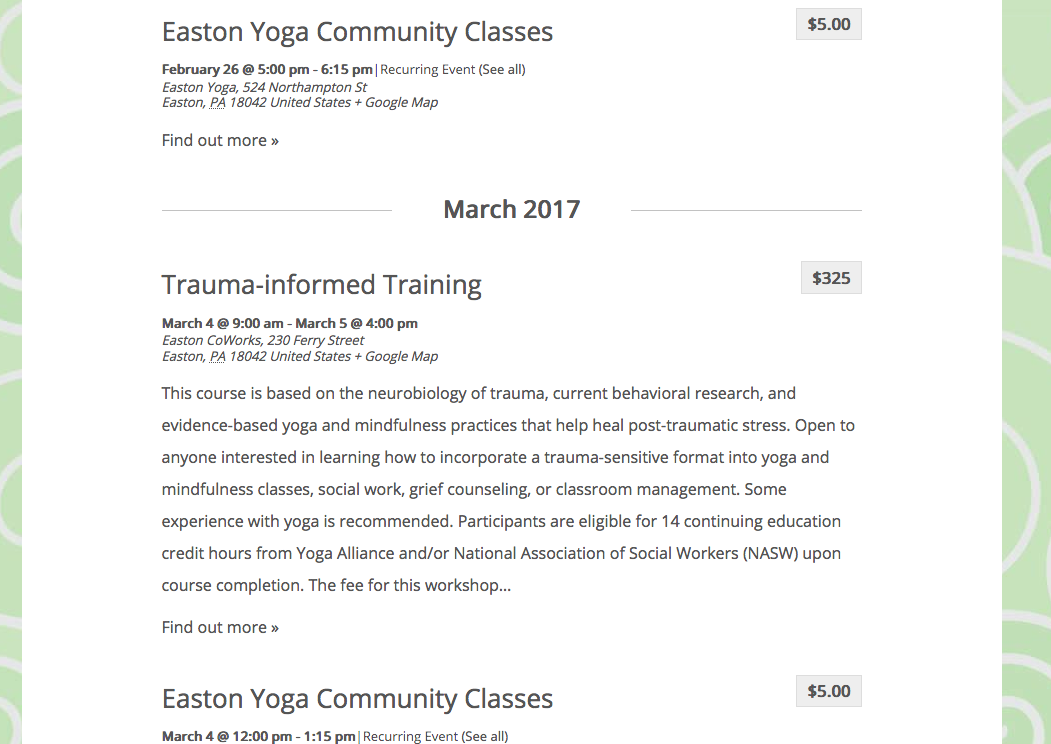
When it comes to the specific page you linked to, this is a very weird page—I cannot access this myself just by clicking through the site, only by going directly to the URL you provide here.
1. If the page you linked me to is just an example of one of the many pages of the “List View” of your main events calendar, then how do you get to this page? What I mean is, as noted above, if I go to http://www.shanthiproject.org/events/list/ directly and click “Previous Events” and “Next Events” to page through all of the events, I cannot every get to a page that looks like it does in your direct link.
2. You mention using “excerpt text” for the page you linked me to. Can you please share a screenshot of where you can enter such “excerpt text” in the wp-admin of your site? If the page you linked me to has an “edit” screen in the admin, for example, where you can enter excerpt text, then can you please take a screenshot of this admin page and share that here? You can do so by uploading the screenshots to this thread. If you have issues with that, you can upload to Imgur.com, Flickr.com, CloudUp.com, or any similar image-hosting site; then just share the links to those images here and I’ll take a look.
Thank you!
GeorgeParticipantIndeed it is, Mark! Our premium add-on to Event Tickets, Event Tickets Plus, has a built-in featured called “Attendee Information” that lets you do just this.
You can learn more about the “Attendee Information” features by checking out this Knowledgebase guide here → https://theeventscalendar.com/knowledgebase/collecting-attendee-information/
Let us know if this guide is helpful! Learn more about Event Tickets Plus here and let us know if you have any further questions we can try to help with.
Cheers,
GeorgeParticipantHey Rion,
Thanks for reaching out.
It’s important to note that we do not officially partner with any specific theme out there, so whatever calendar widget that came with our theme may not be anything we make.
Can you please share a link to where you bought this theme online, so that we can investigate it to try and determine what Calendar Widget within it you’re referring to? This may be helpful.
Next, you describe this:
but when I go to enter the new Pro license in the license key section of the settings menu, it is asking me for the “Event Aggregator” licence key?
Can you please share a screenshot of the exact location within your wp-admin where you pasted your Events Calendar Pro license key? You can do so by uploading the screenshots to this thread. If you have issues with that, you can upload to Imgur.com, Flickr.com, CloudUp.com, or any similar image-hosting site; then just share the links to those images here and I’ll take a look.
If you can share a second screenshot, which shows the screen when it asks you for the Event Aggregator license key, this would also be very helpful.
Thanks!
GeorgeJanuary 18, 2017 at 1:28 pm in reply to: asking for a license key when I didnt install Event Aggregator #1220480ParticipantThis reply is private.
ParticipantThank you for these details!
I took a look at your site and would recommend adding the following CSS to the bottom of your theme’s style.css file:
.tribe-mini-calendar-event .list-date .list-dayname {

    padding: 0 !important;

}
Cheers!
GeorgeJanuary 18, 2017 at 1:20 pm in reply to: Logged as admin , QR code check in just opens page of event #1220473ParticipantSorry to hear this, David!
1. When you say that this happens when you’re “Logged in as admin”, can you confirm what type of admin user you’re logged in as? Are you logged in as an “Administrator”-level user? And “Editor”-level user? A “Subscriber”-level user?
Let me know!
2. Next, your system information does not show what your site’s Permalinks settings are. Can you verify what they are set to? Are they set to /%postname%/, for example?
Thank you for your patience here!
GeorgeJanuary 18, 2017 at 1:17 pm in reply to: TEC License + Theme Conflict with Community Events #1220471ParticipantHey @CDC,
Your license is a Personal License, so it only includes support for one domain name. It should be fine to receive support for the dev site if it is an exact clone of the production site.
If this an issue you want help with, for example, I would recommend verifying that it behaves the exact same way on the dev site and the production site. This way, if we can recommend things that fix it on the dev site, those same things would fix it on the production site.
Please let me know if there are any other issues or questions I can try to help with.
Sincerely,
GeorgeJanuary 18, 2017 at 1:15 pm in reply to: Awful update – no way to input correct event times, not on the hour or half hour #1220465ParticipantThanks, Tony!
Participant(PS — Just to be clear, to see your licenses head to http://theeventscalendar.com/license-keys)
ParticipantNo worries! Thanks for confirming, Michele—I’ve added an Event Tickets Plus license to your account which will expire one year from today—it will expire on January 18, 2018, at which point it will need to be renewed for future support and updates.
I’ve canceled your Events Calendar Pro license.
I’ll close this thread for now, but please open a new thread any time if other issues or questions arise!
Cheers,
GeorgeJanuary 18, 2017 at 1:11 pm in reply to: Event Aggregator – Google Calendar Images/Attachments #1220461ParticipantSure thing Joe! Good question; the featured images you add will not be removed if you did subsequent imports. 🙂
Please let me know if there are any other issues or questions I can try to help with!
— George
January 18, 2017 at 1:09 pm in reply to: Fatal Errors on Windows Servers with the 4.4.0.1 Release #1220456ParticipantThis reply is private.
ParticipantThis reply is private.
ParticipantHey Mike,
This is a pretty trick thing to pull off, the details of which are outside the scope of these support forums. What I mean is that we can help with regards to the specific functioning of our plugins, but when it comes to the processes and methods for setting up a local site, a local network, etc., this is a set of questions we unfortunately cannot help with.
Please read more about this here → https://theeventscalendar.com/knowledgebase/what-support-is-provided-for-license-holders/
With this all being said, I’m happy to at least try and point you in the right direction here.
This is a tricky thing to pull off because what you use for checking in Attendees is the official Attendees List on the event—sounds obvious, but the thing to keep in mind here is that this Attendees List is only generated by real people buying real tickets online.
In other words, the Attendees List would only exist on the internet-accessible site—if it was locally-hosted, then people out on the web would not be able to buy the tickets in the first place.
And so you’re now left with a whole other layer to pulling this off: the core issue of doing check-ins on a local network or with a local WordPress installation, but then also the problem of keeping Attendee records totally in sync between the “real” live site and the local version of the site, which would ostensibly have to be a duplicate of the live site.
One thing that would work locally is to just avoid the QR Codes altogether—just migrate the attendees data to a local machine before events, and then manually use the “Check in” buttons in the attendees list.
There is not a specific Mac OS app that works the way you describe, that would scan a QR code and open a URL and that I can be certain would work with a localhost URL.
Finally, as I understand it, I would need to set the scanning app to visit the URL:
Yes, another layer to this complex problem would be having to manually regenerate all QR codes for all tickets for each event. There is nothing within our plugins that let you do this, and so to go back to my first point on this reply, this is all probably technically possible but is a very complicated thing to do right, and features many things that are far outside the scope of support we can provide.
I’m sorry to bear some of this news! Please let me know if there are any other issues or questions I can try to help with.
Sincerely,
GeorgeParticipantHello!
I’m sorry to bear this news, but we unfortunately don’t have any bundles or multi-license discounts other than the specific bundles listed at http://theeventscalendar.com/bundles
Please let me know if there are any other issues or questions I can try to help with!
— George
-
AuthorPosts