

Forum Replies Created
-
AuthorPosts
-
George
ParticipantThis reply is private.
January 17, 2017 at 11:46 pm in reply to: How can I designate image and title for the calendar url for social media? #1220118ParticipantHey Samantha,
Thanks for reaching out.
There’s not an official or “out-of-the-box” way to do this sort of thing with our plugins at this time. The main details in this respect would come from the HTML header of the page, which is mostly dictated by your theme.
You would unfortunately have to get pretty creative with some custom coding, and write custom filters for wp_head that echo proper meta tags based on the event page displaying.
So to implement this, you would have to write that custom code or hire a professional developer to do it for you. We have a list of great developers here → http://m.tri.be/18k1 (and have no affiliation with any of these folks—they’re simply some well-respected names in the community that we’ve compiled to share in situations like this one).
I’m sorry to disappoint, but hope this information helps you move forward! Please note that you may also be able to find free plugins on wordpress.org that add this sort of functionality—we do not endorse or recommend any specific such plugin, but here is an example of one that I found that adds twitter card details: https://wordpress.org/plugins/jm-twitter-cards/
Please let me know if there are any other issues or questions I can try to help with!
Sincerely,
GeorgeJanuary 17, 2017 at 11:41 pm in reply to: Logged as admin , QR code check in just opens page of event #1220115ParticipantSorry to hear this, @aya!
One thing that stands out to me is that your site’s WordPress version is listed as version 3.6.3.1 — this is a very, very outdated version of WordPress and our plugins require at least 4.5.x
The current version of WordPress is 4.7.1. Please update your site’s version of WordPress to this version, then let us know if anything improves with the behavior of these issues.
If you upgrade, but issues persist, then in your reply please post your site’s complete, un-edited system information to this thread. Here is how to do that → https://theeventscalendar.com/knowledgebase/sharing-sys-info/
THanks,
GeorgeParticipantHey Donovan,
Thanks for reaching out. Customers should indeed be able to use Global Stock on tickets for Community Tickets within the Community Events submissions form (click for a larger-sized image):
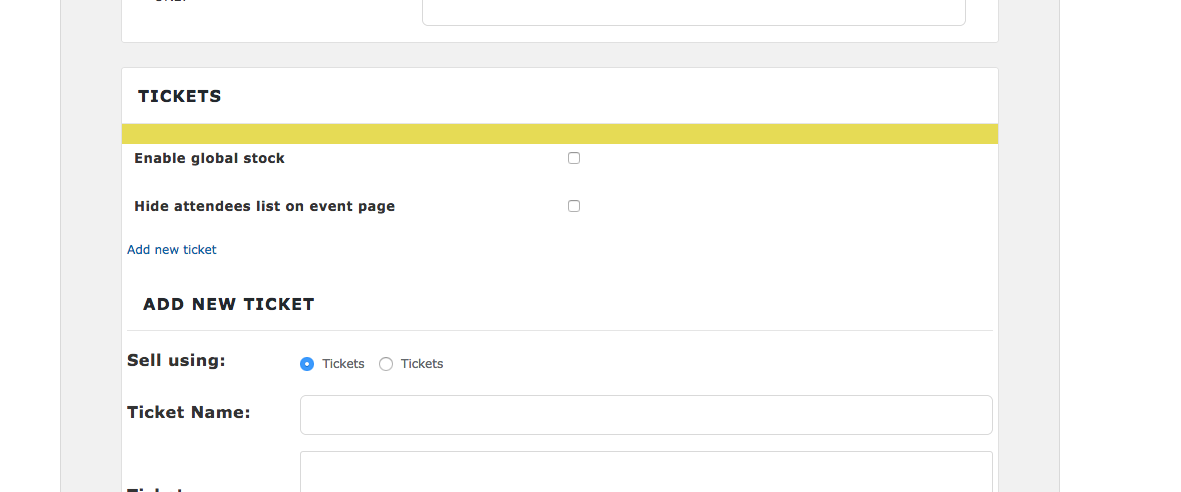
If you cannot locate this option on your own site, can you please post your site’s complete, un-edited system information to this thread to help us investigate? Here’s how to do that → https://theeventscalendar.com/knowledgebase/sharing-sys-info/
Thank you!
GeorgeParticipantI’m really sorry to hear this, @Aaron! I cannot recreate these issues. I would recommend, then, doing the following things:
1. Deactivate all plugins on your site.
2. Ensure your site’s version of WordPress is up-to-date—it should be at version 4.7.1. If it’s not, then update the version of WordPress before proceeding.
3. Delete The Events Calendar, Events Calendar Pro, Event Tickets, Event Tickets Plus, The Events Calendar: WooCommerce Tickets, and any other The Events Calendar add-ons like this from your site. Don’t just deactivate, but delete—this will not affect event data.
4. Once thos are deleted, download a fresh copy of The Events Calendar from here → https://wordpress.org/plugins/the-events-calendar/
5. Just install this fresh copy of The Events Calendar. Activate it and let us know if any error messages arise. Do not proceed to other plugins, just activate The Events Calendar and let us know how it goes! 😀
— George
January 17, 2017 at 11:27 pm in reply to: Site Slowness and errors with Events Calendar Pro #1220108ParticipantHey @Michelle,
I’m sorry to hear about these issues! I’m curious: What’s the volume of events on your site, roughly speaking…are there many thousands of events per month, for example? Are there hundreds per day? Dozens per day? A couple of events per week?
Just curious about any insight here as to the number of events on your calendar. How many events show up per month, roughly?
Thanks!
GeorgeParticipantHey Juan,
Really sorry to hear about this—I’m not able to recreate any issues with featured images on my own test site, so I’m wondering two things:
1. Can you please share a link to a couple of specific events on your site that have featured images that are not showing up any more?
2. Can you create a new test event on your site and add a featured image to it, then publish it? Does the featured image for this event show up without issue?
Thanks!
GeorgeJanuary 17, 2017 at 11:18 pm in reply to: HOT TO REQUEST A REFUND FOR THE EVENTS CALENDAR PRO #1220105ParticipantThis reply is private.
January 17, 2017 at 11:16 pm in reply to: Just Downloaded Events Calendar Pro (Not Activating) #1220104ParticipantHi Sophia,
Have you installed and activated The Events Calendar first? If not, please do so; you can get The Events Calendar for free anytime here: https://wordpress.org/plugins/the-events-calendar/
If you have done this, and issues persist, then I would recommend trying to see if any errors pop up on your site if you head to your site’s wp-config.php file and change this line of code:
define('WP_DEBUG', false);to this:
define('WP_DEBUG', true);That will display PHP errors if any exist, which might be quite useful here. So once you make this change, try activating Events Calendar Pro again — if any PHP errors arise when doing this, can you copy the full text of those error messages and paste them here?
Thank you!
GeorgeJanuary 17, 2017 at 11:10 pm in reply to: Awful update – no way to input correct event times, not on the hour or half hour #1220102ParticipantHi @Simon,
I’m sorry for the trouble here.
There is unfortunately no way to revert to the previously-implemented time pickers or date pickers. The only thing you could do to achieve this would be to literally uninstall the current versions of The Events Calendar and its add-ons, and then replace them with older versions of the plugins that have the date-pickers you prefer.
Please note, however, that we would not be able to provide support for non-current versions of our plugins. If issues arise and you return to the forums for assistance, the first step will be to get up-to-date with the most recent versions of our plugins.
I hope this information helps!
Thanks,
GeorgeParticipantThanks for reaching out, James!
I’m not able to reproduce this error on my own sites, but I have logged a bug ticket for our developers to investigate this problem.
If it’s confirmed to be the case that there’s a bug here, I will update this thread with information about when the bug fix can be expected to arrive.
Stay tuned!
GeorgeParticipantThanks for reaching out @Denon,
Pulling off the sort of calendar configuration you describe is unfortunately a bit tricky with Community Events 🙁 There are simply no solid out-of-the-box tools so that people can, as you describe it, “‘select a community’ and not have to see what’s going on in other areas.”
You could make each “community” of events its own Event Category, and then use the [tribe_events] shortcode to display instances of calendars that only show events from a specific category. So, something like this:
[tribe_events category="st-paul"]You can learn more about that shortcode here → https://theeventscalendar.com/knowledgebase/embedding-calendar-views-tribe_events-shortcode/
In terms of the Community submission form, you could try to make a category a “required” field for event submissions. This unfortunately requires custom coding, which we’re not able to help with, but we do have a Knowledgebase guide that may help you get started with that process which you can read about here → https://theeventscalendar.com/knowledgebase/required-fields-for-events-submission-form/
I hope this information helps you get the ball rolling with your project!
GeorgeParticipantHey Ben,
Thanks for reaching out! Our ticketing plugins themselves don’t provide “discount” functionality—this comes from the eCommerce platform you’re using with our plugins.
So if you’re using WooCommerce, for example, then you would use WooCommerce’s own coupon code/discount features, which you can read more about here ? https://docs.woocommerce.com/document/coupon-management/
There is no way to make a “buy x tickets, get y discount” coupon code with our plugins out-of-the-box — you would need to tinker with WooCommerce or even possibly use a WooCommerce Extension that would allow for more advanced coupons. But with WooCommerce out-of-the-box, for example, you can set a “Minimum spend” value for a given coupon code to work; so if tickets are $20 apiece, and you only want a discount code to work for folks buying four or more tickets, you can set the minimum spend value for that discount code to $80 and thus basically pull off the sort of discount you describe.
I hope this information helps!
GeorgeParticipantHey @darrienw93,
It’s unfortunately not possible to remove the Customizer integration with The Events Calendar without some extensive code modifications, which isunfortunately outside the scope of the support forums. Please read more about that here ? https://theeventscalendar.com/knowledgebase/what-support-is-provided-for-license-holders/
As for the inline CSS, can you clarify what inline CSS you’re hoping to remove, specifically?
Thank you!
GeorgeJanuary 17, 2017 at 10:47 pm in reply to: "Side by Side" events in week view – limiting days in week view #1220094ParticipantHey Jared,
Thanks for reaching out!
There unfortunately is not a way to achieve the specific sort of layout you describe without extensive custom design modifications. We’re unfortunately not able to help with such modifications, as elaborated upon here.
So to implement the features you describe, you would have to write that custom code or hire a professional developer to do it for you. We have a list of great developers here → http://m.tri.be/18k1 (and have no affiliation with any of these folks—they’re simply some well-respected names in the community that we’ve compiled to share in situations like this one).
Sorry to disappoint!
George -
AuthorPosts