

Forum Replies Created
-
AuthorPosts
-
George
ParticipantHey Andrew,
When you mention “still having issues”, are you referring to a specific thread of yours here on this site? if so, which thread? Share the URL to it if possible.
Next, recurring events only support tickets in a very specific way. It may not be exactly what you want. The specific way tickets work with recurring events is elaborated upon here (click for a larger-sized image):
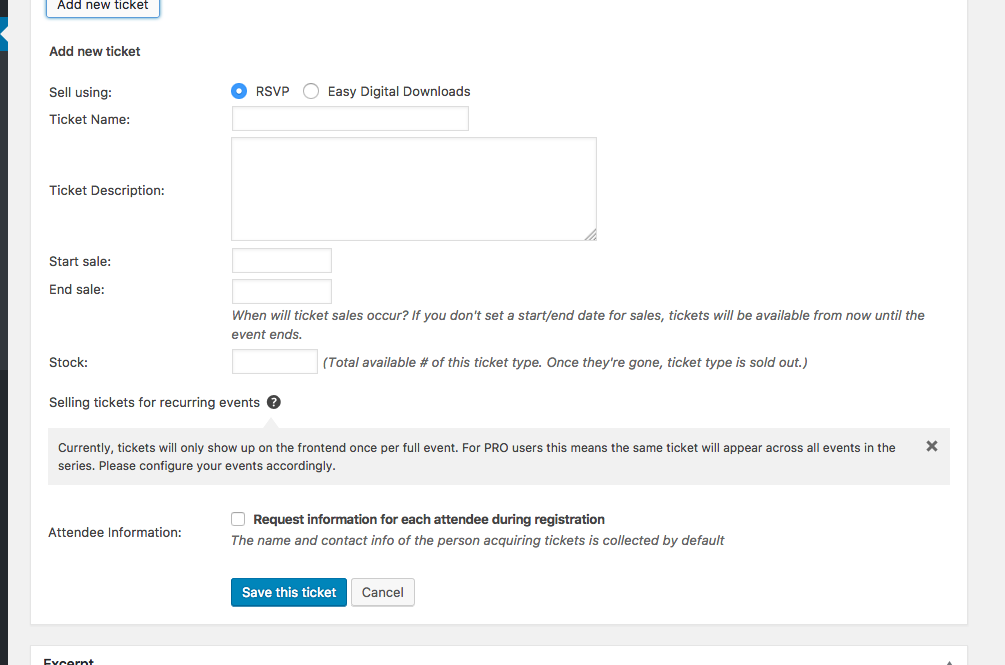
1. If you want something different to happen than what currently happens, can you please specify exactly how you view tickets on recurring events to work?
2. Can you also please post your site’s complete “System Information” to this thread? Here’s how to do that ? https://theeventscalendar.com/knowledgebase/sharing-sys-info/
Thank you!
GeorgeParticipantHi there! What issue are you referring to, specifically? Can you share a link to the URL of the thread you’re referring to?
Next, can you share a link to a specific place on your website where we can see the date icon being cut off?
Thanks!
GeorgeJanuary 17, 2017 at 10:31 pm in reply to: Order screen / Attendee screen not calculating correctly #1220089ParticipantHey Dirk,
I’m sorry to see these issues! I cannot recreate such discrepancies, so I”m curious: can you post your site’s complete system information to this thread to help me investigate these problems?
Here’s how to do that → https://theeventscalendar.com/knowledgebase/sharing-sys-info/
Thank you!
GeorgeJanuary 17, 2017 at 10:24 pm in reply to: TEC License + Theme Conflict with Community Events #1220086ParticipantHello!
Your licenses that run until 2025 are Nonprofit licenses that were granted to you per our Nonprofit Partnership Program.
Nonprofit licenses do not come with any customer support, as clarified in our Nonprofit Partnership Program guide here → https://theeventscalendar.com/knowledgebase/do-you-offer-discounts-for-nonprofit-organizations/
Thus no support can be provided for your main site since it is license with an unsupported license.
As for the Community Events conflict, this is unfortunately a known bug. We’re working on a fix. There is no news about that fix yet, or a specific date for the arrival of a fix, but I will keep this thread updated with news about a big fix as that news arises.
Cheers!
GeorgeParticipantHey there,
By default the calendar will show up at /events/ on your site — so if you have installed and activated the plugin on example.com, your calendar should appear at example.com/events/
Head into Events → Settings in your wp-admin and look for the “Events URL slug” option — this will let you customize the specific URL slug at which the calendar will show up.
Please let me know if there are any other issues or questions I can try to help with.
— George
Participanthey Michele,
The sort of functionality you describe is indeed part of Event Tickets Plus—not Events Calendar Pro. You can learn more about collecting Attendee Information with these features here ? https://theeventscalendar.com/knowledgebase/collecting-attendee-information/
I can indeed swap out your Events Calendar Pro license for an Event Tickets Plus, with the same expiration date and all—can you confirm if you want me to do this? I will do so if you confirm that.
Thanks,
GeorgeJanuary 17, 2017 at 6:47 pm in reply to: Event Aggregator – Google Calendar Images/Attachments #1220027ParticipantHey Joe,
Thanks for reaching out! At this time, it isn’t possible to import images from Google Calendar within Event Aggregator.
I’m sorry to disappoint! Please let me know if there are any other issues or questions I can try to help with.
Sincerely,
GeorgeParticipantThanks a ton for this, Math. Based on your results, it sounds like there’s something specifically going awry with the Payfast payment gateway.
Can you share a link to where you found this Payfast Payment Gateway online?
And can you also open a support ticket with them in the meantime describing your issues? There may be an issue on their end that they can help to identify—I will be looking at this in the meantime as well and may reach out to developers on our team for further assistance.
Thank you so much for your continued patience and persistence here!
— George
ParticipantThanks, @marwickmarketing. If you manage to hear from GoDaddy at all about this, keep us posted!
— George
ParticipantThanks so much for this information! I am sorry about the continued trouble here, and appreciate your patience—I cannot recreate these problems, and so it is taking some time to figure out this problem.
To help me continue to investigate this, can you share the Time & Date screenshot for this specific event series: https://www.rondvaartsneek.nl/event/grachtentocht-sneek-ijlst/2017-07-21/
This is the exact same type of “Time & Date” screenshot like you shared above.
Thanks!
GeorgeParticipantHey Rob, thanks for doing that testing and for following up with the Enfold folks. We’re always happy to collaborate and we do our best to accommodate as many themes as possible. If this issue arises from an aspect of the Enfold theme that deviates from WordPress Coding Standards, then the onus may mostly be on the Enfold theme to improve compliance there—but even so, yes, we’re happy to work with any theme within reason. Keep us posted!
Cheers,
GeorgeParticipantThis reply is private.
ParticipantHey Jennifer,
You’re absolutely right that this could be a caching or other lower-level issue and not a theme issue.
A few things to note here as follows:
1. To be clear, the Troubleshooting Steps I linked to include much more than just the theme testing.
2. Next, while it’s generally true that a theme issue would probably not manifest in the way in which these issues are manifesting, I’m not able to recreate your problems and we don’t have other reports of them—so it seems like the unique and specific combination of variables that make up your site is where the cause of the problem will be found.
That “unique and specific combination of variables” on your site is, really, just the combination of plugins, theme, and hosting. You’ve described how hosting is not likely the relevant variable here, and I generally agree with that view. So next on the list to check is the plugins and themes.
Plugins and themes can cause caching issues because they may be specifying their own cookies or doing other operations that affect issues like the nonce failures we see happening here.
I hope this backstory helps—I know that testing plugins and themes in this way can be a bit tedious, and genuinely appreciate your patience here!
Sorry for the continued trouble. Please let me know if you’re able to do those complete troubleshooting steps and, if so, what you find by doing so.
Thank you!
GeorgeJanuary 17, 2017 at 4:31 pm in reply to: Fatal Errors on Windows Servers with the 4.4.0.1 Release #1219959ParticipantHi Thomas,
This indeed seems like the same type of Fatal Errors we’re describing here. I’ve noted your specific error with our developers.
There is no specific progress report on these issues at this time, but stay tuned to this thread—when there is news about these bugs, I will post that news here!
Stay tuned,
GeorgeParticipantThanks for sharing, Jeff!
Best of luck with your project.
George -
AuthorPosts