
Home › Forums › Ticket Products › Event Tickets Plus › Reoccurring Events
- This topic has 5 replies, 4 voices, and was last updated 9 years, 8 months ago by
Andrew Hodson.
-
AuthorPosts
-
January 17, 2017 at 7:16 am #1219596
Andrew Hodson
ParticipantHi,
I’ve just updated both pro packages and are still having issues with Reoccurring Events showing the same dates. I noticed in your posts you’ve reworked this but still all tickets show the same date.
Has this been fixed if not when? As it’s pointless in having Reoccurring Events if they all display the same date in checkout, email and tickets.
January 17, 2017 at 10:41 pm #1220092George
ParticipantHey Andrew,
When you mention “still having issues”, are you referring to a specific thread of yours here on this site? if so, which thread? Share the URL to it if possible.
Next, recurring events only support tickets in a very specific way. It may not be exactly what you want. The specific way tickets work with recurring events is elaborated upon here (click for a larger-sized image):
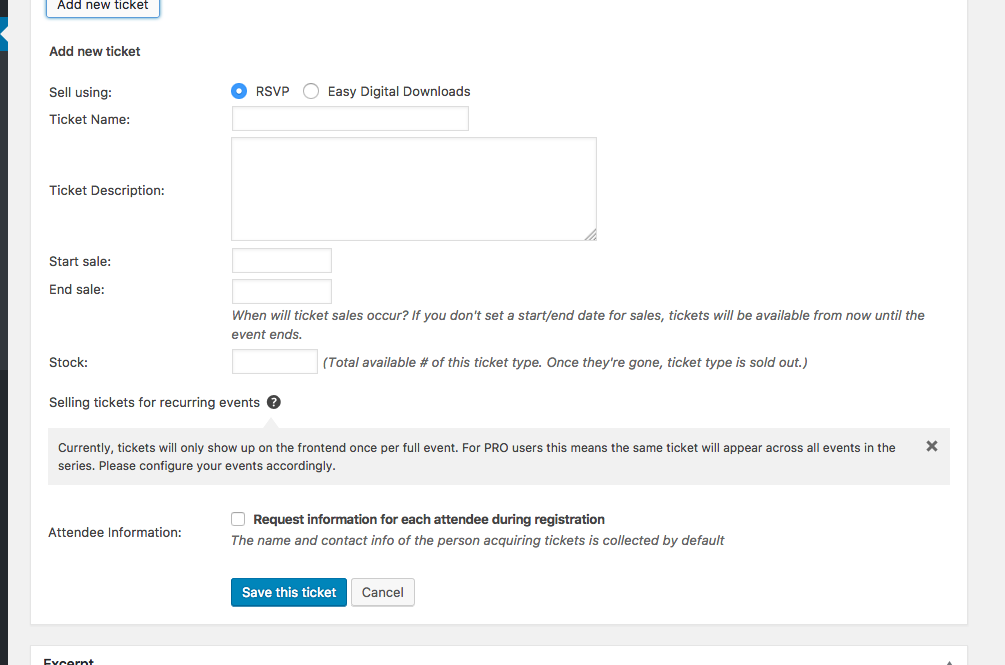
1. If you want something different to happen than what currently happens, can you please specify exactly how you view tickets on recurring events to work?
2. Can you also please post your site’s complete “System Information” to this thread? Here’s how to do that ? https://theeventscalendar.com/knowledgebase/sharing-sys-info/
Thank you!
GeorgeJanuary 24, 2017 at 2:10 am #1222844ParticipantHi George,
Not posted a thread just seen the same issue in support. All I need is the date on the emails and on the tickets to show the right date.
Example, if you set an event up for today and reoccur for the rest of the week. The user purchases 24th, 25th and 26th The 24th shows on all emails & tickets. Not the one ticket for the 24th, one for the 25th and so on. Therefore the user has no idea which ticket is for what date and the person checking in doesn’t know either.
As you can see NOT very helpful. As per above there seems to be quite a few asking about this..
January 24, 2017 at 8:46 pm #1223345ParticipantHey @Andrew,
Thanks for the followup. Did you happen to see the screenshot I posted?
In it, there is a comment that describes how tickets work with recurring events: only the first event in the series is ticketed. So it will behaved as you describe and only refer to the date and content of the first event in the series.
If you have separate events on the 24th, 25th, 26th, etc., and want a ticket for each one, that to have each ticket have its own date and details you would need to make three SEPARATE (i.e., non-recurring) events and add tickets to each separate event.
I do apologize about this not being ideal but it is unfortunately the only way recurring events and tickets work at this time.
Please let me know if this helps and if there are any other issues or questions I can try to help with.
Sincerely,
GeorgeFebruary 15, 2017 at 8:35 am #1235502Support Droid
KeymasterHey there! This thread has been pretty quiet for the last three weeks, so we’re going to go ahead and close it to avoid confusion with other topics. If you’re still looking for help with this, please do open a new thread, reference this one and we’d be more than happy to continue the conversation over there.
Thanks so much!
The Events Calendar Support Team -
AuthorPosts
- The topic ‘Reoccurring Events’ is closed to new replies.