

Forum Replies Created
-
AuthorPosts
-
George
ParticipantHey Doug,
Thanks for reaching out!
The way the Event Tickets Plus QR Code check-in system works is that each ticket has its own QR Code.
So if you sell one ticket for the whole three-day series, then that ticket can only be checked-in one time.
To have three different check-ins, you’d need three different tickets.
There’s unfortunately no way to alter these facts at this time without some extensive code customization. 🙁
I hope this helps! Please let me know if there are any other issues or questions I can try to help with.
Cheers,
GeorgeParticipantHey Sally,
Thanks for reaching out.
Adding a custom filter like this is technically possible, but not without some extensive custom coding far outside the scope of support. 🙁 You can learn more about that here.
So to implement the features you describe, you would have to write that custom code or hire a professional developer to do it for you. We have a list of great developers here → http://m.tri.be/18k1 (and have no affiliation with any of these folks—they’re simply some well-respected names in the community that we’ve compiled to share in situations like this one).
Sorry to disappoint! Please let me know if there are any other issues or questions I can try to help with.
Sincerely,
GeorgeParticipantHey Sabrina,
Thanks for reaching out.
We are constantly working on improving the readability and searchability of our Knowledgebase, so I do apologize if you found it hard to navigate.
In the meantime, some key facts:
• the Knowledgebase is here: http://theeventscalendar.com/knowledgebase
• you can find all shortcode-related KB articles here: https://theeventscalendar.com/knowledgebase-tag/shortcodes/
• for example, here’s a widget-specific guide that may be helpful: https://theeventscalendar.com/knowledgebase/pro-widget-shortcodes/
Let us know if this helps! 😀
— George
ParticipantHey @Ira,
Thanks for reaching out.
I’m not familiar with any workarounds myself, but have contacted an accessibility expert on our development team for some insight here.
It’s late Friday night as I type this, so a reply may be a bit slow here, but stay tuned! 😀
— George
ParticipantHey Michael,
Thanks for reaching out!
This is indeed beyond the scope of our support, as elaborated upon here → https://theeventscalendar.com/knowledgebase/what-support-is-provided-for-license-holders/
I’d love to help you get going in the right direction, though, and hope to do so here! 😀
What I would recommend doing is keeping in mind that Featured Images are a feature of WordPress itself—not something our plugins add, per se. And so I would recommend using the WordPress-default function get_the_post_thumbnail(), which you can read about here: https://developer.wordpress.org/reference/functions/get_the_post_thumbnail/
So what you could do is just get the Venue ID for the Venue, and then pass it to the get_the_post_thumbnail() function. You can get the Venue ID with the function tribe_get_venue_id().
So here’s an example of how that might look in an example of real code:
echo get_the_post_thumbnail( tribe_get_venue_id(), 'full' );
Let us know if this helps!
— George
ParticipantThanks for reaching out!
I cannot recreate any such issues on my own testing site, and was not able to spot anything outright problematic in your System Information, so I would recommend doing the following things:
- Do the complete set of troubleshooting steps on this page → https://theeventscalendar.com/knowledgebase/testing-for-conflicts/
- After EACH STEP in that process, go back to the Community Events submission page and try submitting a test event.
- Does anything improve along the way if you do these steps?
Next, can you also please share a link to the Community Events submission page on your site? I could not find the URL to the submission form. Please share that URL in your reply.
Thanks! 😀
GeorgeParticipantSorry to hear this, Bram!
What I would recommend doing is first updating the version of The Events Calendar on your site to version 4.4.0.1, the most recent version.
1. Once that’s updated, you should be able to do a manual import from the Facebook pages and events you specify—if you do this, what do you find? Do any events successfully import?
2. If not, then what if you do a manual import of a different Facebook page or event? What I mean is, basically do a test import of a Facebook event or page you have not imported before. Does this import work well?
Let us know what you find!
Thanks,
GeorgeParticipantThis reply is private.
ParticipantSorry to hear this, Albertus!
I cannot recreate any similar issues on my own site, so to help me help you, can you please confirm the following things:
1. What are your site’s Permalinks settings? Are they set to /%postname%/, for example?
2. If you activate a default theme like Twenty Twelve or Twenty Seventeen, does anything improve with your issues?
3. If you leave a default activated and then proceed to deactivate ALL plugins on your except for only The Events Calendar and Events Calendar Pro, does anything improve with your issues?
Thanks!
GeorgeParticipantSorry to hear this, Jonas!
Can you share your site’s “System information” to help me investigate this for you? Here’s how to do that → https://theeventscalendar.com/knowledgebase/sharing-sys-info/
I’ll use that information and some testing on my end to see if I can figure out what’s causing this.
Thanks!
GeorgeParticipantHey Michael,
Thanks for reaching out.
The Events Calendar doesn’t generate real pages—it creates “endpoints” that act more like feeds than real “Pages” within WordPress.
When it comes to modifying the appearance of these feeds, you unfortunately have to make custom theme templates. We have a guide for the process of doing that here that will hopefully be helpful → https://theeventscalendar.com/knowledgebase/themers-guide/
Please let me know if there are any other issues or questions I can try to help with!
— George
January 20, 2017 at 2:53 pm in reply to: Recurring events 3 times a day on Tuesday to Sunday #1221758ParticipantHi @Dominik,
This would generally be possible using the recurring events system in Events Calendar Pro, with an event configuration like the one shown in this screenshot (click for a larger-sized image):
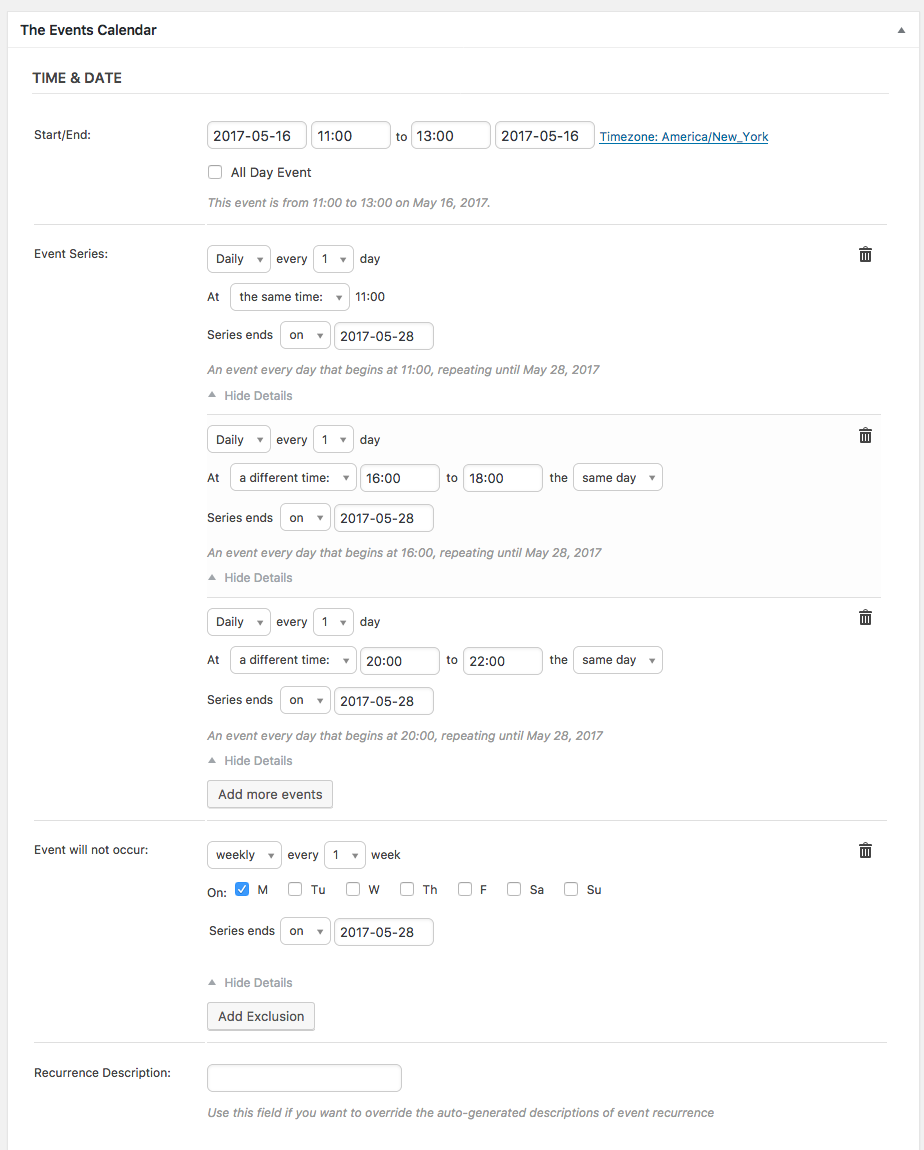
However, there is currently a bit of a bug with same-day recurrence patterns like this. 🙁
So your best bet would probably be to make three separate recurrence series. Each one should start on May 16 and end on May 28, and should have an “Exclusion” set up for every Monday so that Mondays don’t have events. Make the first series be for the 11–13 event, then another one for the 16–18 event, and then another for the 20–22 event.
I hope this helps—and sorry to bear news about the bug!
— George
January 20, 2017 at 2:40 pm in reply to: Nowhere to put licence key – says Events Aggragator in the settings instead? #1221747ParticipantHey @weatherly,
Have you downloaded, installed, and activated all of the necessary plugins? Here are the plugins you should have installed and activated on your site:
• The Events Calendar
• Event Tickets
• Event Tickets PlusIf you’re trying to use Events Calendar Pro as well, then you’d need to download, install, and activate that on your site, too.
If those plugins are installed, can you please post your site’s system information to this thread to help me investigate what might be happening here? Here’s how to do that → https://theeventscalendar.com/knowledgebase/sharing-sys-info/
Thanks!
GeorgeParticipantThanks for reaching out Annie!
The core of what you’re looking for seems to be summed up by your question here:
I would like to pull one day at a time or at least specify the date range. Is that possible?
↑ This is unfortunately not possible at this time. 🙁
You describe circumventing current limitations by doing the following:
For the past year, I’ve been going through all of the events and tagging them either Friday, Saturday, or Sunday and then referencing that tag in a shortcode for each day.
↑ I totally understand the problems with this that you mentioned, but even so, this is still the best way to achieve what you’re trying to do.
A Possible Bit of Progress
With the [tribe_events] shortcode that was new in version 4.3 of The Events Calendar and Events Calendar Pro, you can embed instances of the day view and specify a date.
Learn more about doing that here: https://theeventscalendar.com/knowledgebase/embedding-calendar-views-tribe_events-shortcode/
To render a Day View instance for events on Saturday, January 21 2017, for example, you could use this shortcode:
[tribe_events view="day" date="2017-01-21"](Note the specific date format! Learn more about in the article linked above)
There is a problem with this, though: you can only have one instance of the [tribe_events] shortcode on any given page. 🙁 So while this would work to show events for one day—Saturday, for example—you could not use this to show events for both Saturday and Sunday, or Friday and Saturday, and so on.
So while it’s a partial solution, I just wanted to mention this to cover all of the options.
Sorry to disappoint here—please let me know if there are any other issues or questions I can try to help with!
— George
January 20, 2017 at 2:29 pm in reply to: Event Json markup doesn't follow time zone settings #1221742ParticipantHey Jacquie,
Thanks for reaching out. I don’t see any known bugs like this with current versions of our plugins. I notice you’re using version 4.3 of both The Events Calendar and Events Calendar Pro, and an outdated version of WordPress.
Can you please update your site’s version of WordPress to its current version, 4.7.1? Next, can you update The Events Calendar to 4.4.0.1, and Events Calendar Pro to 4.4?
Once those are all up to date, try reproducing these same issues—let us know what you find!
Thanks,
George -
AuthorPosts