

Forum Replies Created
-
AuthorPosts
-
January 24, 2017 at 8:55 pm in reply to: Editing recurring event makes organiser and venue disappear #1223356
George
ParticipantHey Lucy,
Thanks for sharing this information!
Unfortunately it is not listing all of the plugins that are on your site, which is an error—I’m not sure why it doesn’t list those!
With this in mind, can I trouble you to list the version numbers of The Events Calendar and all The Events Calendar add-ons on your site?
• What version of The Events Calendar are you using?
• What version of Events Calendar Pro are you using?
• Are you using any other add-ons like Community Events? If so, what version of it are you using?Thanks!
GeorgeParticipantThanks for confirming, @Michelle. That amount of events should definitely not be problematic here.
One thing I’ve noticed is that your System Information shows that you’re running version 4.4.0.1 of The Events Calendar, but are still using the outdated version 4.3.3 of Events Calendar Pro.
This could create some problems—please update Events Calendar Pro to version 4.4.
Next, you say, “We are using events calendar Pro AND community events”, but I do not see Community Events listed in the Plugins section of your System Information.
Why is this the case? Did you remove Community Events from your site before you opened this thread?
Let me know, and let me know if updating Events Calendar Pro to its most recent version helps at all here.
Thanks!
GeorgeJanuary 24, 2017 at 8:48 pm in reply to: Logged as admin , QR code check in just opens page of event #1223346ParticipantThanks for confirming!
I’m not able to reproduce these problems and we have no other reports of this issue, so there may be a theme or plugin conflict on your site.
To help see if that’s the case, I would recommend doing the complete set of troubleshooting steps on this page → https://theeventscalendar.com/knowledgebase/testing-for-conflicts/ After EACH STEP in that process, go back to a test event and try doing a QR code check-in.
Do the QR Code check-ins improve anywhere along the way in this testing process?
Thanks!
GeorgeParticipantHey @Andrew,
Thanks for the followup. Did you happen to see the screenshot I posted?
In it, there is a comment that describes how tickets work with recurring events: only the first event in the series is ticketed. So it will behaved as you describe and only refer to the date and content of the first event in the series.
If you have separate events on the 24th, 25th, 26th, etc., and want a ticket for each one, that to have each ticket have its own date and details you would need to make three SEPARATE (i.e., non-recurring) events and add tickets to each separate event.
I do apologize about this not being ideal but it is unfortunately the only way recurring events and tickets work at this time.
Please let me know if this helps and if there are any other issues or questions I can try to help with.
Sincerely,
GeorgeParticipantHey Jennifer,
Is the difference between people who can experience the problems vs those who cannot experience the problems simply that those who can experience the problems are logged-out of the site? And so once you log into the site that the problems are no longer experienced?
You can learn about our refund policy here → https://theeventscalendar.com/knowledgebase/refund-policy/
— George
ParticipantThanks for posting, Sylvanus!
I would encourage you both to post this idea on our UserVoice “Feature Requests” page here → http://tribe.uservoice.com
Best of luck with your project!
GeorgeParticipantHey @Adage,
The categories should already be part of events. You can tell on your site by checking out its HTML source.
To make it easier to do this, definitely check out a [free!] tool like Firebug if you use FireFox, or the Developer Tools for either Safari or Chrome. They have “Inspector” tools that let you zoom right over the element whose CSS classes you want to see.
Once you have these tools on your site, view your Week View or any other events view and use these tools to “inspect” an event. You’ll see all its class names and can go from there.
Cheers!
GeorgeParticipantSounds good! Please keep me posted and let me know if you have any further questions along the way.
— George
January 24, 2017 at 11:10 am in reply to: Months are displaying instead of days in calendar #1223116ParticipantHey @Fadi,
What I would recommend is that you remove all custom coding from your site.
Next, if you’re using WPML, please make sure you that you set up The Events Calendar and Events Calendar Pro with WPML following the exact steps in these Knowledgebase articles:
• https://theeventscalendar.com/knowledgebase/wpml-support/
• ⭐️ https://theeventscalendar.com/knowledgebase/setting-up-the-events-calendar-with-wpml/
• ⭐️ https://theeventscalendar.com/knowledgebase/creating-translations-for-events-using-wpml/☝️ Let me know if once you remove all custom coding from your site and then set up WPML with our plugins exactly as described in the above articles if anything improves!
Thanks,
GeorgeParticipantHi Jennifer,
Thanks for reaching out.
how am I supposed to determine what is causing the problem when I can’t recreate the issue myself
↑ This is a valid concern for sure. Here is what I wrote about it:
If you can reliably recreate the issues you face with the submission form—or, if you can’t, at least have someone else on hand who can reliably reproduce those issues—I would encourage you or them do the complete set of troubleshooting steps
I bolded some text above for emphasis.
But yes, it’s unfortunately a truth that if you cannot recreate issues yourself, you would need to find someone who can and have them do the steps I recommended above.
is there anyone on your team I could contract with to do this testing?
Unfortunately, no, we are not able to provide this sort of service. 🙁
I am genuinely sorry about this situation, Jennifer. I cannot recreate your issues, and you yourself often cannot reproduce your issues, and so there’s a bit of a stalemate on these problems.
We do have another update coming soon—hopefully this week, for example—and it’s possible that this update could incidentally fix your issues. So one option is to just sit tight and wait for that update, and then if issues persist even after that, proceed with getting one of your users who experiences these issues to do the troubleshooting.
Please let me know what you think!
Sincerely,
GeorgeParticipantThanks for confirming the code you want to remove, @darrienw93. This code is added via the wp_print_footer_scripts action hook—I’ve been trying to write some different custom code snippets to remove this, but have thus far failed to pull it off.
I’m still trying, and may reach out to a developer on our team if I remain unsuccessful. Stay tuned!
Cheers,
GeorgeJanuary 23, 2017 at 6:57 pm in reply to: You have entered a license key for The Events Calendar PRO but the key is out of #1222700ParticipantThanks for clarifying, Jim.
This behavior is odd and I cannot reproduce it. What I have done for now is deleted your original license key, and generated a new license key in your account.
You can find it at http://theeventscalendar.com/license-keys
This key will expire on the same exact date as your original key: March 11, 2017.
Let me know if the new key works any better. Please note that if these issues arise again even with the new key, then there is some other issue happening on your site and further troubleshooting steps would be needed to try and resolve the problem.
Cheers!
GeorgeJanuary 23, 2017 at 6:49 pm in reply to: All user roles except admin show a blank dashboard #1222694ParticipantThis reply is private.
ParticipantHey @copephotos,
Thanks for your patience here!
I tested importing the two events you posted and they imported without issue. When I say “without issue”, here’s what I mean:
• In Event Aggregator, events will be imported with the timezone defined by the source.
• If no time zone is specified, events will be assigned your site’s default timezone (in Settings → General).For an example, let’s take this event you posted: https://www.facebook.com/events/376422506057458/
That event starts at 10pm PST.
My local test site’s timezone is set America/New_York, which is basically EST (UTC-5).
So when I import your event, here’s how it looks (click for a larger-sized image):
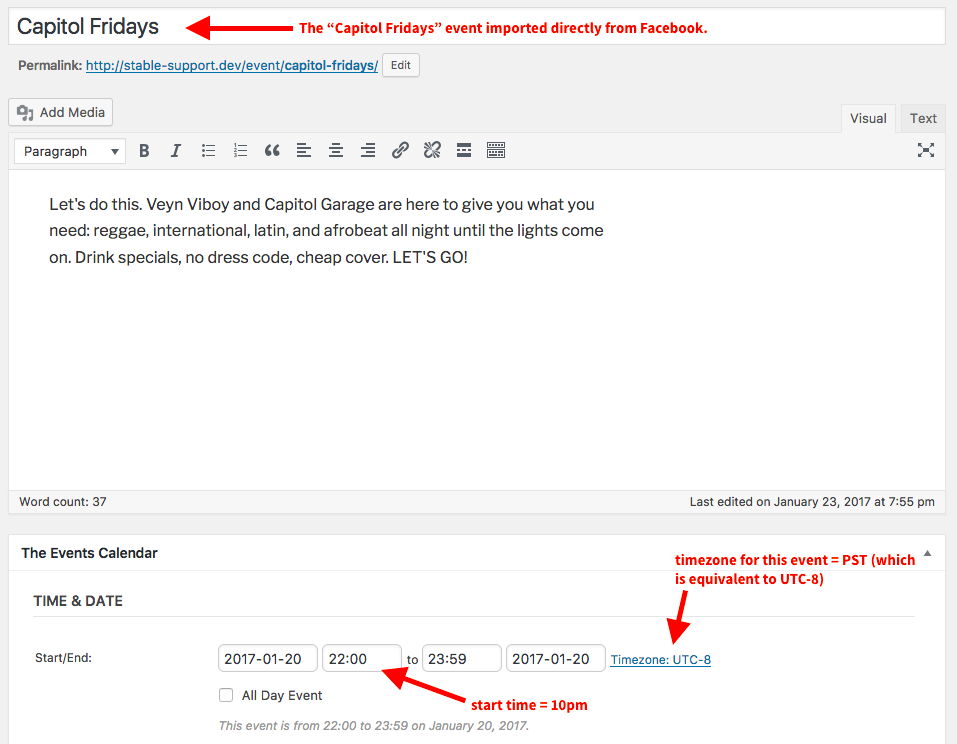
The time is set to 10pm in the UTC-8 timezome, which is the same as PST, the original timezone of the source event. You could edit this if you wanted to, of course—but hopefully this gives a good summation of how Event Aggregator handles this.
I could not produce any discrepancies in my testing, so I hope this is helpful!
Please let me know if there are any other issues or questions I can try to help with.
— George
ParticipantThis reply is private.
-
AuthorPosts