
Home › Forums › Calendar Products › Events Calendar PRO › Facebook cut off time
- This topic has 9 replies, 4 voices, and was last updated 9 years, 8 months ago by
copephotos.
-
AuthorPosts
-
January 18, 2017 at 9:06 pm #1220741
copephotos
ParticipantHi there I’ve looked through the forums and can’t seem to find a solution for this. As events import from facebook they are displaying across two days. The end of day cut off time is set to 12am and I also double checked to make sure my time zone was set properly, which it is.
This is on a live site and the client wants it fixed. All help is greatly appreciated.
ThanksJanuary 18, 2017 at 10:35 pm #1220771George
ParticipantSorry to hear this, @copephotos.
Can you share the URLs of some of the Facebook pages you’re importing from, or specific Facebook events that have these issues? I will test manually to see what I find.
Also, are you aware of Event Aggregator? This is a replacement for the Facebook Importer plugin, which you’re using—the Facebook Importer plugin is no longer actively maintained, and I would strongly encourage you to replace it with Event Aggregator. You already have a free Event Aggregator license in your account because you are a preexisting Facebook Importer user (head to http://theeventscalendar.com/license-keys to find the actual licenses).
You can learn more about moving to Event Aggregator here: https://theeventscalendar.com/knowledgebase/moving-to-event-aggregator/
Cheers!
GeorgeJanuary 19, 2017 at 4:46 pm #1221188Participanthttps://www.facebook.com/capGarage/
https://www.facebook.com/events/376422506057458/
http://capitolgarage.com/events/That’s the page, the example event and the calendar page. It looks like the updated the cut off time in hopes that it would fix the issue but that event was set to end at 1 am like it shows on the site.
I would have no problem switching over to event aggregator but it looks like I only have one available license which sucks as I have a couple sites using the facebook importer. If you can help me out with that I would appreciate it.
January 19, 2017 at 7:24 pm #1221287ParticipantHey @Copephotos,
Thanks for these Facebook pages. I will start testing them with Event Aggregator.
Speaking of Event Aggregator, it’s worth noting that the license you have for Event Aggregator does not limit you by the number of domain names on which the license is activated—it sets the limit by number of imports per day (100 per day, specifically).
So you can use it on several different sites. And I actually just went ahead and tripled the license limit for you 🙂 So now it will allow for 300 imports per day.
Cheers!
GeorgeJanuary 20, 2017 at 1:50 pm #1221716ParticipantRad thanks George! Please let me know if the problem is fixed by using event aggregator and I’ll look more into the switch. Thanks
January 23, 2017 at 5:09 pm #1222640ParticipantHey @copephotos,
Thanks for your patience here!
I tested importing the two events you posted and they imported without issue. When I say “without issue”, here’s what I mean:
• In Event Aggregator, events will be imported with the timezone defined by the source.
• If no time zone is specified, events will be assigned your site’s default timezone (in Settings → General).For an example, let’s take this event you posted: https://www.facebook.com/events/376422506057458/
That event starts at 10pm PST.
My local test site’s timezone is set America/New_York, which is basically EST (UTC-5).
So when I import your event, here’s how it looks (click for a larger-sized image):
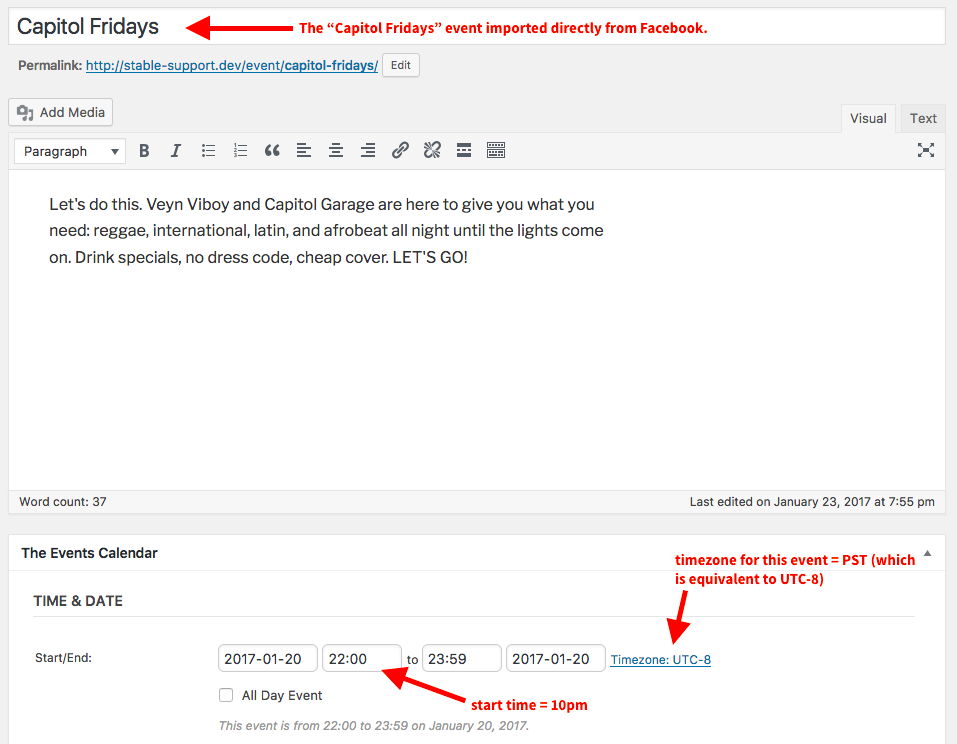
The time is set to 10pm in the UTC-8 timezome, which is the same as PST, the original timezone of the source event. You could edit this if you wanted to, of course—but hopefully this gives a good summation of how Event Aggregator handles this.
I could not produce any discrepancies in my testing, so I hope this is helpful!
Please let me know if there are any other issues or questions I can try to help with.
— George
January 23, 2017 at 5:18 pm #1222645ParticipantThanks George, I will try to transition to the event aggregator plugin and see if it fixes my issue.
Will report back.
January 24, 2017 at 11:16 am #1223118ParticipantSounds good! Please keep me posted and let me know if you have any further questions along the way.
— George
February 15, 2017 at 8:35 am #1235471Support Droid
KeymasterHey there! This thread has been pretty quiet for the last three weeks, so we’re going to go ahead and close it to avoid confusion with other topics. If you’re still looking for help with this, please do open a new thread, reference this one and we’d be more than happy to continue the conversation over there.
Thanks so much!
The Events Calendar Support Team -
AuthorPosts
- The topic ‘Facebook cut off time’ is closed to new replies.