

Forum Replies Created
-
AuthorPosts
-
George
ParticipantHey Ulrich,
Thanks for your patience here. I checked out your site but did not see a filter bar and thus no categories in it, either 🙁
Here’s a screenshot of what I saw on your site’s “Events” page: https://cloudup.com/cVgzbqWd7SV
Can you clarify exactly where the list of categories is on your site? If you’ve temporarily hidden these things, can you make sure that they are showing? I will take a look and share CSS here.
Thank you!
GeorgeSeptember 16, 2015 at 11:16 am in reply to: New Event Calendar PRO v3.12 Recurring events generates on random #1005681ParticipantHey Michal,
Apologies for the delayed reply here – I’ve been looking into this and unfortunately do not have good news to share, because we actually have some known issues with recurring events and WPML that we are working very hard on fixing.
With that in mind, however, I’m still curious about what you mean by your comment here:
and then I’m turning off WPML both recurrence Polish and English showing on Polish site.
To be clear, do you mean that your problem is only that two series of events show if WPML is deactivated? If so, then are there still problems when WPML is activated? And if, then what are these problems when WPML is activated, specifically?
I’m sorry for any confusion on my end but am just trying to best understand your issue so I can hopefully help out! 🙂
Thank you for your patience,
GeorgeParticipantHey @Jim,
Thanks for your input here – I’m sorry that our features haven’t quite met your needs, but I’m curious about what you mentioned here:
We have many events that happen on multiple occasions, but not on any discernible “repeating” schedule.
It sounds like PRO’s new “free-form recurrence” abilities – new as of version 3.12, anyways – might work well for this sort of event. Have you played around with the new recurrence features at all? Do they help, or is it still too limiting?
Thank you for your feedback – it helps us improve and we really appreciate that 🙂
— George
ParticipantHey Darren,
Thanks for sharing your system information! I looked through it and didn’t notice anything out of the ordinary, and was unfortunately not able to reproduce your problems on my local testing site 🙁
With these details in mind, then, I think the best step from here is for you to run through our Troubleshooting Steps outlined here → https://theeventscalendar.com/knowledgebase/testing-for-conflicts/
Those steps may seem tedious but are fortunately much faster to work through than it seems, and are very useful for ruling out (or revealing!) code conflicts, which might be at play here.
Let us know what you find! 🙂
Thanks,
GeorgeParticipantHey Hans,
I’m really sorry that our plugins didn’t meet your or your project’s needs 🙁
It sounds like refunding your purchases here is the best course of action – do you agree? To get started on that process, shoot us an email at [email protected] with a copy of your original order receipt from this website (this is a receipt sent from theeventscalendar.com directly, with the Order Number in the top of the email, not a PayPal receipt from paypal.com or something).
Once we have that email, we’ll match your order to our records and issue a refund immediately.
In the meantime, one thing I’m curious about is that a purchase for our WooCommerce Tickets plugin isn’t showing in your account here. Did you, in fact, try out WooCommerce Tickets directly on your site? Or did you learn the things you listed about it from reading on the forums, and so decided to not even purchase the plugin?
Also, it sounds like we might have dropped the ball communicating the features of our plugins. Do you agree? If so, where do you think we could’ve done a better job at demonstrating how the plugin’s calendar looked, what the features of the add-ons were, etc.?
I’m sorry for the hassle our plugins have caused you Hans, genuinely. We’re constantly improving our products, so any feedback you can provide here would be much appreciated to that end. I hope that at least our refunding of your purchases is a start to making things right here, too.
I look forward to your Order Receipt email so I can refund your purchase; I’m also genuinely looking forward to your feedback.
Sincerely,
GeorgeSeptember 15, 2015 at 4:46 pm in reply to: Cannot set recurring event end date– no option visible #1005458ParticipantHey @Bet,
Sorry you’re having trouble here!
I appreciate the screenshot you shared, and it reveals that your site seems to be running an older version of our plugin, which might be to blame for the problems here. To confirm this, can you share your System Information with us as directed here? → https://theeventscalendar.com/knowledgebase/sharing-sys-info/
The most recent versions of our plugins are as follows:
• The Events Calendar: 3.12.1
• Events Calendar Pro: 3.12
• Everything Else: 3.12Can you make sure that your active versions of your plugins are up-to-date with those versions listed above? Once you’re up-to-date, let us know if issues persist.
Thank you! 🙂
GeorgeParticipantHey Laura,
I’m sorry to bear this news, but the capabilities you listed are not really possible without some extensive custom coding 🙁 We are working hard on a Tickets User Meta add-on which will allow some extensive customizable data-gathering features, which should help with some of the items you listed there, but I do not have an ETA for this add-on at this time.
We are working hard on it and should be launching a public beta in a couple of months – if you’re interested in participating in that Beta, feel free to sign up for it here! → https://theeventscalendar.com/knowledgebase/how-to-signup-for-beta-access/
I’m sorry to disappoint. Please let me know if the information I provided here is at all helpful, or if there’s anything else that I can help with.
Sincerely,
GeorgeParticipantHey Catherine,
Sorry your issues are persisting!
I’m curious – in that original thread Nico made this suggestion:
Also can you try @Miah suggestion? A quick test, renaming the /tribe-events/ inside your theme folder -or switching to WordPress Tweentyfifteen theme- should be enough to see if your case is the same as @Miah’s or not. Please let me know if you can test this out.
Can you, indeed, do those steps now and let us know what you find? How do things behave on your site after you do these steps?
Thanks!
GeorgeParticipantHey @flamsteedas,
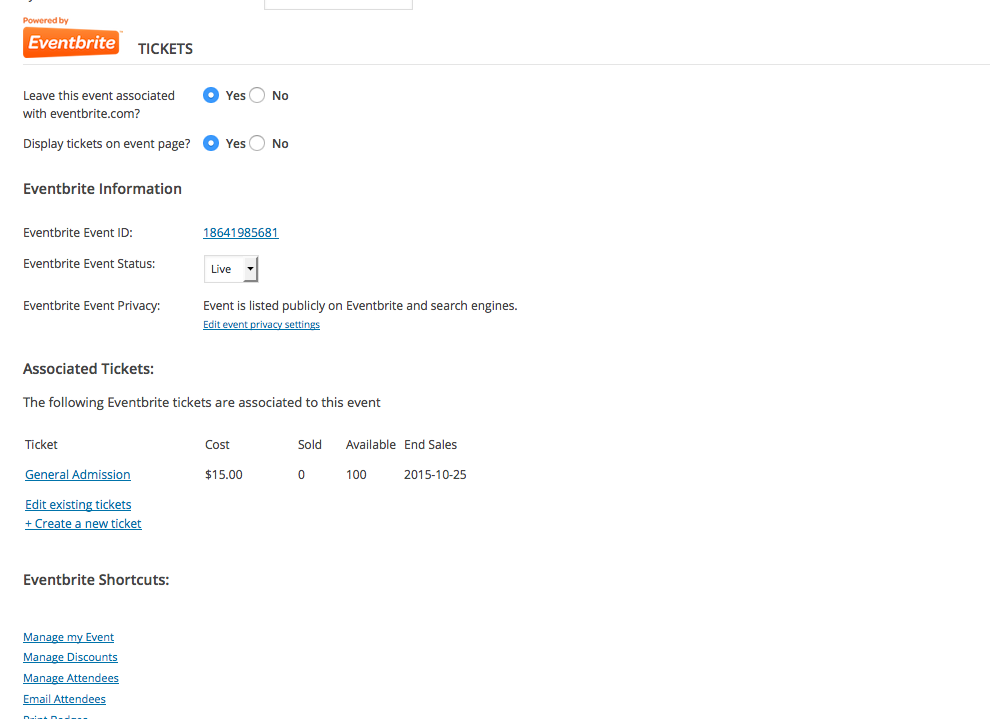
Sorry you’re having trouble here! I’m curious, if you head into the edit-event screen for an imported event on your WP site, do you find that the “Display tickets on event page” option is set to “Yes” or “No”? If set to “no”, does setting it to “Yes” and saving the changes resolve your problem here?
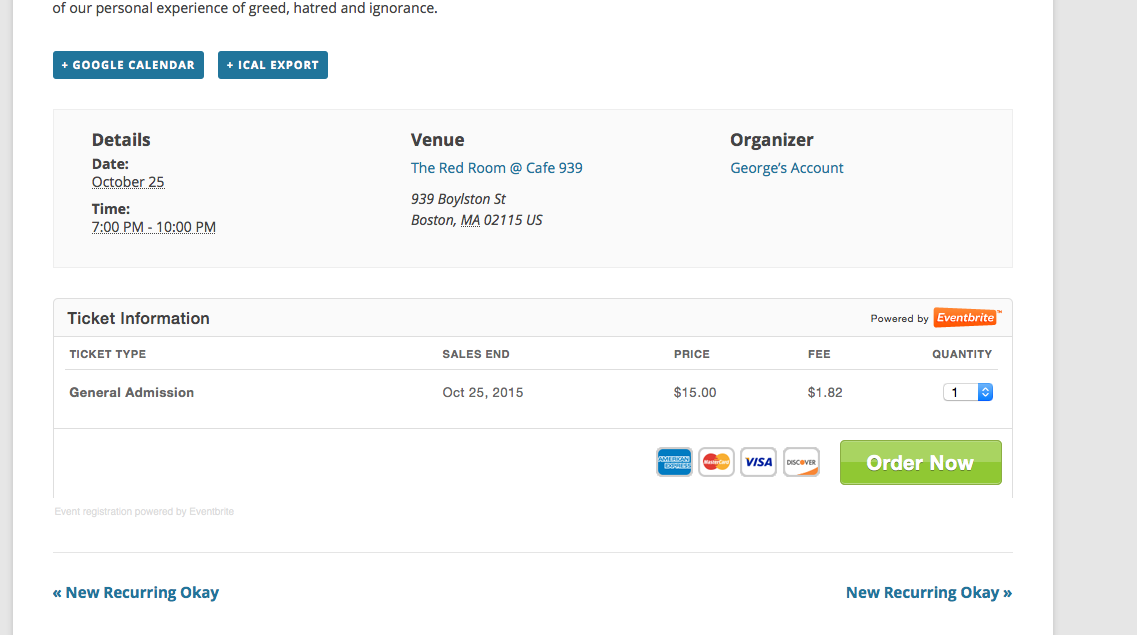
If not, then can you take a screenshot of your whole Eventbrite-related information in the edit-event screen for the event you linked to above? As an example of that, here’s a screenshot of the EB-related information from an event I imported for testing purposes:
And this event works fine for me:
Thank you!
GeorgeParticipantSorry you’re having trouble David! We’re happy to help Muppets here and hopefully I can help sort this out.
First things first, do you have any pages on your site whose title is “Events”, and therefore whose “URL slug” is /events/ ?
If so, find this in the Admin of your site, and then delete it, and then head to the “trash” and “Permanently Delete” this page there too.
Does this get rid of the error? And if so, does that enable your update to happen smoothly?
Cheers! 🙂
GeorgeParticipantHey Ana (and Rob),
If you’re indeed just trying to display ticket stock information on the front-end of your site, then this code snippet shows how to do so with WooCommerce Tickets: https://gist.github.com/ggwicz/31f9d9774e938846d635
That should help and should not require manual descriptions – let me know if it does! And if you’re wondering where to use this function, that’s actually mostly up to you – you can use it on any calendar view, as long as you use the process detailed in our Themer’s Guide here: https://theeventscalendar.com/knowledgebase/themers-guide/
Cheers!
GeorgeSeptember 15, 2015 at 7:27 am in reply to: Woo Commerce Shortcodes don't work in – Display Settings #1005268ParticipantHey @laughmasters,
A filter or, as you suggested, an option/toggle for that visibility option would indeed be quite handy for tickets. I’ll try to slip it into an upcoming update 🙂
As for the HTML above and below views, unfortunately you could only truly remove that by heading into core plugin code for The Events Calendar and removing instances of the functions tribe_events_before_html() and tribe_events_after_html().
But this would be tedious itself and would also require re-application after each plugin update, so a simpler way of doing things might be to let the HTML load everywhere as it does by default, but just CSS to hide it everywhere except the main events page.
That should be possible by adding CSS like the following to the bottom of your theme’s style.css file:
div.tribe-events-before-html,

div.tribe-events-after-html {

    display: none !important;

}
body.post-type-archive-tribe_events div.tribe-events-before-html,
body.post-type-archive-tribe_events div.tribe-events-after-html {
display: inline-block !important;
}
Cheers!
GeorgeParticipantI’m sorry to hear issues persist @mumbaimeetups!
I’m curious: what is the specific moment when the webpage fails to load for you?
What I mean is, for example, are you manually entering Facebook Event IDs in the import screen, and then when you click “Import” things fail?
Or does the page where you can enter Facebook Event IDs itself not even loading for you now?
ParticipantI then tried to recreate this issue, but was unsuccessful – The page appeared
I then followed the instructions of re-activating my current theme ( WP-Prosperity v. 2.6) Premium theme.
I reactivated all other plugins with no other changes.
Hey @gadswil,
Thank you for running through all of those steps! The things you noted which I quoted above all indicate that this is indeed a conflict between Events Calendar Pro and your theme.
The fact that rolling back just one version resolves this conflict is odd, and I’m sorry that our updates for 3.12 which were meant to improve the plugin have, on your site at least, made things worse!
The next steps from here that I can think of would be to first contact support for the theme and report this issue – they may have some insight here and might be able to take a quick look at things.
In the meantime, you can share a .zip of the theme with us here too. We don’t officially support third-party software so I unfortunately cannot guarantee that I’ll be able to find the specific error, but I’d be happy to take a look at the theme on my local test site and see if I can find something in our code that is causing things to break.
You can share a .zip by uploading it to something like http://ge.tt, and then sharing the download link here in a “Private Reply”. I’ll take a look and see what I can find, if anything! 🙂
Thanks for your patience and persistence with this issue, @gadswil. I look forward to trying to figure out the “puzzle” of this bug, and genuinely hope I can fix it for you.
Cheers,
GeorgeSeptember 15, 2015 at 7:10 am in reply to: New version of Event Calendar conflicts with Mappress Google maps plugin. #1005260ParticipantHey Karen,
Enabling Debug will print errors on the front-end of your site, which is a bit ugly admittedly! However, you only have to enable it for a second and then just copy any errors that pop up. Then you can paste them in a response here or in something like a Gist at http://gist.github.com – once the errors are saved or shared somewhere, you can disable the Debug code immediately on your site by setting it back to “false” like this:
define('WP_DEBUG', false);
I hope that helps! 🙂
-
AuthorPosts